# Plex Suddenly Stops Hardware Transcoding
**URL:** https://forums.plex.tv/t/plex-suddenly-stops-hardware-transcoding/841173
**Category:** Plex Media Server
**Tags:** server-linux, apple-tv, server-truenas
**Created:** [May 15, 2023, 1:21pm UTC](https://forums.plex.tv/t/plex-suddenly-stops-hardware-transcoding/841173 "2023-05-15T13:21:26Z")
**Posts on this page:** 10
**Page:** 4
### Author:  [@edd\_1](https://forums.plex.tv/u/edd_1)
#### Post date: [May 22, 2023, 6:49pm UTC](https://forums.plex.tv/t/plex-suddenly-stops-hardware-transcoding/841173/62 "2023-05-22T18:49:51Z")
anyone looking at the Intel Quicksync issue in 1.32.2.7100 ? Do you need some logs ?
---
### Author:  [@djaykay](https://forums.plex.tv/u/djaykay)
#### Post date: [May 23, 2023, 9:34am UTC](https://forums.plex.tv/t/plex-suddenly-stops-hardware-transcoding/841173/63 "2023-05-23T09:34:21Z")
I can post logs if required but I have a Synology DS920+ which has a Intel(R) Celeron(R) J4125 CPU and hardware transcoding is now no longer functioning when it was fine before.
A long time ago to get HW transcoding working I added:
> VaapiDriver=“i965”
To the Preferences.xml and things have been fine up until these last few releases. I am not sure exactly which one, possibly it stopped working at 1.32.2.7002.
In any case, nothing on my side has changed apart from updating Plex.
If you need logs, please let me know which.
---
### Author:  [@KillerKaac](https://forums.plex.tv/u/KillerKaac)
#### Post date: [May 23, 2023, 10:03am UTC](https://forums.plex.tv/t/plex-suddenly-stops-hardware-transcoding/841173/64 "2023-05-23T10:03:11Z")
@ChuckPa
I played around with some networking things (was told to add “tcp\_keepalive” to my ubuntu instance)
Still occurring. The port is defiantly opened and worked in this instance for about 20 minutes of streaming.
I just dont understand how this is a network issue, as direct play works perfectly fine when playing anything - no drops out no stuttering. When transcoding and it stops, it almost seems like its buffering and will play a second occasionally after a few minutes of loading and then just stop.
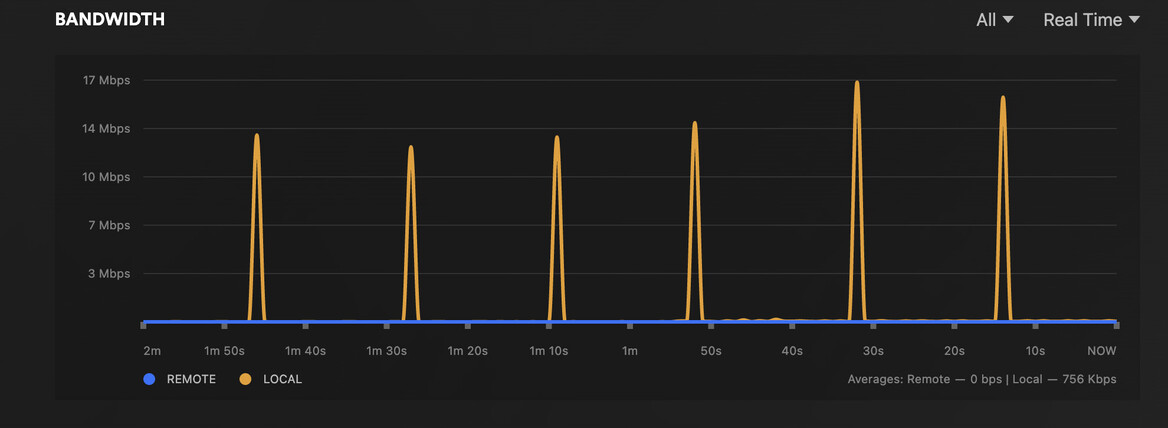
My bandwidth is now doing this too. I just don’t understand how this is an internet issue as it plays perfectly normal for the first few minutes after reboot and then just dies.
[Plex Media Server Logs\_2023-05-23\_09-57-27.zip](https://forums.plex.tv/uploads/short-url/wm1BTvZ0tUd1BcKTcrr5juOe4uP.zip) (3.2 MB)
Logs attached again. Theres no way this is a software bug is there?
---
### Author:  [@ChuckPa](https://forums.plex.tv/u/ChuckPa)
#### Post date: [May 23, 2023, 10:37am UTC](https://forums.plex.tv/t/plex-suddenly-stops-hardware-transcoding/841173/65 "2023-05-23T10:37:20Z")
Folks.
For those with older CPUs (e.g. -3xxx) and the J3xxx / J4xxx NAS processors –
Use build 1.32.1.6999 for now.
There seems to be a problem with the i965 interface as provided in the Intel Media Driver.
I’ve collected the data and given it to the Engineer
---
### Author:  [@KillerKaac](https://forums.plex.tv/u/KillerKaac)
#### Post date: [May 23, 2023, 11:06am UTC](https://forums.plex.tv/t/plex-suddenly-stops-hardware-transcoding/841173/66 "2023-05-23T11:06:04Z")
Dont think this one effects me
- Ryzen 7 5700x
- Trying to use hardware encoding with an external GPU
---
### Author:  [@KillerKaac](https://forums.plex.tv/u/KillerKaac)
#### Post date: [May 25, 2023, 9:50am UTC](https://forums.plex.tv/t/plex-suddenly-stops-hardware-transcoding/841173/67 "2023-05-25T09:50:52Z")
@ChuckPa Just wondering if you had a chance to look here. If this is still a network issue I honestly have no idea what the problem is
---
### Author:  [@ChuckPa](https://forums.plex.tv/u/ChuckPa)
#### Post date: [May 30, 2023, 4:05pm UTC](https://forums.plex.tv/t/plex-suddenly-stops-hardware-transcoding/841173/68 "2023-05-30T16:05:37Z")
Folks,
Please join us here, we have progress and a test to perform.
> [@Hardware Transcoding issues - ApolloLake & GeminiLake CPUs](https://forums.plex.tv/t/1-32-2-7002/840714/54):
>
> ALL: For those with the J3355, J3455, J4125 problem, as well as those with older Intel Core -3xxx and -4xxx CPUs, The engineer has a file for you to test with. There are specific instructions : Place this file in the Cache/va-dri-linux-x86\_64 directory under Plex Media Server unzip it It will look like this when done. root@glockner:/vol/plexmediaserver/Plex Media Server/Cache/va-dri-linux-x86\_64# ls -la total 9176 drwxr-xr-x 2 plex plex 69 May 30 12:00 . drwxr-xr-x 9 plex pl…
---
### Author:  [@KillerKaac](https://forums.plex.tv/u/KillerKaac)
#### Post date: [June 22, 2023, 1:10pm UTC](https://forums.plex.tv/t/plex-suddenly-stops-hardware-transcoding/841173/69 "2023-06-22T13:10:30Z")
@ChuckPa
Just wanted to re open this thread as the issue is still occurring.
I’ve even installed a windows VM on my system, and still having almost IDENTICAL issues. GPU will transcode for a little bit upon boot and them crash and instead on windows push all encoding over to the CPU.
Is it possible that this could be my card? Im very unsure
---
### Author:  [@ChuckPa](https://forums.plex.tv/u/ChuckPa)
#### Post date: [June 22, 2023, 2:49pm UTC](https://forums.plex.tv/t/plex-suddenly-stops-hardware-transcoding/841173/70 "2023-06-22T14:49:20Z")
@KillerKaac
I need more info – versions before and current ??
AMD GPU support is now official in 1.32.5 so the timing of this , in the absence of details , ???
Please add more info.
I don’t “do windows” … lol
---
### Author:  [@system](https://forums.plex.tv/u/system)
#### Post date: [September 20, 2023, 2:49pm UTC](https://forums.plex.tv/t/plex-suddenly-stops-hardware-transcoding/841173/71 "2023-09-20T14:49:37Z")
This topic was automatically closed 90 days after the last reply. New replies are no longer allowed.
[Previous page](https://forums.plex.tv/t/plex-suddenly-stops-hardware-transcoding/841173.md?page=3)