# Plex Transcoder memory usage increase spike causes crash
**URL:** https://forums.plex.tv/t/plex-transcoder-memory-usage-increase-spike-causes-crash/671696
**Category:** Plex Media Server
**Tags:** server-windows
**Created:** [December 29, 2020, 10:31pm UTC](https://forums.plex.tv/t/plex-transcoder-memory-usage-increase-spike-causes-crash/671696 "2020-12-29T22:31:39Z")
**Posts on this page:** 9
**Page:** 1
### Author:  [@La-Menmita](https://forums.plex.tv/u/La-Menmita)
#### Post date: [December 29, 2020, 10:31pm UTC](https://forums.plex.tv/t/plex-transcoder-memory-usage-increase-spike-causes-crash/671696/1 "2020-12-29T22:31:40Z")
Server Version#: Version 1.21.1.3830
Player Version#: Occurs on Roku TV app and Android app
I’ve been having an issue lately with the plex transcoder on my Windows Desktop.
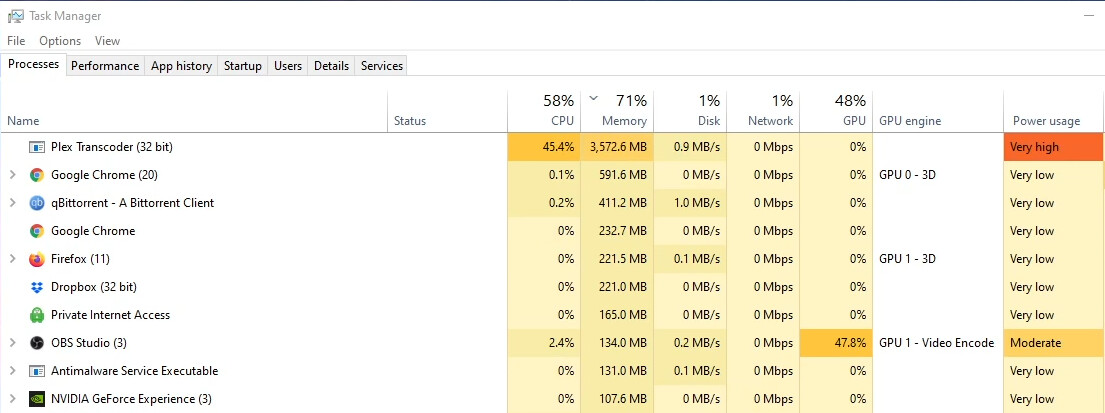
Usually the “Plex Transcoder (32 bit)” process uses less than 500 MB of memory. The issue occurs where the Transcoder memory usage spikes up to over 3 GB before finally crashing and closing - ending playback. During the memory increase, I’ve noticed the GPU will stop being used for hardware transcoding.
Server specs:
CPU - Ryzen 5 2600
GPU - RTX 3060 Ti
RAM - 16 GB at 3000 MHz
PMS is installed in a Sata SSD. I’ve run StablebitScanner to check the drive and it’s healthy. Have disabled HDR Tone Mapping and DLNA. Uninstalled and reinstalled PMS. Created a new transcode folder and deleted the codecs folder. May be unrelated but also have noticed an issue where it says the permissions to delete the transcoding session are denied.
Any assistance would be deeply appreciated!
(File removed)
 

---
### Author:  [@Super4Jet](https://forums.plex.tv/u/Super4Jet)
#### Post date: [December 30, 2020, 11:25am UTC](https://forums.plex.tv/t/plex-transcoder-memory-usage-increase-spike-causes-crash/671696/2 "2020-12-30T11:25:41Z")
Hi [La-Menmita](https://forums.plex.tv/u/La-Menmita),
Looking at your logs when the Transcoder died,

the transcoder seems to die as a consequence of not having enough memory. Looking at the first screenshot I would say it’s got something to do with hardware transcoding. Does this still occur when disabling this?
---
### Author:  [@OttoKerner](https://forums.plex.tv/u/OttoKerner)
#### Post date: [December 30, 2020, 11:32am UTC](https://forums.plex.tv/t/plex-transcoder-memory-usage-increase-spike-causes-crash/671696/3 "2020-12-30T11:32:42Z")
Install the Plex server software into the default location on drive C:
Then try again.
---
### Author:  [@La-Menmita](https://forums.plex.tv/u/La-Menmita)
#### Post date: [December 30, 2020, 12:12pm UTC](https://forums.plex.tv/t/plex-transcoder-memory-usage-increase-spike-causes-crash/671696/4 "2020-12-30T12:12:12Z")
It was on the C drive before. I moved it to see if it would fix the issue. Unfortunately still occurs.
---
### Author:  [@La-Menmita](https://forums.plex.tv/u/La-Menmita)
#### Post date: [December 30, 2020, 12:16pm UTC](https://forums.plex.tv/t/plex-transcoder-memory-usage-increase-spike-causes-crash/671696/5 "2020-12-30T12:16:26Z")
Thanks I’ve noticed that. The main reason I purchased a plex pass and the nvidia gpu was to utilize hardware transcoding so I really would like to solve the issue as opposed to turning it off.
Would the memory spike because the cpu can’t handle the software transcoding?
---
### Author:  [@Super4Jet](https://forums.plex.tv/u/Super4Jet)
#### Post date: [December 30, 2020, 1:59pm UTC](https://forums.plex.tv/t/plex-transcoder-memory-usage-increase-spike-causes-crash/671696/6 "2020-12-30T13:59:02Z")
I’d suggest it being a driver issue rather than a Plex issue. Since when do you have this problem? Was there an update you installed, like a major Windows Feature Update?
---
### Author:  [@Imagamer](https://forums.plex.tv/u/Imagamer)
#### Post date: [March 1, 2021, 5:14am UTC](https://forums.plex.tv/t/plex-transcoder-memory-usage-increase-spike-causes-crash/671696/7 "2021-03-01T05:14:06Z")
I’m having the exact same issue, around 500-600MB of memory used then all of a sudden it will spike to 3gb and crash. but unlike you I’m not using hardware encoding. I noticed the issue only happens when i have subtitles enabled with a specific show, was wondering if you have found a fix. my computer is
R5 2600
5700XT
16GB 3000mhz
---
### Author:  [@Super4Jet](https://forums.plex.tv/u/Super4Jet)
#### Post date: [March 6, 2021, 4:31pm UTC](https://forums.plex.tv/t/plex-transcoder-memory-usage-increase-spike-causes-crash/671696/8 "2021-03-06T16:31:25Z")
Hi [Imagamer](https://forums.plex.tv/u/Imagamer),
I believe your issue is that Plex [does](https://forums.plex.tv/t/new-plex-on-windows-has-issues-with-hardware-decoding-10bit-hevc/447871/7) - [not](https://forums.plex.tv/t/local-machine-video-stutter-newly-migrated-server/603184) - [like](https://forums.plex.tv/t/plex-server-hardware-encoding-error-with-amd-gpu/641516) - [Navi-GPUs](https://forums.plex.tv/t/nvidia-shield-freezes-buffers-on-high-bitrate-files-4k-hdr-when-direct-playing/615506) (or the other way around) too much. But would you mind opening a new thread for that? The forum should not become too messy with several issues in one thread. You also ping all the people (including me) dealing with the OP issue, not yours. Not in a mean way, but - you know - keeps my inbox tidy. 🙂
---
### Author:  [@system](https://forums.plex.tv/u/system)
#### Post date: [June 4, 2021, 4:32pm UTC](https://forums.plex.tv/t/plex-transcoder-memory-usage-increase-spike-causes-crash/671696/9 "2021-06-04T16:32:04Z")
This topic was automatically closed 90 days after the last reply. New replies are no longer allowed.