# Poor quality while streaming
**URL:** https://forums.plex.tv/t/poor-quality-while-streaming/876830
**Category:** General Discussions
**Tags:** server-windows, ios-legacy
**Created:** [May 5, 2024, 8:21am UTC](https://forums.plex.tv/t/poor-quality-while-streaming/876830 "2024-05-05T08:21:37Z")
**Posts on this page:** 11
**Page:** 1
### Author:  [@hbe81](https://forums.plex.tv/u/hbe81)
#### Post date: [May 5, 2024, 8:21am UTC](https://forums.plex.tv/t/poor-quality-while-streaming/876830/1 "2024-05-05T08:21:37Z")
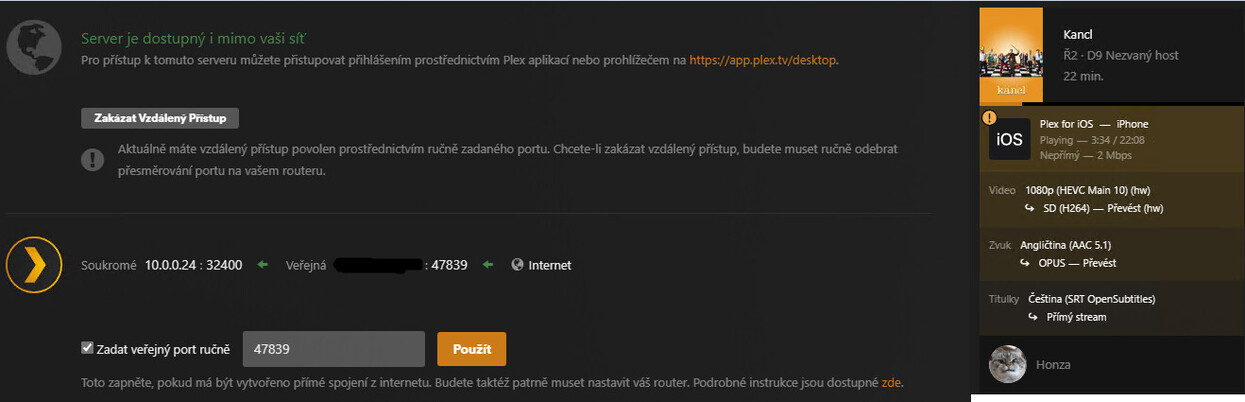
Hi, I have this problem with quality of streaming. My upload speed is 25Mbps and I’ve setup it on the server. My download speed is currently on my cellular data 20Mbps. The quality limitations for cellular are turned off, I have setup up it to use the maximum quality. Still when I try to play video that has 6.5Mbps bitrate it is automatically downgraded to 2Mbps max and I can’t change it. What am I doing wrong? It looks like Minecraft. I’m trying to play it on iPhone 15. It’s 1080p video in HEVC.
---
### Author:  [@tom80H](https://forums.plex.tv/u/tom80H)
#### Post date: [May 5, 2024, 8:41am UTC](https://forums.plex.tv/t/poor-quality-while-streaming/876830/2 "2024-05-05T08:41:53Z")
From the sound of it, there might be an issue with your remote access setup causing your remote connection to depend on a [Plex Relay](https://support.plex.tv/articles/216766168-accessing-a-server-through-relay/) server (indirect connection).
Does the connection show as remote or indirect on the „now playing“ section of your server’s dashboard?
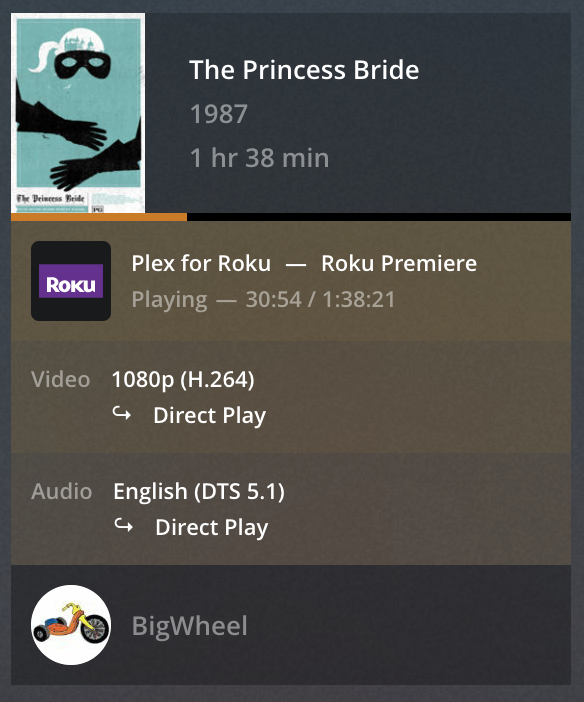
[https://support.plex.tv/articles/200871837-status-and-dashboard/](https://support.plex.tv/articles/200871837-status-and-dashboard/)
If so you might need to troubleshoot that remote access setup.
Did you already have a look at the related troubleshooting support article?
[https://support.plex.tv/articles/200931138-troubleshooting-remote-access/](https://support.plex.tv/articles/200931138-troubleshooting-remote-access/)
#
There’s also a guide with some more details on how to troubleshoot remote access issues.
> [@The Basics of Remote Access Troubleshooting](https://forums.plex.tv/t/the-basics-of-remote-access-troubleshooting/769517):
>
> When it comes to remote access, there’s a lot of different factors which can impact your setup. Some are under your own control, others not so much. First off… there’s a dedicated [support article on troubleshooting your remote access](https://support.plex.tv/articles/200931138-troubleshooting-remote-access/). I strongly recommend you have a look at that. Find below some additional remarks on how to troubleshoot your remote access setup. Review your internet access / remote access configuration It’s good practice to review if Plex gets the correct public IP address…
---
### Author:  [@hbe81](https://forums.plex.tv/u/hbe81)
#### Post date: [May 5, 2024, 2:28pm UTC](https://forums.plex.tv/t/poor-quality-while-streaming/876830/4 "2024-05-05T14:28:31Z")
I have port forwarding setup correctly. External port is 47839 and in my Mikrotik router everything comming on this port is forwarded on 32400 on local IP of the windows server. Even if I type to my browser myPublicIP:47839/web/index.html I can connect to my plex account and use it. Still I’m locked only on 2Mbps, it looks like that everything goes through the [Plex Relay](https://support.plex.tv/articles/216766168-accessing-a-server-through-relay/) which is limited to this bandwidth
---
### Author:  [@hbe81](https://forums.plex.tv/u/hbe81)
#### Post date: [May 5, 2024, 2:30pm UTC](https://forums.plex.tv/t/poor-quality-while-streaming/876830/5 "2024-05-05T14:30:33Z")
When I connect it, it even says in the server remote access settings that the Servers is available ouside of my network for a while, after some time it turns red and says that it couldn’t be contacted through the internet
---
### Author:  [@hbe81](https://forums.plex.tv/u/hbe81)
#### Post date: [May 5, 2024, 2:34pm UTC](https://forums.plex.tv/t/poor-quality-while-streaming/876830/6 "2024-05-05T14:34:21Z")
---
### Author:  [@tom80H](https://forums.plex.tv/u/tom80H)
#### Post date: [May 5, 2024, 2:54pm UTC](https://forums.plex.tv/t/poor-quality-while-streaming/876830/7 "2024-05-05T14:54:09Z")
> [@hbe81](#):
>
> it even says in the server remote access settings that the Servers is available ouside of my network for a while, after some time it turns red
PMS shows your remote access status as „green“ while it’s checking the status. The status changing back to „red“ means your remote access setup isn’t working to start with.
If your own configuration is flawless, there’s still other restrictions that could impact the remote access setup along the communication chain.
---
### Author:  [@hbe81](https://forums.plex.tv/u/hbe81)
#### Post date: [May 5, 2024, 3:05pm UTC](https://forums.plex.tv/t/poor-quality-while-streaming/876830/8 "2024-05-05T15:05:55Z")
How can I troubleshoot more deeply? Could it be some ISP related problem?
---
### Author:  [@tom80H](https://forums.plex.tv/u/tom80H)
#### Post date: [May 5, 2024, 3:28pm UTC](https://forums.plex.tv/t/poor-quality-while-streaming/876830/10 "2024-05-05T15:28:58Z")
See the troubleshooting support article and forum guide posted above…
> [@Poor quality while streaming](https://forums.plex.tv/t/poor-quality-while-streaming/876830/2):
>
> From the sound of it, there might be an issue with your remote access setup causing your remote connection to depend on a [Plex Relay](https://support.plex.tv/articles/216766168-accessing-a-server-through-relay/) server (indirect connection). Does the connection show as remote or indirect on the „now playing“ section of your server’s dashboard? [Exemplary screenshot from the "now playing" section] [https://support.plex.tv/articles/200871837-status-and-dashboard/](https://support.plex.tv/articles/200871837-status-and-dashboard/) If so you might need to troubleshoot that remote access setup. Did you already have a look at the related tro…
---
### Author:  [@hbe81](https://forums.plex.tv/u/hbe81)
#### Post date: [May 5, 2024, 4:01pm UTC](https://forums.plex.tv/t/poor-quality-while-streaming/876830/11 "2024-05-05T16:01:43Z")
That article is totally useless
---
### Author:  [@FordGuy61](https://forums.plex.tv/u/FordGuy61)
#### Post date: [May 5, 2024, 5:28pm UTC](https://forums.plex.tv/t/poor-quality-while-streaming/876830/12 "2024-05-05T17:28:33Z")
> [@hbe81](#):
>
> My download speed is currently on my cellular data 20Mbps.
Are you using a mobile / wireless ISP?
The wireless ISPs in the US (T-Mobile, Verizon, Starlink) use CG-NAT addressing, which is incompatible with Plex remote access. It places the server in a double-NAT situation.
The ISPs in your country might be doing the same.
Contact your ISP. If they use CG-NAT addressing, ask if they can provide a public, IPv4 address that supports port forwarding.
---
### Author:  [@system](https://forums.plex.tv/u/system)
#### Post date: [August 3, 2024, 5:28pm UTC](https://forums.plex.tv/t/poor-quality-while-streaming/876830/13 "2024-08-03T17:28:47Z")
This topic was automatically closed 90 days after the last reply. New replies are no longer allowed.