# Poster naming
**URL:** https://forums.plex.tv/t/poster-naming/885557
**Category:** General Discussions
**Tags:** server-windows
**Created:** [August 17, 2024, 10:09pm UTC](https://forums.plex.tv/t/poster-naming/885557 "2024-08-17T22:09:35Z")
**Posts on this page:** 19
**Page:** 1
### Author:  [@Rickt1962](https://forums.plex.tv/u/Rickt1962)
#### Post date: [August 17, 2024, 10:09pm UTC](https://forums.plex.tv/t/poster-naming/885557/1 "2024-08-17T22:09:35Z")
Quick question for PLEX engineers. Does PLEX recognize File naming in this structure?

---
### Author:  [@CWallace](https://forums.plex.tv/u/CWallace)
#### Post date: [August 17, 2024, 10:12pm UTC](https://forums.plex.tv/t/poster-naming/885557/2 "2024-08-17T22:12:30Z")
Not a Plex Engineer, but here’s the Support Article that deals with local assets for movies:
[https://support.plex.tv/articles/200220677-local-media-assets-movies/](https://support.plex.tv/articles/200220677-local-media-assets-movies/)
Seems to indicate a No on that filename format:
### Poster Artwork
Posters are typically displayed for movies on Plex app dashboards, library views, and when looking at details for the movie. Poster art is typically of 1:1.5 aspect ratio. Custom Poster artwork will be detected and used if named and stored as follows:
- `MovieName (Release Date).ext` or
- `Movie/MovieName (Release Date)/Custom_Poster_Name.ext`
Where `Custom_Poster_Name` is:
- cover
- default
- folder
- movie
- poster
…and `ext` is the file extension. (Some operating systems such as Windows may [hide your file extensions](http://www.thewindowsclub.com/show-file-extensions-in-windows) by default.)
Good Luck,
Chris
---
### Author:  [@Rickt1962](https://forums.plex.tv/u/Rickt1962)
#### Post date: [August 17, 2024, 10:41pm UTC](https://forums.plex.tv/t/poster-naming/885557/3 "2024-08-17T22:41:34Z")
It shows this Movie/MovieName (Release Date)/Custom\_Poster\_Name which my Scraper has been doing since XBMC days. If PLEX can’t see that why are they trying to reInvent the wheel?
---
### Author:  [@Rickt1962](https://forums.plex.tv/u/Rickt1962)
#### Post date: [August 18, 2024, 2:01pm UTC](https://forums.plex.tv/t/poster-naming/885557/4 "2024-08-18T14:01:48Z")
Conventional naming My Folder is Movies/Breakheart Pass (1975) inside that folder is been the standard for over 10 years PLUS since XBMC so you saying PLEX will not use this structure?

---
### Author:  [@anon5074910](https://forums.plex.tv/u/anon5074910)
#### Post date: [August 18, 2024, 4:09pm UTC](https://forums.plex.tv/t/poster-naming/885557/5 "2024-08-18T16:09:15Z")
I’ve always called mine `fanart.jpg` and `poster.jpg` and never had a problem. I’ve never tried how you have named them but just to confirm, do you have `Use local assets` enabled on your libraries advanced settings as that IS needed to get plex to scan local assets (artwork)?
---
### Author:  [@CWallace](https://forums.plex.tv/u/CWallace)
#### Post date: [August 18, 2024, 4:50pm UTC](https://forums.plex.tv/t/poster-naming/885557/6 "2024-08-18T16:50:30Z")
> [@CWallace](#):
>
> - `MovieName (Release Date).ext` or
> - `Movie/MovieName (Release Date)/Custom_Poster_Name.ext`
Seems to indicate to me that you could use either
Breakheart Pass (1975).jpg
or as @anon5074910 mentioned
poster.jpg
You could setup a test library, copy over a movie or two and then experiment with that instead of your main library.
Someone like @OttoKerner could verify that the documenation reads this way.
Good luck,
Chris
---
### Author:  [@pl\_5309](https://forums.plex.tv/u/pl_5309)
#### Post date: [August 18, 2024, 6:13pm UTC](https://forums.plex.tv/t/poster-naming/885557/7 "2024-08-18T18:13:02Z")
The mp4 can also have a poster.
---
### Author:  [@Rickt1962](https://forums.plex.tv/u/Rickt1962)
#### Post date: [August 18, 2024, 11:23pm UTC](https://forums.plex.tv/t/poster-naming/885557/8 "2024-08-18T23:23:12Z")

Yep
---
### Author:  [@Rickt1962](https://forums.plex.tv/u/Rickt1962)
#### Post date: [August 18, 2024, 11:26pm UTC](https://forums.plex.tv/t/poster-naming/885557/9 "2024-08-18T23:26:33Z")
My original library has just poster and fanart. But not many of those left as I update those movies to better resolution when transferring files I find it easier having the name of the movie with the poster for a better description whats floating around
---
### Author:  [@anon5074910](https://forums.plex.tv/u/anon5074910)
#### Post date: [August 19, 2024, 7:40am UTC](https://forums.plex.tv/t/poster-naming/885557/10 "2024-08-19T07:40:58Z")
Nope. That’s the legacy agents/scanner and not the new modern one which the documentation refers to.
That setting is under the advanced settings on the library itself.
---
### Author:  [@Rickt1962](https://forums.plex.tv/u/Rickt1962)
#### Post date: [August 19, 2024, 11:11am UTC](https://forums.plex.tv/t/poster-naming/885557/11 "2024-08-19T11:11:25Z")
Okay, I get the legacy. But the Poster/Fanart should be used by any of agent even the new one. Since I want local assets used not PLEX’s
---
### Author:  [@anon5074910](https://forums.plex.tv/u/anon5074910)
#### Post date: [August 19, 2024, 11:13am UTC](https://forums.plex.tv/t/poster-naming/885557/12 "2024-08-19T11:13:49Z")
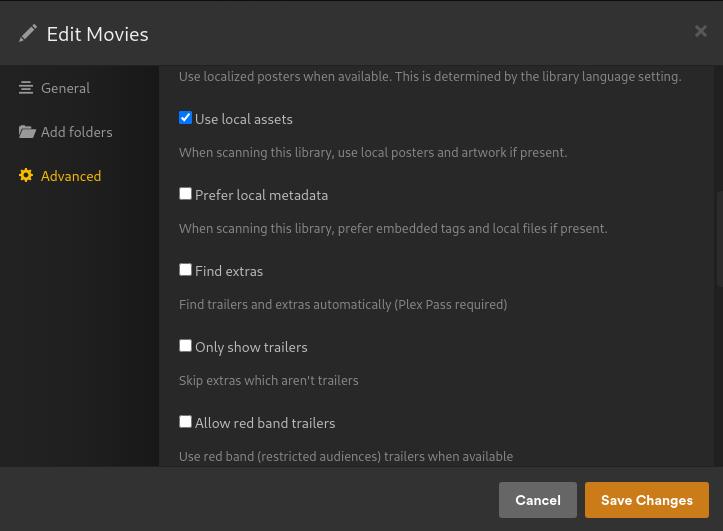
The question still stands… do you have `Use local assets` enabled on your movie library ? If not then plex will NEVER pick them up.
---
### Author:  [@Rickt1962](https://forums.plex.tv/u/Rickt1962)
#### Post date: [August 19, 2024, 11:36am UTC](https://forums.plex.tv/t/poster-naming/885557/13 "2024-08-19T11:36:05Z")
---
### Author:  [@drzoidberg33](https://forums.plex.tv/u/drzoidberg33)
#### Post date: [August 19, 2024, 11:48am UTC](https://forums.plex.tv/t/poster-naming/885557/14 "2024-08-19T11:48:07Z")
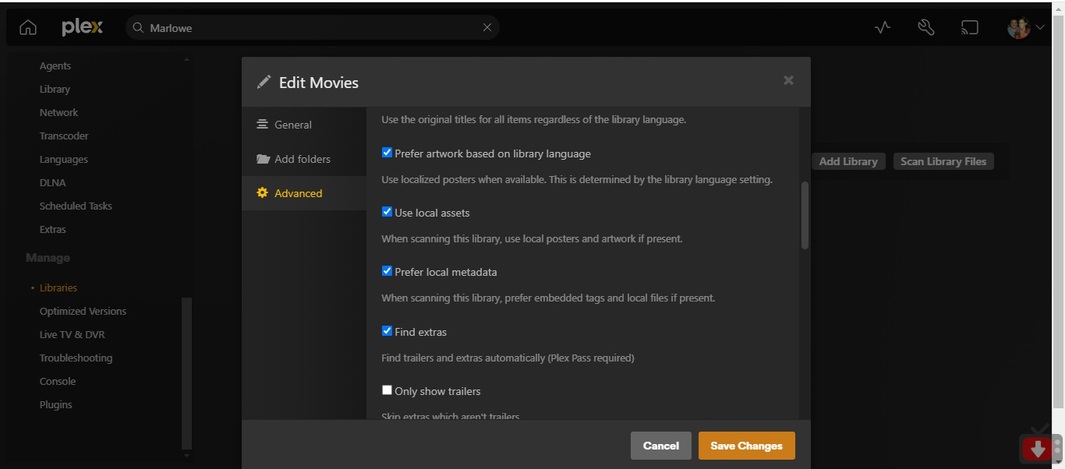
Just a note, never enable “Prefer local metadata” unless you know exactly what you’re doing and you know exactly what that option does and that it works with your files. You generally only enable this when you have meticulously curated tags in your media files.
I suspect your issue is that the mp4 file has an embedded poster in it. Remove the embedded poster from the media and it will pick up the next local asset.
---
### Author:  [@Rickt1962](https://forums.plex.tv/u/Rickt1962)
#### Post date: [August 19, 2024, 12:08pm UTC](https://forums.plex.tv/t/poster-naming/885557/15 "2024-08-19T12:08:27Z")
The word “Prefer” is very ambiguous. All of my Libraries have nfo files for KODI to read and 2/3 of the Library has nfo and mediainfo.xml because I thought that is what PLEX uses. So one would think if it can’t find a mediainfo.xml the fallback would be the proper naming of the Folder of the Movie or TV Show series. So the definition should read NO mediainfo.xml do not use?
---
### Author:  [@drzoidberg33](https://forums.plex.tv/u/drzoidberg33)
#### Post date: [August 19, 2024, 12:15pm UTC](https://forums.plex.tv/t/poster-naming/885557/16 "2024-08-19T12:15:50Z")
Plex does not use NFO files.
---
### Author:  [@Rickt1962](https://forums.plex.tv/u/Rickt1962)
#### Post date: [August 19, 2024, 12:24pm UTC](https://forums.plex.tv/t/poster-naming/885557/17 "2024-08-19T12:24:13Z")
Yes I know this. Thats why I was confused about the Prefer because is says below"When scanning this library, prefer embedded tags and local files if present." If not present it falls back. This has worked because 99% of the LIbrary scanned in. Correctly. This problem is goofy because all the info of the movie was scanned in correctly except for the poster which was stored in the same folder is when PLEX had a brain fart. And falls back use local if present artwork
---
### Author:  [@SeekingAdvice](https://forums.plex.tv/u/SeekingAdvice)
#### Post date: [September 18, 2024, 11:55am UTC](https://forums.plex.tv/t/poster-naming/885557/18 "2024-09-18T11:55:01Z")
Right, a better name for this feature as implemented would be “Prefer metadata embedded in video file”, because it’s not “local” (on the server) metadata that’s being used exactly.
---
### Author:  [@system](https://forums.plex.tv/u/system)
#### Post date: [December 17, 2024, 11:55am UTC](https://forums.plex.tv/t/poster-naming/885557/19 "2024-12-17T11:55:57Z")
This topic was automatically closed 90 days after the last reply. New replies are no longer allowed.