# Problems remote streaming
**URL:** https://forums.plex.tv/t/problems-remote-streaming/843030
**Category:** Remote Access
**Tags:** server-windows
**Created:** [May 31, 2023, 7:40pm UTC](https://forums.plex.tv/t/problems-remote-streaming/843030 "2023-05-31T19:40:14Z")
**Posts on this page:** 4
**Page:** 1
### Author:  [@EternaLDark14](https://forums.plex.tv/u/EternaLDark14)
#### Post date: [May 31, 2023, 7:40pm UTC](https://forums.plex.tv/t/problems-remote-streaming/843030/1 "2023-05-31T19:40:14Z")
Server Version#: 1.32.3.7089
Player Version#: same on everything
Hi, I changed home and ISP and since my plex server behaves in a strange way, I don’t watch anything locally, only remote
The thing is I have 300mbps up and can’t even direct a 15mbps file without buffering every minute, the remote access green tick is there, I have a dynamic public IPV4 (maybe this is the problem? I don’t think so)
I don’t know what else to test, I think I tried everything I could, like enabling/disabling http, ipv6, changing ports, etc.
I seed for torrents too and tried removing limits and all goes smooth so I don’t think is something related to ISP
P.S. seems that under 10-8mbps everything goes quite well
anything else I can try?
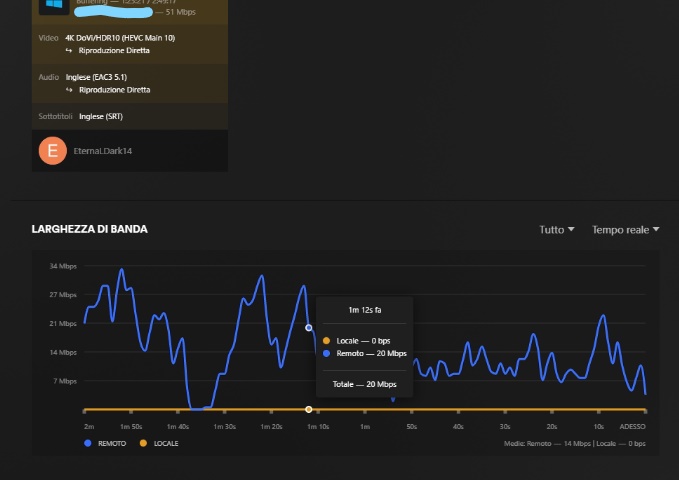
This is quite spikey while remote streaming, I don’t remember if it was like that before
---
### Author:  [@DeBoet](https://forums.plex.tv/u/DeBoet)
#### Post date: [June 2, 2023, 1:09pm UTC](https://forums.plex.tv/t/problems-remote-streaming/843030/3 "2023-06-02T13:09:44Z")
Some useful info:
What connection type do you watch from
What device do you use to watch from
What browser/app/software you use to watch from
Have you tried a speedtest to see if the client device can actually handle 50 Mbps (as most 4/5G towers still can’t persistently)
Have you tried a less killing video type format? My 2022 Samsung TV doesn’t even like to play Dolby Vision HDR10+ 4k x265 and all that.
---
### Author:  [@EternaLDark14](https://forums.plex.tv/u/EternaLDark14)
#### Post date: [June 2, 2023, 2:27pm UTC](https://forums.plex.tv/t/problems-remote-streaming/843030/4 "2023-06-02T14:27:12Z")
Thank you for answering
So,
Tried different devices in different location with Wifi, wired or 4g and always buffer in some way, Always using the official last version plex app for windows, ios, on last iphones and high perf. PCs
Tried many speedtest the lowest I have seen was 110mbps for the client, other location does 1gbps
The server speedtest is always around 280-290 as I have a 300up
It’s not the video type format as other types work the same
Tried setting the remote IPs as local in settings seems to work a bit better and then it’s the same as before, I think the big problem is all these spikes and drops to 0mbps, I feel like those shouldn’t be there. (In this picture the remote client is set as local in IP server settings as it shows)

---
### Author:  [@system](https://forums.plex.tv/u/system)
#### Post date: [August 31, 2023, 2:27pm UTC](https://forums.plex.tv/t/problems-remote-streaming/843030/5 "2023-08-31T14:27:26Z")
This topic was automatically closed 90 days after the last reply. New replies are no longer allowed.