# Problems With ID3v2.3 Metadata Tags
**URL:** https://forums.plex.tv/t/problems-with-id3v2-3-metadata-tags/602762
**Category:** Metadata & Adding Files
**Tags:** server-windows
**Created:** [June 12, 2020, 12:18pm UTC](https://forums.plex.tv/t/problems-with-id3v2-3-metadata-tags/602762 "2020-06-12T12:18:43Z")
**Posts on this page:** 12
**Page:** 1
### Author:  [@banjokazooie1807\_gmail\_com](https://forums.plex.tv/u/banjokazooie1807_gmail_com)
#### Post date: [June 12, 2020, 12:18pm UTC](https://forums.plex.tv/t/problems-with-id3v2-3-metadata-tags/602762/1 "2020-06-12T12:18:43Z")
Don’t know if anybody can help here, but I have recently used Mp3tag to tag .wav cd rips. When scanning my music library the song titles of all the non-recognised albums (such as live recordings and vinyl rips) have disappeared. I’ve tried changing the settings of the library to prefer local metadata but still no track titles. The album art, artist, track number and year all work fine but not the titles. Can anybody help with this?
---
### Author:  [@Mr-Deejay](https://forums.plex.tv/u/Mr-Deejay)
#### Post date: [June 12, 2020, 2:57pm UTC](https://forums.plex.tv/t/problems-with-id3v2-3-metadata-tags/602762/2 "2020-06-12T14:57:58Z")
I had the same problem, which was solved using “last.fm agent” instead of “plex music agent”, do some testing and you will see.
You need to FOLLOW these steps:
1. Go to the advanced settings of your music library
2. Select the LAST.FM agent
Note 1. All your songs must have the album title.
Note 2. If you only have two or more songs from the same album, you must put the track number in each song.
Done.
You will see your library the way you want it!
I hope you find it useful
---
### Author:  [@banjokazooie1807\_gmail\_com](https://forums.plex.tv/u/banjokazooie1807_gmail_com)
#### Post date: [June 12, 2020, 4:22pm UTC](https://forums.plex.tv/t/problems-with-id3v2-3-metadata-tags/602762/3 "2020-06-12T16:22:44Z")
That didn’t work for me. I’ve made sure that the tags are all right and refreshed the metadata with Last.fm. I’ve also made sure that the track title field is not locked. It’s just the way it was before.
---
### Author:  [@Mr-Deejay](https://forums.plex.tv/u/Mr-Deejay)
#### Post date: [June 12, 2020, 4:25pm UTC](https://forums.plex.tv/t/problems-with-id3v2-3-metadata-tags/602762/4 "2020-06-12T16:25:54Z")
Have you tried using “plex music scanner”?
---
### Author:  [@banjokazooie1807\_gmail\_com](https://forums.plex.tv/u/banjokazooie1807_gmail_com)
#### Post date: [June 12, 2020, 4:27pm UTC](https://forums.plex.tv/t/problems-with-id3v2-3-metadata-tags/602762/5 "2020-06-12T16:27:49Z")
I’ve also given that a go.
---
### Author:  [@Mr-Deejay](https://forums.plex.tv/u/Mr-Deejay)
#### Post date: [June 12, 2020, 5:14pm UTC](https://forums.plex.tv/t/problems-with-id3v2-3-metadata-tags/602762/6 "2020-06-12T17:14:14Z")
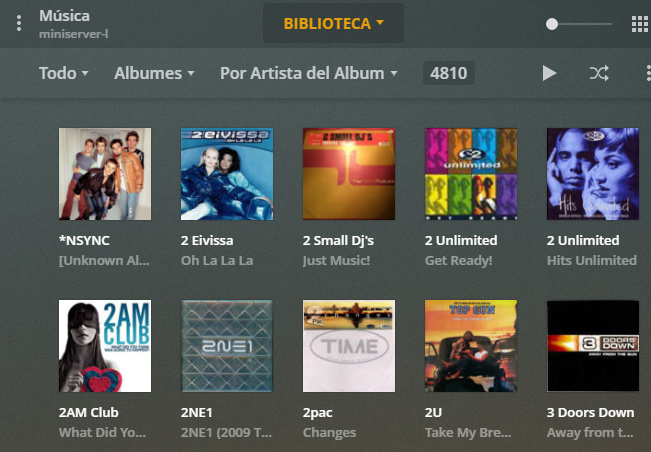
oops, maybe yoo need to erase the library, and adding again, using plex musica scanner like me. I did it and it works, Check it out. (música is my music library)
I Get some like that

---
### Author:  [@OttoKerner](https://forums.plex.tv/u/OttoKerner)
#### Post date: [June 12, 2020, 6:09pm UTC](https://forums.plex.tv/t/problems-with-id3v2-3-metadata-tags/602762/7 "2020-06-12T18:09:22Z")
Plex cannot read meta tags from wav files.
If you need lossless quality, use the Flac format.
---
### Author:  [@banjokazooie1807\_gmail\_com](https://forums.plex.tv/u/banjokazooie1807_gmail_com)
#### Post date: [June 13, 2020, 1:50pm UTC](https://forums.plex.tv/t/problems-with-id3v2-3-metadata-tags/602762/8 "2020-06-13T13:50:06Z")
If it can’t read the metadata tags, can you suggest an easy way to batch convert my files losslessly from .wav to .flac?
---
### Author:  [@OttoKerner](https://forums.plex.tv/u/OttoKerner)
#### Post date: [June 13, 2020, 2:20pm UTC](https://forums.plex.tv/t/problems-with-id3v2-3-metadata-tags/602762/9 "2020-06-13T14:20:15Z")
Flac is always losslessly.
You can use whatever works for you.
Many audio players have conversion already built in. e.g. foobar2000
Or you use the official flac packer [https://www.rarewares.org/lossless.php](https://www.rarewares.org/lossless.php)
I recommend [mp3tag](http://www.mp3tag.de/en/index.html "mp3tag") which you then can use to copy & paste the metatags from the wav to the flac versions.
mp3tag has the also useful feature to derive metatags from folder names and parts of the filename. Saves a lot of manual work.
---
### Author:  [@banjokazooie1807\_gmail\_com](https://forums.plex.tv/u/banjokazooie1807_gmail_com)
#### Post date: [June 13, 2020, 2:31pm UTC](https://forums.plex.tv/t/problems-with-id3v2-3-metadata-tags/602762/10 "2020-06-13T14:31:06Z")
Thanks. Ill give that a go. I’m already familiar with mp3tag because it’s what I used originally to tag them through the discogs database. I’ll have a look at the official flac packer and update you on if it worked.
---
### Author:  [@OttoKerner](https://forums.plex.tv/u/OttoKerner)
#### Post date: [June 13, 2020, 3:16pm UTC](https://forums.plex.tv/t/problems-with-id3v2-3-metadata-tags/602762/11 "2020-06-13T15:16:18Z")
foobar2000 is probably better at retaining the metatags from wav
---
### Author:  [@system](https://forums.plex.tv/u/system)
#### Post date: [September 11, 2020, 3:16pm UTC](https://forums.plex.tv/t/problems-with-id3v2-3-metadata-tags/602762/12 "2020-09-11T15:16:24Z")
This topic was automatically closed 90 days after the last reply. New replies are no longer allowed.