# Problems with MKV files
**URL:** https://forums.plex.tv/t/problems-with-mkv-files/692911
**Category:** Plex Media Server
**Tags:** server-linux, plex-web
**Created:** [February 20, 2021, 5:55pm UTC](https://forums.plex.tv/t/problems-with-mkv-files/692911 "2021-02-20T17:55:31Z")
**Posts on this page:** 11
**Page:** 1
### Author:  [@Jeremyy444](https://forums.plex.tv/u/Jeremyy444)
#### Post date: [February 20, 2021, 5:55pm UTC](https://forums.plex.tv/t/problems-with-mkv-files/692911/1 "2021-02-20T17:55:32Z")
So since this morning ive been having problems playing MVK movies through my windows 10 web player in chrome. I cant play them at all the preroll does work but the movie never plays same for series but mp4 or other file type work just fine. Even when im trying to move those movies from my plex server (ubuntu server 20.04) to my windows 10 pc I get a error but not when I copy them and again it only occurs on MKV file nothing else. I purchased plex pass yesterday could it have something to do with it?
This being the error I get

---
### Author:  [@ChuckPa](https://forums.plex.tv/u/ChuckPa)
#### Post date: [February 20, 2021, 6:10pm UTC](https://forums.plex.tv/t/problems-with-mkv-files/692911/2 "2021-02-20T18:10:16Z")
Need logs ZIP (DEBUG ON, VERBOSE OFF) which capture this.
---
### Author:  [@Jeremyy444](https://forums.plex.tv/u/Jeremyy444)
#### Post date: [February 20, 2021, 6:13pm UTC](https://forums.plex.tv/t/problems-with-mkv-files/692911/3 "2021-02-20T18:13:59Z")
[Plex Media Server Logs\_2021-02-20\_18-13-13.zip](https://forums.plex.tv/uploads/short-url/fw3XrjoNXlfnKVkw5wGQrgsuuFM.zip) (4.0 MB)
---
### Author:  [@Jeremyy444](https://forums.plex.tv/u/Jeremyy444)
#### Post date: [February 20, 2021, 6:15pm UTC](https://forums.plex.tv/t/problems-with-mkv-files/692911/4 "2021-02-20T18:15:16Z")
also started getting this error prier to sending you the logs 
---
### Author:  [@ChuckPa](https://forums.plex.tv/u/ChuckPa)
#### Post date: [February 20, 2021, 6:27pm UTC](https://forums.plex.tv/t/problems-with-mkv-files/692911/5 "2021-02-20T18:27:38Z")
Codec isn’t there / is damaged.
Go into the Codecs directory,
Delete the AAC codecs
Make certain all is owned by `plex:plex`
Restart PMS
Play again
```auto
Feb 20, 2021 17:16:23.145 [0x7fcef7238700] DEBUG - Completed: [127.0.0.1:35114] 200 PUT /video/:/transcode/session/1q9eug4cthm7qbo8no301sq9/c160286e-c568-4fd1-b596-0c46c7653a56/progress/streamDetail?index=2&id=0&codec=subrip&type=subtitle&language=eng&disp_default=1 (11 live) 0ms 195 bytes (pipelined: 9) (range: bytes=0-)
Feb 20, 2021 17:16:23.150 [0x7fce5bfff700] ERROR - [Transcoder] Unknown encoder 'aac'
Feb 20, 2021 17:16:23.151 [0x7fcefd8ec700] DEBUG - Jobs: '/usr/lib/plexmediaserver/Plex Transcoder' exit code for process 5567 is 1 (failure)
Feb 20, 2021 17:16:23.151 [0x7fce9a7fc700] DEBUG - Streaming Resource: Terminated session 0x7fce540695e0:gjd5jnsz27gh1q797xmvlrzd with reason Conversion failed. The transcoder exited due to an error.
Feb 20, 2021 17:16:23.151 [0x7fce9bfff700] DEBUG - [Transcode] Using default transcode duration of 120 minutes
Feb 20, 2021 17:16:23.151 [0x7fce9bfff700] DEBUG - [Transcode] Started session successfully: 1q9eug4cthm7qbo8no301sq9
Feb 20, 2021 17:16:23.152 [0x7fce997fa700] DEBUG - Killing job.
Feb 20, 2021 17:16:23.152 [0x7fce997fa700] DEBUG - Signalling job ID 5567 with 9
```
---
### Author:  [@Jeremyy444](https://forums.plex.tv/u/Jeremyy444)
#### Post date: [February 20, 2021, 6:31pm UTC](https://forums.plex.tv/t/problems-with-mkv-files/692911/6 "2021-02-20T18:31:08Z")
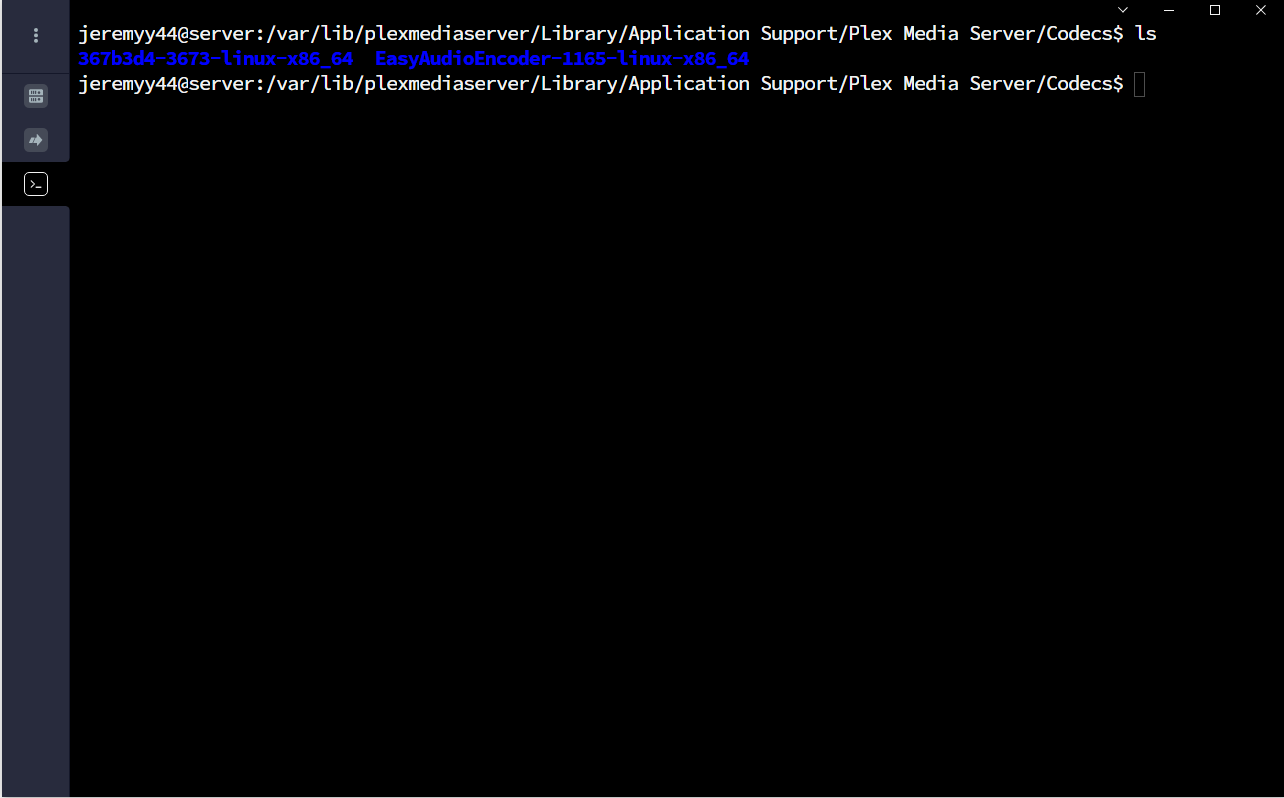
Im in the codecs folder do I just delete these two folder? or is is something in them?
---
### Author:  [@ChuckPa](https://forums.plex.tv/u/ChuckPa)
#### Post date: [February 20, 2021, 6:32pm UTC](https://forums.plex.tv/t/problems-with-mkv-files/692911/7 "2021-02-20T18:32:38Z")
go deeper and then `ls -la` or just `ls -laR`
---
### Author:  [@Jeremyy444](https://forums.plex.tv/u/Jeremyy444)
#### Post date: [February 20, 2021, 6:35pm UTC](https://forums.plex.tv/t/problems-with-mkv-files/692911/8 "2021-02-20T18:35:36Z")
So libaac\_encoder.so was originaly root:root so changed it to plex:plex did not fix it so the ones to delete would be both libaac.so?

---
### Author:  [@ChuckPa](https://forums.plex.tv/u/ChuckPa)
#### Post date: [February 20, 2021, 6:39pm UTC](https://forums.plex.tv/t/problems-with-mkv-files/692911/9 "2021-02-20T18:39:27Z")
And?
zero byte length – see it? It failed to download something munged it up (hard reboot / power cycle of the machine perhaps?)
1. Stop Plex
2. sudo rm -f libaac-encoder.so
3. Start Plex.
---
### Author:  [@Jeremyy444](https://forums.plex.tv/u/Jeremyy444)
#### Post date: [February 20, 2021, 6:43pm UTC](https://forums.plex.tv/t/problems-with-mkv-files/692911/10 "2021-02-20T18:43:06Z")
I hadn’t noticed that zero bytes length.
Deleted it and everything worked again aside from moving the mkv to the my windows pc but that’s not that important.
Thank you very much!!
---
### Author:  [@system](https://forums.plex.tv/u/system)
#### Post date: [May 21, 2021, 6:43pm UTC](https://forums.plex.tv/t/problems-with-mkv-files/692911/11 "2021-05-21T18:43:52Z")
This topic was automatically closed 90 days after the last reply. New replies are no longer allowed.