# QNAP, Plex, and Remote Access not working
**URL:** https://forums.plex.tv/t/qnap-plex-and-remote-access-not-working/422472
**Category:** Remote Access
**Tags:** server-qnap
**Created:** [June 13, 2019, 2:42pm UTC](https://forums.plex.tv/t/qnap-plex-and-remote-access-not-working/422472 "2019-06-13T14:42:10Z")
**Posts on this page:** 5
**Page:** 1
### Author:  [@fowldogs](https://forums.plex.tv/u/fowldogs)
#### Post date: [June 13, 2019, 2:42pm UTC](https://forums.plex.tv/t/qnap-plex-and-remote-access-not-working/422472/1 "2019-06-13T14:42:10Z")
Server Version#: 1.15.8.1198
I believe there is something going on with QNAP and Plex, but I have not tracked it down. I have 2 Plex servers running on my network, a QNAP setup and a Windows setup. I have QNAP plex setup to use the default port 32400 for remote access. I have Windows setup to use port 32401.
I have the exact same setup for my firewall rules both the QNAP and Windows. My Windows remote access works great. My QNAP doesn’t work. I did get a connection briefly to my QNAP Plex through [Plex.TV](http://Plex.TV) from a remote location, but it said the connection was “indirect” when the Windows Plex looked correct. After about 3 minutes, I lost the QNAP Plex connection (without making any network changes) and have never gotten it back.
I cloned my successful Windows Plex firewall rule, changing the destination internal IP and port number, and it still doesn’t work. I have 3 other port forwards for other purposes pointing to my QNAP and they work successfully 100% of the time, so the issue only is affecting Plex.
---
### Author:  [@pl\_5309](https://forums.plex.tv/u/pl_5309)
#### Post date: [June 13, 2019, 2:49pm UTC](https://forums.plex.tv/t/qnap-plex-and-remote-access-not-working/422472/2 "2019-06-13T14:49:35Z")
Sounds wrong, screenshot of your Port forwarding rules.
Left Side Internet|Right Side inside the house.
Example:
port 5000(your choice) | server1ip:32400
port 6000 | server2ip:32400
---
### Author:  [@fowldogs](https://forums.plex.tv/u/fowldogs)
#### Post date: [June 14, 2019, 1:24pm UTC](https://forums.plex.tv/t/qnap-plex-and-remote-access-not-working/422472/3 "2019-06-14T13:24:19Z")
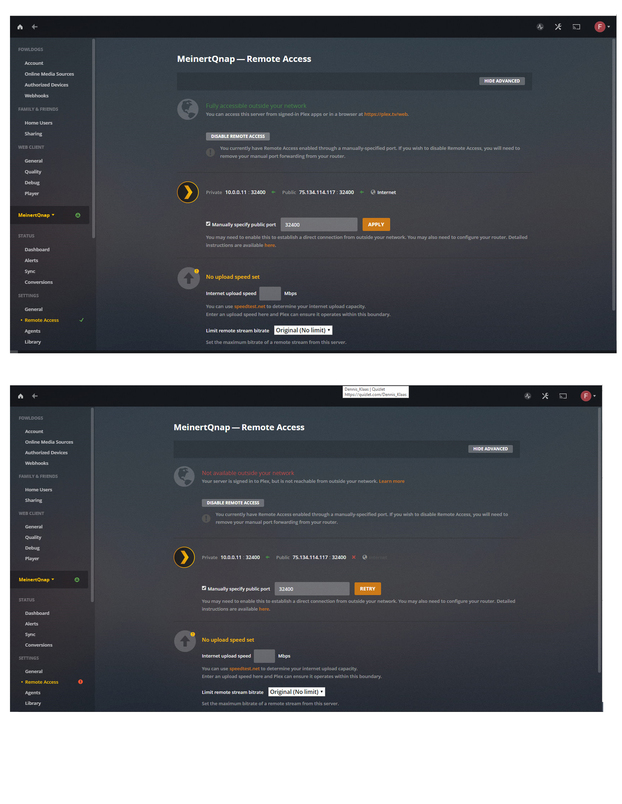
Here are 2 screenshots of when I setup my Plex on my QNAP for remote access.
The top screen shot is the result when I turn on remote access. You see that it is successful, therefore, the firewall rule is working.
The bottom screen shot is 3-4 seconds later and shows that remote access is not available. Nothing on the network changed in the 3-4 seconds from the top screenshot. This is why I believe this is a Plex on the QNAP issue and not a firewall issue. Firewall access either works or it doesn’t. Firewalls do not timeout access after 3-4 seconds of a successful connection.
---
### Author:  [@pl\_5309](https://forums.plex.tv/u/pl_5309)
#### Post date: [June 14, 2019, 1:44pm UTC](https://forums.plex.tv/t/qnap-plex-and-remote-access-not-working/422472/4 "2019-06-14T13:44:27Z")
> [@fowldogs](#):
>
> changing the destination internal IP and port number, and it still doesn’t work
This statement concerns me, the internal destination port is 32400 for both servers, you can’t make one 32401. The external port is different.
If you are port forwarding do you have UPNP turned off?
Don’t get stuck on whether the status is green or not, check via a cell phone or remote connection. Plex is aware that the status doesn’t always reflect properly.
---
### Author:  [@system](https://forums.plex.tv/u/system)
#### Post date: [September 11, 2019, 2:42pm UTC](https://forums.plex.tv/t/qnap-plex-and-remote-access-not-working/422472/5 "2019-09-11T14:42:11Z")
This topic was automatically closed after 90 days. New replies are no longer allowed.