# Recent issue with Connection via web/Remote Access
**URL:** https://forums.plex.tv/t/recent-issue-with-connection-via-web-remote-access/733310
**Category:** Plex Media Server
**Tags:** server-windows, plex-web
**Created:** [August 1, 2021, 9:02pm UTC](https://forums.plex.tv/t/recent-issue-with-connection-via-web-remote-access/733310 "2021-08-01T21:02:31Z")
**Posts on this page:** 20
**Page:** 1
### Author:  [@SethBrower](https://forums.plex.tv/u/SethBrower)
#### Post date: [August 1, 2021, 9:02pm UTC](https://forums.plex.tv/t/recent-issue-with-connection-via-web-remote-access/733310/1 "2021-08-01T21:02:31Z")
So … recently (within the last week or so) my remote access has been acting up, and now it’s escalated to the stage where I am unable to access my Windows10 hosted server via the Plex.tv webportal or via remote access.
From what I can tell via troubleshooting, I am able to access via the
LocalHost:32400 address
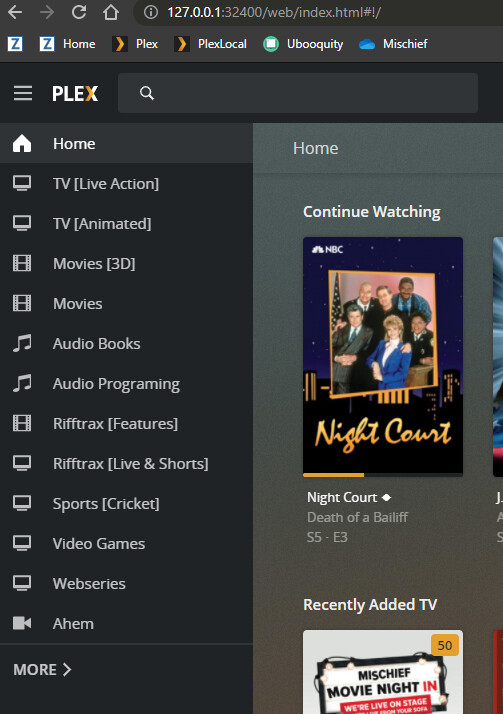
the internal 192.168.1.xx:32400
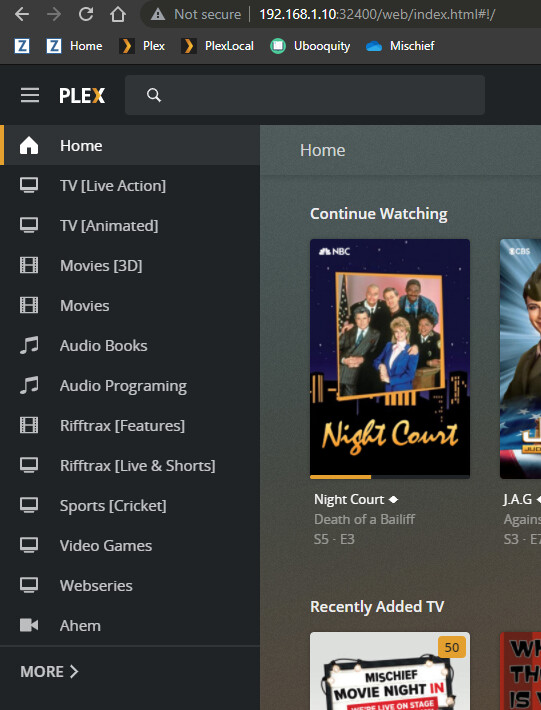
and the external “Remote Access” address
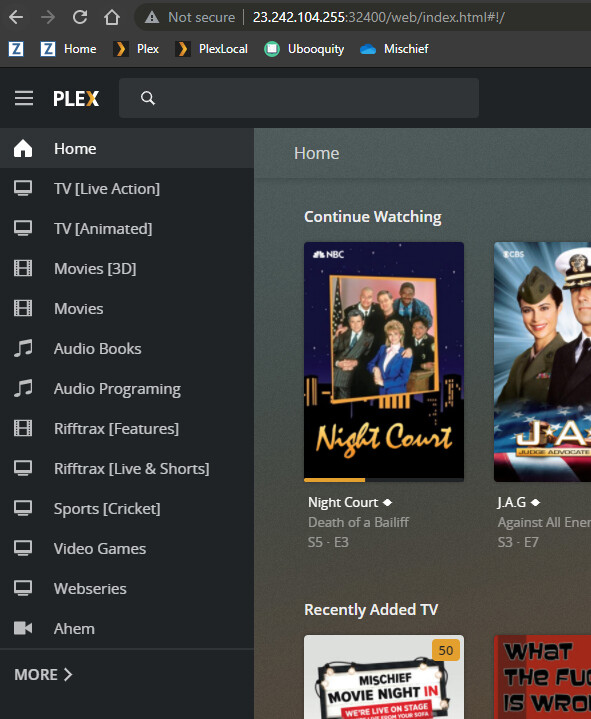
BUT NOT
the plex.tv portal.

It appears that I have a variable amount of time before it … dies after a server restart, I’ve had it take only a couple minutes of plex.tv access or a couple hours, or as of typing and gathering info, no time at all after a restart of the server, for it to drop/not have a connection to the plex.tv or remote access via a friends SHIELD TV app
I have saved my [server logs](https://support.plex.tv/articles/200250417-plex-media-server-log-files/) post restart, and can provide them, but honestly not sure what’s broken. The one thing that I’ve seen that It MAY be is there has been a lot of talk about certificates, and while I have gone looking I think this is an issue, but not 100% sure on that.
Server Version#: 1.23.6.4881-e2e58f321
Player Version#: PlexWeb 4.59.2
---
### Author:  [@SethBrower](https://forums.plex.tv/u/SethBrower)
#### Post date: [August 1, 2021, 9:05pm UTC](https://forums.plex.tv/t/recent-issue-with-connection-via-web-remote-access/733310/2 "2021-08-01T21:05:10Z")
[Plex\_Web\_App\_Debug\_Logs.txt](https://forums.plex.tv/uploads/short-url/7FE3p08kbhTZIn3UbAorAbtzrXA.txt) (1.4 KB)
[Plex Media Server Logs\_2021-08-01\_13-57-53.zip](https://forums.plex.tv/uploads/short-url/wiShQyDZ2JuHlnf9owlxs31BoqX.zip) (2.4 MB)
---
### Author:  [@SethBrower](https://forums.plex.tv/u/SethBrower)
#### Post date: [August 1, 2021, 10:17pm UTC](https://forums.plex.tv/t/recent-issue-with-connection-via-web-remote-access/733310/3 "2021-08-01T22:17:18Z")
As a further follow up, I’m feeling as confident as I can that this is a Certificate issue.
All of the working access sites claim that I am fully remote access connected & secure
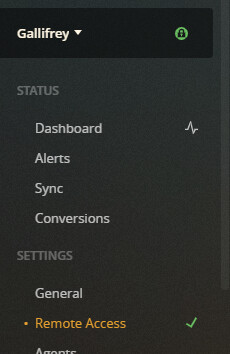
It is only via Plex.tv that I get the “secure” connection warning.

I currently have it set on “Preferred” but I did test it on “Disabled” and had no noticeable change.
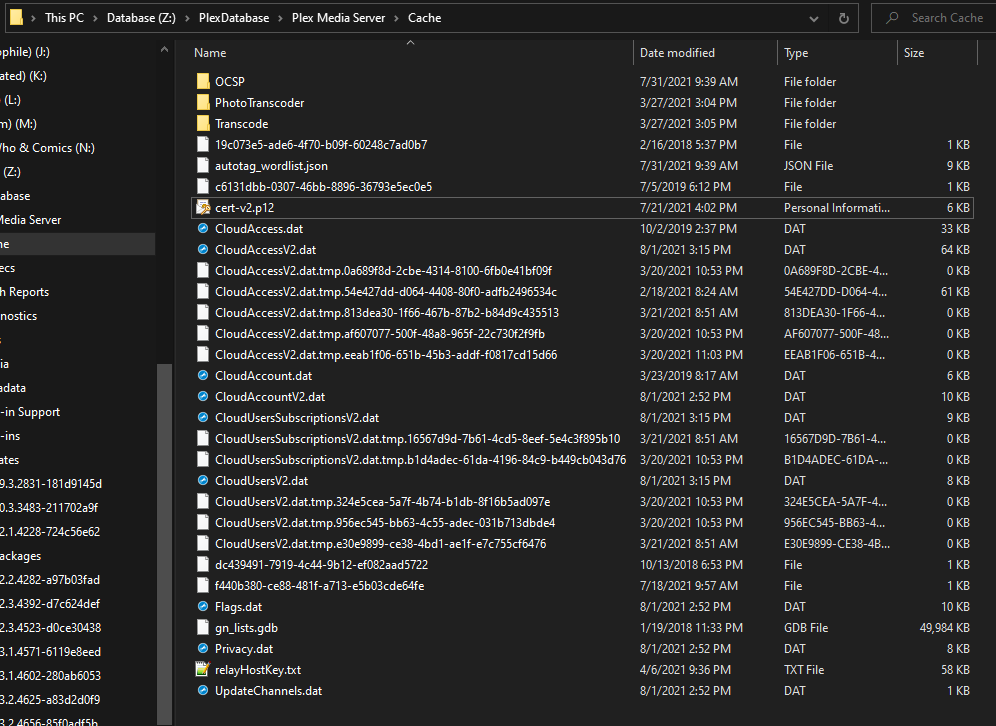
I think it’s a cert issue, but not 100% sure, when I look into the folder that is supposed to have the “certificate.p12” file … I can’t see it.
---
### Author:  [@OttoKerner](https://forums.plex.tv/u/OttoKerner)
#### Post date: [August 2, 2021, 11:57am UTC](https://forums.plex.tv/t/recent-issue-with-connection-via-web-remote-access/733310/4 "2021-08-02T11:57:02Z")
Your server has currently no certificate at all assigned to it.
Shut it down, wait a few seconds, then re-start it.
Make sure its internet access is not impeded by VPNs or DNS filters etc. Otherwise it might not be able to fetch a certificate.
(I hope your drive Z: is a local, NTFS-formatted volume)
---
### Author:  [@SethBrower](https://forums.plex.tv/u/SethBrower)
#### Post date: [August 2, 2021, 3:08pm UTC](https://forums.plex.tv/t/recent-issue-with-connection-via-web-remote-access/733310/5 "2021-08-02T15:08:08Z")
Good morning, thanks for the response.
Simple thing first z is an internal M.2 drive that is formatted correctly, its been living on that drive for … most of the year without issue, so that should be fine.
so … I’ve done multiple shut it downs, including as some of the other forum posts have indicated flushing my DNS and doing full powercycles of modem/router/pc.
I occasionally (during the day now) have to turn on a VPN to connect to work (Forticlient VPN) but that has worked with the server cleanly for over a year now with not apparent issue, and its only on for the 8(with OT) hours that I’m actively working, so the program was not even on all weekend while I was trying to troubleshoot this.
I am currently using Google’s DNS, though I did attempt rolling back to my ISP’s for a couple hours to see if that was doing anything new for some reason and causing a new issue.
I’ll cycle the server again just to test, and pull the logs again just to be sure. (hold for test)
[Plex Media Server Logs\_2021-08-02\_08-06-14.zip](https://forums.plex.tv/uploads/short-url/xNmleyMLgwMhYUQDH4ybI7CKDvA.zip) (3.7 MB)
and nope, was playing some Phineas and Ferb all night, but just restarted it leaving it off for a minute or so, back up and … still the same.
Sorry. not sure what else on my end may have changed in the past week or two to cause this, or that I can adjust to force the certificates beyond rebooting/restarting another dozen times.
---
### Author:  [@OttoKerner](https://forums.plex.tv/u/OttoKerner)
#### Post date: [August 2, 2021, 4:05pm UTC](https://forums.plex.tv/t/recent-issue-with-connection-via-web-remote-access/733310/6 "2021-08-02T16:05:57Z")
Settings - Server - Network - “Secure Connections”
toggle this setting off
save settings
restart the server
toggle it back on
restart the server
leave it at “preferred” for now.
---
### Author:  [@SethBrower](https://forums.plex.tv/u/SethBrower)
#### Post date: [August 2, 2021, 4:13pm UTC](https://forums.plex.tv/t/recent-issue-with-connection-via-web-remote-access/733310/7 "2021-08-02T16:13:32Z")
ok, realized I had put it on “none” to try and end-run around it, so that was my default, before this test.
- switched it on and off saving each time, just to be sure it saved as “off”.
- server restart
- turned it back on

- then restarted again
- no change noticed
- did one more restart just to be sure (still no change)
sorry to be a pain with this, attaching new logs in the off chance something new is there.
[Plex Media Server Logs\_2021-08-02\_09-12-35.zip](https://forums.plex.tv/uploads/short-url/a2HEMCOYbTGlc0RnKkn2XhkQjFa.zip) (2.1 MB)
went back to check, still not seeing any cert files created in what I believe is the correct location.
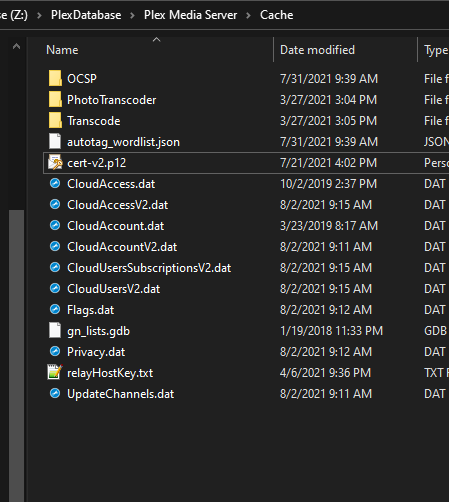
I did delete all the extraneous “temp” files that seemed to have been hanging around.
---
### Author:  [@OttoKerner](https://forums.plex.tv/u/OttoKerner)
#### Post date: [August 2, 2021, 4:20pm UTC](https://forums.plex.tv/t/recent-issue-with-connection-via-web-remote-access/733310/8 "2021-08-02T16:20:29Z")
Could you take a look into the default location of the [plex data folder](https://support.plex.tv/articles/202915258-where-is-the-plex-media-server-data-directory-located/)?
Something is off.
---
### Author:  [@SethBrower](https://forums.plex.tv/u/SethBrower)
#### Post date: [August 2, 2021, 4:24pm UTC](https://forums.plex.tv/t/recent-issue-with-connection-via-web-remote-access/733310/9 "2021-08-02T16:24:37Z")
so … oh man at least almost a year back I did the called out method for moving my database over to the M.2 drive ( and tweaking the registry to account for it ) and it’s been there since.
I’ve done multiple updates via the updaters put out, and even uninstalled and reinstalled the server software, in the hopes that it would fix any issues with missing files/locations.
But … in some cleanup I may have done, I no longer have on my C drive in the
“%LOCALAPPDATA%\Plex Media Server” that folder.
Did I accidentally blow something away?
if so, if uninstalling and reinstalling didn’t seem to fix it (though will try again if you want) what’s the fix for that.


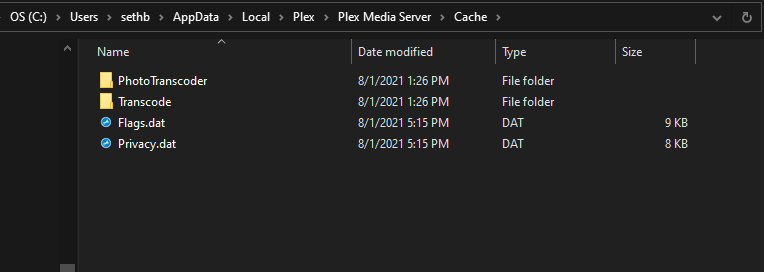
this is what’s living in the C drive for “local” for Plex
---
### Author:  [@OttoKerner](https://forums.plex.tv/u/OttoKerner)
#### Post date: [August 2, 2021, 4:25pm UTC](https://forums.plex.tv/t/recent-issue-with-connection-via-web-remote-access/733310/10 "2021-08-02T16:25:46Z")
No, no. If you don’t have a folder at the old location, then all is as it should be.
---
### Author:  [@SethBrower](https://forums.plex.tv/u/SethBrower)
#### Post date: [August 2, 2021, 4:27pm UTC](https://forums.plex.tv/t/recent-issue-with-connection-via-web-remote-access/733310/11 "2021-08-02T16:27:11Z")
sorry, updated with images, likely as you were posting your reply.
windows updated “snip” tool being a hotkey away has … led me to be more prolific with screengrabs.
---
### Author:  [@SethBrower](https://forums.plex.tv/u/SethBrower)
#### Post date: [August 2, 2021, 4:29pm UTC](https://forums.plex.tv/t/recent-issue-with-connection-via-web-remote-access/733310/12 "2021-08-02T16:29:24Z")
as for the Z drive
the database is literally the only thing on it. I got a good deal on a 1TB M.2 drive and figured it would be a good use of it.

---
### Author:  [@OttoKerner](https://forums.plex.tv/u/OttoKerner)
#### Post date: [August 2, 2021, 4:30pm UTC](https://forums.plex.tv/t/recent-issue-with-connection-via-web-remote-access/733310/13 "2021-08-02T16:30:42Z")
Could you show me what is actually in the registry key `LocalAppDataPath`?
There is definitely more in there than it should be.
---
### Author:  [@SethBrower](https://forums.plex.tv/u/SethBrower)
#### Post date: [August 2, 2021, 4:31pm UTC](https://forums.plex.tv/t/recent-issue-with-connection-via-web-remote-access/733310/14 "2021-08-02T16:31:09Z")
was heading there as you apparently typed this.

if more is needed, i cropped a bit in for size reasons.
and just being paranoid, this is the drive

---
### Author:  [@OttoKerner](https://forums.plex.tv/u/OttoKerner)
#### Post date: [August 2, 2021, 4:34pm UTC](https://forums.plex.tv/t/recent-issue-with-connection-via-web-remote-access/733310/15 "2021-08-02T16:34:01Z")
Try this:
1. shut down the server
2. make sure you did the steps in the “addendum” of this post: [[HowTo] An extended guide on how to move the Plex data folder on Windows](https://forums.plex.tv/t/howto-an-extended-guide-on-how-to-move-the-plex-data-folder-on-windows/197060/1)
3. clear out the folder `Plex Media Server` in the default location (i.e. on drive C:)
4. start your server
---
### Author:  [@SethBrower](https://forums.plex.tv/u/SethBrower)
#### Post date: [August 2, 2021, 4:34pm UTC](https://forums.plex.tv/t/recent-issue-with-connection-via-web-remote-access/733310/16 "2021-08-02T16:34:23Z")
will do now.
---
### Author:  [@SethBrower](https://forums.plex.tv/u/SethBrower)
#### Post date: [August 2, 2021, 4:41pm UTC](https://forums.plex.tv/t/recent-issue-with-connection-via-web-remote-access/733310/17 "2021-08-02T16:41:03Z")
ok, server and updater service off, and back to regedit.
I’m not seeing any further drive letter references here.
I removed the actual “Plex Media Server” folder after snagging this image.
I know the addendum said to reboot the machine, but as I appear to not have to actually make any regedit changes, I’m skipping that part.
restarted server and … no apparent change that I can see.
[Plex Media Server Logs\_2021-08-02\_09-40-35.zip](https://forums.plex.tv/uploads/short-url/dOhRgHd0HCihAm8gNkaNVS4zhpu.zip) (1.4 MB)
---
### Author:  [@SethBrower](https://forums.plex.tv/u/SethBrower)
#### Post date: [August 2, 2021, 4:42pm UTC](https://forums.plex.tv/t/recent-issue-with-connection-via-web-remote-access/733310/18 "2021-08-02T16:42:20Z")
it just does really not want to grab a certificate apparently.
---
### Author:  [@OttoKerner](https://forums.plex.tv/u/OttoKerner)
#### Post date: [August 2, 2021, 4:43pm UTC](https://forums.plex.tv/t/recent-issue-with-connection-via-web-remote-access/733310/19 "2021-08-02T16:43:01Z")
Please do NOT post your server ID or your Token!
---
### Author:  [@SethBrower](https://forums.plex.tv/u/SethBrower)
#### Post date: [August 2, 2021, 4:43pm UTC](https://forums.plex.tv/t/recent-issue-with-connection-via-web-remote-access/733310/20 "2021-08-02T16:43:31Z")
Ahh sorry, didn’t think of those, my bad.
“early” morning brain.
[Next page](https://forums.plex.tv/t/recent-issue-with-connection-via-web-remote-access/733310.md?page=2)