# Recent update breaks VC1 transcoding
**URL:** https://forums.plex.tv/t/recent-update-breaks-vc1-transcoding/888022
**Category:** Plex Media Server
**Tags:** server-windows
**Created:** [September 12, 2024, 5:59pm UTC](https://forums.plex.tv/t/recent-update-breaks-vc1-transcoding/888022 "2024-09-12T17:59:48Z")
**Posts on this page:** 20
**Page:** 1
### Author:  [@ThePrower](https://forums.plex.tv/u/ThePrower)
#### Post date: [September 12, 2024, 5:59pm UTC](https://forums.plex.tv/t/recent-update-breaks-vc1-transcoding/888022/1 "2024-09-12T17:59:48Z")
Server Version#: 1.41.0.8992
Player Version#: 4.138.0
It appears today’s update has broken VC1 transcoding. Direct play appears to work on mobile though begins to buffer endlessly when transcoding. Setting it down to 720p and below appears to begin playback though. Turning on subtitles makes it super pixelated. This is occurring regardless of the player. On Windows 11 with a 12700K. HW transcoding and tone mapping is working great otherwise with other files. Any thoughts on what is going on?
EDIT: Uploaded [server log](https://support.plex.tv/articles/200250417-plex-media-server-log-files/) replicating the problem
[Plex Media Server Logs\_2024-09-12\_13-37-12.zip](https://forums.plex.tv/uploads/short-url/oQDVFIXrowSAs8w7fABtVvzIvZJ.zip) (2.6 MB)
---
### Author:  [@FordGuy61](https://forums.plex.tv/u/FordGuy61)
#### Post date: [September 13, 2024, 2:15am UTC](https://forums.plex.tv/t/recent-update-breaks-vc1-transcoding/888022/2 "2024-09-13T02:15:44Z")
> [@ThePrower](#):
>
> 12700K
Intel dropped support for hardware accelerated decoding of VC1 video starting with the 11th gen CPUs.
However, it should decode VC1 quite easily using the CPU.
What happens if you disable hardware accelerated transcoding?
From the Intel datasheet for 12th gen Core CPUs:

[Intel 12th Gen Core Processors Datasheet 1 of 2.zip](https://forums.plex.tv/uploads/short-url/xPUHOTuoQlFVhsYavUtCrmeWDNn.zip) (5.2 MB)
---
### Author:  [@ThePrower](https://forums.plex.tv/u/ThePrower)
#### Post date: [September 13, 2024, 3:16am UTC](https://forums.plex.tv/t/recent-update-breaks-vc1-transcoding/888022/3 "2024-09-13T03:16:00Z")
Yep. It plays when disabling hardware-accelerated video encoding. At this point I presume there is no way for it to automatically switch to CPU when hardware-accelerated encoding is enabled then.
---
### Author:  [@FordGuy61](https://forums.plex.tv/u/FordGuy61)
#### Post date: [September 13, 2024, 4:57am UTC](https://forums.plex.tv/t/recent-update-breaks-vc1-transcoding/888022/4 "2024-09-13T04:57:49Z")
You left “Use hardware acceleration when available” enabled?
Could you upload the log files from that test?
---
### Author:  [@ThePrower](https://forums.plex.tv/u/ThePrower)
#### Post date: [September 13, 2024, 1:02pm UTC](https://forums.plex.tv/t/recent-update-breaks-vc1-transcoding/888022/5 "2024-09-13T13:02:52Z")
Sure. So when leaving both on, at least on chrome browser, it stalls.

When turning off “Use hardware-accelerated video encoding”, and leaving on “Use hardware acceleration when available”, it does transcode and plays properly.
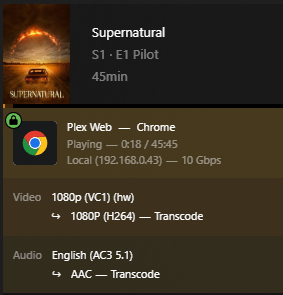
Here are the logs with “Use hardware-accelerated video encoding” turned off. Prior to this update, I did have both setting turned on and had no problem with playback with this filetype.
[Plex Media Server Logs\_2024-09-13\_08-01-16.zip](https://forums.plex.tv/uploads/short-url/h8SgzD54GqKeJPZXTXuubVU68cZ.zip) (2.4 MB)
---
### Author:  [@ThePrower](https://forums.plex.tv/u/ThePrower)
#### Post date: [September 14, 2024, 5:05pm UTC](https://forums.plex.tv/t/recent-update-breaks-vc1-transcoding/888022/6 "2024-09-14T17:05:53Z")
In theory, Plex should see that it is not compatable with the hardware side and start transcoding on the software side correct? Is this a bug or am I just misunderstanding?
---
### Author:  [@kd6icz](https://forums.plex.tv/u/kd6icz)
#### Post date: [September 15, 2024, 5:55pm UTC](https://forums.plex.tv/t/recent-update-breaks-vc1-transcoding/888022/7 "2024-09-15T17:55:20Z")
“Intel dropped support for hardware accelerated decoding of VC1 video starting with the 11th gen CPUs.”
This is inaccurate information. VC1 hardware decoding is supported through the 14th generation. Going forward (starting with Arc cards) it will not be supported.
The latest version of PMS broke ALL hardware transcoding for me on both of my servers. I had to roll back to get it working.
---
### Author:  [@ThePrower](https://forums.plex.tv/u/ThePrower)
#### Post date: [September 24, 2024, 10:03pm UTC](https://forums.plex.tv/t/recent-update-breaks-vc1-transcoding/888022/8 "2024-09-24T22:03:56Z")
Just to confirm things, I rolled back to 1.40.5.8897 with hardware-accelerated video encoding enabled. No issues with playback.

I feel pretty confident to say this is a bug at this point.
---
### Author:  [@ThePrower](https://forums.plex.tv/u/ThePrower)
#### Post date: [September 25, 2024, 5:00pm UTC](https://forums.plex.tv/t/recent-update-breaks-vc1-transcoding/888022/9 "2024-09-25T17:00:17Z")
To confirm, today’s beta release 1.41.0.8994-f2c27da23 does not fix the issue.
---
### Author:  [@Atomatth](https://forums.plex.tv/u/Atomatth)
#### Post date: [September 26, 2024, 3:11pm UTC](https://forums.plex.tv/t/recent-update-breaks-vc1-transcoding/888022/10 "2024-09-26T15:11:42Z")
@ThePrower thank you for reporting. I’ve collected your logs and observations into an internal issue.
---
### Author:  [@PRiiXX](https://forums.plex.tv/u/PRiiXX)
#### Post date: [October 3, 2024, 2:36am UTC](https://forums.plex.tv/t/recent-update-breaks-vc1-transcoding/888022/12 "2024-10-03T02:36:35Z")
I also ran into this issue a few days ago. Thought a Windows update maybe broke something because it used to transcode just fine.
What I wanna know is: if one decides to upgrade to a 15th gen or Intel Arc GPU, is hardware encoding still possible? Meaning software decode and hardware encode, or is that not a thing?
EDIT: Also seems to affect 1080p MPEG2 files (old Blu-rays), but not 576p/480p MPEG2 files. Weird.
---
### Author:  [@Kirnak](https://forums.plex.tv/u/Kirnak)
#### Post date: [October 8, 2024, 2:01am UTC](https://forums.plex.tv/t/recent-update-breaks-vc1-transcoding/888022/13 "2024-10-08T02:01:50Z")
I’m having the exact same issue with one addition.
> [@ThePrower](#):
>
> When turning off “Use hardware-accelerated video encoding”, and leaving on “Use hardware acceleration when available”, it does transcode and plays properly.
However, my Plex server will occasionally hang when starting a video wit the latest update. I’ll get a black screen instead of the video playing; I have to hit “play” to get the video to start at this point. Again, this is occasional and random, but I never saw this behavior prior to the latest stable release. I7-12650, 32 gb ram.
---
### Author:  [@ThePrower](https://forums.plex.tv/u/ThePrower)
#### Post date: [October 24, 2024, 8:20pm UTC](https://forums.plex.tv/t/recent-update-breaks-vc1-transcoding/888022/14 "2024-10-24T20:20:38Z")
Today’s beta fixed the issue. Thank you so much to the Plex team! You all are greatly appreciated!
---
### Author:  [@ChristianKent](https://forums.plex.tv/u/ChristianKent)
#### Post date: [October 24, 2024, 9:59pm UTC](https://forums.plex.tv/t/recent-update-breaks-vc1-transcoding/888022/15 "2024-10-24T21:59:11Z")
What version?
---
### Author:  [@FordGuy61](https://forums.plex.tv/u/FordGuy61)
#### Post date: [October 24, 2024, 10:24pm UTC](https://forums.plex.tv/t/recent-update-breaks-vc1-transcoding/888022/16 "2024-10-24T22:24:44Z")
See PMS Release Notes: [Plex Media Server - #651 by gbooker02](https://forums.plex.tv/t/plex-media-server/30447/651)
---
### Author:  [@kd6icz](https://forums.plex.tv/u/kd6icz)
#### Post date: [October 25, 2024, 12:40pm UTC](https://forums.plex.tv/t/recent-update-breaks-vc1-transcoding/888022/17 "2024-10-25T12:40:35Z")
Live TV playback when transcoding is still starts off a scrambled mess. Frames play out of sequence.
I see they sticking to no hardware decoding.
Seems the software decoding/hardware encoding isn’t getting along.
---
### Author:  [@kd6icz](https://forums.plex.tv/u/kd6icz)
#### Post date: [October 25, 2024, 12:44pm UTC](https://forums.plex.tv/t/recent-update-breaks-vc1-transcoding/888022/18 "2024-10-25T12:44:03Z")
And I just tried playing a raw Blu Ray MKV rip and no hardware support. Decoding and encoding is all software. So this build DID NOT fix the issue!
---
### Author:  [@kd6icz](https://forums.plex.tv/u/kd6icz)
#### Post date: [October 25, 2024, 1:02pm UTC](https://forums.plex.tv/t/recent-update-breaks-vc1-transcoding/888022/19 "2024-10-25T13:02:25Z")
@ThePrower double check that hardware acceleration is actually being used and not software transcoding.
---
### Author:  [@ThePrower](https://forums.plex.tv/u/ThePrower)
#### Post date: [October 25, 2024, 1:18pm UTC](https://forums.plex.tv/t/recent-update-breaks-vc1-transcoding/888022/21 "2024-10-25T13:18:36Z")
Everything is running as it should.


---
### Author:  [@Atomatth](https://forums.plex.tv/u/Atomatth)
#### Post date: [November 1, 2024, 6:30pm UTC](https://forums.plex.tv/t/recent-update-breaks-vc1-transcoding/888022/22 "2024-11-01T18:30:39Z")
4 posts were split to a new topic: [Transcoder issues on Windows](https://forums.plex.tv/t/transcoder-issues-on-windows/894169)
[Next page](https://forums.plex.tv/t/recent-update-breaks-vc1-transcoding/888022.md?page=2)