# Recently Added and Continue Watching (DUPLICATES!)
**URL:** https://forums.plex.tv/t/recently-added-and-continue-watching-duplicates/934592
**Category:** Plex Media Server
**Tags:** server-synology
**Created:** [December 17, 2025, 2:07pm UTC](https://forums.plex.tv/t/recently-added-and-continue-watching-duplicates/934592 "2025-12-17T14:07:39Z")
**Posts on this page:** 3
**Page:** 1
### Author:  [@pparker900](https://forums.plex.tv/u/pparker900)
#### Post date: [December 17, 2025, 2:07pm UTC](https://forums.plex.tv/t/recently-added-and-continue-watching-duplicates/934592/1 "2025-12-17T14:07:39Z")
Server Version#: 1.42.2.10156-720010156
Player Version#: 10.30.7.190
I know this subject has been touched on. My issue is similar where I see duplicates of the same movie in both Recently added and Continue Watching. I’m pretty good at managing my content so I know for a fact that there is only one file for each of these movies, so that’s not it. I can’t seem to get rid of these and now need a bit of expert help on how to resolve this issue. As you can see, the server is on my Synology and the client is on a firestick. Help
---
### Author:  [@trumpy81](https://forums.plex.tv/u/trumpy81)
#### Post date: [December 17, 2025, 11:38pm UTC](https://forums.plex.tv/t/recently-added-and-continue-watching-duplicates/934592/2 "2025-12-17T23:38:17Z")
Continue Watching generally means you have started to watch something, but then stopped the video before it reached the end.
You can remove items from the Continue Watching list by marking them as _Watched_.
In Plex/Web, go to the Movie poster or Episode poster shown in Continue Watching and click on the _ellipsis_. Select _Mark as Watched_ to remove the item from the list.
On the Fire TV, click on the Movie poster you want to remove, then move the cursor to the right of _Resume_ and click on the _ellipsis_, then select _Mark as Watched_.
For a TV Show episode, move the cursor below the episode posters and then towards the right and click on _Mark as Watched_.
Recently Added, means just that, the file was added to your collection, recently.
You can stop displaying the Recently Added list by turning off Recently Added in _Plex Settings \> Server \> Libraries \> Library Name \> Manage Recommendations_.
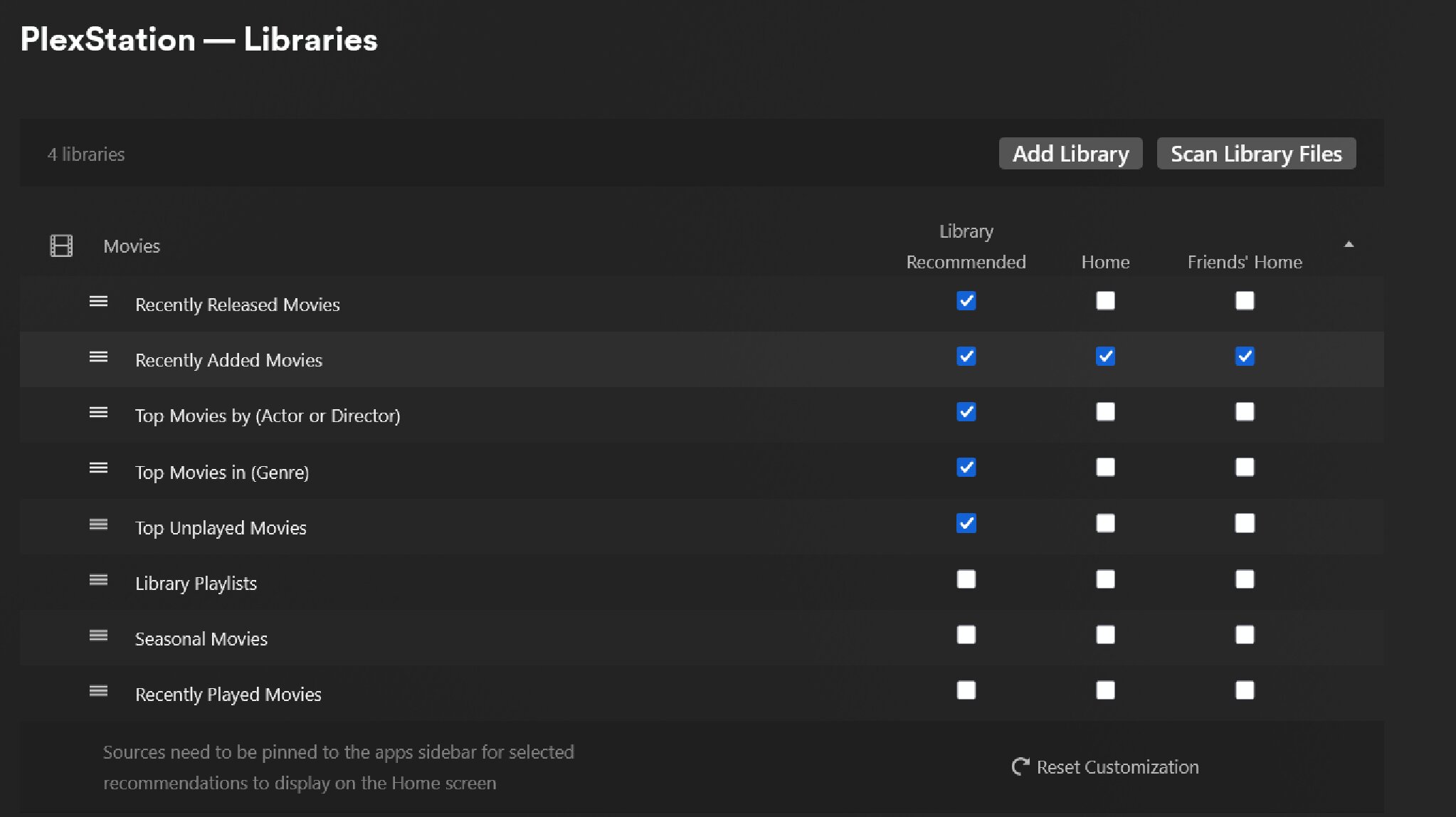
Library Recommended is shown when you enter your library and the Recommended tab is selected.
Home is shown on your Plex Home page.
Friends Home is shown on your friends Plex Home page.
In the image above, I am displaying Recently Added for my Movies library, in the library (Recommended tab), on my Home page and on my friends Home page.
---
### Author:  [@system](https://forums.plex.tv/u/system)
#### Post date: [March 17, 2026, 11:38pm UTC](https://forums.plex.tv/t/recently-added-and-continue-watching-duplicates/934592/3 "2026-03-17T23:38:25Z")
This topic was automatically closed 90 days after the last reply. New replies are no longer allowed.