I just have the movie files placed directly under the series name folder, with no “Specials” or “Season” subdirectories, per my understanding from the README:
Movie files in Series libraries (since this is a Series Scanner) are supported if:
Files are in a folder with the same name or with a single file inside it
Filename contain " - Complete Movie"
Files are numbered (01|ep 01|s01e01)
Given all this, it shows up in plex as follows:
So, as far as what looks correct:
The series name
The episode titles
The parts that look wrong (or missing):
Episode descriptions missing
Series description is wrong (it’s not a description of the movies, but rather an unrelated series)
Serie was assigned anidb id 8357, your naming seem fine and showing in plex at the right season and ep number
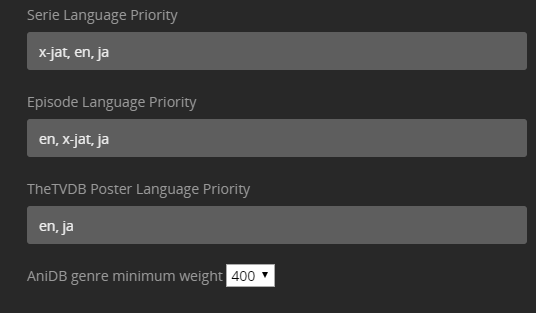
serie description and poster comes from thetvdb serie 102261 assigned to this anidbid. change the priority of episode description to AniDB first in agent settings: ‘AniDB, TheTVDB|AniDB, TheTVDB’ (serie|ep separation if they differs) instead of ‘TheTVDB, AniDB’ and poster fron AniDB first instead of ‘tvdb4, TheTVDB, TheMovieDb, FanartTV, AniDB’
You could edit Plex Media Server\Plug-in Support\Data\com.plexapp.agents.hama\DataItems\AnimeLists\anime-list-corrections.xml so it doesn’t map anymore to thetvdb but no ep summary then
Okay so I still need to use your absolute agent (normal plex agent thinks - 125 - is 25) but tvdb plex agent works on absolute. What is still crazy is trakt still continues to no scrobble or sync watches on the show. I have no idea what to do on this but not your issue :). This does fix any numbering issue i have with the show and pulls correct information
my agent support both absolute and season numbering
Never claimed Trakt compatibility but they kindly added support for theTVDB ids numbered series inside HAMA
Trakt supports tvdb|tvdb2|tvdb3 modes. try to assign tvdbid to show by adding [tvdb-xxxxx] in the series ‘fix match’ > ‘Search option’ > ‘ftitle [tvdb-xxxxxxxx]’ with xxxxxxxx being the series tvdbid
Did you leave ticked “download single” and runnin an old agent version???
If the agent is not downloading all art from: “TheTVDB, TheMovieDb, FanartTV” , attach the series logs from agent data folders as per the readme
I just updated the agent and it seems the other artworks are from different languages. Is it possible to add other languages beside english to download backgrounds? and also there is another problem
Most of the new animes are not mapped with the tvdb id so they are not getting posters/backgrounds like the is one: Cells at work https://www.thetvdb.com/series/cells-at-work
Don’t know if its something you can fix.
here are the logs: logs.zip (5.1 KB)
You can submit an update ScudLee’s AnimeLists and it will reflect in Hama.
I put html lists in HAMA agent data folder to help updating metadata sources.
Ok i downloaded the new xml files and and my tv shows are there with the correct tvdbid and replaced the old ones, then I did a refresh for the metadata but still no backdrops and the logs shows that there is no tvdbid. maybe i missed a step?
Actually how can i trigger the plugin to update the xml files without me manually downloading them?
Destination: Plex Media Server\Plug-in Support\Data\com.plexapp.agents.hama\DataItems\AnimeLists\anime-list-master.xml
Hama looks locally for the file and only if too old does it download it which could be taken from Plex cache so you did wrong somewhere as Scudlee AnimeList have the tvdbid:
you should clear the plex cache by manually matching any serie manually searching ‘clear-cache’ name then cancelling. the score would be 0 and titlle found indicating you cleared cache, then delete the xml then update the metadata
Hello, I found another issue where the agent is not downloading the specials season posers. for example:
The “Overlord” https://www.thetvdb.com/series/overlord
Has 1 Japanese poster. the agent should download it and use it for the season instead its using the main series poster:
Update() - AniDBid: ‘10816’, TVDBid: ‘’, TMDbid: ‘’, IMDbid: ‘’, ANNid:‘16729’, MALid: ‘29803’
Can’t download tvdb poster if no tvdbid…
Missing all beginning of the log including AnimeLists parts which does map the anidbid to the tvdbid.
Need this section of the logs
Hi.
I am going nuts here over how to use HAMA and ASS “correctly” I got it working just fine for One Piece but that was easy since I don’t have any specials only main series.
Now on to the problem.
I can wrap my head arround Neon Genesis Evangelion.
Can someone show me how the EP’s should be named?
For now it looks like this wich is probably totaly wrong =)
I hope someone can help me with this.
I took this is an exampel since I think Genesis is the most advanced Anime I have with a movie that ends the series etc.
If you have other more complex series I would also like examples of that for future references.
Episodes should be named following AniBD numbering or TVDB numbering.
Movies in series folders are supported by ASS if you name the movie and folder the same it works. here they are named differently, hence the issue. I just pushed an update to recognize single files in folders as episode 1 for ASS so update your ass and report back please.
Do not put the force id on the filename, doesn’t work
The names are right but for some reason they are not being mapped to the wrong episodes in the tvdb
the specials should be s0e1,2,3 but its skipping and starting from s0e4
Edit: Plex agent gets them right without issues
Logs: root.agent-update.zip (520.6 KB)
you used standard matching (AniBD) on a single season series, it uses specials numbering for AniDB
If using a tvdb specials numbering, try adding the “[tvdb-316842]” to the series name, and re-matching - the agent automatically use tvdb id for multi season series but you need to force for single series one
if that works, please consider donating (link in read-me) as it is much more complicated to have an agent following two separate naming conventions and metadata source and cross referencing episode and seasons and offset between them… Also need money… In few weeks will be published a new agent for exporting/reimporting metadata alongside your media files, stay tuned.
Is there a way to use the tvdb all the time? I noticed alot of my shows need to fix the match because specials are not getting the correct metadata. I only care about the Japanese titles from anidb. Maybe there is an option to choose which source we prefer?




 ? (double negative)

