# Remote Access is no longer working!
**URL:** https://forums.plex.tv/t/remote-access-is-no-longer-working/780830
**Category:** Remote Access
**Tags:** server-windows
**Created:** [March 16, 2022, 9:15am UTC](https://forums.plex.tv/t/remote-access-is-no-longer-working/780830 "2022-03-16T09:15:22Z")
**Posts on this page:** 15
**Page:** 1
### Author:  [@Leon-Lam](https://forums.plex.tv/u/Leon-Lam)
#### Post date: [March 16, 2022, 9:15am UTC](https://forums.plex.tv/t/remote-access-is-no-longer-working/780830/1 "2022-03-16T09:15:22Z")
Remote access says its fine then turns red. I have the XR500 and have setup a reserved IP and forwarded the ports but unable to get remote access to work. Any help would be very much appreciated!
Server Version#: 1.25.7.5604
Player Version#: 1.25.7.5604
---
### Author:  [@Leon-Lam](https://forums.plex.tv/u/Leon-Lam)
#### Post date: [March 16, 2022, 9:25am UTC](https://forums.plex.tv/t/remote-access-is-no-longer-working/780830/2 "2022-03-16T09:25:21Z")
[Plex Media Server Logs\_2022-03-16\_04-21-43.zip](https://forums.plex.tv/uploads/short-url/8MgrPoQS2rTac2OCMI4M4y1K6pu.zip) (4.3 MB)
Uploading: Plex Media Server Logs\_2022-03-15\_23-42-25.zip…
---
### Author:  [@tom80H](https://forums.plex.tv/u/tom80H)
#### Post date: [March 16, 2022, 10:18am UTC](https://forums.plex.tv/t/remote-access-is-no-longer-working/780830/3 "2022-03-16T10:18:48Z")
Your logs aren’t necessarily painting the full picture.
Did you already have a look at the related troubleshooting support article?
[https://support.plex.tv/articles/200931138-troubleshooting-remote-access/](https://support.plex.tv/articles/200931138-troubleshooting-remote-access/)
#
There’s also a guide with some more details on how to pin down what’s causing remote access problems.
> [@The Basics of Remote Access Troubleshooting](https://forums.plex.tv/t/the-basics-of-remote-access-troubleshooting/769517):
>
> When it comes to remote access, there’s a lot of different factors which can impact your setup. Some are under your own control, others not so much. First off… there’s a dedicated [support article on troubleshooting your remote access](https://support.plex.tv/articles/200931138-troubleshooting-remote-access/). I strongly recommend you have a look at that. Find below some additional remarks on how to troubleshoot your remote access setup. Review your internet access / remote access configuration It’s good practice to review if Plex gets the correct public IP address…
---
### Author:  [@Gordon-Wong](https://forums.plex.tv/u/Gordon-Wong)
#### Post date: [March 16, 2022, 4:41pm UTC](https://forums.plex.tv/t/remote-access-is-no-longer-working/780830/4 "2022-03-16T16:41:18Z")
3/16/22
#### Version 1.25.7.5604
Mac Pro 2009
Gryphon Router Tower
I have the same issue and the remote access would be available and then not.
I tried port forwarding, turning TCP/ UPnP off and off.
My manual port is set to 32400. There isn’t any VPN.
Plex’s recent server update really jacked me.
---
### Author:  [@tom80H](https://forums.plex.tv/u/tom80H)
#### Post date: [March 16, 2022, 5:16pm UTC](https://forums.plex.tv/t/remote-access-is-no-longer-working/780830/5 "2022-03-16T17:16:49Z")
> [@Gordon-Wong](#):
>
> I have the same issue
in which case the same basic troubleshooting steps apply to you.
---
### Author:  [@kahilzinger](https://forums.plex.tv/u/kahilzinger)
#### Post date: [March 16, 2022, 5:28pm UTC](https://forums.plex.tv/t/remote-access-is-no-longer-working/780830/6 "2022-03-16T17:28:31Z")
I got to agree with checking your router. UPnP is great for automatic router configuration but it does not always work.
For instance, I changed my home network to a Layer-3 switch dividing my network between voice, video, home computers, servers, IoT devices, and Guest. From that Layer-3 switch, I created a point to point transit network. All Internet goes to my router if there is no path on my incoming network. I just say this to give you an example why UPnP would not work in my case.
I had to create a port-forward for tcp/32400 to my internal IP Address of my Plex server from each of my Internet connections (I have two) as well as a port-trigger. This is a manual way of doing what UPnP does, and it is a bit more secure because you do not have devices changing your router’s firewall configuration. I would keep your inside port number the same as your outside port number in this case, which for Plex is tcp/32400.
If you have statically assigned IP Addresses, you can also do a static Network Address Translation (NAT). Most of us have DHCP assigned addresses (automatic) so Port-forwarding works for that.

---
### Author:  [@Leon-Lam](https://forums.plex.tv/u/Leon-Lam)
#### Post date: [March 16, 2022, 8:47pm UTC](https://forums.plex.tv/t/remote-access-is-no-longer-working/780830/7 "2022-03-16T20:47:26Z")
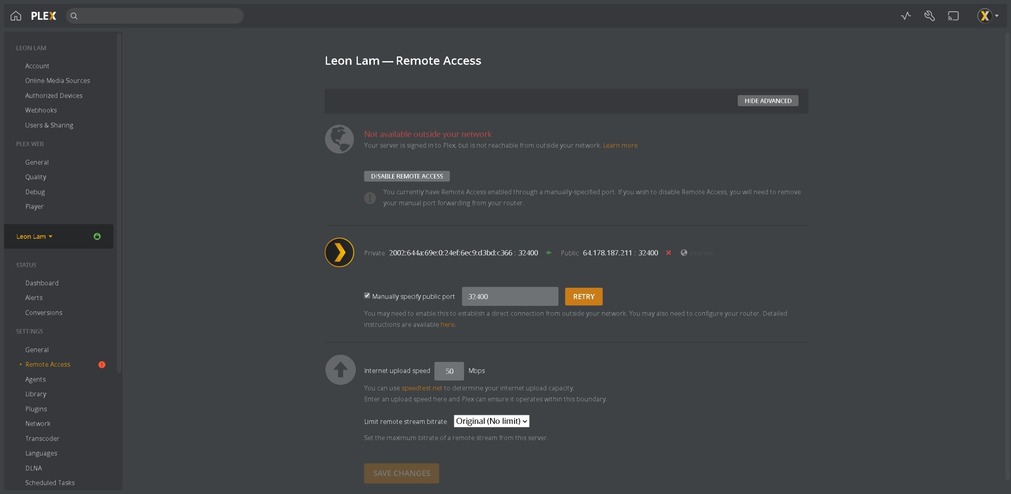
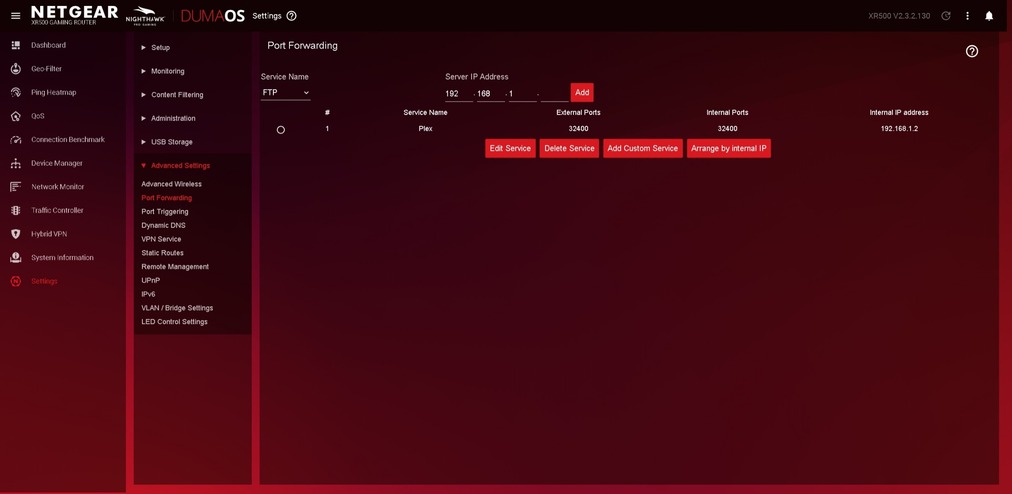
@tom80H yea I spent hours last night trying everything. I reserved IP, set up port forwarding on XR500, bridge mode on arris DG3450 modem and it still shows green at first and after 30 seconds it goes red. For some reason though the public IP and WAN IP are different. I also keep getting error when check port. I have NordVPN but it is only cut on when I need it. When it is on it is set on split tunneling for Edge browser and qBittorrent.



---
### Author:  [@Leon-Lam](https://forums.plex.tv/u/Leon-Lam)
#### Post date: [March 16, 2022, 8:47pm UTC](https://forums.plex.tv/t/remote-access-is-no-longer-working/780830/8 "2022-03-16T20:47:57Z")


---
### Author:  [@Leon-Lam](https://forums.plex.tv/u/Leon-Lam)
#### Post date: [March 16, 2022, 8:51pm UTC](https://forums.plex.tv/t/remote-access-is-no-longer-working/780830/9 "2022-03-16T20:51:56Z")
updated picture with the private IP showing


---
### Author:  [@tom80H](https://forums.plex.tv/u/tom80H)
#### Post date: [March 16, 2022, 9:08pm UTC](https://forums.plex.tv/t/remote-access-is-no-longer-working/780830/10 "2022-03-16T21:08:47Z")
Your ISP has placed you behind a CGNAT (carrier-grade NAT) – that’s why your router’s WAN IP is different from the public IP recognized by Plex.
That pretty much leaves you with the only option to speak to your ISP if they can give you a publicly routable IPv4 address. Some ISPs will support such requests – most of those will try to sell you a static IPv4 address (which isn’t necessarily needed).
---
### Author:  [@kahilzinger](https://forums.plex.tv/u/kahilzinger)
#### Post date: [March 16, 2022, 9:12pm UTC](https://forums.plex.tv/t/remote-access-is-no-longer-working/780830/11 "2022-03-16T21:12:03Z")
NAT is NAT. I have a difficult time with the phrase “carrier-grade NAT”. That only means they forced it on you.
---
### Author:  [@Leon-Lam](https://forums.plex.tv/u/Leon-Lam)
#### Post date: [March 16, 2022, 9:22pm UTC](https://forums.plex.tv/t/remote-access-is-no-longer-working/780830/12 "2022-03-16T21:22:01Z")
Ok I will call them and see what they can do. There isn’t any other way around it though through the router/modem settings and my router? I can access my network from the outside but it transcodes everything to SD

---
### Author:  [@tom80H](https://forums.plex.tv/u/tom80H)
#### Post date: [March 16, 2022, 10:00pm UTC](https://forums.plex.tv/t/remote-access-is-no-longer-working/780830/13 "2022-03-16T22:00:41Z")
Nothing you can do on your side of things.
ISP have locked you in nicely, so the best you can currently get is an indirect connection through a relay server of Plex – and those have limited bandwidth (1 Mbps regularly, 2 Mbps for Plex Pass members)
---
### Author:  [@Gordon-Wong](https://forums.plex.tv/u/Gordon-Wong)
#### Post date: [March 17, 2022, 1:58pm UTC](https://forums.plex.tv/t/remote-access-is-no-longer-working/780830/14 "2022-03-17T13:58:17Z")
I’m going to try some of this see if works for me. I’m on Spectrum.
---
### Author:  [@system](https://forums.plex.tv/u/system)
#### Post date: [June 15, 2022, 1:58pm UTC](https://forums.plex.tv/t/remote-access-is-no-longer-working/780830/15 "2022-06-15T13:58:20Z")
This topic was automatically closed 90 days after the last reply. New replies are no longer allowed.