# Remote Access - Not working
**URL:** https://forums.plex.tv/t/remote-access-not-working/310134
**Category:** Plex Media Server
**Tags:** server-mac, ios-legacy
**Created:** [September 19, 2018, 1:11pm UTC](https://forums.plex.tv/t/remote-access-not-working/310134 "2018-09-19T13:11:45Z")
**Posts on this page:** 20
**Page:** 1
### Author:  [@rhett7660](https://forums.plex.tv/u/rhett7660)
#### Post date: [September 19, 2018, 1:11pm UTC](https://forums.plex.tv/t/remote-access-not-working/310134/1 "2018-09-19T13:11:45Z")
Server Version#: 1.13.5.5332
Player Version#: Web Chrome or iOS version 5.3
Current router setup:
Orbi Model BRB40 set to AP Mode Firmware: V2.1.4.16
Manufacture of FiOS Modem: Verizon FiOS-G1100 Firmware: 01.04.00.10-FTR (Latest version as there is no update pending)
FiOS is handling the DHCP, WiFI is turned off. Used to access the internet
Orbi is connected to FiOS and is set to AP Mode and is handling the WiFi for the house.
Server is running on a Mac Mini
I have a port forward rule setup in the Verizion G1100 for port 32400. I have tried it with both TCP and UDP. I have tried other ports which also did not work.
I have an exception within the Mac OS to allow incomming and outgoing data via the firewall.
I have an exception within the G1100 firewall to allow the port 32400 via the firewall
I have checked, I do not have a double NAT situation, however I am unable to see the port on the outside via [http://www.canyouseeme.org/](http://www.canyouseeme.org/)
Please let me know if there is anything else you would need to see or know about my setup.
I have read and looked at plenty of topics to try and troubleshoot this issue and I am now asking for help.
---
### Author:  [@BigWheel](https://forums.plex.tv/u/BigWheel)
#### Post date: [September 19, 2018, 8:49pm UTC](https://forums.plex.tv/t/remote-access-not-working/310134/2 "2018-09-19T20:49:40Z")
> [@rhett7660](#):
>
> I have a port forward rule setup in the Verizion G1100 for port 32400. I have tried it with both TCP and UDP. I have tried other ports which also did not work.
Only use TCP.
Did you enter 32400 in the manually specify port field in Remote access settings?
---
### Author:  [@rhett7660](https://forums.plex.tv/u/rhett7660)
#### Post date: [September 19, 2018, 9:02pm UTC](https://forums.plex.tv/t/remote-access-not-working/310134/3 "2018-09-19T21:02:55Z")
Yes I did. I took out the UDP and have tried only the TCP. Still no go.
I have tried UDP and TCP
Just TCP
Just UDP
Yes, I did enter the 32400 in the MSP field under the remote access settings.
---
### Author:  [@rhett7660](https://forums.plex.tv/u/rhett7660)
#### Post date: [September 19, 2018, 9:06pm UTC](https://forums.plex.tv/t/remote-access-not-working/310134/4 "2018-09-19T21:06:46Z")
It will flash green for a few seconds and then flash back to red. I haven’t been able to get it to stay green for more than a few seconds.
---
### Author:  [@BigWheel](https://forums.plex.tv/u/BigWheel)
#### Post date: [September 19, 2018, 10:12pm UTC](https://forums.plex.tv/t/remote-access-not-working/310134/5 "2018-09-19T22:12:12Z")
If [canyouseeme.org](http://canyouseeme.org) can’t get to it, and you are mostly positive the router set up is correct, I would next try to just turn off firewall completely for a moment and try again. If it does work then you know there is something up with firewall. If it still doesn’t work then it would be something in router set up.
---
### Author:  [@rhett7660](https://forums.plex.tv/u/rhett7660)
#### Post date: [September 20, 2018, 1:37pm UTC](https://forums.plex.tv/t/remote-access-not-working/310134/6 "2018-09-20T13:37:31Z")
Hmmm… I have turned off the firewall on my Mac and now I am waiting to see if that works. Will report back. If that doesn’t work, is there anyone here that would be willing to or could assist in making sure all of my router settings are correct?
---
### Author:  [@BigWheel](https://forums.plex.tv/u/BigWheel)
#### Post date: [September 20, 2018, 4:14pm UTC](https://forums.plex.tv/t/remote-access-not-working/310134/7 "2018-09-20T16:14:37Z")
> [@rhett7660](#):
>
> is there anyone here that would be willing to or could assist in making sure all of my router settings are correct?
just take a screen shot of your port forward page. I’m sure there are plenty of folks who have Verizon and have it working.
---
### Author:  [@rhett7660](https://forums.plex.tv/u/rhett7660)
#### Post date: [September 20, 2018, 4:58pm UTC](https://forums.plex.tv/t/remote-access-not-working/310134/8 "2018-09-20T16:58:21Z")
Here is a screen shot of my Server Settings. It does mention I am going through two routers, however my setup is as follows:
Mac Mini --\>Hard wired to switch–\>hardwired to FIOS Router–\>Internet

I do have a Orbi router which handles my Wifi for the house connected as such:
Orbi (Set in AP Mode)–\>FIOS Router (Wifi turned off)–\>Internet
---
### Author:  [@BigWheel](https://forums.plex.tv/u/BigWheel)
#### Post date: [September 20, 2018, 5:34pm UTC](https://forums.plex.tv/t/remote-access-not-working/310134/9 "2018-09-20T17:34:06Z")
sorry i meant of your port forward settings page in your verizon router
---
### Author:  [@rhett7660](https://forums.plex.tv/u/rhett7660)
#### Post date: [September 20, 2018, 9:59pm UTC](https://forums.plex.tv/t/remote-access-not-working/310134/10 "2018-09-20T21:59:40Z")
Ahhh ok, I will post that shortly.
---
### Author:  [@rhett7660](https://forums.plex.tv/u/rhett7660)
#### Post date: [September 21, 2018, 12:37am UTC](https://forums.plex.tv/t/remote-access-not-working/310134/11 "2018-09-21T00:37:55Z")
 
The first one is the rule for the firewall and second one is the port forwarding rule.
---
### Author:  [@rhett7660](https://forums.plex.tv/u/rhett7660)
#### Post date: [September 21, 2018, 12:47am UTC](https://forums.plex.tv/t/remote-access-not-working/310134/12 "2018-09-21T00:47:29Z")
Let me know if there is another screen shot I should provide.
---
### Author:  [@rhett7660](https://forums.plex.tv/u/rhett7660)
#### Post date: [September 21, 2018, 1:23am UTC](https://forums.plex.tv/t/remote-access-not-working/310134/13 "2018-09-21T01:23:12Z")
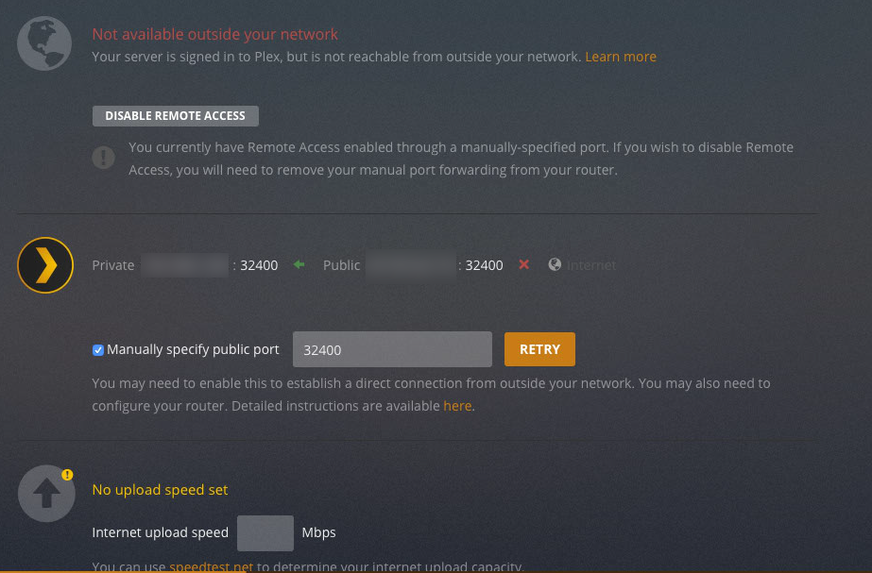
Good thing is now I am not seeing the double NAT error, just that I can’t access the server outside my network. See screen shot.
---
### Author:  [@BigWheel](https://forums.plex.tv/u/BigWheel)
#### Post date: [September 21, 2018, 1:53am UTC](https://forums.plex.tv/t/remote-access-not-working/310134/14 "2018-09-21T01:53:34Z")
Your blurred out your local IP but I am assuming the what you have blurred in first image is the same IP listed as Private IP in the Plex Remote access settings. And the Public IP there is the same as when you search google for “What is my IP”. If so then yeah that looks correct.
Your Mini is not using Wifi so the Orb is not in the equation.
Have you tried using a different public/external port for the port forwarding? ( i can’t imagine why Fios would block 32400 but you never know)
---
### Author:  [@rhett7660](https://forums.plex.tv/u/rhett7660)
#### Post date: [September 21, 2018, 1:58am UTC](https://forums.plex.tv/t/remote-access-not-working/310134/15 "2018-09-21T01:58:26Z")
Quote @BigWheel “Your blurred out your local IP but I am assuming the what you have blurred in first image is the same IP listed as Private IP in the Plex Remote access settings. And the Public IP there is the same as when you search google for “What is my IP”. If so then yeah that looks correct.”
That is correct, they are the same IP address when I check the open ip address website, it is the same as what is showing on my router and also what is showing in plex. Don’t know why it is now not showing the double NAT message, because there wasn’t one before. Strange I tell you.
I have tried a couple different variations such as 32401, 32900, etc. Any suggestions on what port I should try?
---
### Author:  [@rhett7660](https://forums.plex.tv/u/rhett7660)
#### Post date: [September 21, 2018, 2:04am UTC](https://forums.plex.tv/t/remote-access-not-working/310134/16 "2018-09-21T02:04:04Z")
This is the screen I am presented with from the Verizon router. Want to make sure I put the correct info in the correct place. I know one of them has to be 32400, which one would I put that number in?

Again, just wanting to make sure I put the correct 32400 number in the correct spot.
---
### Author:  [@rhett7660](https://forums.plex.tv/u/rhett7660)
#### Post date: [September 24, 2018, 5:05pm UTC](https://forums.plex.tv/t/remote-access-not-working/310134/17 "2018-09-24T17:05:39Z")
Still looking for some help on this…
Thanks
---
### Author:  [@rhett7660](https://forums.plex.tv/u/rhett7660)
#### Post date: [October 12, 2018, 12:15am UTC](https://forums.plex.tv/t/remote-access-not-working/310134/18 "2018-10-12T00:15:15Z")
Ok, I have switched out my Orbi router and I am now using a Linksys. The Linksys has DHCP turned off.
I have once again checked, I do not have a double nat.
Can someone else assist with this? Please.
---
### Author:  [@cetteup](https://forums.plex.tv/u/cetteup)
#### Post date: [October 12, 2018, 6:54am UTC](https://forums.plex.tv/t/remote-access-not-working/310134/19 "2018-10-12T06:54:46Z")
Here’s what I would try in order to verify that my ISP isn’t simply blocking those ports:
1. run plex on a standard port like 443 or 8443 and see if that works
2. forward port 32400 to a webserver (or any server that logs access to it) on your network and see if you can connect to it
One small thing: Note that [canseeyoume.org](http://canseeyoume.org) will only tell you that the open is open if anything is actually listening on that port. So while the port may be open and forwarded, the server might just not allow the connection.
Local access is working fine I assume?
---
### Author:  [@rhett7660](https://forums.plex.tv/u/rhett7660)
#### Post date: [October 12, 2018, 2:30pm UTC](https://forums.plex.tv/t/remote-access-not-working/310134/20 "2018-10-12T14:30:10Z")
Hello @cetteup
Yes local access is fine. I can stream to my AppleTV via hardwire and I can stream to my iPhones when on my local WiFi.
Just for clarification, I should use one of the two ports for port forwarding?
[Next page](https://forums.plex.tv/t/remote-access-not-working/310134.md?page=2)