# Remote Access - Not working
**URL:** https://forums.plex.tv/t/remote-access-not-working/310134
**Category:** Plex Media Server
**Tags:** server-mac, ios-legacy
**Created:** [September 19, 2018, 1:11pm UTC](https://forums.plex.tv/t/remote-access-not-working/310134 "2018-09-19T13:11:45Z")
**Posts on this page:** 20
**Page:** 2
### Author:  [@cetteup](https://forums.plex.tv/u/cetteup)
#### Post date: [October 12, 2018, 2:37pm UTC](https://forums.plex.tv/t/remote-access-not-working/310134/21 "2018-10-12T14:37:25Z")
> [@rhett7660](#):
>
> Just for clarification, I should use one of the two ports for port forwarding?
Yes, that’s what I would try. Change the custom port in the PMS settings to 443 (if you are not already using that port, use 8443 instead). Then go to your router and forward port 443 (external) to port 32400 (internal) on your Plex server, since the internal port always stays 32400.
Once done, check connectivity using [canyouseeme.org](http://canyouseeme.org) and/or an external Plex client.
---
### Author:  [@rhett7660](https://forums.plex.tv/u/rhett7660)
#### Post date: [October 12, 2018, 4:49pm UTC](https://forums.plex.tv/t/remote-access-not-working/310134/22 "2018-10-12T16:49:52Z")
Ok, this is weird, when I change the “Manual Specify Public Port” to 443 and hit the “Apply” button, everything goes green. This is even before I do any port forwarding. And it is staying green!
So when I go to the port forwarding in my router I use the following:
I changed the following:
Source Ports to 32400
Destination Ports to 443
Hit apply. This carries over to the port forwarding section under the firewall settings.
When I check under [canyouseeme.org](http://canyouseeme.org) it is still showing can’t see.
Update: I just checked to see if I could connect via cellular on my phone, and it is still not connecting.
 
---
### Author:  [@cetteup](https://forums.plex.tv/u/cetteup)
#### Post date: [October 12, 2018, 5:08pm UTC](https://forums.plex.tv/t/remote-access-not-working/310134/23 "2018-10-12T17:08:50Z")
I have no clue as to why it says that you’re connected. Do you have an existing port forward setting for that source port?
Regarding the screenshots: You need to switch source and destination port. The traffic comes in to your router on port 443 and you want it to go to port 32400 on your server. Thus, 443 is the source and 32400 the destination port.
---
### Author:  [@rhett7660](https://forums.plex.tv/u/rhett7660)
#### Post date: [October 12, 2018, 5:13pm UTC](https://forums.plex.tv/t/remote-access-not-working/310134/24 "2018-10-12T17:13:49Z")
Whoops! Ok changing it now.
Actually I do have a 443 already being used by HTTPS. Changing it now to 8443.
---
### Author:  [@rhett7660](https://forums.plex.tv/u/rhett7660)
#### Post date: [October 12, 2018, 5:16pm UTC](https://forums.plex.tv/t/remote-access-not-working/310134/25 "2018-10-12T17:16:13Z")
See screen shots. It is now showing green for 8443.
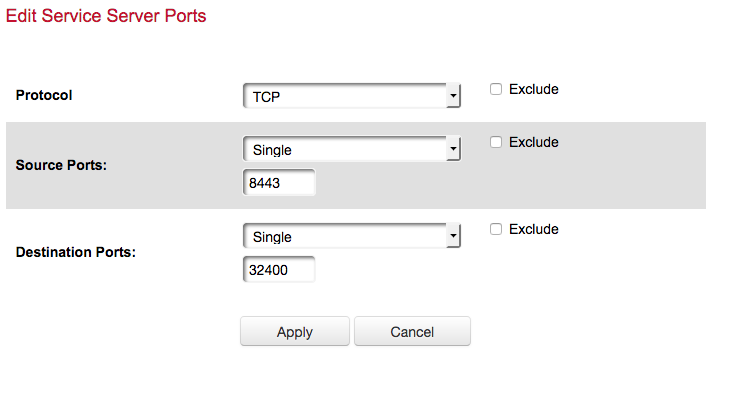 
Also still showing not accessible re: the above website that looks at ports.
---
### Author:  [@cetteup](https://forums.plex.tv/u/cetteup)
#### Post date: [October 12, 2018, 5:29pm UTC](https://forums.plex.tv/t/remote-access-not-working/310134/26 "2018-10-12T17:29:35Z")
I’m guessing remote access is not actually working either?
Have you taken a look at [this support article about remote access issues](https://support.plex.tv/articles/200931138-troubleshooting-remote-access/)?
Please post logs from a remote client. You can turn client logging on in both the web-gui as well as the app.
---
### Author:  [@Vannia80](https://forums.plex.tv/u/Vannia80)
#### Post date: [October 12, 2018, 6:55pm UTC](https://forums.plex.tv/t/remote-access-not-working/310134/27 "2018-10-12T18:55:41Z")
I have tried all these steps and my remote access keeps disconnecting every moment.
---
### Author:  [@rhett7660](https://forums.plex.tv/u/rhett7660)
#### Post date: [October 12, 2018, 9:59pm UTC](https://forums.plex.tv/t/remote-access-not-working/310134/28 "2018-10-12T21:59:39Z")
That is correct. I have been to the support article and I would imagine almost every blog/forum post I can find regarding the settings. I have tried quite a few things and nothing seems to be working.
Will post my logs shortly.
Update see the two attached logs from an iOS device using cellular to access.[PlexDebugInfo-rhett7660-5.5.1-15289 (2018-10-12 15.18.47 -0700).zip](https://global.discourse-cdn.com/plex/original/3X/0/e/0ea2113c8240836bd03570b901edcead636a8348.zip) (380.4 KB)
[PlexDebugInfo-rhett7660-5.5.1-15289 (2018-10-12 15.18.02 -0700).zip](https://global.discourse-cdn.com/plex/original/3X/8/a/8a03ea784b4d6ebc8cc358468d014ea595c1615b.zip) (379.7 KB)
Hopefully these help.
---
### Author:  [@razvan.constantin](https://forums.plex.tv/u/razvan.constantin)
#### Post date: [October 12, 2018, 10:29pm UTC](https://forums.plex.tv/t/remote-access-not-working/310134/29 "2018-10-12T22:29:25Z")
Have the same issue from time to time and the more I think about it I realize some times it is [plex.tv](http://plex.tv) fault. If not most of the times.
Just today, my plex server says: Not available outside your network.
Yet, everyone can connect to it via [plex.tv](http://plex.tv).
I can connect to it via android app and PlexWeb.
More then that, the poor plex server has a public IP without NAT so chances that a port forwarding has gone wrong are zero.
Would love to see the day when plex devs actually write better and stable code.
---
### Author:  [@rhett7660](https://forums.plex.tv/u/rhett7660)
#### Post date: [October 12, 2018, 10:29pm UTC](https://forums.plex.tv/t/remote-access-not-working/310134/30 "2018-10-12T22:29:35Z")
Here is a log from the web interface on the server where plex is installed.
[com.plexapp.system.log](https://global.discourse-cdn.com/plex/original/3X/d/4/d43ee01799099112067e29190b2596e8f70da73c.log) (212.2 KB)
[Plex Media Server.log](https://global.discourse-cdn.com/plex/original/3X/6/4/643d249b895310678abc4840be5b48421cd6b61a.log) (2.9 MB)
---
### Author:  [@cetteup](https://forums.plex.tv/u/cetteup)
#### Post date: [October 13, 2018, 8:46am UTC](https://forums.plex.tv/t/remote-access-not-working/310134/31 "2018-10-13T08:46:26Z")
Here’s something curious. Is the IP address ending on 235 your server’s IP address? If so, it looks like the app is trying to connect to your server’s local ip which fails due to phone using a cellular connection. While it is totally normally for Plex to this in order to use local connections if available, I did not see single attempt to connect to a public IP.
> 2018/10/11 17:45:17.384 (122 MB) (210204) ❌ PMKConnectionTestOperation.m:58 | Failed testing connection \[http://[x.x.x.235]:32400 - [x.x.x.235]:32400 (plex,published,direct) ] to standard server MacMini (hasPresence) - [key] with error Error Domain=NSURLErrorDomain Code=-1001 “The request timed out.” UserInfo={\_kCFStreamErrorCodeKey=-2102, NSUnderlyingError=0x2814bf150 {Error Domain=kCFErrorDomainCFNetwork Code=-1001 “(null)” UserInfo={\_kCFStreamErrorCodeKey=-2102, \_kCFStreamErrorDomainKey=4}}, \_NSURLErrorFailingURLSessionTaskErrorKey=LocalDataTask \<[…]\>.\<2\>, \_NSURLErrorRelatedURLSessionTaskErrorKey=(
> “LocalDataTask \<[…]\>.\<2\>”
> ), NSLocalizedDescription=The request timed out., NSErrorFailingURLStringKey=http://[x.x.x.235]:32400/?X-Plex-Device-Name=Rhett%E2%80%99s%207%2B, NSErrorFailingURLKey=http://[x.x.x.235]:32400/?X-Plex-Device-Name=Rhett%E2%80%99s%207%2B, \_kCFStreamErrorDomainKey=4} (remaining attempts 0)
I also found some log entries in older logs (2018-08-27 for example) where Plex tried to connect to 8443. Did you previously try to set remote access up using that port? It looked like it wasn’t actually connecting to the correct server since it got an SSL error.
Since it looks to me like a mess of port forwards to different servers, here’s what you might want to do:
1. Make sure your PMS has a static IP address
2. Remove any `Custom server access URLs` under `Settings` \> `Network`.
3. Backup/screenshot your current port forwarding configuration
4. Remove all port forwards except the one for PMS (8443 → 32400)
5. Wait a few minutes, then test connection from a remote client (force close the app once maybe)
Come back with your findings/logs.
Edit: You also might want to keep an eye on this thread: [Remote Access - Says its working, but it isnt - #22 by Achilles](https://forums.plex.tv/t/remote-access-says-its-working-but-it-isnt/319273/22)
---
### Author:  [@rhett7660](https://forums.plex.tv/u/rhett7660)
#### Post date: [October 13, 2018, 3:12pm UTC](https://forums.plex.tv/t/remote-access-not-working/310134/32 "2018-10-13T15:12:47Z")
@cetteup
Answer to some of your questions:
Yes I have tried 8443 and 443 as well as slew of other ports to see if I could get traffic through. When I said, I have been working on this for a while, I have. There are a whole lot of forums I have been to, to try and figure this out.
1. Make sure your PMS has a static IP address - **Already has one. That is the 235 IP address.**
2. Remove any `Custom server access URLs` under `Settings` \> `Network` . - **I don’t have any see screen shots.**
3. Backup/screenshot your current port forwarding configuration - **All of the port forwarding current active are ones that came with the router with the exception of the one I created for Plex. See screen shot.**
4. Remove all port forwards except the one for PMS (8443 -\> 32400) - **See above…**
5. Wait a few minutes, then test connection from a remote client (force close the app once maybe) - Give me a few minutes and I will have these.    
---
### Author:  [@rhett7660](https://forums.plex.tv/u/rhett7660)
#### Post date: [October 13, 2018, 3:19pm UTC](https://forums.plex.tv/t/remote-access-not-working/310134/33 "2018-10-13T15:19:43Z")
Here the logs…
@cetteup
Did a restart of the plex server also.
First one is from my Cell Phone trying to access via Cellular.
Second one is from Plex Server.
[PlexDebugInfo-rhett7660-5.5.1-15289 (2018-10-13 08.16.29 -0700).zip](https://global.discourse-cdn.com/plex/original/3X/5/5/55bb71a94fb0231c99a29b464f139a5e440a3d61.zip) (369.0 KB)
[Plex Media Server.log](https://global.discourse-cdn.com/plex/original/3X/4/d/4df29f7fff353bea5e89b989b7092f41ff18d41f.log) (100.6 KB)
[com.plexapp.system.log](https://global.discourse-cdn.com/plex/original/3X/b/0/b03faed2f87449b7db209cfeea0e1292127e1ff7.log) (32.8 KB)
---
### Author:  [@SE56](https://forums.plex.tv/u/SE56)
#### Post date: [October 13, 2018, 3:37pm UTC](https://forums.plex.tv/t/remote-access-not-working/310134/34 "2018-10-13T15:37:23Z")
Recently had the same issue and tried the following and all is good again.

_Did not check manually specify_
Add a extension to Chrome my go to browser

---
### Author:  [@rhett7660](https://forums.plex.tv/u/rhett7660)
#### Post date: [October 13, 2018, 3:53pm UTC](https://forums.plex.tv/t/remote-access-not-working/310134/35 "2018-10-13T15:53:10Z")
Are you able to access plex on your mobile device such as a phone? Or are you accessing it via the browser on your phone?
---
### Author:  [@cetteup](https://forums.plex.tv/u/cetteup)
#### Post date: [October 13, 2018, 6:02pm UTC](https://forums.plex.tv/t/remote-access-not-working/310134/36 "2018-10-13T18:02:33Z")
I could not find anything in the logs, but here’s a thought: Have you tried signing out of your server and back in?
---
### Author:  [@rhett7660](https://forums.plex.tv/u/rhett7660)
#### Post date: [October 13, 2018, 6:08pm UTC](https://forums.plex.tv/t/remote-access-not-working/310134/37 "2018-10-13T18:08:43Z")
Just did that… It stays green for a little longer and then goes back to red.
Attached are a new set of logs from mobile device after I logged out on all my devices and logged back in starting with the Server side software.
[PlexDebugInfo-rhett7660-5.5.1-15289 (2018-10-13 11.09.35 -0700).zip](https://global.discourse-cdn.com/plex/original/3X/1/d/1d881657b89a48482cca2b166f4882891cf059bc.zip) (371.5 KB)
---
### Author:  [@tom80H](https://forums.plex.tv/u/tom80H)
#### Post date: [October 13, 2018, 6:14pm UTC](https://forums.plex.tv/t/remote-access-not-working/310134/38 "2018-10-13T18:14:21Z")
There’s been some updates with some of the internet’s main DNS infrastructure in the last few days… this is a long shot… but what DNS server have you guys activated on your server or router?
Edit: or your mobile/remote device respectively
---
### Author:  [@rhett7660](https://forums.plex.tv/u/rhett7660)
#### Post date: [October 13, 2018, 6:15pm UTC](https://forums.plex.tv/t/remote-access-not-working/310134/39 "2018-10-13T18:15:20Z")
Also my setup is as follows:
MacMini running Server software --\>Unmanaged switch in media closet–\>to Fios Router–\>Internet
On the Fios router I have the port forward setup and also the rule for the router firewall (see above screen shots)
On the Mac Mini I have it setup for Plex as an exception in the firewall for incoming and outgoing connections. I have also disabled the firewall all together.
Hopefully this helps a little.
---
### Author:  [@rhett7660](https://forums.plex.tv/u/rhett7660)
#### Post date: [October 13, 2018, 6:18pm UTC](https://forums.plex.tv/t/remote-access-not-working/310134/40 "2018-10-13T18:18:51Z")
@tom80H
I haven’t activated any DNS servers on my router, I haven’t touched that area. I have been letting my Fios Router handle it.
Re: Mobile/remote devices, I would I find this information out?
And this has been going on longer than just a few days. I have tried, almost everything before I posted here, and I posted here almost a month ago.
[Previous page](https://forums.plex.tv/t/remote-access-not-working/310134.md?page=1)
[Next page](https://forums.plex.tv/t/remote-access-not-working/310134.md?page=3)