# Remote Access only 720p
**URL:** https://forums.plex.tv/t/remote-access-only-720p/886723
**Category:** Remote Access
**Tags:** server-windows
**Created:** [August 30, 2024, 2:00am UTC](https://forums.plex.tv/t/remote-access-only-720p/886723 "2024-08-30T02:00:56Z")
**Posts on this page:** 8
**Page:** 1
### Author:  [@umutkara742\_gmail\_com](https://forums.plex.tv/u/umutkara742_gmail_com)
#### Post date: [August 30, 2024, 2:00am UTC](https://forums.plex.tv/t/remote-access-only-720p/886723/1 "2024-08-30T02:00:56Z")
Server Version#: Sürüm 4.136.1
Player Version#:
I have a friend who access my server remote. He can only watch 720p. We tried all settings but none of it worked. I can watch with my own account original quality remote. He has no plexpass membership. Is it because of it? Does he need membership to watch originial quality? What did I miss?
---
### Author:  [@FordGuy61](https://forums.plex.tv/u/FordGuy61)
#### Post date: [August 30, 2024, 2:05am UTC](https://forums.plex.tv/t/remote-access-only-720p/886723/2 "2024-08-30T02:05:20Z")
Which Plex clients is he using?
Did you check the remote streaming settings on the client (not the server)?
Monitor playback via [Plex Dashboard](https://support.plex.tv/articles/200871837-status-and-dashboard/#toc-1) → Now Playing + Expanded View.
Is the connection local, remote, or indirect?
Post a screenshot of Now Playing if possible.
---
### Author:  [@umutkara742\_gmail\_com](https://forums.plex.tv/u/umutkara742_gmail_com)
#### Post date: [August 31, 2024, 2:00am UTC](https://forums.plex.tv/t/remote-access-only-720p/886723/3 "2024-08-31T02:00:41Z")
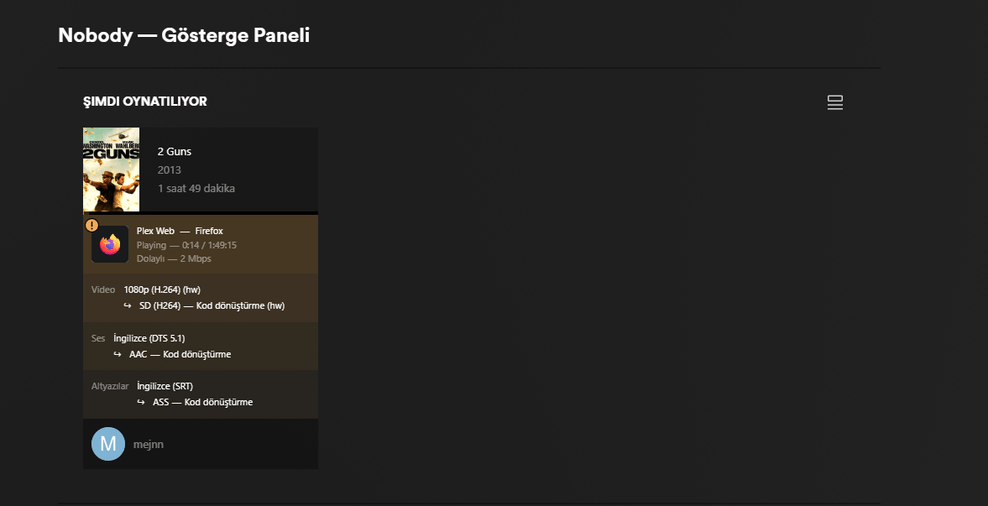


some of the movies playing direct play some of them transcoding but 720p still it is showing.
---
### Author:  [@FordGuy61](https://forums.plex.tv/u/FordGuy61)
#### Post date: [August 31, 2024, 5:58pm UTC](https://forums.plex.tv/t/remote-access-only-720p/886723/4 "2024-08-31T17:58:36Z")
The connection is Indirect.
It is using [Plex Relay](https://support.plex.tv/articles/216766168-accessing-a-server-through-relay/), which is tunneled through a server at Plex and limited to 2 Mbps.
Remote Access is not working correctly on your server.
Double check your remote access configuration and follow the troubleshooting guides.
[The Basics of Remote Access Troubleshooting](https://forums.plex.tv/t/the-basics-of-remote-access-troubleshooting/769517)
[Plex Documentation](https://support.plex.tv/articles/) → [Remote Access and Granting Library Access](https://support.plex.tv/articles/categories/features/remote-access-server-sharing/)
→ [Remote Access](https://support.plex.tv/articles/200289506-remote-access/)
→ [Troubleshooting Remote Access](https://support.plex.tv/articles/200931138-troubleshooting-remote-access/)
---
### Author:  [@umutkara742\_gmail\_com](https://forums.plex.tv/u/umutkara742_gmail_com)
#### Post date: [August 31, 2024, 8:18pm UTC](https://forums.plex.tv/t/remote-access-only-720p/886723/5 "2024-08-31T20:18:02Z")
I have cgnat. I have keenetic router. I opened port on my device. But it is not opened I think because of cgnat double nat. If I want to get out of cgnat, my ISP wants me to pay 10 usd per month. Actually it is expensive for me. Is there anyway to bypass it? Free solution.

---
### Author:  [@FordGuy61](https://forums.plex.tv/u/FordGuy61)
#### Post date: [August 31, 2024, 8:30pm UTC](https://forums.plex.tv/t/remote-access-only-720p/886723/6 "2024-08-31T20:30:33Z")
There is probably something, but I’m not aware of any methods.
Hopefully others can assist.
---
### Author:  [@premikkoci](https://forums.plex.tv/u/premikkoci)
#### Post date: [September 1, 2024, 1:16am UTC](https://forums.plex.tv/t/remote-access-only-720p/886723/7 "2024-09-01T01:16:23Z")
You can use cloudflare tunnel, tailscale, IPv6 only or cloudflare proxy using IPv6 and reverse proxy.
Keep in mind that having a publicly routable IPv4 address is the simplest solution for home user. Unfortunately IPv4 addresses are exhausted (that’s why it costs an extra fee which will grow) and world IPv6 implementation has been slow because there are still people who think that IPv6 is not important.
---
### Author:  [@system](https://forums.plex.tv/u/system)
#### Post date: [November 30, 2024, 1:16am UTC](https://forums.plex.tv/t/remote-access-only-720p/886723/8 "2024-11-30T01:16:28Z")
This topic was automatically closed 90 days after the last reply. New replies are no longer allowed.