# Remote Access problem
**URL:** https://forums.plex.tv/t/remote-access-problem/237251
**Category:** General Discussions
**Created:** [May 31, 2018, 4:46am UTC](https://forums.plex.tv/t/remote-access-problem/237251 "2018-05-31T04:46:56Z")
**Posts on this page:** 4
**Page:** 1
### Author:  [@trojanhears3](https://forums.plex.tv/u/trojanhears3)
#### Post date: [May 31, 2018, 4:46am UTC](https://forums.plex.tv/t/remote-access-problem/237251/1 "2018-05-31T04:46:56Z")
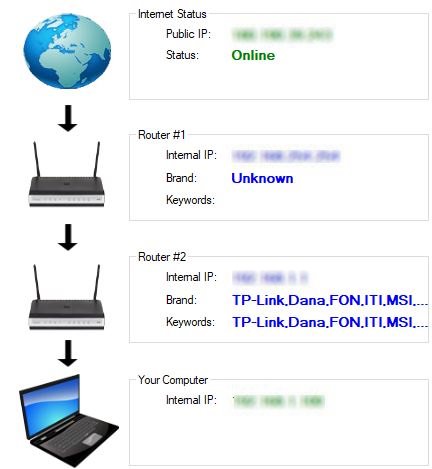
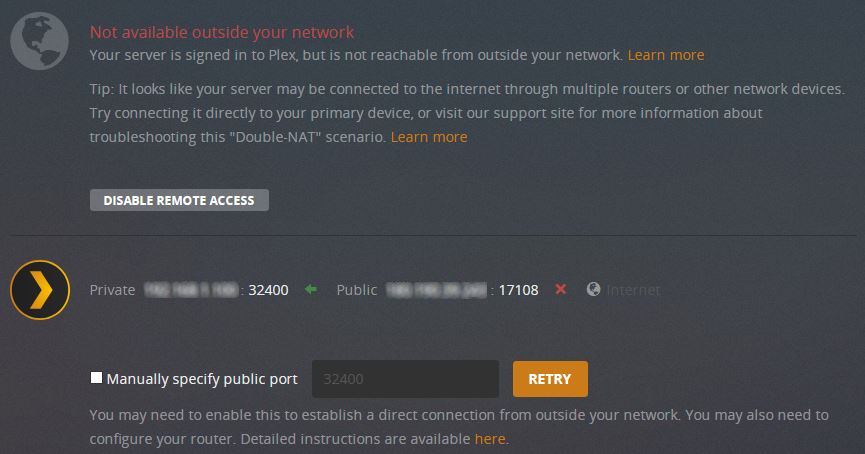
I have a Remote Access problem with Plex. I think it might be a Double NAT issue and I followed the relevant instructions in the Double Router Forwarding page but it’s still coming out wrong. I think I got my port forwarding chain all mixed up and that my ISP’s external IP might be the issue. I’ve enclosed a couple of screenshots to detail my issue and setup. Please inform me if you need any additional info to help me.
---
### Author:  [@OttoKerner](https://forums.plex.tv/u/OttoKerner)
#### Post date: [May 31, 2018, 7:31am UTC](https://forums.plex.tv/t/remote-access-problem/237251/2 "2018-05-31T07:31:00Z")
The second screenshot shows, that you didn’t tell Plex to use your manually set up port forwardings.
You need to fill the checkbox, then type in the external port number you used in the internet-facing router.
Verify the function of the portforwarding using
[http://canyouseeme.org](http://canyouseeme.org)
How did you create the first screenshot?
---
### Author:  [@trojanhears3](https://forums.plex.tv/u/trojanhears3)
#### Post date: [May 31, 2018, 9:11am UTC](https://forums.plex.tv/t/remote-access-problem/237251/3 "2018-05-31T09:11:55Z")
> @OttoKerner said:
> The second screenshot shows, that you didn’t tell Plex to use your manually set up port forwardings.
> You need to fill the checkbox, then type in the external port number you used in the internet-facing router.
> Verify the function of the portforwarding using
> [http://canyouseeme.org](http://canyouseeme.org)
>
> How did you create the first screenshot?
For the second screenshot, I already did what you said before I took that screenshot. That’s just to indicate what it looked before I did anything.

For the first screenshot, I ran PortForward Network Utilities’ Router Detector program and took a screenshot of the results.
---
### Author:  [@system](https://forums.plex.tv/u/system)
#### Post date: [January 8, 2020, 1:06am UTC](https://forums.plex.tv/t/remote-access-problem/237251/4 "2020-01-08T01:06:45Z")