# Remote Access Settings Page "incorrectly reports remote accessibility"
**URL:** https://forums.plex.tv/t/remote-access-settings-page-incorrectly-reports-remote-accessibility/513858
**Category:** Remote Access
**Tags:** server-mac, server-western-digital
**Created:** [December 24, 2019, 6:50pm UTC](https://forums.plex.tv/t/remote-access-settings-page-incorrectly-reports-remote-accessibility/513858 "2019-12-24T18:50:20Z")
**Posts on this page:** 16
**Page:** 1
### Author:  [@basilbabaa](https://forums.plex.tv/u/basilbabaa)
#### Post date: [December 24, 2019, 6:50pm UTC](https://forums.plex.tv/t/remote-access-settings-page-incorrectly-reports-remote-accessibility/513858/1 "2019-12-24T18:50:20Z")
Server Version#: 1.18.3.2156
Player Version#: 1.4.1.940-574c2fa7
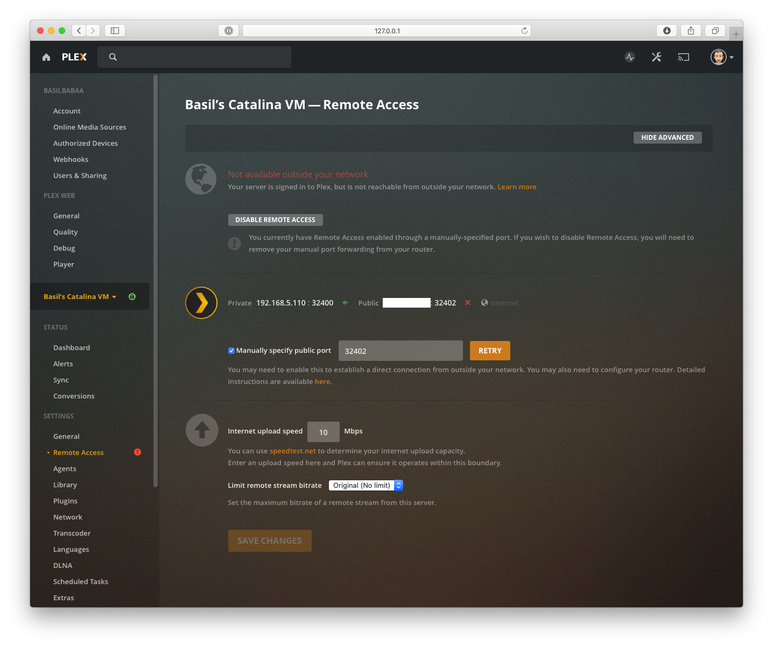
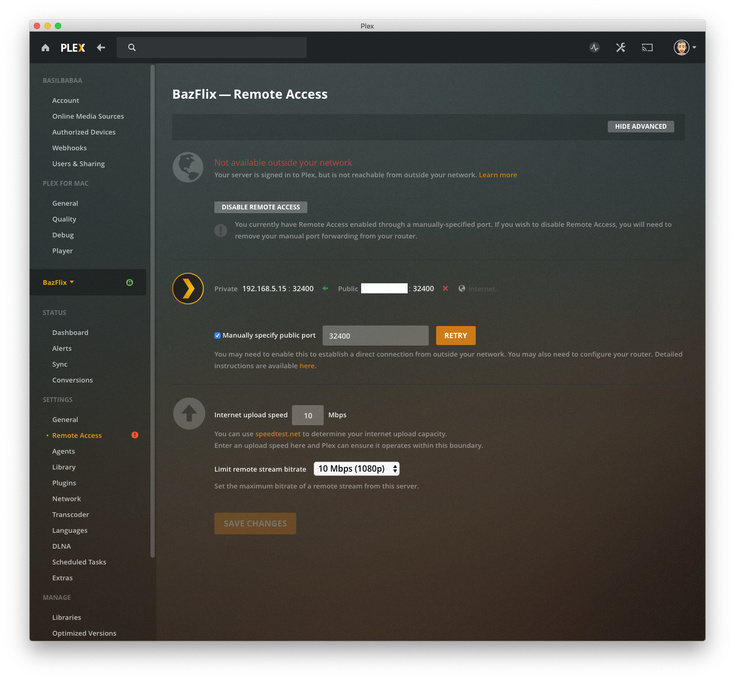
So I have setup 3 Plex Servers 2 on MacOS and 1 on a WDMyCloud PR4100…
**SITUATION:**
with these settings to test…
Manually specified port forwarded public ports 32400, 32402, and 32410 to each of the server Ip’s…
**RESULT**
All act the same… so it is obviously by design???
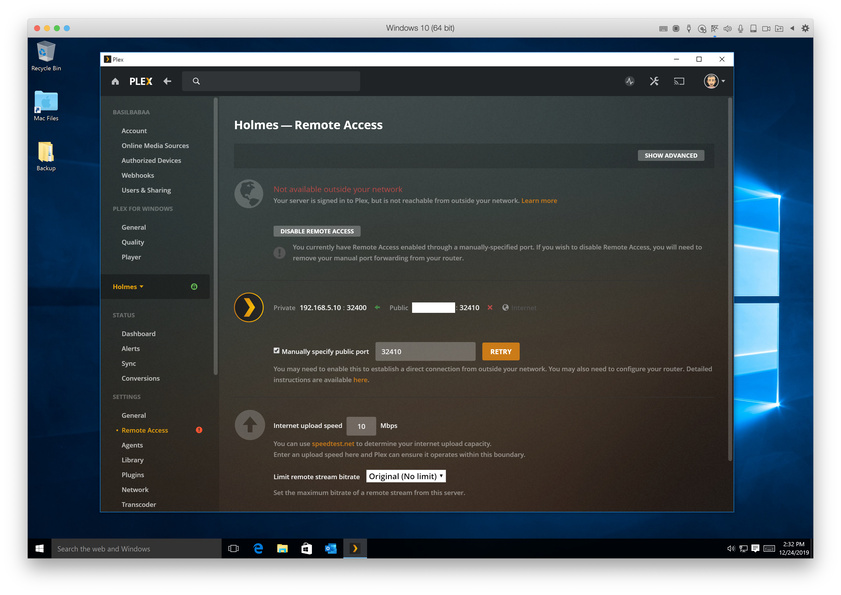
1. Remote Access shows “Fully accessible outside your network” for about 3 seconds then
2. Remote Access shows “Not available outside your network”.
3. However, access is confirmed as accessible on all 3 servers from outside the network.
**CONCLUSION**
When port forwarding is enabled in Plex Server Settings and properly configured on the router, while Plex reports Remote Access as “Not available outside your network”. It actually is available…
**REQUEST**
I would prefer the interface properly indicate that remote access show as “fully accessible outside your network” when it is actually accessible from outside the network.
CAN THIS BE FIXED?
---
### Author:  [@darcilicious](https://forums.plex.tv/u/darcilicious)
#### Post date: [December 24, 2019, 6:56pm UTC](https://forums.plex.tv/t/remote-access-settings-page-incorrectly-reports-remote-accessibility/513858/2 "2019-12-24T18:56:28Z")
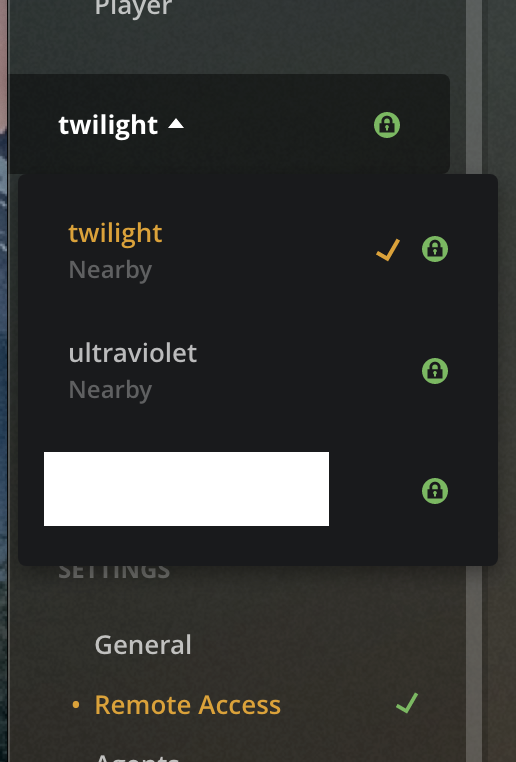
Do you get the same if you use [https://app.plex.tv/desktop](https://app.plex.tv/desktop) instead? You can toggle to each Server via Settings – it’s possible that this is a web client bug and the hosted version has a more current release:
---
### Author:  [@SE56](https://forums.plex.tv/u/SE56)
#### Post date: [December 24, 2019, 7:02pm UTC](https://forums.plex.tv/t/remote-access-settings-page-incorrectly-reports-remote-accessibility/513858/3 "2019-12-24T19:02:13Z")
Sometimes it’s a bit delayed or you need to refresh the browser. Even using [https://app.plex.tv/desktop](https://app.plex.tv/desktop)
I would also advice hiding your Public IP address shown in the screenshots above. Easily done in Preview, Select and Cut. You can do this through the forum’s edit tool.
Merry Xmas
---
### Author:  [@basilbabaa](https://forums.plex.tv/u/basilbabaa)
#### Post date: [December 24, 2019, 7:09pm UTC](https://forums.plex.tv/t/remote-access-settings-page-incorrectly-reports-remote-accessibility/513858/4 "2019-12-24T19:09:21Z")
I have tested on the following:
Plex for Windows
Plex for Mac
Plex for Safari
Plex for Chrome
The result is consistent…
---
### Author:  [@darcilicious](https://forums.plex.tv/u/darcilicious)
#### Post date: [December 24, 2019, 7:13pm UTC](https://forums.plex.tv/t/remote-access-settings-page-incorrectly-reports-remote-accessibility/513858/5 "2019-12-24T19:13:57Z")
Are you using the **following URL** on any of the browsers?
[https://app.plex.tv/desktop](https://app.plex.tv/desktop)
Your screenshots show only the **local URL**. There is a difference. It is worth using the other URL to check.
---
### Author:  [@SE56](https://forums.plex.tv/u/SE56)
#### Post date: [December 24, 2019, 7:17pm UTC](https://forums.plex.tv/t/remote-access-settings-page-incorrectly-reports-remote-accessibility/513858/6 "2019-12-24T19:17:04Z")
If your using the Plex Icon/Open to Launch, Try using a Browser with
[https://app.plex.tv/desktop](https://app.plex.tv/desktop)
As a Bookmark instead
---
### Author:  [@basilbabaa](https://forums.plex.tv/u/basilbabaa)
#### Post date: [December 24, 2019, 7:27pm UTC](https://forums.plex.tv/t/remote-access-settings-page-incorrectly-reports-remote-accessibility/513858/7 "2019-12-24T19:27:53Z")
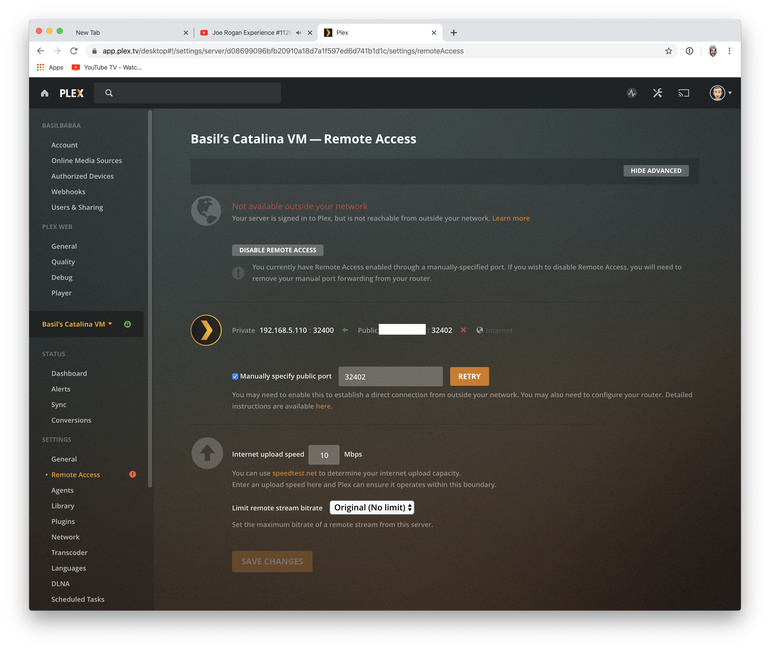
[https://app.plex.tv/desktop](https://app.plex.tv/desktop) reports the same:

---
### Author:  [@SE56](https://forums.plex.tv/u/SE56)
#### Post date: [December 24, 2019, 7:38pm UTC](https://forums.plex.tv/t/remote-access-settings-page-incorrectly-reports-remote-accessibility/513858/8 "2019-12-24T19:38:39Z")
Have all devices had a restart including Modem?
---
### Author:  [@darcilicious](https://forums.plex.tv/u/darcilicious)
#### Post date: [December 24, 2019, 7:48pm UTC](https://forums.plex.tv/t/remote-access-settings-page-incorrectly-reports-remote-accessibility/513858/9 "2019-12-24T19:48:23Z")
The first screenshot has the correct URL (the third does not, and I don’t see a URL in the second).
In that first screenshot, you can change servers on the left by clicking on the server name - you should get a dropdown menu with all your servers.
For each server using the URL I have posted, you can retry to enable remote access.
If that is not working then there may be an issue with the DNS or DNS rebinding:
1. set the DNS server to the one provided by Google (in your router) (8.8.8.8 and/or 8.8.4.4)
2. disable DNS rebinding protection for the domain `plex.direct` (also in the settings of your router)
> **[How to Use Secure Server Connections | Plex Support](https://support.plex.tv/articles/206225077-how-to-use-secure-server-connections/)**
>
> What’s the Deal With Secure Connections? Why Is It Important? When browsing the internet or making other connections these days,...
---
### Author:  [@basilbabaa](https://forums.plex.tv/u/basilbabaa)
#### Post date: [December 24, 2019, 7:50pm UTC](https://forums.plex.tv/t/remote-access-settings-page-incorrectly-reports-remote-accessibility/513858/10 "2019-12-24T19:50:04Z")
Router and Modem restarted a couple days ago, Plex servers have been restarted yesterday.
This has been happening consistently for several months. And the entire network has been restarted once as well due to a power outage…
So by your questions for me am I to assume that this is not supposed to be happening and is not a design flaw?
---
### Author:  [@SE56](https://forums.plex.tv/u/SE56)
#### Post date: [December 24, 2019, 7:54pm UTC](https://forums.plex.tv/t/remote-access-settings-page-incorrectly-reports-remote-accessibility/513858/11 "2019-12-24T19:54:49Z")
Correct, my Catalina setup does not show your issues. Have you followed darcilicious latest post?
---
### Author:  [@basilbabaa](https://forums.plex.tv/u/basilbabaa)
#### Post date: [December 24, 2019, 8:33pm UTC](https://forums.plex.tv/t/remote-access-settings-page-incorrectly-reports-remote-accessibility/513858/12 "2019-12-24T20:33:05Z")
Worked!
Disable and re-nable remote access did nothing, but updating dns settings on router worked.
Thanks!

---
### Author:  [@SE56](https://forums.plex.tv/u/SE56)
#### Post date: [December 24, 2019, 8:45pm UTC](https://forums.plex.tv/t/remote-access-settings-page-incorrectly-reports-remote-accessibility/513858/13 "2019-12-24T20:45:17Z")
Woohoo
---
### Author:  [@darcilicious](https://forums.plex.tv/u/darcilicious)
#### Post date: [December 24, 2019, 8:46pm UTC](https://forums.plex.tv/t/remote-access-settings-page-incorrectly-reports-remote-accessibility/513858/14 "2019-12-24T20:46:24Z")
Glad to hear it!
---
### Author:  [@darcilicious](https://forums.plex.tv/u/darcilicious)
#### Post date: [December 24, 2019, 10:24pm UTC](https://forums.plex.tv/t/remote-access-settings-page-incorrectly-reports-remote-accessibility/513858/15 "2019-12-24T22:24:16Z")
A post was split to a new topic: [Incomplete PMS Install](https://forums.plex.tv/t/incomplete-pms-install/513957)
---
### Author:  [@system](https://forums.plex.tv/u/system)
#### Post date: [March 23, 2020, 6:50pm UTC](https://forums.plex.tv/t/remote-access-settings-page-incorrectly-reports-remote-accessibility/513858/16 "2020-03-23T18:50:26Z")
This topic was automatically closed after 90 days. New replies are no longer allowed.