# Remote stream bitrate applying even for Local stream
**URL:** https://forums.plex.tv/t/remote-stream-bitrate-applying-even-for-local-stream/934106
**Category:** Plex Media Server
**Tags:** server-unraid, fire-tv, player-windows, android-mobile
**Created:** [December 2, 2025, 8:42am UTC](https://forums.plex.tv/t/remote-stream-bitrate-applying-even-for-local-stream/934106 "2025-12-02T08:42:22Z")
**Posts on this page:** 6
**Page:** 1
### Author:  [@itsmemaccy](https://forums.plex.tv/u/itsmemaccy)
#### Post date: [December 2, 2025, 8:42am UTC](https://forums.plex.tv/t/remote-stream-bitrate-applying-even-for-local-stream/934106/1 "2025-12-02T08:42:22Z")
Server Version#:1.43.0.10346
Player Version#:1.112.0.359-0d79a49f [windows] 2025.30.0(966828550) [Android] 10.30.5.4094 (1b82b1be) [FireTv]
I had a complete working setup of plex which was working fine without any issues
Recent updates seems to have messed up how plex processes bandwidth control
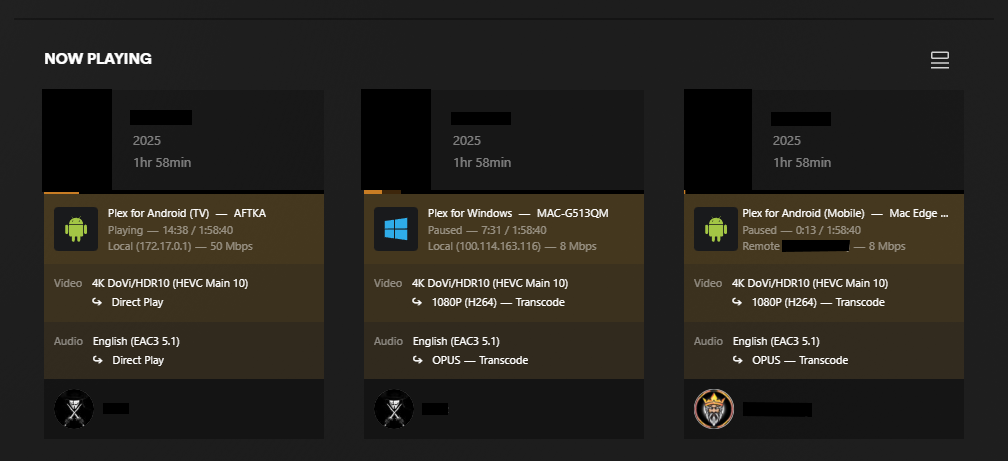
The above screenshot shows 3 different client playing the same 4k file
1st Device - FireTv - Works without any issues and directplay 4k works
2nd Device - Windows Plex Player applied the remote bitrate settings even though its local
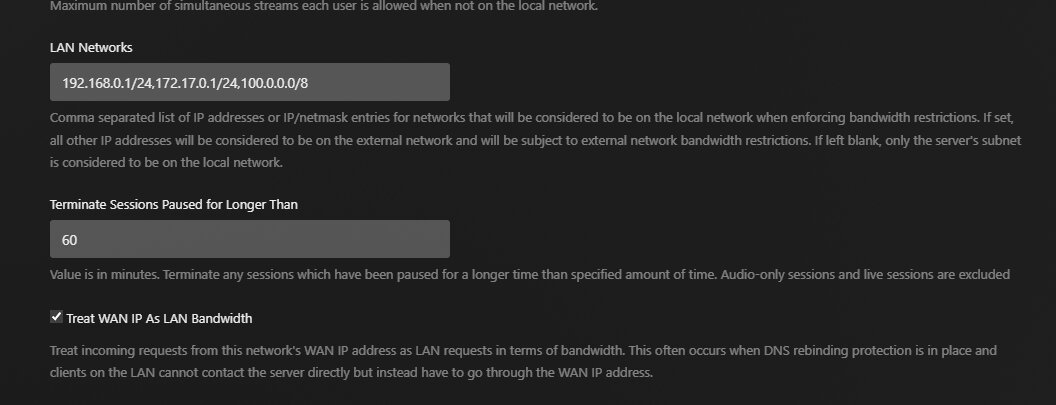
No idea why it treats it as remote but it still shows LAN in both Plex and Tautulli
as i have configured the IP as LAN networks (I have my tailscale app disabled but still plex picks up ip from tailscale)

The device is 4k HDR compatible display and direct play used to work in the past with 4k HDR movies (tried old movies as well, still the same so not an issue with the files)
There is no quality setting for original streaming even though i have direct play and direct stream enabled amd also have set player to play at maximum settings


The quality if stuck at 1080p 8Mbps
This is my remote stream limit for bitrate i have set in my server

3rd Device (Motorola Edge 30 ultra) A 4K HDR compatible mobile device. Used to work with 4K HDR movies but now the same issue. Even though its connected the same network as my Unraid server, it shows my WAN ip and treats it as remote stream (i had treat WAN ip as LAN option enabled)
In all above devices, direct play should have worked (it was previously) but now its not working as expected
Nothing weird in logs
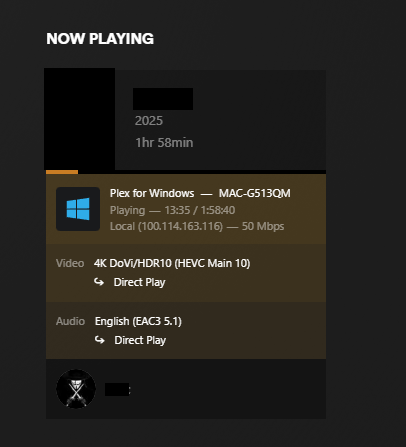
after i set bitrate to maximum in server, direct play starts to work again
Help me fix this issue plex team
---
### Author:  [@dbirch](https://forums.plex.tv/u/dbirch)
#### Post date: [December 2, 2025, 2:54pm UTC](https://forums.plex.tv/t/remote-stream-bitrate-applying-even-for-local-stream/934106/3 "2025-12-02T14:54:30Z")
The IP address you are using doesnt follow the required standards:
RFC-1918
> [@Server setup wizard not authorized](https://forums.plex.tv/t/server-setup-wizard-not-authorized/930187/10):
>
> Your current network configuration does not comply with standard networking practices and will likely lead to problems in the future. According to RFC 1918, specific ranges of IP addresses are reserved for private use within homes and organizations. These are: 10.0.0.0/8 172.16.0.0/12 192.168.0.0/16 Instead of using one of these reserved ranges, your network is configured with 1.1.1.0/24, which is not a private range. In fact, this block belongs to Cloudflare and is part of the glob…
---
### Author:  [@itsmemaccy](https://forums.plex.tv/u/itsmemaccy)
#### Post date: [December 3, 2025, 7:03pm UTC](https://forums.plex.tv/t/remote-stream-bitrate-applying-even-for-local-stream/934106/4 "2025-12-03T19:03:08Z")
i don’t see anywhere with 1.1.1.0/24 being configured in my IP ranges.
The IP’s you see are local IP’s to let plex know which IP traffic to consider as LAN
---
### Author:  [@dbirch](https://forums.plex.tv/u/dbirch)
#### Post date: [December 4, 2025, 1:28am UTC](https://forums.plex.tv/t/remote-stream-bitrate-applying-even-for-local-stream/934106/5 "2025-12-04T01:28:33Z")
You set `100.0.0.0/8` which isnt local its not one of the RFC compliant subnets for local addressing.
That address you are claiming as local is a Swiss ISP.
---
### Author:  [@ChuckPa](https://forums.plex.tv/u/ChuckPa)
#### Post date: [December 4, 2025, 6:29am UTC](https://forums.plex.tv/t/remote-stream-bitrate-applying-even-for-local-stream/934106/6 "2025-12-04T06:29:51Z")
To add to dbirch, Here is the Wikipedia page which shows you what the RFC-1918 specification defines.
> **[Private network](https://en.wikipedia.org/wiki/Private_network)**
>
> In Internet networking, a private network is a computer network that uses a private address space of IP addresses. These addresses are commonly used for local area networks (LANs) in residential, office, and enterprise environments. Both the IPv4 and the IPv6 specifications define private IP address ranges.
> Most Internet service providers (ISPs) allocate only a single publicly routable IPv4 address to each residential customer, but many homes have more than one computer, smartphone, or other Int...
Plex uses this as the standard for “Local addresses”
It is done this way to guarantee your LAN traffic doesn’t get out onto the open internet when you don’t want it to
---
### Author:  [@system](https://forums.plex.tv/u/system)
#### Post date: [March 4, 2026, 6:30am UTC](https://forums.plex.tv/t/remote-stream-bitrate-applying-even-for-local-stream/934106/7 "2026-03-04T06:30:05Z")
This topic was automatically closed 90 days after the last reply. New replies are no longer allowed.