# Same novice ... different issue
**URL:** https://forums.plex.tv/t/same-novice-different-issue/891283
**Category:** Plex Media Server
**Tags:** server-synology
**Created:** [October 4, 2024, 1:46am UTC](https://forums.plex.tv/t/same-novice-different-issue/891283 "2024-10-04T01:46:31Z")
**Posts on this page:** 20
**Page:** 1
### Author:  [@phe85](https://forums.plex.tv/u/phe85)
#### Post date: [October 4, 2024, 1:46am UTC](https://forums.plex.tv/t/same-novice-different-issue/891283/1 "2024-10-04T01:46:31Z")
I was able to do the initial setup of Plex on one of our Synology NAS and we have been testing the playback of videos, photos, etc. We installed the pfx version of the cert using the instructions here → [Plex/Synology - Custom domain with HTTPS - Imgur](https://imgur.com/a/plex-synology-custom-domain-with-https-9UKLh) and all was fine.
During my first post for another issue, I was told I was running a quite old version of Plex as I installed from Synology Package Center. As novice to Plex and not wanting to damage what we have accomplish, I contacted Synology support to find out the correct way to update Plex and, in short, they told me to use Plex for that.
We were running 1.29.2.6364-700, have installed the pft version of our [SSLS.com](http://SSLS.com) certificate and everything was working nicely … until the update to 1.41.0.8994-70008994.
Now all browsers are throwing privacy errors:
Edge → net::ERR\_CERT\_COMMON\_NAME\_INVALID
Chrome → similar but re-directs to [app.plex.tv](http://app.plex.tv), then back to our URL stating “not secure”
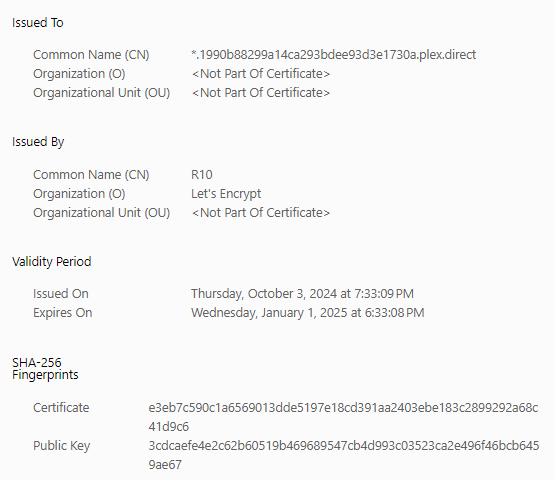
A weird thing we notice is that when checking the certificate in Edge, we get no reference to our common name or about Sectigo as the issuer but …

We have re-produce the pfx, stop, start, retype the “Custom certificate location”, “Custom certificate encryption key” and “Custom certificate domain” with no luck.
Any ideas are appreciatted
---
### Author:  [@ChuckPa](https://forums.plex.tv/u/ChuckPa)
#### Post date: [October 4, 2024, 6:22pm UTC](https://forums.plex.tv/t/same-novice-different-issue/891283/2 "2024-10-04T18:22:50Z")
I looked at your plex.tv account.
It does have the certificate attached to the server.
The plex.direct domain is for PMS ↔ client app communications only.
If you’re getting errors in your logs from specific clients – have the clients force-terminate and restart so they can download the new plex.direct cert.
It’s not something you should be using to access PMS securely.
When you add your own domain’s certificate, did you:
1. Include the CA, Cert, and Key in the P12 file?
2. Give that info to PMS (in Network settings)
3. Give PMS the alternate URL to access your server which references your FQDN?
---
### Author:  [@phe85](https://forums.plex.tv/u/phe85)
#### Post date: [October 4, 2024, 8:21pm UTC](https://forums.plex.tv/t/same-novice-different-issue/891283/3 "2024-10-04T20:21:18Z")
Chuck: Thanks.
As said, before the update all was good. And yes, CA, Cert and Key were included. Actually, the command used was → pkcs12 -export -out innovateit.pfx -in cert.pem -inkey privkey.pem -certfile chain.pem -name “[innovate-it.us](http://innovate-it.us)”.
Network settings look like:

I am not sure as to # 3 though.
Have never looked at the logs … will try to do that.
What do you mean by “It’s not something you should be using to access PMS securely.”. What is I shouldn’t do?
---
### Author:  [@phe85](https://forums.plex.tv/u/phe85)
#### Post date: [October 4, 2024, 8:24pm UTC](https://forums.plex.tv/t/same-novice-different-issue/891283/4 "2024-10-04T20:24:45Z")
I downloaded the logs … 103 files … not easy to understand what should I look for.
Again, none of this was happening before updating
---
### Author:  [@phe85](https://forums.plex.tv/u/phe85)
#### Post date: [October 4, 2024, 8:28pm UTC](https://forums.plex.tv/t/same-novice-different-issue/891283/5 "2024-10-04T20:28:15Z")
> [@ChuckPa](#):
>
> It does have the certificate attached to the server.
And … if you could …
It does have the certificate attached to the server. → How can I see that?
have the clients force-terminate and restart so they can download the new plex.direct cert → How?
---
### Author:  [@phe85](https://forums.plex.tv/u/phe85)
#### Post date: [October 5, 2024, 1:37am UTC](https://forums.plex.tv/t/same-novice-different-issue/891283/6 "2024-10-05T01:37:26Z")
Ok … I am ready to give up. I have installed OpenSSL as per [Installing OpenSSL for Windows - A Handy Guide (monovm.com)](https://monovm.com/blog/install-openssl-on-windows/#How-to-Download-OpenSSL-Windows?)
I have generated the PFX and I always get the error with the certificate showing this:
[Installing OpenSSL for Windows - A Handy Guide (monovm.com)](https://monovm.com/blog/install-openssl-on-windows/#How-to-Download-OpenSSL-Windows?)
When my MAS certificate shows this:

Why is the PFX not showing Sectigo? Now, just for the sake of doing it, I set this ALL FALSE info

and the error is exactly the same. So, again, NOVICE here, but it seems to me the server is not able to read the PFX at all.
So where is the PFX needs to be placed? Because I am placing in the same PlexMediaServer folder as it is the only folder that the Plex system user has R/W over.
---
### Author:  [@phe85](https://forums.plex.tv/u/phe85)
#### Post date: [October 5, 2024, 1:39am UTC](https://forums.plex.tv/t/same-novice-different-issue/891283/7 "2024-10-05T01:39:14Z")
for some reason the R10 certificate shown when error was not loaded into the post
---
### Author:  [@ChuckPa](https://forums.plex.tv/u/ChuckPa)
#### Post date: [October 5, 2024, 5:31am UTC](https://forums.plex.tv/t/same-novice-different-issue/891283/8 "2024-10-05T05:31:44Z")
Apologies for delay, I’ve been very busy all day and it’s past end of my day.
Could you please restart Plex, give it a few minutes, then download (Plex/web browser → Settings - [server] - Troubleshooting (lower left) - Download Logs.
(PMS will make a ZIP file for you)
Take that file and attach it here.
I’ll go through it.
---
### Author:  [@phe85](https://forums.plex.tv/u/phe85)
#### Post date: [October 5, 2024, 12:15pm UTC](https://forums.plex.tv/t/same-novice-different-issue/891283/9 "2024-10-05T12:15:40Z")
Chuck: Thanks, and no need to apologize. I appreciate you taking the time to help me.
Logs are attached.
[Plex Media Server Logs\_2024-10-05\_08-14-25.zip](https://forums.plex.tv/uploads/short-url/ljJ0TCHbVmRvLSX2zSynfftuQn3.zip) (4.1 MB)
---
### Author:  [@phe85](https://forums.plex.tv/u/phe85)
#### Post date: [October 5, 2024, 12:30pm UTC](https://forums.plex.tv/t/same-novice-different-issue/891283/10 "2024-10-05T12:30:23Z")
Please use these logs
[Plex Media Server Logs\_2024-10-05\_08-29-20.zip](https://forums.plex.tv/uploads/short-url/w1yFrBtBlJGiTymNKIJgNL4FC2q.zip) (4.1 MB)
instead … I did not restart Plex nor waited few minutes before.
---
### Author:  [@phe85](https://forums.plex.tv/u/phe85)
#### Post date: [October 5, 2024, 9:23pm UTC](https://forums.plex.tv/t/same-novice-different-issue/891283/11 "2024-10-05T21:23:51Z")
Chuck: For you to have the scope of our problem. We have 14 customers using Synology Video Station which Synology just removed from DSM 7.2.2. Those 14 NAS must be update to 7.2.2 for security reasons next week.
We are also using Video Station and we decided to go through the process ourselves, get the minimum familiarization to guide our customers through.
We are against the wall here and we are stuck with the error after the update to a package supplied by Plex for Synology.
I want to roll everything back and I am very familiar to the Synology side, but I do not know what needs to be done to close/erase/remove whatever is needed on the Plex’s side so that we can repeat the same steps we did until before the update and move on. I do not want anything left on Plex’s side before restarting, not even usernames, account or whatever else in on Plex’s side.
We were forced out of Synology Video Station and the support we had for it into a free Plex with support limited to forums. Again, as novices, we do not know if getting “a pass” also get us some different level of support.
Please, do not take me wrong. I just do not know better and need to come up to a conclusion real fast.
---
### Author:  [@ChuckPa](https://forums.plex.tv/u/ChuckPa)
#### Post date: [October 6, 2024, 4:47am UTC](https://forums.plex.tv/t/same-novice-different-issue/891283/12 "2024-10-06T04:47:30Z")
Been literally ALL DAY working on a system.
Rereading your post, it sounds like a much different conversation is needed.
This open forum is not the proper venue,
I will open a PM to you
---
### Author:  [@phe85](https://forums.plex.tv/u/phe85)
#### Post date: [October 6, 2024, 1:19pm UTC](https://forums.plex.tv/t/same-novice-different-issue/891283/13 "2024-10-06T13:19:14Z")
Thanks, Chuck. Will be attentive.
---
### Author:  [@ChuckPa](https://forums.plex.tv/u/ChuckPa)
#### Post date: [October 6, 2024, 11:17pm UTC](https://forums.plex.tv/t/same-novice-different-issue/891283/14 "2024-10-06T23:17:29Z")
@phe85
Upper right corner of the forum – Green dot – That’s me 🙂
---
### Author:  [@ChuckPa](https://forums.plex.tv/u/ChuckPa)
#### Post date: [October 7, 2024, 3:58am UTC](https://forums.plex.tv/t/same-novice-different-issue/891283/15 "2024-10-07T03:58:23Z")
ALL,
I had a telephone conversation with phe85.
This sounded a lot worse than it was.
The solution was simple:
1. Create a correct Plex “P12” certificate file with Key, Cert. and CA
2. Place that P12 where PMS could see it (/PlexMediaServer/Cert/cert.p12)
– I don’t mind if putting a user cert up here above AppData.
3. Use `openssl` to create the P12
4. Give PMS the path
5. Tell PMS the domain
6. Specify the full FQDN URL to access PMS with
7. Restart PMS.
---
### Author:  [@phe85](https://forums.plex.tv/u/phe85)
#### Post date: [October 7, 2024, 12:16pm UTC](https://forums.plex.tv/t/same-novice-different-issue/891283/16 "2024-10-07T12:16:58Z")
Chuck,
As novices, we tend to panic a bit. Your knowledge and help were instrumental and appreciated.
---
### Author:  [@phe85](https://forums.plex.tv/u/phe85)
#### Post date: [December 10, 2024, 1:40am UTC](https://forums.plex.tv/t/same-novice-different-issue/891283/17 "2024-12-10T01:40:13Z")
Dear Chuck,
First of all, please have a very happy Holidays.
I am trying to help a friend setup his own PMS on his Synology NAS. Have followed all the notes I took from our interaction but I am getting an error:
Dec 09, 2024 20:23:57.282 [139780349119120] DEBUG - [CERT] Subject name is /CN=\*.af27584c8b6047149ce24c7442e52f4f.plex.direct
Dec 09, 2024 20:23:57.282 [139780349119120] DEBUG - [CERT] Installed certificate with fingerprint 85:c3:ae:a5:29:00:02:69:67:d2:bb:93:8a:50:79:59:01:5c:c7:a1.
Dec 09, 2024 20:23:57.282 [139780349119120] DEBUG - [CERT/OCSP] Stapling requests will be made to ‘[http://r10.o.lencr.org/](http://r10.o.lencr.org/)’.
Dec 09, 2024 20:23:57.282 [139780349119120] INFO - [CERT/OCSP] Successfully retrieved response from cache.
Dec 09, 2024 20:23:57.282 [139780349119120] ERROR - [CERT] PKCS12\_parse failed: error:11800071:PKCS12 routines::mac verify failure
Dec 09, 2024 20:23:57.282 [139780349119120] ERROR - [CERT] Found a user-provided certificate, but couldn’t install it.
I exported his \*.pem and used the installation of openssl in my desktop PC to generate the P12 and uploaded to the Cert folder.
What am I doing wrong or missing?
---
### Author:  [@phe85](https://forums.plex.tv/u/phe85)
#### Post date: [December 10, 2024, 1:42am UTC](https://forums.plex.tv/t/same-novice-different-issue/891283/18 "2024-12-10T01:42:44Z")
[Plex Media Server.log](https://forums.plex.tv/uploads/short-url/xQfMyZvMvWmKFUBx6A5HWl7CedZ.log) (358.1 KB)
Full Plex Media [Server log](https://support.plex.tv/articles/200250417-plex-media-server-log-files/)
---
### Author:  [@ChuckPa](https://forums.plex.tv/u/ChuckPa)
#### Post date: [December 10, 2024, 2:22am UTC](https://forums.plex.tv/t/same-novice-different-issue/891283/19 "2024-12-10T02:22:47Z")
> [@phe85](#):
>
> Dec 09, 2024 20:23:57.282 [139780349119120] ERROR - [CERT] Found a user-provided certificate, but couldn’t install it.
This error ?
> [@phe85](#):
>
> Dec 09, 2024 20:23:57.282 [139780349119120] ERROR - [CERT] PKCS12\_parse failed: error:11800071:PKCS12 routines::mac verify failure
1. Make certain to include the CA with the P12 file (not PEM)
2. Don’t forget the password 😉 or this way 🙂
```auto
openssl pkcs12 -export -out mydomain.p12 -inkey mydomain.key -in mydomain.crt -certfile "Acmecert_+O=Let's+Encrypt,+CN=R3,+C=US.crt"
[chuck@lizum cert.2003]$
```
Notice I include the CA from LE which was used to sign my certificate.
This provides the traceability PMS requires to confirm it’s an authentic certifcate
---
### Author:  [@phe85](https://forums.plex.tv/u/phe85)
#### Post date: [December 10, 2024, 2:20pm UTC](https://forums.plex.tv/t/same-novice-different-issue/891283/20 "2024-12-10T14:20:57Z")
Thanks Chuc.
This is what I did based on our conversation for my NAS:
openssl pkcs12 -export -out innovateit.p12 -in cert.pem -inkey privkey.pem -certfile chain.pem
The only thing different on what I did for him was that every PEM is coming from his certificate and of course, the out name. My cert and his are issued by [ssls.com/SECTIGO](http://ssls.com/SECTIGO)
I can send you the file if needed be.
[Next page](https://forums.plex.tv/t/same-novice-different-issue/891283.md?page=2)