# Server setup wizard not authorized
**URL:** https://forums.plex.tv/t/server-setup-wizard-not-authorized/930187
**Category:** Plex Media Server
**Tags:** server-linux
**Created:** [August 28, 2025, 1:52pm UTC](https://forums.plex.tv/t/server-setup-wizard-not-authorized/930187 "2025-08-28T13:52:51Z")
**Posts on this page:** 11
**Page:** 1
### Author:  [@zaitsev\_p](https://forums.plex.tv/u/zaitsev_p)
#### Post date: [August 28, 2025, 1:52pm UTC](https://forums.plex.tv/t/server-setup-wizard-not-authorized/930187/1 "2025-08-28T13:52:51Z")
Server Version#: latest
Ive installed PMS on ubuntu server (24.04 ltsc)
Trying to first setup wizard from another pc in local network (by local IP)
Login in account
And always encounter “not authorized“
So I cant setup media folders
What should I do?
---
### Author:  [@pl\_5309](https://forums.plex.tv/u/pl_5309)
#### Post date: [August 28, 2025, 2:00pm UTC](https://forums.plex.tv/t/server-setup-wizard-not-authorized/930187/2 "2025-08-28T14:00:26Z")
Give us more information.
How did you install?
Docker
Download and dpkg -i
Snap
Assuming you downloaded the .deb file and dpkg -i to install grab the “Plex Media Server.log” file from `/var/lib/plexmediaserver/Library/Application Support/Plex Media Server/Logs`.
---
### Author:  [@zaitsev\_p](https://forums.plex.tv/u/zaitsev_p)
#### Post date: [August 28, 2025, 3:18pm UTC](https://forums.plex.tv/t/server-setup-wizard-not-authorized/930187/3 "2025-08-28T15:18:48Z")
Well, I figured out solution
I should use ssh tunnel for first setup
Cos it (surprise) should be done from localhost only
But Im on ubuntu server without GUI (and any browser)
Now all works great
PS
Can you somehow free my email and username?
I delete old and create new account for troubleshooting
(Google recomended that)
And now I cant use them on this account
(Username: ZAIAC001 email: [pasha1346798213@gmail.com](mailto:pasha1346798213@gmail.com) )
---
### Author:  [@zaitsev\_p](https://forums.plex.tv/u/zaitsev_p)
#### Post date: [August 28, 2025, 3:28pm UTC](https://forums.plex.tv/t/server-setup-wizard-not-authorized/930187/4 "2025-08-28T15:28:17Z")
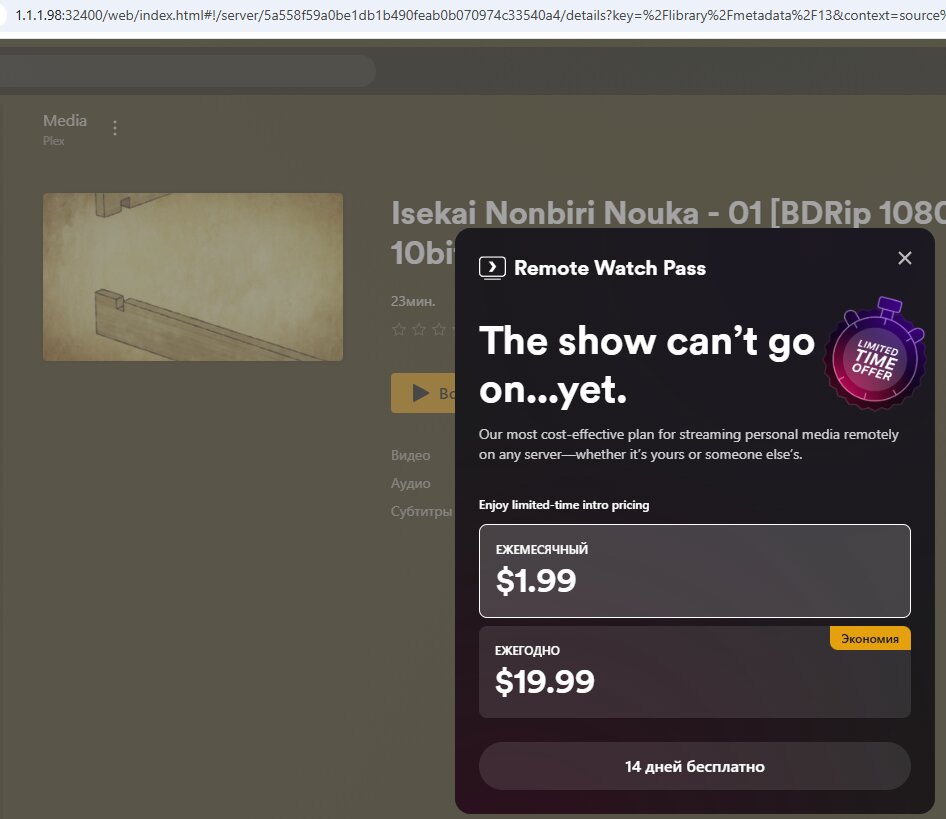
Now new problem
Why plex think that Im using remote (and ask for pro subscription)?
If Im on lan
---
### Author:  [@ChuckPa](https://forums.plex.tv/u/ChuckPa)
#### Post date: [August 28, 2025, 4:27pm UTC](https://forums.plex.tv/t/server-setup-wizard-not-authorized/930187/5 "2025-08-28T16:27:19Z")
What is the LAN IP of the server and what is the LAN IP of the player ?
They must be on the same subnet else it is considered Remote.
---
### Author:  [@zaitsev\_p](https://forums.plex.tv/u/zaitsev_p)
#### Post date: [August 28, 2025, 6:54pm UTC](https://forums.plex.tv/t/server-setup-wizard-not-authorized/930187/6 "2025-08-28T18:54:05Z")
As on screenshot
Server on 1.1.1.98
Player on 1.1.1.2
Can it be cos of cifs mount?
Storage with media mounted to server via cifs
Then scanned and shared via plex
But all of them on same subnet 1.1.1.\*
---
### Author:  [@ChuckPa](https://forums.plex.tv/u/ChuckPa)
#### Post date: [August 28, 2025, 7:41pm UTC](https://forums.plex.tv/t/server-setup-wizard-not-authorized/930187/7 "2025-08-28T19:41:13Z")
CIFS does not matter when claiming.
I have multiple hosts on the LAN.
I SSH into each of them.
To (re)claim a server, I do this while in that ssh session.
> **[GitHub - ChuckPa/UserCredentialReset: User Credential Reset utility for Plex](https://github.com/ChuckPa/UserCredentialReset)**
>
> User Credential Reset utility for Plex
There are instructions & examples in the README file
---
### Author:  [@dbirch](https://forums.plex.tv/u/dbirch)
#### Post date: [August 28, 2025, 11:21pm UTC](https://forums.plex.tv/t/server-setup-wizard-not-authorized/930187/8 "2025-08-28T23:21:59Z")
> [@zaitsev\_p](#):
>
> Server on 1.1.1.98
>
> Player on 1.1.1.2
Thats not a private network, you need to use an RFC-1918 subnet.
---
### Author:  [@zaitsev\_p](https://forums.plex.tv/u/zaitsev_p)
#### Post date: [August 29, 2025, 3:26am UTC](https://forums.plex.tv/t/server-setup-wizard-not-authorized/930187/9 "2025-08-29T03:26:13Z")
Well, ty for help
Seems plex not compatible with my network
Ill try emby instead, cos there are no such limits
---
### Author:  [@dbirch](https://forums.plex.tv/u/dbirch)
#### Post date: [August 29, 2025, 10:36am UTC](https://forums.plex.tv/t/server-setup-wizard-not-authorized/930187/10 "2025-08-29T10:36:49Z")
> [@zaitsev\_p](#):
>
> Seems plex not compatible with my network
Your current network configuration does not comply with standard networking practices and will likely lead to problems in the future. According to **RFC 1918** , specific ranges of IP addresses are reserved for private use within homes and organizations. These are:
- 10.0.0.0/8
- 172.16.0.0/12
- 192.168.0.0/16
Instead of using one of these reserved ranges, your network is configured with **1.1.1.0/24** , which is not a private range. In fact, this block belongs to **Cloudflare** and is part of the global public address space. Cloudflare actively uses this range, including **1.1.1.1** , which serves as a widely used public DNS resolver.
By assigning addresses from this public range internally, your devices may experience conflicts, routing issues, or connectivity problems when communicating with the internet. To ensure stability, compliance, and proper functionality, the network should be reconfigured to use one of the RFC 1918 private ranges.
---
### Author:  [@system](https://forums.plex.tv/u/system)
#### Post date: [November 27, 2025, 10:37am UTC](https://forums.plex.tv/t/server-setup-wizard-not-authorized/930187/11 "2025-11-27T10:37:03Z")
This topic was automatically closed 90 days after the last reply. New replies are no longer allowed.