### Author:  [@ejhansen](https://forums.plex.tv/u/ejhansen)
#### Post date: [January 26, 2025, 3:21am UTC](https://forums.plex.tv/t/set-path-for-dvr/903608/1 "2025-01-26T03:21:17Z")
Server Version#: 4.141.0
Player Version#:
Tuner Make/Model: HD Homerun CONNECT Quattro
Guide/Lineup name:
Using XMLTV?: No
Channel number/Name:
\
I would like to set the path the DVR uses to record programs, I am not comfortable with all the writes to my SSD main drive and would like to move it to an HDD data drive in my system.
---
### Author:  [@SE56](https://forums.plex.tv/u/SE56)
#### Post date: [January 26, 2025, 4:47am UTC](https://forums.plex.tv/t/set-path-for-dvr/903608/2 "2025-01-26T04:47:54Z")
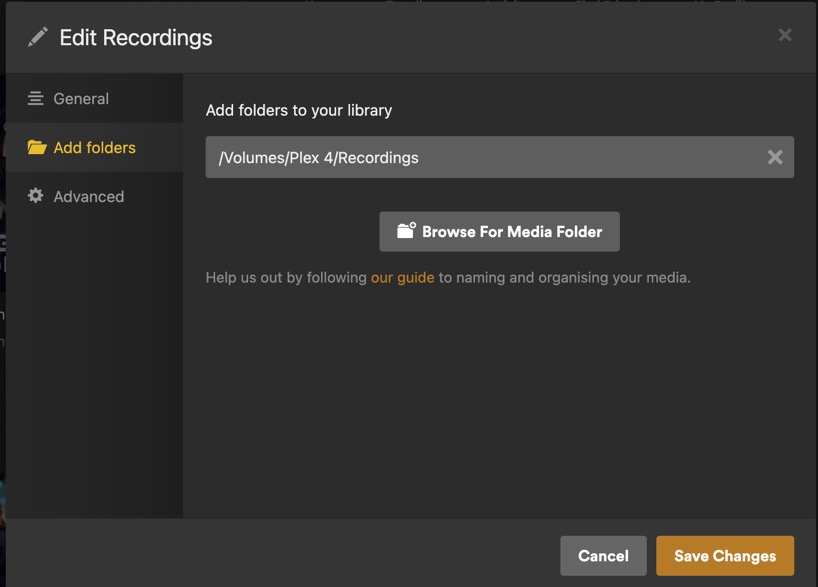
Create a Library called Recording, within the Library edit and your location.
---
### Author:  [@ejhansen](https://forums.plex.tv/u/ejhansen)
#### Post date: [January 26, 2025, 6:26am UTC](https://forums.plex.tv/t/set-path-for-dvr/903608/3 "2025-01-26T06:26:42Z")
That will work thanks, too bad I can’t combine all recordings into a single library. I have to separate movies and tv shows and put them in the same folder. I’m hoping hockey games are TV shows and not Other Video.
---
### Author:  [@SE56](https://forums.plex.tv/u/SE56)
#### Post date: [January 26, 2025, 7:21am UTC](https://forums.plex.tv/t/set-path-for-dvr/903608/4 "2025-01-26T07:21:57Z")
For sport I normally use catch up TV
---
### Author:  [@ejhansen](https://forums.plex.tv/u/ejhansen)
#### Post date: [January 26, 2025, 8:54am UTC](https://forums.plex.tv/t/set-path-for-dvr/903608/5 "2025-01-26T08:54:03Z")
Weird, I tested recording an OTA show with the DVR, on the Plex Server computer it has sound but just a green screen. On my FireTV cubes running Plex Client it’s as clear as a bell and plays perfectly. If I use VLC or Windows Media to open the .TS file, it plays fine as well. Not sure whats up but it isn’t a deal breaker, I use the server as a server, I play back with the cubes.
---
### Author:  [@system](https://forums.plex.tv/u/system)
#### Post date: [April 26, 2025, 8:55am UTC](https://forums.plex.tv/t/set-path-for-dvr/903608/6 "2025-04-26T08:55:00Z")
This topic was automatically closed 90 days after the last reply. New replies are no longer allowed.