# Setting up remote access
**URL:** https://forums.plex.tv/t/setting-up-remote-access/787821
**Category:** Remote Access
**Tags:** server-truenas
**Created:** [April 11, 2022, 1:58pm UTC](https://forums.plex.tv/t/setting-up-remote-access/787821 "2022-04-11T13:58:12Z")
**Posts on this page:** 20
**Page:** 1
### Author:  [@Conzaaa](https://forums.plex.tv/u/Conzaaa)
#### Post date: [April 11, 2022, 1:58pm UTC](https://forums.plex.tv/t/setting-up-remote-access/787821/1 "2022-04-11T13:58:12Z")
Thanks. I am struggling. Router is picking up UPnP automatically:

When using [canyouseeme.org](http://canyouseeme.org/) - no dice ☹
---
### Author:  [@skwor01](https://forums.plex.tv/u/skwor01)
#### Post date: [April 11, 2022, 2:00pm UTC](https://forums.plex.tv/t/setting-up-remote-access/787821/2 "2022-04-11T14:00:13Z")
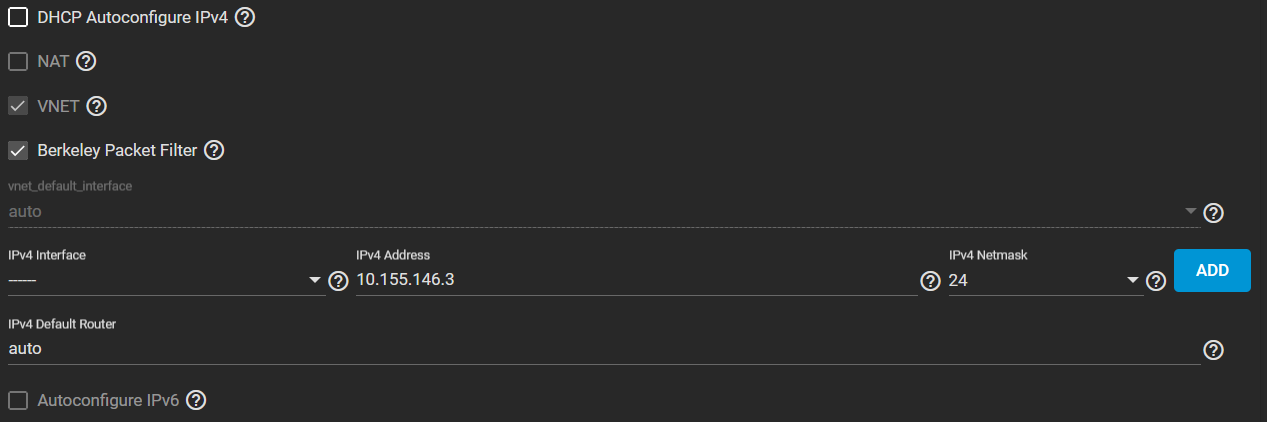
Honestly, for everyone’s safety DO NOT USE UPNP, turn it off and make manual port forwarding work and ONLY forward the Plex port!
---
### Author:  [@Conzaaa](https://forums.plex.tv/u/Conzaaa)
#### Post date: [April 11, 2022, 10:52pm UTC](https://forums.plex.tv/t/setting-up-remote-access/787821/3 "2022-04-11T22:52:14Z")
Can you point me in the direction of why that is? Noob here.

What do I need to put in to forward here?

---
### Author:  [@tom80H](https://forums.plex.tv/u/tom80H)
#### Post date: [April 11, 2022, 10:57pm UTC](https://forums.plex.tv/t/setting-up-remote-access/787821/4 "2022-04-11T22:57:19Z")
| Option | Value | Remark |
| --- | --- | --- |
| Service Name | `...` | _up to your liking_ |
| External Port | `...` | _specify a single port up to your liking; some use `32400` but it’s all up to you_ |
| Internal IP | `192.168.1.114` | _The IP of the machine hosting your Plex Media Server_ |
| Internal Port | `32400` | |
| Protocol | `TCP` | |
---
### Author:  [@Conzaaa](https://forums.plex.tv/u/Conzaaa)
#### Post date: [April 11, 2022, 11:08pm UTC](https://forums.plex.tv/t/setting-up-remote-access/787821/5 "2022-04-11T23:08:31Z")

😐
I am running personal server, Truenas → plex plugin if that helps.

No VPN on that server. I don’t have a static ip setup I don’t think. Dynamic.
---
### Author:  [@tom80H](https://forums.plex.tv/u/tom80H)
#### Post date: [April 11, 2022, 11:15pm UTC](https://forums.plex.tv/t/setting-up-remote-access/787821/6 "2022-04-11T23:15:24Z")
If your TrueNAS is assigning different subnets to individual plugins, you’ll need to establish a sequence of port forward rules. It’s not enough to tell the router the final endpoint. Each component can only address its direct child nodes.
## Example
**E2E route:** Router → TrueNAS host → TrueNAS plugin
**Router to TrueNAS host:** `router WAN IP address` → 192.168.0.147
**TrueNAS host to TrueNAS plugin:** `TrueNAS host IP address` → 192.168.1.114
---
### Author:  [@Conzaaa](https://forums.plex.tv/u/Conzaaa)
#### Post date: [April 12, 2022, 1:02am UTC](https://forums.plex.tv/t/setting-up-remote-access/787821/7 "2022-04-12T01:02:31Z")
Oh gotcha. How to find that exactly?
This is the truenas IP. Doesn’t work :\ same error.

---
### Author:  [@Conzaaa](https://forums.plex.tv/u/Conzaaa)
#### Post date: [April 12, 2022, 5:08am UTC](https://forums.plex.tv/t/setting-up-remote-access/787821/8 "2022-04-12T05:08:10Z")

---
### Author:  [@Conzaaa](https://forums.plex.tv/u/Conzaaa)
#### Post date: [April 18, 2022, 5:40am UTC](https://forums.plex.tv/t/setting-up-remote-access/787821/9 "2022-04-18T05:40:26Z")
🤔
Any help would be greatly appreciated.
---
### Author:  [@phoneguyinpgh](https://forums.plex.tv/u/phoneguyinpgh)
#### Post date: [April 18, 2022, 5:37pm UTC](https://forums.plex.tv/t/setting-up-remote-access/787821/10 "2022-04-18T17:37:16Z")
Setp #1;
In your router’s WAN/Virtual Servers set up,
Service Name= (anything that sounds good to you, like Plex)
External Port=32400
Internal IP=(any unused IP in your subnet 192.168.1.xxx, remember this for step #2)
Internal Port=32400
Protocol=TCP
Step #2;
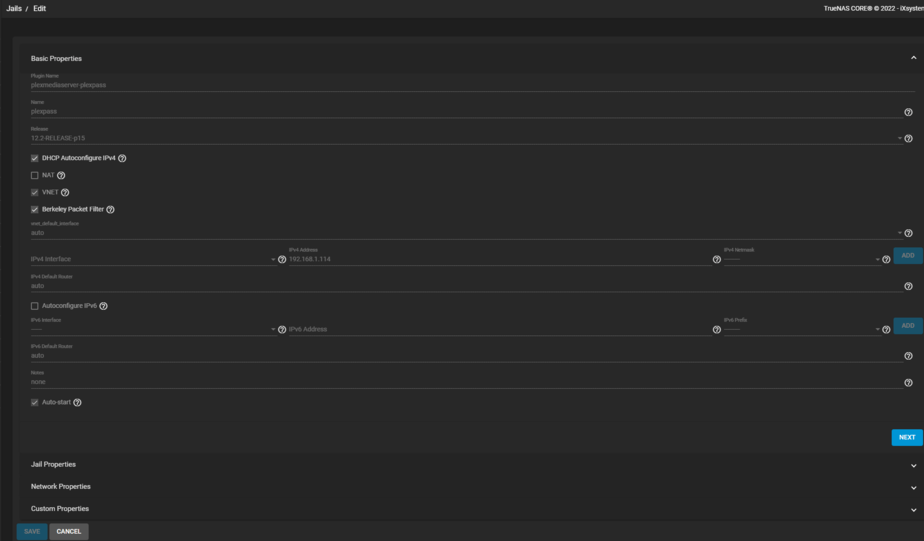
Referring to your 1st TrueNAS screen capture above, disable DHCP and manually assign the IPv4 address in your subnet tht you set into your router in step #1. Do not turn on NAT. Leave VNET and Berkley Packet filter enabled. You may need to restart the jail afterwards for the changes to take affect. This IP should now be ping-able from a command prompt.
Step#3;
Access your Plex server with the IPv4 address you set above using 192.168.1.xxx:32400/web. Click the wrench to go to your settings. Select Remote access. Enable your remote access so that it resembles this. As you can see my Plex Server uses the IP 10.155.146.3, yours will show the IP you set in your TrueNAS jail.

You may need to manually specify the public port to 32400.
That should make your Plex Server accessible from the internet.
---
### Author:  [@Conzaaa](https://forums.plex.tv/u/Conzaaa)
#### Post date: [April 19, 2022, 1:27pm UTC](https://forums.plex.tv/t/setting-up-remote-access/787821/11 "2022-04-19T13:27:28Z")
Legend, thanks for the response.
I had some questions about step 2, but can’t make it past step 1 still:

Tried many options for internal IP. New, old, etc. used, unused.
---
### Author:  [@phoneguyinpgh](https://forums.plex.tv/u/phoneguyinpgh)
#### Post date: [April 19, 2022, 1:35pm UTC](https://forums.plex.tv/t/setting-up-remote-access/787821/12 "2022-04-19T13:35:03Z")
That issue may be specific to your router.
You may need to do step #2 1st then do step #1. Give that a try & let us know if it worked.
---
### Author:  [@Conzaaa](https://forums.plex.tv/u/Conzaaa)
#### Post date: [April 19, 2022, 1:59pm UTC](https://forums.plex.tv/t/setting-up-remote-access/787821/13 "2022-04-19T13:59:09Z")
Thanks.

Not sure on these. Tried many combo’s, struggling to get in to manage it via 192.168.1.[xxx]:32400/web.
---
### Author:  [@phoneguyinpgh](https://forums.plex.tv/u/phoneguyinpgh)
#### Post date: [April 20, 2022, 1:17am UTC](https://forums.plex.tv/t/setting-up-remote-access/787821/14 "2022-04-20T01:17:45Z")
Here is my config screen…
---
### Author:  [@Conzaaa](https://forums.plex.tv/u/Conzaaa)
#### Post date: [April 20, 2022, 3:38am UTC](https://forums.plex.tv/t/setting-up-remote-access/787821/15 "2022-04-20T03:38:52Z")

🤔
---
### Author:  [@phoneguyinpgh](https://forums.plex.tv/u/phoneguyinpgh)
#### Post date: [April 21, 2022, 12:22am UTC](https://forums.plex.tv/t/setting-up-remote-access/787821/16 "2022-04-21T00:22:35Z")
If you are using the same IP for your jail as your TrueNAS machine is using, that might be causing that failure. My TrueNAS box ends in .180, the Plex jail ends in .3 so make sure you are using different IPs for the TrueNAS system and the Plex jail.
---
### Author:  [@Conzaaa](https://forums.plex.tv/u/Conzaaa)
#### Post date: [April 21, 2022, 10:20am UTC](https://forums.plex.tv/t/setting-up-remote-access/787821/17 "2022-04-21T10:20:40Z")
Is there something real basic I might be missing?
Static routes not setup, dynamic DNS (although hasn’t changed IP’s so shouldn’t be why…?)

---
### Author:  [@phoneguyinpgh](https://forums.plex.tv/u/phoneguyinpgh)
#### Post date: [April 24, 2022, 2:07am UTC](https://forums.plex.tv/t/setting-up-remote-access/787821/18 "2022-04-24T02:07:28Z")
With out getting my hands on your network I not sure what to tell you. The setup I have told you about is how I have 3 different machines running on my network and I can access all of them remotely.
---
### Author:  [@nx6](https://forums.plex.tv/u/nx6)
#### Post date: [April 24, 2022, 2:24am UTC](https://forums.plex.tv/t/setting-up-remote-access/787821/19 "2022-04-24T02:24:49Z")
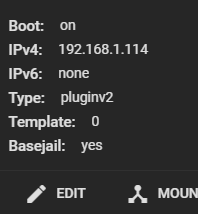
Can we see what your config looks like now for the jail networking? Like the screenshot you did back on post 13 but current?
---
### Author:  [@Conzaaa](https://forums.plex.tv/u/Conzaaa)
#### Post date: [April 24, 2022, 2:43am UTC](https://forums.plex.tv/t/setting-up-remote-access/787821/20 "2022-04-24T02:43:22Z")
Sure thing. This?

Reverted back after no worky (plex broke, etc. so obviously no remote access)
I have disabled UPnP btw and allowed remote port as required too.
[Next page](https://forums.plex.tv/t/setting-up-remote-access/787821.md?page=2)