# Subtitle Language Not Working
**URL:** https://forums.plex.tv/t/subtitle-language-not-working/408000
**Category:** General Discussions
**Tags:** subtitles
**Created:** [May 4, 2019, 9:32pm UTC](https://forums.plex.tv/t/subtitle-language-not-working/408000 "2019-05-04T21:32:24Z")
**Posts on this page:** 12
**Page:** 1
### Author:  [@setite](https://forums.plex.tv/u/setite)
#### Post date: [May 4, 2019, 9:32pm UTC](https://forums.plex.tv/t/subtitle-language-not-working/408000/1 "2019-05-04T21:32:25Z")
I can’t find a section to post problems. I can get subtitles to play the right language. I have an MKV file with built in SRT subtitles, and the first track is not English. The second track is English. It shows up as “English, UTF-8” in media info, and as “en (SRT)” in Plex. I have the server settings and personal account settings to play English subtitles but it seems to always just play the first subtitle. Please help me get this working.
---
### Author:  [@OttoKerner](https://forums.plex.tv/u/OttoKerner)
#### Post date: [May 4, 2019, 10:07pm UTC](https://forums.plex.tv/t/subtitle-language-not-working/408000/2 "2019-05-04T22:07:39Z")
Please post the content of the Plex media XML
[https://support.plex.tv/articles/201998867-investigate-media-information-and-formats/](https://support.plex.tv/articles/201998867-investigate-media-information-and-formats/)
of one such video
and what you have set here
[https://app.plex.tv/desktop#!/settings/account](https://app.plex.tv/desktop#!/settings/account)
under Audio & Subtitle Settings
---
### Author:  [@setite](https://forums.plex.tv/u/setite)
#### Post date: [May 9, 2019, 2:06pm UTC](https://forums.plex.tv/t/subtitle-language-not-working/408000/3 "2019-05-09T14:06:51Z")
[https://pastebin.com/W3MXG84u](https://pastebin.com/W3MXG84u)
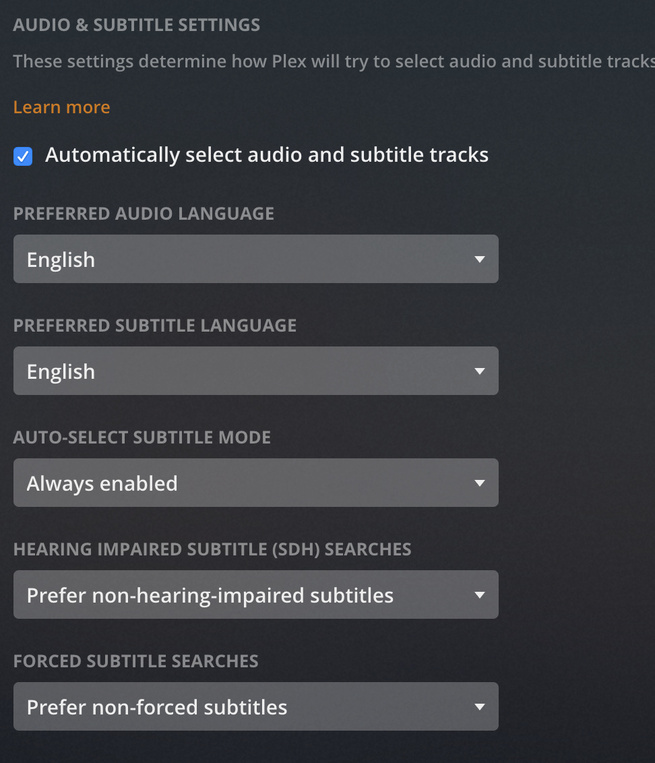
---
### Author:  [@OttoKerner](https://forums.plex.tv/u/OttoKerner)
#### Post date: [May 9, 2019, 2:13pm UTC](https://forums.plex.tv/t/subtitle-language-not-working/408000/4 "2019-05-09T14:13:19Z")
The mediainfo shows that the first subtitle is in Arabic language.
The second subtitle is in English. It is ‘selected’ too, so it should show up.
Now, on what kind of Plex client are you trying to watch it?
I also saw that you don’t use `Season 0x` subfolders. You should always create them – even if the show has only one season.
---
### Author:  [@setite](https://forums.plex.tv/u/setite)
#### Post date: [May 9, 2019, 2:26pm UTC](https://forums.plex.tv/t/subtitle-language-not-working/408000/5 "2019-05-09T14:26:50Z")
I use Season 0x on everything but my foreign shows because they only ever have one season. Are you saying that this could cause a problem?
I am using the web client right now. I know Arabic is first and changing the first language is too much of a PITA. I can set english as an option manually (on each and every single episode) but I am wondering why it’s not being detected and selected by default since my settings say English.
---
### Author:  [@OttoKerner](https://forums.plex.tv/u/OttoKerner)
#### Post date: [May 9, 2019, 2:30pm UTC](https://forums.plex.tv/t/subtitle-language-not-working/408000/6 "2019-05-09T14:30:37Z")
I know that a missing season folder is an issue when you’re using external subtitles. But since we have internal subtitles here, it shouldn’t matter.
The automatic subtitle selection will only be effective, if the subtitle selector hasn’t been changed manually.
So to ensure it has never been “touched” before, you’d need to either
- add a _new_ video
- [Plex Dance](https://forums.plex.tv/t/plex-incorrectly-identifying-tv-episodes/100265/4 "Plex Dance") an existing video
---
### Author:  [@setite](https://forums.plex.tv/u/setite)
#### Post date: [May 9, 2019, 2:44pm UTC](https://forums.plex.tv/t/subtitle-language-not-working/408000/7 "2019-05-09T14:44:24Z")
If I understand the question. I know for a fact that I never touched the language selection on these particular files. I’ve noticed that whenever I get something new, for well over a year now, it defaults to the first internal language on the list, so if it’s english I’m lucky, if it’s not english then I have to manually change it every time I watch a new MKV with multiple internal subs.
I’ll try the plex dance when I get home though.
---
### Author:  [@OttoKerner](https://forums.plex.tv/u/OttoKerner)
#### Post date: [May 9, 2019, 2:46pm UTC](https://forums.plex.tv/t/subtitle-language-not-working/408000/8 "2019-05-09T14:46:52Z")
Are you using a different user account to actually _watch_ your media?
Because these language preferences are individual per user account. That also affects managed users.
---
### Author:  [@OttoKerner](https://forums.plex.tv/u/OttoKerner)
#### Post date: [May 9, 2019, 2:51pm UTC](https://forums.plex.tv/t/subtitle-language-not-working/408000/9 "2019-05-09T14:51:00Z")
I’ve also seen something weird: on my server, I see 3-letter language codes. Your media info only shows 2-letter ones.
Can you try to drag this file into [MKVtoolnixGUI](https://mkvtoolnix.download/ "MKVtoolnixGUI"),
verify the language codes on every track
then Mux the file.
Insert the newly muxed file into your library,
[Analyze](https://support.plex.tv/articles/200289336-analyze-media/) it and re-evaluate.
---
### Author:  [@setite](https://forums.plex.tv/u/setite)
#### Post date: [May 9, 2019, 8:28pm UTC](https://forums.plex.tv/t/subtitle-language-not-working/408000/10 "2019-05-09T20:28:46Z")
Okay I remuxed it in MKVToolNix and the codes were all 3 letter already.
[https://pastebin.com/2ZiPq1Ki](https://pastebin.com/2ZiPq1Ki)

---
### Author:  [@OttoKerner](https://forums.plex.tv/u/OttoKerner)
#### Post date: [May 9, 2019, 8:31pm UTC](https://forums.plex.tv/t/subtitle-language-not-working/408000/11 "2019-05-09T20:31:50Z")
I can see that now the language codes are also 3-letter inside of Plex.
Perform the [Plex Dance](https://forums.plex.tv/t/plex-incorrectly-identifying-tv-episodes/100265/4 "Plex Dance") with the file and see which subtitle track gets selected automatically.
Little tip: when you remux MKVs, uncheck all those ‘tags’ and ‘Global tags’ below the subtitle tracks. I have seen them causing some crazy misbehaviour.
---
### Author:  [@system](https://forums.plex.tv/u/system)
#### Post date: [August 7, 2019, 8:31pm UTC](https://forums.plex.tv/t/subtitle-language-not-working/408000/12 "2019-08-07T20:31:55Z")
This topic was automatically closed 90 days after the last reply. New replies are no longer allowed.