# Synology support says its a Plex problem
**URL:** https://forums.plex.tv/t/synology-support-says-its-a-plex-problem/802544
**Category:** Plex Media Server
**Tags:** server-synology
**Created:** [July 29, 2022, 11:24pm UTC](https://forums.plex.tv/t/synology-support-says-its-a-plex-problem/802544 "2022-07-29T23:24:50Z")
**Posts on this page:** 10
**Page:** 1
### Author:  [@mitre\_11](https://forums.plex.tv/u/mitre_11)
#### Post date: [July 29, 2022, 11:24pm UTC](https://forums.plex.tv/t/synology-support-says-its-a-plex-problem/802544/1 "2022-07-29T23:24:50Z")
Using Synology DS220j. I just got this NAS and I’m ready to throw it out. I’ve installed Plex 7 or 8 times using the Beta and the manual install, even factory reset the NAS.
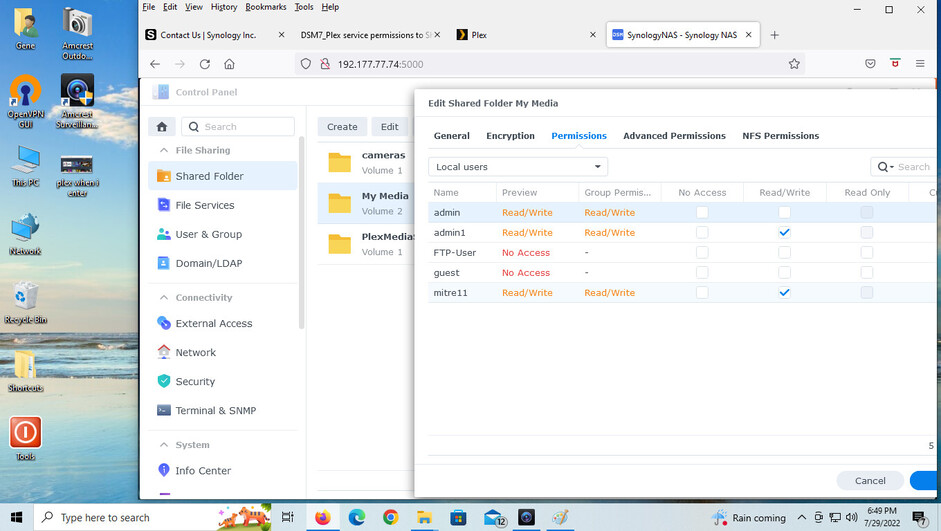
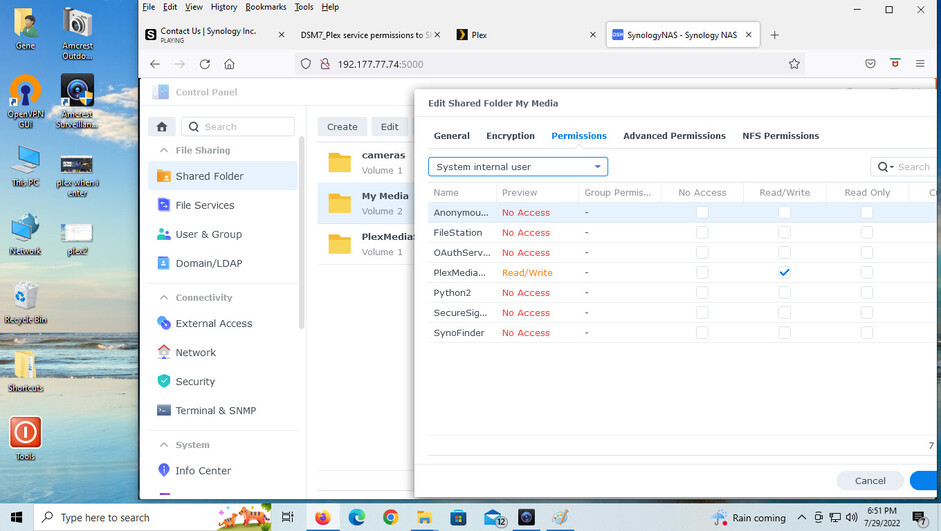
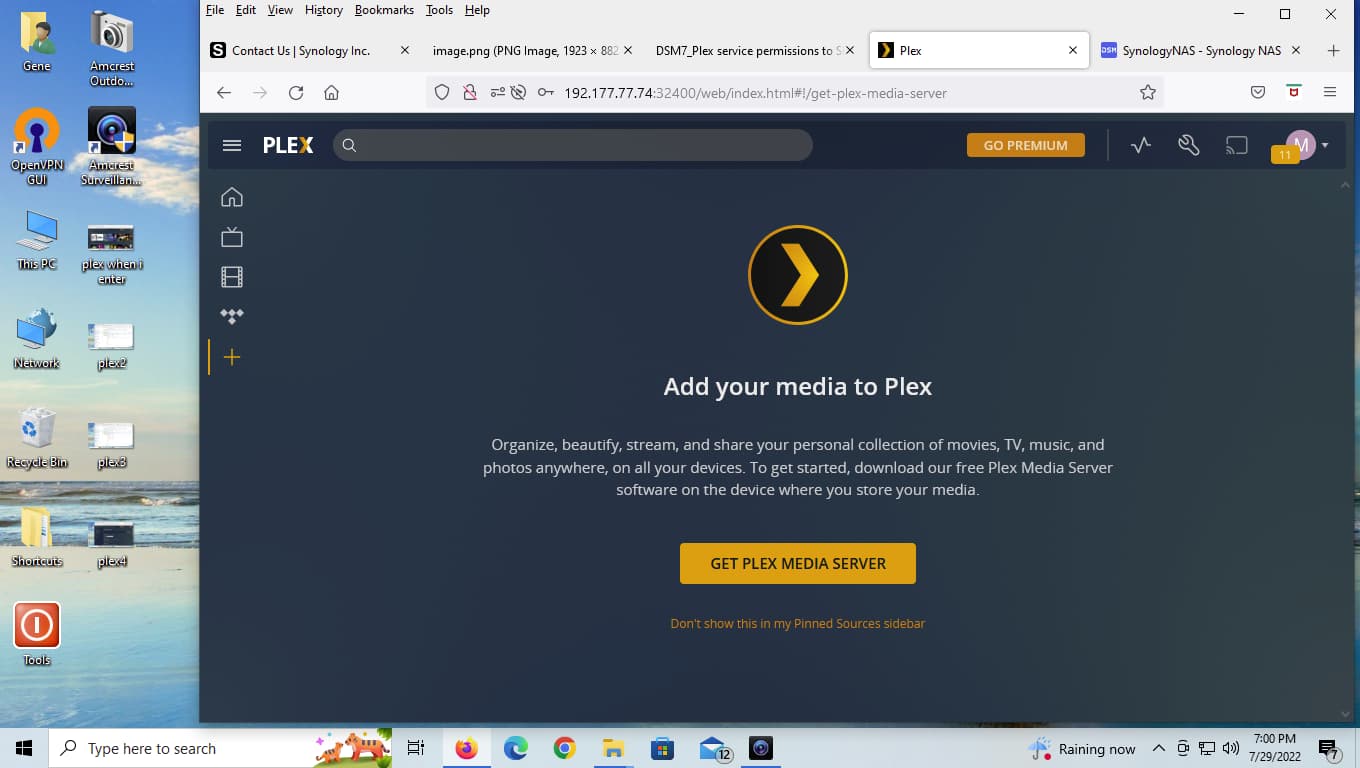
Synology looked at my screenshots and says their part is fine. So when I go inside Plex I do not have the option to add media from the shared drive on the NAS as seen in the screenshot. Help!


---
### Author:  [@ChuckPa](https://forums.plex.tv/u/ChuckPa)
#### Post date: [July 29, 2022, 11:36pm UTC](https://forums.plex.tv/t/synology-support-says-its-a-plex-problem/802544/2 "2022-07-29T23:36:53Z")
Unfortunately, Synology never supports any “3rd party” apps (their warnings make it painfully clear as you install)
Please tell me where the “external media” is? Is it a USB drive plugged into the NAS?
Also, the screenshot you’re showing me tells me the server isn’t “Claimed” (attached to your Plex account). We can fix that pretty quickly.
I would like to ask: You show the IP address of the Synology as 192.177.77.74.
Is this an address you assigned or is the NAS connected directly to the Internet (or remote) ?
---
### Author:  [@mitre\_11](https://forums.plex.tv/u/mitre_11)
#### Post date: [July 30, 2022, 12:02am UTC](https://forums.plex.tv/t/synology-support-says-its-a-plex-problem/802544/3 "2022-07-30T00:02:58Z")
The external media is in a shared folder called "My Media"on one of the two drives installed on the Synology NAS.
The ip address is an address on my LAN at home.
---
### Author:  [@ChuckPa](https://forums.plex.tv/u/ChuckPa)
#### Post date: [July 30, 2022, 12:11am UTC](https://forums.plex.tv/t/synology-support-says-its-a-plex-problem/802544/4 "2022-07-30T00:11:04Z")
I suggest you properly renumber your home LAN range to be any of the following (RFC-1918) ranges.
1. 192.168.x.x (Common ranges are 192.168.0.x, 192.168.1.x)
2. 10.x.x.x
3. 172.16.x.x → 172.31.x.x
I suggest this because you’ve defined a range which overlays a real-world Hosting Provider company.
```auto
[chuck@lizum 1281.2014]$ whois 192.177.77.0
#
# ARIN WHOIS data and services are subject to the Terms of Use
# available at: https://www.arin.net/resources/registry/whois/tou/
#
# If you see inaccuracies in the results, please report at
# https://www.arin.net/resources/registry/whois/inaccuracy_reporting/
#
# Copyright 1997-2022, American Registry for Internet Numbers, Ltd.
#
NetRange: 192.177.0.0 - 192.177.255.255
CIDR: 192.177.0.0/16
NetName: EGNL-1
NetHandle: NET-192-177-0-0-1
Parent: NET192 (NET-192-0-0-0-0)
NetType: Direct Allocation
OriginAS: AS18779
Organization: EGIHosting (EGNL-1)
RegDate: 2013-06-28
Updated: 2013-06-28
Ref: https://rdap.arin.net/registry/ip/192.177.0.0
EGIHosting (EGNL-1)
OrgNOCHandle: NOC2660-ARIN
OrgNOCName: Network Operations Center
OrgNOCPhone: +1-888-808-8806
OrgNOCEmail: noc@egihosting.com
OrgNOCRef: https://rdap.arin.net/registry/entity/NOC2660-ARIN
OrgRoutingHandle: NOC2660-ARIN
OrgRoutingName: Network Operations Center
OrgRoutingPhone: +1-888-808-8806
OrgRoutingEmail: noc@egihosting.com
OrgRoutingRef: https://rdap.arin.net/registry/entity/NOC2660-ARIN
OrgTechHandle: CHENJ-ARIN
OrgTechName: Chen, James
OrgTechPhone: +1-408-228-4448
OrgTechEmail: james@egihosting.com
OrgTechRef: https://rdap.arin.net/registry/entity/CHENJ-ARIN
OrgTechHandle: KTBIJ-ARIN
OrgTechName: KT, Bijoy
OrgTechPhone: +1-888-808-8806
OrgTechEmail: egni@egihosting.com
OrgTechRef: https://rdap.arin.net/registry/entity/KTBIJ-ARIN
OrgTechHandle: ORTIZ362-ARIN
OrgTechName: Ortiz, Joaquin
OrgTechPhone: +1-408-228-4448
OrgTechEmail: joaquin@egihosting.com
OrgTechRef: https://rdap.arin.net/registry/entity/ORTIZ362-ARIN
OrgTechHandle: TRANR22-ARIN
OrgTechName: Tran, Ryan
OrgTechPhone: +1-408-228-4448
OrgTechEmail: rtran@egihosting.com
OrgTechRef: https://rdap.arin.net/registry/entity/TRANR22-ARIN
OrgTechHandle: RASCO11-ARIN
OrgTechName: Rascol, Victor
OrgTechPhone: +1-408-228-4448
OrgTechEmail: victor@egihosting.com
OrgTechRef: https://rdap.arin.net/registry/entity/RASCO11-ARIN
OrgAbuseHandle: ABUSE1715-ARIN
OrgAbuseName: Abuse Department
OrgAbusePhone: +1-888-808-8806
OrgAbuseEmail: abuse@egihosting.com
OrgAbuseRef: https://rdap.arin.net/registry/entity/ABUSE1715-ARIN
#
# ARIN WHOIS data and services are subject to the Terms of Use
# available at: https://www.arin.net/resources/registry/whois/tou/
#
# If you see inaccuracies in the results, please report at
# https://www.arin.net/resources/registry/whois/inaccuracy_reporting/
#
# Copyright 1997-2022, American Registry for Internet Numbers, Ltd.
#
[chuck@lizum 1281.2015]$
```
PMS will never treat your home LAN as a LAN because it’s using someone else’s Public IP address
Reference:
> **[Private network](https://en.wikipedia.org/wiki/Private_network)**
>
> In Internet networking, a private network is a computer network that uses a private address space of IP addresses. These addresses are commonly used for local area networks (LANs) in residential, office, and enterprise environments. Both the IPv4 and the IPv6 specifications define private IP address ranges.
> Private network addresses are not allocated to any specific organization. Anyone may use these addresses without approval from regional or local Internet registries. Private IP address spac...
---
### Author:  [@mitre\_11](https://forums.plex.tv/u/mitre_11)
#### Post date: [July 30, 2022, 12:14am UTC](https://forums.plex.tv/t/synology-support-says-its-a-plex-problem/802544/5 "2022-07-30T00:14:32Z")
Yes, I understand that as I am a Cisco CCNP. But I already have another Plex Server which runs on my LAN (installed on a WIN10 PC on the same LAN segment) and works perfectly fine. So why doesn’t it work for the NAS?
---
### Author:  [@dbirch](https://forums.plex.tv/u/dbirch)
#### Post date: [July 30, 2022, 12:18am UTC](https://forums.plex.tv/t/synology-support-says-its-a-plex-problem/802544/6 "2022-07-30T00:18:44Z")
> [@mitre\_11](#):
>
> So why doesn’t it work for the NAS?
Because you claimed the Windows PC using the 127.0.0.1 local host address and not the 192.177.xxx.xxx address.
127 is always local, while the 192.177 is a public address. This prevents a third party from claiming your server if your server ever gets into an unclaimed status.
---
### Author:  [@dbirch](https://forums.plex.tv/u/dbirch)
#### Post date: [July 30, 2022, 12:19am UTC](https://forums.plex.tv/t/synology-support-says-its-a-plex-problem/802544/7 "2022-07-30T00:19:20Z")
> [@mitre\_11](#):
>
> I am a Cisco CCNP
Then you should know to follow the RFC, failure to do so causes things to break.
---
### Author:  [@ChuckPa](https://forums.plex.tv/u/ChuckPa)
#### Post date: [July 30, 2022, 12:23am UTC](https://forums.plex.tv/t/synology-support-says-its-a-plex-problem/802544/8 "2022-07-30T00:23:03Z")
I looked at your account and see your Windows machine. I don’t know how that works given the addressing is completely non-standard.
Linux is one thing but Synology is a whole new bag of hurt to claim manually because it has no console (desktop glass).
On windows and Linux, you can open `http://127.0.0.1:32400/web` and get to the hosts. You can’t on any NAS products. Their web UI negates all that.
The answer here is SSH tunnel and the Plex claim token method.
Familiar with these ?
---
### Author:  [@mitre\_11](https://forums.plex.tv/u/mitre_11)
#### Post date: [July 30, 2022, 12:26am UTC](https://forums.plex.tv/t/synology-support-says-its-a-plex-problem/802544/9 "2022-07-30T00:26:40Z")
Yes I am…and that answer makes sense. Yeah, I’ve been running the other Plex server for years on the same LAN segment.
I guess if I want to get this running on Synology, I need to redo my LAN segment. Thanks
---
### Author:  [@system](https://forums.plex.tv/u/system)
#### Post date: [October 28, 2022, 12:27am UTC](https://forums.plex.tv/t/synology-support-says-its-a-plex-problem/802544/10 "2022-10-28T00:27:13Z")
This topic was automatically closed 90 days after the last reply. New replies are no longer allowed.