# TRANSCODING. What the hack is going on with the transcoding?
**URL:** https://forums.plex.tv/t/transcoding-what-the-hack-is-going-on-with-the-transcoding/584085
**Category:** Remote Access
**Tags:** server-windows
**Created:** [May 2, 2020, 3:02am UTC](https://forums.plex.tv/t/transcoding-what-the-hack-is-going-on-with-the-transcoding/584085 "2020-05-02T03:02:18Z")
**Posts on this page:** 15
**Page:** 1
### Author:  [@Alicante2020](https://forums.plex.tv/u/Alicante2020)
#### Post date: [May 2, 2020, 3:02am UTC](https://forums.plex.tv/t/transcoding-what-the-hack-is-going-on-with-the-transcoding/584085/1 "2020-05-02T03:02:19Z")
Server Version#: 1.19.2.2737
Player Version#: 1.9.0.1203-00f2b4d9[Plex Media Server [Plex Media Server Logs\_2020-05-01\_22-50-11.zip](https://forums.plex.tv/uploads/short-url/6djsDNNwDlI2Bn2uHKpBhMPqSdN.zip) (9.6 MB)
I AM SO TIRED OF THIS VERSION OF PLEX. I HAVE ASK MY USER TO CHANGE THE QUALITY SETTING FOR REMOTE TO ORIGINAL OR MAXIMUM, AND YET IT STILL TRANSCODE TO LOWER FORMAT.
EXSAMPLE: ON THE IMAGE

ON ROKU ULTRA PLAYER AND HIS TV IS 1080P HD. WHY IS IT TRANSCODING FROM 1080P TO 720P. FOR U & S WITH CHROMECAST THEY BOTH HAVE 1080P HD. IPHONE I UNDERSTAND BUT IT SHOULD BE 720P NOT SD AND I HAVE ASK ONE WITH MOBILE TO CHANGE THE QUALITY SETTING FOR REMOTE TO ORIGINAL OR MAXIMUM AND TURN OFF THE LIMIT DATA PLAN AS MOST IS UNLIMITED DATA OR WIFI.
CAN SOMEONE FROM PLEX PLEASE EXPLAIN WHY IS THIA KEEP HAPPENING AND IS THER A FIX TO IT… GOD DAMN IT… I AM ON MY LAST LEG ON THIS… I WILL LOOK INTO EMBY AND OTHERS…
---
### Author:  [@pshanew](https://forums.plex.tv/u/pshanew)
#### Post date: [May 2, 2020, 3:36am UTC](https://forums.plex.tv/t/transcoding-what-the-hack-is-going-on-with-the-transcoding/584085/2 "2020-05-02T03:36:13Z")
I’m not sure if it’s your only issue, but you’re running in to some bandwidth restrictions, either on the client or server side (though it appears to be the client):
```auto
May 01, 2020 22:44:58.333 [13748] DEBUG - Streaming Resource: Calculated bandwidth of 8360kbps exceeds bandwidth limit. Changing decision parameters provided by client to fit bandwidth limit of 720kbps
```
It also seems that it would be forced to transcode anyway due to the file container being mpegts; it would normally switch to direct streaming, but it can’t since that is disabled:
```auto
May 01, 2020 22:44:58.531 [13748] DEBUG - MDE: Selected protocol hls; container: mpegts
May 01, 2020 22:44:58.531 [13748] DEBUG - MDE: analyzing media item 205161
May 01, 2020 22:44:58.531 [13748] DEBUG - MDE: Once Upon a Time... in Hollywood (2019): Direct Play is disabled
May 01, 2020 22:44:58.531 [13748] DEBUG - MDE: Once Upon a Time... in Hollywood (2019): media must be transcoded in order to use the hls protocol
May 01, 2020 22:44:58.531 [13748] DEBUG - MDE: Once Upon a Time... in Hollywood (2019): no direct play video profile exists for http/mkv/h264
May 01, 2020 22:44:58.531 [13748] DEBUG - MDE: Once Upon a Time... in Hollywood (2019): no direct play video profile exists for http/mkv/h264/ac3
May 01, 2020 22:44:58.531 [13748] DEBUG - MDE: Once Upon a Time... in Hollywood (2019): Direct Streaming is disabled, so video stream will be transcoded
May 01, 2020 22:44:58.531 [13748] DEBUG - MDE: Once Upon a Time... in Hollywood (2019): no remuxable profile found, so video stream will be transcoded
May 01, 2020 22:44:58.531 [13748] DEBUG - MDE: Cannot direct stream video stream due to profile or setting limitations
```
So, I’d suggest double-checking your clients’ remote quality settings and your server’s Internet upload speed/Limit remote stream bandwidth settings under Settings -\> Remote Access. Something’s imposing a bandwidth restriction.
It’s hard to tell much else as you have verbose logging enabled. Those log entries are unnecessary most of the time and end up filling the logs with useless information. If you can, submit new logs showing the issue, but with only debug logging enabled (turn off verbose).
---
### Author:  [@dseto](https://forums.plex.tv/u/dseto)
#### Post date: [May 2, 2020, 3:32pm UTC](https://forums.plex.tv/t/transcoding-what-the-hack-is-going-on-with-the-transcoding/584085/3 "2020-05-02T15:32:08Z")
I am having similar issues, everything is either transcoding or direct stream, no more direct play since this last server update.
---
### Author:  [@Coxeroni](https://forums.plex.tv/u/Coxeroni)
#### Post date: [May 2, 2020, 3:49pm UTC](https://forums.plex.tv/t/transcoding-what-the-hack-is-going-on-with-the-transcoding/584085/4 "2020-05-02T15:49:39Z")
> **[Rule number 2 - Do not use all caps](https://netiquette.fandom.com/wiki/Rule_number_2_-_Do_not_use_all_caps)**
>
> I use all caps for Subject line always, like if I need a quote I will type to the vendor "REQUEST QUOTE FOR ROUTED LETTERS ABC COMPANY" or "URGENT PRICE REQUEST FOR ABC COMPANY". We find it muy importante and of urgent nature. In today's world it is...
---
### Author:  [@Alicante2020](https://forums.plex.tv/u/Alicante2020)
#### Post date: [May 2, 2020, 4:34pm UTC](https://forums.plex.tv/t/transcoding-what-the-hack-is-going-on-with-the-transcoding/584085/5 "2020-05-02T16:34:06Z")
Thank you for the respond… Regards to the verbose it is Disable.
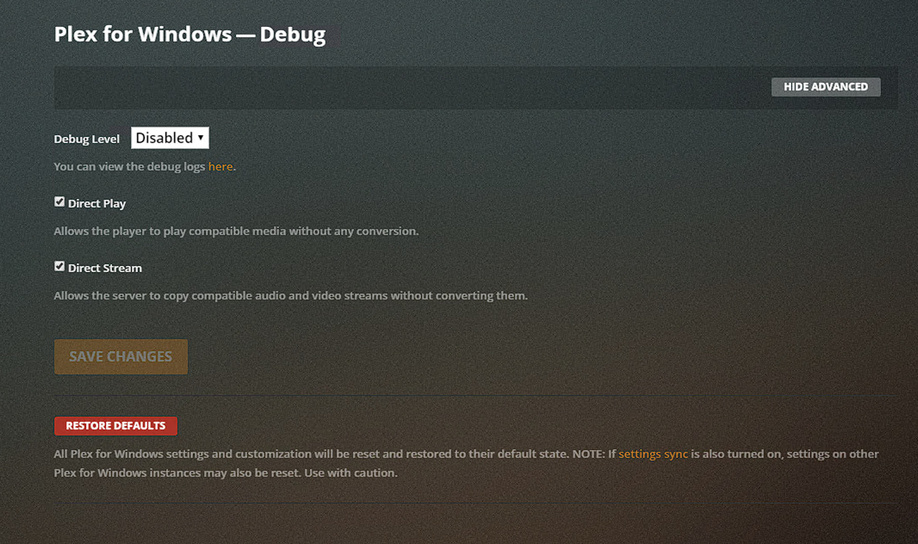
And my Upload speed is 80 Mbps

I will get my friends play something later and get the Logs.
Thank you again
---
### Author:  [@pshanew](https://forums.plex.tv/u/pshanew)
#### Post date: [May 2, 2020, 4:36pm UTC](https://forums.plex.tv/t/transcoding-what-the-hack-is-going-on-with-the-transcoding/584085/6 "2020-05-02T16:36:19Z")
Those settings are for the web client. Make sure you disable it in the server settings as well:
Settings -\> (SETTINGS) General
They should look like this:

Here’s some additional information:
> **[Reporting issues with Plex Media Server | Plex Support](https://support.plex.tv/articles/201643703-reporting-issues-with-plex-media-server/)**
>
> How to Report an Issue If you believe you have found an issue in Plex Media Server, please report it...
---
### Author:  [@Alicante2020](https://forums.plex.tv/u/Alicante2020)
#### Post date: [May 2, 2020, 4:41pm UTC](https://forums.plex.tv/t/transcoding-what-the-hack-is-going-on-with-the-transcoding/584085/7 "2020-05-02T16:41:06Z")
Oh I See… User Error… LOL… I have disable it. Thank you. I will upload logs later tonight
---
### Author:  [@Alicante2020](https://forums.plex.tv/u/Alicante2020)
#### Post date: [May 10, 2020, 3:29am UTC](https://forums.plex.tv/t/transcoding-what-the-hack-is-going-on-with-the-transcoding/584085/8 "2020-05-10T03:29:17Z")
here is a log i got regards to chrome-cast in Australia[Plex Media Server Logs\_2020-05-09\_23-25-43.zip](https://forums.plex.tv/uploads/short-url/byXrjvfoVCYPZtwFIbnXtmGN3My.zip) (9.3 MB)
Could you advice me. Thank you
---
### Author:  [@pshanew](https://forums.plex.tv/u/pshanew)
#### Post date: [May 10, 2020, 5:42pm UTC](https://forums.plex.tv/t/transcoding-what-the-hack-is-going-on-with-the-transcoding/584085/9 "2020-05-10T17:42:33Z")
The logs indicate that it’s unable to direct play (or direct stream) due to profile/settings. It’s not due to bandwidth limitations, in this case.
```auto
May 09, 2020 23:00:13.571 [16176] DEBUG - MDE: Selected protocol http; container: mkv
May 09, 2020 23:00:13.571 [16176] DEBUG - MDE: analyzing media item 11773
May 09, 2020 23:00:13.571 [16176] DEBUG - MDE: E16 - The Cohabitation Formulation: Direct Play is disabled
May 09, 2020 23:00:13.571 [16176] DEBUG - MDE: E16 - The Cohabitation Formulation: no direct play video profile exists for http/mp4/hevc
May 09, 2020 23:00:13.571 [16176] DEBUG - MDE: E16 - The Cohabitation Formulation: no direct play video profile exists for http/mp4/hevc/aac
May 09, 2020 23:00:13.571 [16176] DEBUG - MDE: E16 - The Cohabitation Formulation: no remuxable profile found, so video stream will be transcoded
May 09, 2020 23:00:13.571 [16176] DEBUG - MDE: Cannot direct stream video stream due to profile or setting limitations
May 09, 2020 23:00:13.573 [16176] DEBUG - MDE: Cannot direct stream audio stream due to profile or setting limitations
May 09, 2020 23:00:13.573 [16176] DEBUG - MDE: The Big Bang Theory - S4 E16 - The Cohabitation Formulation: selected media 0 / 11773
```
I’m not all that familiar Chromecast, but from what I can find on the web an Ultra is required for HEVC codec support. So this may just be a legitimate device/codec incompatibility causing the transcoding.
---
### Author:  [@Alicante2020](https://forums.plex.tv/u/Alicante2020)
#### Post date: [May 11, 2020, 2:41pm UTC](https://forums.plex.tv/t/transcoding-what-the-hack-is-going-on-with-the-transcoding/584085/10 "2020-05-11T14:41:45Z")
Hi Phillipsw, Thank you for the respond. I can of let it be as one day it will be fix. I do have a question, do you know if PMS run better on Linus? I am getting tired of windows 10.
Thank you again.
---
### Author:  [@pshanew](https://forums.plex.tv/u/pshanew)
#### Post date: [May 11, 2020, 4:12pm UTC](https://forums.plex.tv/t/transcoding-what-the-hack-is-going-on-with-the-transcoding/584085/11 "2020-05-11T16:12:01Z")
> [@Alicante2020](#):
>
> I do have a question, do you know if PMS run better on Linus?
My personal experience is that PMS on Windows and Linux are of similar performance/stability. They both have unique issues pop up from time to time, and there are benefits and challenges
running either. At the end of the day, I’d recommend sticking with the OS you know the best. If you have a good handle on Linux, give it a shot.
---
### Author:  [@Alicante2020](https://forums.plex.tv/u/Alicante2020)
#### Post date: [May 18, 2020, 2:00pm UTC](https://forums.plex.tv/t/transcoding-what-the-hack-is-going-on-with-the-transcoding/584085/12 "2020-05-18T14:00:39Z")
Thank you Philipsw
---
### Author:  [@beauchristopher](https://forums.plex.tv/u/beauchristopher)
#### Post date: [May 18, 2020, 4:26pm UTC](https://forums.plex.tv/t/transcoding-what-the-hack-is-going-on-with-the-transcoding/584085/13 "2020-05-18T16:26:01Z")
I had all sorts of issues on the newer versions. Finally rolling back to Version 1.18.8.2527 has been the most stable for me.
---
### Author:  [@mark1978](https://forums.plex.tv/u/mark1978)
#### Post date: [June 16, 2020, 6:03pm UTC](https://forums.plex.tv/t/transcoding-what-the-hack-is-going-on-with-the-transcoding/584085/14 "2020-06-16T18:03:17Z")
I suggested an option to Plex that could solve your transcoding issues. Vote for it!
> [@Option to override Transcode defaults for a specific Authorised Deviced](https://forums.plex.tv/t/option-to-override-transcode-defaults-for-a-specific-authorised-deviced/604283):
>
> Plenty of issues all arround the web regaring transcoding with SmartTV Plex clients. My suggestion is simple: Create an option in the server settings - Authorized Devices to override the default audio , video codec settings and support for a specific device. This way a plex admin can influence if a stream get transcoded or not. Plex can collect the information and use this to improve the defaults in plex profiles for future released of plex media server based on client/brand/model/app. If the …
---
### Author:  [@system](https://forums.plex.tv/u/system)
#### Post date: [July 31, 2020, 3:02am UTC](https://forums.plex.tv/t/transcoding-what-the-hack-is-going-on-with-the-transcoding/584085/15 "2020-07-31T03:02:19Z")
This topic was automatically closed after 90 days. New replies are no longer allowed.