# Trouble Enabling Quick Sync Hardware Transcoding in Windows 10
**URL:** https://forums.plex.tv/t/trouble-enabling-quick-sync-hardware-transcoding-in-windows-10/678720
**Category:** Plex Media Server
**Tags:** server-windows
**Created:** [January 15, 2021, 11:22pm UTC](https://forums.plex.tv/t/trouble-enabling-quick-sync-hardware-transcoding-in-windows-10/678720 "2021-01-15T23:22:55Z")
**Posts on this page:** 10
**Page:** 1
### Author:  [@ryananding](https://forums.plex.tv/u/ryananding)
#### Post date: [January 15, 2021, 11:22pm UTC](https://forums.plex.tv/t/trouble-enabling-quick-sync-hardware-transcoding-in-windows-10/678720/1 "2021-01-15T23:22:56Z")
Server Version#: 1.21.1.3876
Player Version#: web player in Chrome
Hello everyone, I’m having trouble getting Quick Sync hardware transcoding enabled and functioning in Plex.
Plex version is 1.21.1.3876, server is Windows 10, 16gb DDR4, CPU as of this morning is a G6400, motherboard is a H410M-HDV. Just swapped out a J4105-ITX, stuck with ASRock for driver compatibility with the motherboard swap, definitely not my preferred brand. So I have two hardware options to play around with while troubleshooting right now.
Currently iGPU Multi Monitor is enabled in the BIOS. Virtualization and VT-d are disabled as a forum recommendation specifically for the J4105-ITX, supposedly Quick Sync wasn’t available if VT-d was enabled. I’m not sure that still applies for the new H410M-HDV.
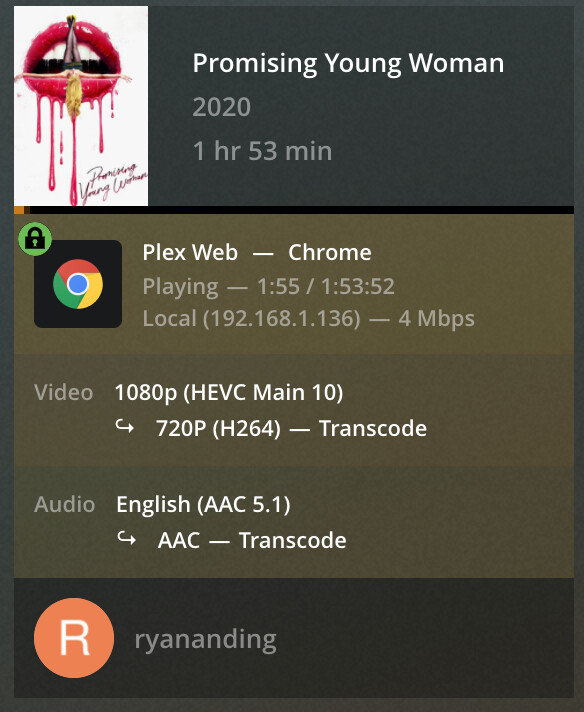
In Plex, Enable HDR Tone Mapping and Use Hardware Acceleration When Available are enabled. Enabling Hardware Accelerated Video Encoding causes video playback to buffer but never start playing, to be expected as this isn’t supported by Intel iGPUs according to all of you smart people. I don’t have any HDR content, so I would think that setting shouldn’t make a difference. The content I’ve been testing with is H265 1080p, lots of H264 1080p as well but haven’t been using that to test. Testing has been done with 720p 4mb transcodes in the web player in Chrome.
Regardless of Plex transcoder setting, I’ve seen the (hw) designation all of one time, and just today with the G6400, this over weeks of playing with this. With software transcoding on the J4105-ITX, even on the LAN, Plex would buffer every few minutes to the point that streaming from Plex wasn’t enjoyable. I haven’t had enough experience with the G6400 to comment on software transcoding yet.
If I could get Quick Sync hardware transcoding working with either hardware solution, I’d be happy. If I could get it working with the J4105-ITX and it could handle four 1080p streams consistently, I’d be even happier. I’m open to exchanging motherboards and moving up to a i3-10100, but from everything I’ve read, transcoding works great once Quick Sync is functioning, and even the J4105 should be able to handle a few simultaneous 1080p streams.
---
### Author:  [@OttoKerner](https://forums.plex.tv/u/OttoKerner)
#### Post date: [January 16, 2021, 7:27am UTC](https://forums.plex.tv/t/trouble-enabling-quick-sync-hardware-transcoding-in-windows-10/678720/2 "2021-01-16T07:27:32Z")
Some mainboards require a monitor to be connected to the output of the integrated graphics card.
There are “dummy plugs” available, which simulate a monitor.
Do you see the Intel graphics adapter in the Windows hardware manager? If not, it isn’t properly enabled yet in the BIOS.
If you see the device, download the fitting device driver from [Intel.com](http://Intel.com)
---
### Author:  [@ryananding](https://forums.plex.tv/u/ryananding)
#### Post date: [January 16, 2021, 7:46am UTC](https://forums.plex.tv/t/trouble-enabling-quick-sync-hardware-transcoding-in-windows-10/678720/3 "2021-01-16T07:46:23Z")
Thanks for the thoughts. I do have one of those HDMI dongles plugged in. Intel UHD Graphics 610 shows up under display adapters in the Device Manager. I just used the Intel Driver Assistant to grab the correct display driver update from Intel earlier today. No change with hardware transcoding.
---
### Author:  [@OttoKerner](https://forums.plex.tv/u/OttoKerner)
#### Post date: [January 16, 2021, 7:51am UTC](https://forums.plex.tv/t/trouble-enabling-quick-sync-hardware-transcoding-in-windows-10/678720/4 "2021-01-16T07:51:34Z")
Is your Plex server signed in to the same Plex account which you are using to post in these forums?
When did you last time perform a proper reboot of the server machine? (Shutting down and switching back on is not the same)
---
### Author:  [@ryananding](https://forums.plex.tv/u/ryananding)
#### Post date: [January 16, 2021, 7:59am UTC](https://forums.plex.tv/t/trouble-enabling-quick-sync-hardware-transcoding-in-windows-10/678720/5 "2021-01-16T07:59:10Z")
Yeah, same account.
I actually just tried uninstalling and reinstalling Plex, without completely clearing out the registry, and did a warm reboot after the uninstall. Haven’t done a cold boot since this morning when I was in the BIOS, before updating the display driver in the afternoon.
---
### Author:  [@ryananding](https://forums.plex.tv/u/ryananding)
#### Post date: [January 16, 2021, 8:10am UTC](https://forums.plex.tv/t/trouble-enabling-quick-sync-hardware-transcoding-in-windows-10/678720/6 "2021-01-16T08:10:27Z")
Cold boot done, pulled the power for a few seconds. No change.
---
### Author:  [@pl\_5309](https://forums.plex.tv/u/pl_5309)
#### Post date: [January 16, 2021, 11:39am UTC](https://forums.plex.tv/t/trouble-enabling-quick-sync-hardware-transcoding-in-windows-10/678720/7 "2021-01-16T11:39:15Z")
Plex can’t access the HW if you start it as a service or initially login via RDP.
---
### Author:  [@ryananding](https://forums.plex.tv/u/ryananding)
#### Post date: [January 16, 2021, 12:18pm UTC](https://forums.plex.tv/t/trouble-enabling-quick-sync-hardware-transcoding-in-windows-10/678720/8 "2021-01-16T12:18:40Z")
One of those two is it. I use AlwaysUp to autologon at startup, and I generally login with RDP. Disabling autologon and using Chrome Remote Desktop initially is now allowing hardware transcoding on four streams as I type this.
Thank you both for the input. This one piece is soooo nuanced. I looked at so many variables while trying to get this working.
---
### Author:  [@ryananding](https://forums.plex.tv/u/ryananding)
#### Post date: [January 16, 2021, 7:02pm UTC](https://forums.plex.tv/t/trouble-enabling-quick-sync-hardware-transcoding-in-windows-10/678720/9 "2021-01-16T19:02:17Z")
I reinstalled the J4105-ITX and it can now handle three concurrent 1080p\>720p transcodes pretty well. Thanks again!
---
### Author:  [@system](https://forums.plex.tv/u/system)
#### Post date: [April 16, 2021, 7:02pm UTC](https://forums.plex.tv/t/trouble-enabling-quick-sync-hardware-transcoding-in-windows-10/678720/10 "2021-04-16T19:02:23Z")
This topic was automatically closed 90 days after the last reply. New replies are no longer allowed.