- 1x01 - .mkv
---
### Author:  [@OttoKerner](https://forums.plex.tv/u/OttoKerner)
#### Post date: [April 14, 2022, 11:02am UTC](https://forums.plex.tv/t/tv-show-not-listed-in-plex/788204/7 "2022-04-14T11:02:25Z")
It’s still incorrect. What you have there is Kodi-style. Plex is not Kodi.
Please take a look at the above linked article.
You can tell your software the correct way to name the files.
---
### Author:  [@Pdog\_UK](https://forums.plex.tv/u/Pdog_UK)
#### Post date: [April 14, 2022, 11:57am UTC](https://forums.plex.tv/t/tv-show-not-listed-in-plex/788204/8 "2022-04-14T11:57:32Z")
Hi OttoKerner, thanks again for replying. Apologies it was the formatting of the post. I have removed the brackets, this is the path that I have:
Confirmed path:
Drive:\TV\Show Name\Season 1\Show Name - 1x01 - Episode Title.mkv
This works fine for all other downloads.
Thanks
P
---
### Author:  [@dbirch](https://forums.plex.tv/u/dbirch)
#### Post date: [April 14, 2022, 12:21pm UTC](https://forums.plex.tv/t/tv-show-not-listed-in-plex/788204/9 "2022-04-14T12:21:01Z")
Can you perform a scan and post your logs?
---
### Author:  [@Pdog\_UK](https://forums.plex.tv/u/Pdog_UK)
#### Post date: [April 14, 2022, 12:27pm UTC](https://forums.plex.tv/t/tv-show-not-listed-in-plex/788204/10 "2022-04-14T12:27:20Z")
Sure, scan completed, logs attached.
[Plex Media Server Logs\_2022-04-14\_13-26-05.zip](https://forums.plex.tv/uploads/short-url/tlB2TN43nDr4Ca3JEjLIfyJdkvn.zip) (4.9 MB)
---
### Author:  [@OttoKerner](https://forums.plex.tv/u/OttoKerner)
#### Post date: [April 14, 2022, 12:32pm UTC](https://forums.plex.tv/t/tv-show-not-listed-in-plex/788204/11 "2022-04-14T12:32:21Z")
Knowing which actual tv show this is about would definitely help.
---
### Author:  [@Pdog\_UK](https://forums.plex.tv/u/Pdog_UK)
#### Post date: [April 14, 2022, 12:34pm UTC](https://forums.plex.tv/t/tv-show-not-listed-in-plex/788204/12 "2022-04-14T12:34:28Z")
Ah Jeez, I knew this would eventually come up. Please don’t judge 🙂
“The Kardashians”
[https://thetvdb.com/series/the-kardashians](https://thetvdb.com/series/the-kardashians)
---
### Author:  [@OttoKerner](https://forums.plex.tv/u/OttoKerner)
#### Post date: [April 14, 2022, 12:45pm UTC](https://forums.plex.tv/t/tv-show-not-listed-in-plex/788204/13 "2022-04-14T12:45:03Z")
> [@Pdog\_UK](#):
>
> Please don’t judge
Too late 😃
Are you downloading directly into the folder I:\TV ? This log file excerpt appears to indicate it.
```auto
r 14, 2022 09:56:28.196 [9068] DEBUG - Scanner: Processing directory I:\TV\The Kardashians (parent: yes)
Apr 14, 2022 09:56:28.197 [9068] DEBUG - Skipping over directory 'The Kardashians', as nothing has changed; removing 0 media items from map.
Apr 14, 2022 09:56:28.198 [9068] DEBUG - Scanner: Processing directory I:\TV\The Kardashians\Season 1 (parent: yes)
Apr 14, 2022 09:56:28.199 [9068] DEBUG - File 'I:\TV\The Kardashians\Season 1\The Kardashians - 1x01 - Burn Them All to the F-cking Ground.mkv' changed size, can't skip.
```
If so, don’t. Always use a “staging” folder outside of the library until at least the episode is completed and the renaming has been performed.
Disable automatic library scans in Plex and let your downloader software trigger a library scan.
On top of that: this show is brand-new. Its first episode has been aired just now.
Metadata have only just now been added to the metadata sites:
[https://www.themoviedb.org/tv/154521-the-kardashians/changes](https://www.themoviedb.org/tv/154521-the-kardashians/changes)
Allow at least 48 hours for metadata changes to reach the Plex proxy servers.
---
### Author:  [@Pdog\_UK](https://forums.plex.tv/u/Pdog_UK)
#### Post date: [April 14, 2022, 2:00pm UTC](https://forums.plex.tv/t/tv-show-not-listed-in-plex/788204/14 "2022-04-14T14:00:06Z")
Haha, knew that was coming. Thanks for the info.
Sonarr is using a separate folder (not the I: drive) the logs I think are showing that, as I attempted the [Plex dance](https://forums.plex.tv/t/the-plex-dance/197064), copied the whole folder back in and performed a scan.
I have disabled:
Scan my library automatically
Scan my library periodically
Is that what you mean?
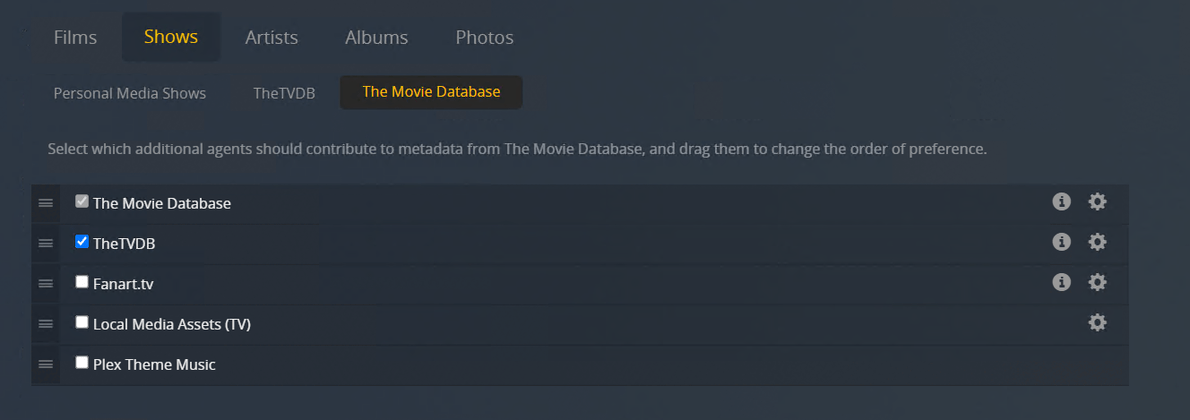
I’ve removed the folder and deleted it from Sonarr. Re-attached the logs.
In terms of the Agents do they look good?
Is there any way I get the show visible in Plex quicker than 48 hours? I have some family members (not me 🙂 ) that would like to watch it sooner.

[Plex Media Server Logs\_2022-04-14\_14-59-02.zip](https://forums.plex.tv/uploads/short-url/nhoYZo8P6Keh9wgn5OiRd3lPnrI.zip) (5.1 MB)
---
### Author:  [@OttoKerner](https://forums.plex.tv/u/OttoKerner)
#### Post date: [April 14, 2022, 2:06pm UTC](https://forums.plex.tv/t/tv-show-not-listed-in-plex/788204/15 "2022-04-14T14:06:11Z")
If you have “the other Kardshians show” in your library, take a look at the [Plex media info](https://support.plex.tv/hc/en-us/articles/201998867-Investigate-Media-Information-and-Formats) of S01E01. Is there the path to the newer show appearing additionally to the existing file? If so, this would be a mismatch.
* * *
I recommend you to convert the library to use the newer agent. It can use far more precise “matching hints”, so mismatches are pretty much impossible. [Migrating a TV library to use the new Plex TV Series Agent/Scanner | Plex Support](https://support.plex.tv/articles/migrating-a-tv-library-to-use-the-new-plex-tv-series-agent-scanner/)
If you’re prefering the episode ordering of TheTVDB over that of TheMovieDB, you can set the appropriate preference to “TheTVDB” in the properties of the library. (only available after the conversion)
---
### Author:  [@Pdog\_UK](https://forums.plex.tv/u/Pdog_UK)
#### Post date: [April 14, 2022, 2:25pm UTC](https://forums.plex.tv/t/tv-show-not-listed-in-plex/788204/16 "2022-04-14T14:25:25Z")
Very interesting, wasn’t aware of the newer agent. I will look into this.
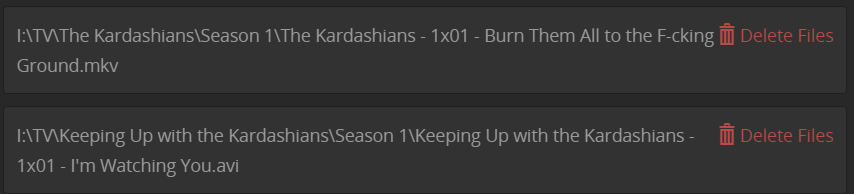
I checked “The Other Kardashians” show and episode S01E01 and you’re right. Both paths are listed. Original and new show.
_If you’re prefering the episode ordering of TheTVDB over that of TheMovieDB, you can set the appropriate preference to “TheTVDB” in the properties of the library. (only available after the conversion)_
EDIT:
Is there a way of fixing the mismatch, with the new show not appearing
Thanks again for the help so far.
I’ve switched to "TheMovieDB and refreshed the Library and Metadata
---
### Author:  [@dbirch](https://forums.plex.tv/u/dbirch)
#### Post date: [April 14, 2022, 3:16pm UTC](https://forums.plex.tv/t/tv-show-not-listed-in-plex/788204/17 "2022-04-14T15:16:05Z")
Yeah, at the show level you can split the match and then fix the match
---
### Author:  [@Pdog\_UK](https://forums.plex.tv/u/Pdog_UK)
#### Post date: [April 14, 2022, 3:17pm UTC](https://forums.plex.tv/t/tv-show-not-listed-in-plex/788204/18 "2022-04-14T15:17:13Z")
Thanks, upgraded the library as per OttoKerner’s post. Just trying again now.
Still the same, seems i’ll have to wait until it has updated.
[Plex Media Server Logs\_2022-04-14\_16-19-36.zip](https://forums.plex.tv/uploads/short-url/5ZQnydt3qCnl7mxAV0YAWceDlrN.zip) (8.1 MB)
---
### Author:  [@dbirch](https://forums.plex.tv/u/dbirch)
#### Post date: [April 14, 2022, 3:38pm UTC](https://forums.plex.tv/t/tv-show-not-listed-in-plex/788204/19 "2022-04-14T15:38:55Z")
At the show level you will need to split them, and fix match on the wrong one
---
### Author:  [@Pdog\_UK](https://forums.plex.tv/u/Pdog_UK)
#### Post date: [April 14, 2022, 4:15pm UTC](https://forums.plex.tv/t/tv-show-not-listed-in-plex/788204/20 "2022-04-14T16:15:05Z")
Thanks, is there a guide for that? Never done that before
[Next page](https://forums.plex.tv/t/tv-show-not-listed-in-plex/788204.md?page=2)