# TV shows episodes mixed
**URL:** https://forums.plex.tv/t/tv-shows-episodes-mixed/611829
**Category:** General Discussions
**Created:** [July 8, 2020, 11:10pm UTC](https://forums.plex.tv/t/tv-shows-episodes-mixed/611829 "2020-07-08T23:10:11Z")
**Posts on this page:** 16
**Page:** 1
### Author:  [@Daisuke](https://forums.plex.tv/u/Daisuke)
#### Post date: [July 8, 2020, 11:10pm UTC](https://forums.plex.tv/t/tv-shows-episodes-mixed/611829/1 "2020-07-08T23:10:11Z")
Hi,
I added a new TV series to Plex 1.19.4.2935, The episodes are displayed properly into TVDB. However, in Plex, they are all mangled. I tried to re-match and clear the metadata, delete the directory and re-create it again, same issue.
---
### Author:  [@BigWheel](https://forums.plex.tv/u/BigWheel)
#### Post date: [July 8, 2020, 11:17pm UTC](https://forums.plex.tv/t/tv-shows-episodes-mixed/611829/2 "2020-07-08T23:17:20Z")
what folder do you have set for your library?
---
### Author:  [@tom80H](https://forums.plex.tv/u/tom80H)
#### Post date: [July 8, 2020, 11:17pm UTC](https://forums.plex.tv/t/tv-shows-episodes-mixed/611829/3 "2020-07-08T23:17:48Z")
Rules of Plex:
1. Stick with the naming conventions
2. Stick with the naming conventions
3. Stick with the naming conventions
[https://support.plex.tv/articles/naming-and-organizing-your-tv-show-files/](https://support.plex.tv/articles/naming-and-organizing-your-tv-show-files/)
😉
Naming should be like this:
```auto
TV Shows <- the folder linked by your Plex tv show library
Warrior Nun
Season 01
Warrior Nun - s01e01 - Psalm 465.mkv
Warrior Nun - s01e02 - Proverbs 3125.mkv
Warrior Nun - s01e03.mkv <- the episode names are not really necessary for Plex to pick the files up
Warrior Nun - s01e04.mkv
...
Warrior Nun - s01e10 - Revelation 210.mkv
```
#
As Plex is already “aware” of those files and has cached some fingerprint you might need to perform a “[Plex Dance](https://forums.plex.tv/t/the-plex-dance/197064)” for the fixed file names to take effect:
1. **move the files outside the folder of monitored by Plex**
_in Finder_
2. **scan library files**
_from the Plex library context menu: `...` \> `Scan Library Files`_
3. **empty trash**
_from the Plex library context menu: `...` \> `Manage Library` \> `Empty Trash`_
4. **Clean bundles**
_from the Plex Settings: `Settings` \> `[Server Name]` \> `Manage` \> `Troubleshooting` \> `Clean Bundles`_
5. **return the files with their fixed names/organization**
_in Finder_
6. **scan library files**
_same as #2_
---
### Author:  [@Daisuke](https://forums.plex.tv/u/Daisuke)
#### Post date: [July 8, 2020, 11:20pm UTC](https://forums.plex.tv/t/tv-shows-episodes-mixed/611829/5 "2020-07-08T23:20:56Z")
I run Plex on my FreeNAS 11, all other TV series and movies are properly listed. This is the only show it gives me trouble.
---
### Author:  [@BigWheel](https://forums.plex.tv/u/BigWheel)
#### Post date: [July 8, 2020, 11:21pm UTC](https://forums.plex.tv/t/tv-shows-episodes-mixed/611829/6 "2020-07-08T23:21:01Z")
As @tom80H mentioned above which i am blind and didn’t notice, the naming is very off. the two sets of numbers in the file names is probably giving it trouble since it does not have the expected. SXXEXX like in the example he shows
---
### Author:  [@BigWheel](https://forums.plex.tv/u/BigWheel)
#### Post date: [July 8, 2020, 11:23pm UTC](https://forums.plex.tv/t/tv-shows-episodes-mixed/611829/7 "2020-07-08T23:23:55Z")
like your Proverbs one. it probably thinks is season 31episode 25
---
### Author:  [@Daisuke](https://forums.plex.tv/u/Daisuke)
#### Post date: [July 8, 2020, 11:25pm UTC](https://forums.plex.tv/t/tv-shows-episodes-mixed/611829/8 "2020-07-08T23:25:37Z")
Hi @tom80H that’s where I have linked the TV Shows directory. I’m going to try your suggestions but I do not plan to rename my episodes from current structure I posted above, I’ve been using them like that for years with zero issues. This is the first time I see this happening.
TV Shows \> Warrior Nun (2020) \> Season 01 \> 01. Psalm 465.mkv
Edit: It might be what @BigWheel said? ^^
That sucks, I have to rename every show. 😃
---
### Author:  [@tom80H](https://forums.plex.tv/u/tom80H)
#### Post date: [July 8, 2020, 11:27pm UTC](https://forums.plex.tv/t/tv-shows-episodes-mixed/611829/9 "2020-07-08T23:27:16Z")
That’s your call.
That being said… without fixing your file names you won’t see any result / fix to your situation.
---
### Author:  [@BigWheel](https://forums.plex.tv/u/BigWheel)
#### Post date: [July 8, 2020, 11:27pm UTC](https://forums.plex.tv/t/tv-shows-episodes-mixed/611829/10 "2020-07-08T23:27:19Z")
shooting a gun straight in the air and being lucky does not mean you will never get hit.
---
### Author:  [@BigWheel](https://forums.plex.tv/u/BigWheel)
#### Post date: [July 8, 2020, 11:29pm UTC](https://forums.plex.tv/t/tv-shows-episodes-mixed/611829/11 "2020-07-08T23:29:18Z")
> [@Daisuke](#):
>
> TV Shows \> Warrior Nun (2020) \> Season 01 \> 01. Psalm 465.mkv
at minimum stick the proper notation at the beginning of the file names for season and episode. such as `S01E01 Psalm 465.mkv`
---
### Author:  [@Daisuke](https://forums.plex.tv/u/Daisuke)
#### Post date: [July 8, 2020, 11:30pm UTC](https://forums.plex.tv/t/tv-shows-episodes-mixed/611829/12 "2020-07-08T23:30:18Z")
Will do, I will let you guys know if it fixed the issue. Thank you!
---
### Author:  [@Daisuke](https://forums.plex.tv/u/Daisuke)
#### Post date: [July 9, 2020, 12:36am UTC](https://forums.plex.tv/t/tv-shows-episodes-mixed/611829/13 "2020-07-09T00:36:04Z")
@BigWheel @tom80H renaming the file with this format fixed the issue:
```auto
TV Shows > Warrior Nun (2020) > Season 01 > S01E01. Psalm 465.mkv
```
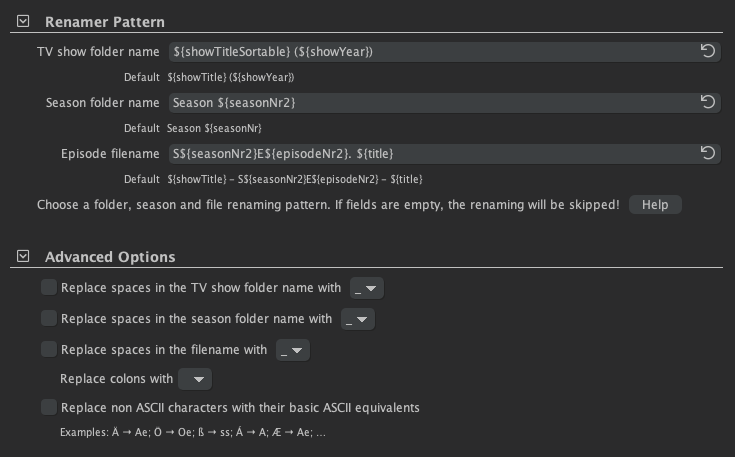
Thank you for the tip. BTW, I use tinyMediaManager to automatically rename everything, including new shows. Is a great product.
---
### Author:  [@tom80H](https://forums.plex.tv/u/tom80H)
#### Post date: [July 9, 2020, 1:27am UTC](https://forums.plex.tv/t/tv-shows-episodes-mixed/611829/14 "2020-07-09T01:27:57Z")
Great that it’s working for you 😃
If you want to be 100% compliant, add a `${showTitle}` before the sXXeYY pattern… but if it’s already working, that might be optional for now 😉
---
### Author:  [@Daisuke](https://forums.plex.tv/u/Daisuke)
#### Post date: [July 9, 2020, 1:41am UTC](https://forums.plex.tv/t/tv-shows-episodes-mixed/611829/15 "2020-07-09T01:41:37Z")
I’ll stick with the current pattern, as it works. Honestly, I never had any problems until now, do to the weird episode numbers.
My naming convention explained:
TV SHOWS
Folder name:
```auto
${showTitleSortable} (${showYear})
```
I want to be able to sort the shows, like Plex. Plex removes automatically the `The` part. For example, the above naming convention will set title to `Americans, The (2013)` and Plex will always find it.
Filename:
```auto
S${seasonNr2}E${episodeNr2}. ${title}
```
I had cases where the same episode is split in 2 parts, for example House `S06E01. Broken.mkv` and `S06E02. Broken, Part 2.mkv`. The TVDB database could not see the two episodes and would rename them both the same name. Because I had the title inserted, it would rename the first episode and second would leave it untouched. So then I would be able to see which episode is which.
MOVIES
Folder name:
```auto
${titleSortable} (${year})
```
Same logic, I want the titles sortable.
Filename:
```auto
${title} (${year})
```
The file name however, I want it to contain the original movie title.
Hope this helps someone, been doing this naming convention for over 10 years.
---
### Author:  [@JuiceWSA](https://forums.plex.tv/u/JuiceWSA)
#### Post date: [July 9, 2020, 1:34pm UTC](https://forums.plex.tv/t/tv-shows-episodes-mixed/611829/16 "2020-07-09T13:34:05Z")
You need to tell your naming program to do it like Plex does it - 'cause your ‘system’ is dead wrong…
Then you need to do this - if Plex Sorting bunches up your panties:
> [@How to not ignore words like "the" when sorting?](https://forums.plex.tv/t/how-to-not-ignore-words-like-the-when-sorting/148357/35):
>
> There is now a hidden server preference where you can remove the default The, A etc from the ‘ignore’ list (or add your own prefixes for your local language). ArticleStrings
Then do the old [Plex Dance](https://forums.plex.tv/t/the-plex-dance/197064) - 'cause the above only works with ‘new’ items:
> [@The Plex Dance ™](https://forums.plex.tv/t/the-plex-dance/197064):
>
> The purpose of this is to remove all cached metadata and xml data for an item that Plex usually keeps. This helps when you want to “start from scratch” for particular item move all files for the media item out of the directory your Library is looking at, so Plex will not “see” it anymore scan the library library (to detect changes) empty trash clean bundles (in menu next to server name, when accessed under ‘More’) double check naming schema and move files back scan the library Support articl…
… and yes - it’s always easier doing it right the first time - but if that’s no longer an option - do it right the second time… at least.
---
### Author:  [@system](https://forums.plex.tv/u/system)
#### Post date: [October 7, 2020, 1:34pm UTC](https://forums.plex.tv/t/tv-shows-episodes-mixed/611829/17 "2020-10-07T13:34:07Z")
This topic was automatically closed 90 days after the last reply. New replies are no longer allowed.