# Two Plex Servers, One LAN, Varying Performance/Experience
**URL:** https://forums.plex.tv/t/two-plex-servers-one-lan-varying-performance-experience/872968
**Category:** Plex Media Server
**Tags:** server-windows, fire-tv, roku, samsung-smart-hub
**Created:** [March 23, 2024, 1:09pm UTC](https://forums.plex.tv/t/two-plex-servers-one-lan-varying-performance-experience/872968 "2024-03-23T13:09:19Z")
**Posts on this page:** 9
**Page:** 1
### Author:  [@Hammerite](https://forums.plex.tv/u/Hammerite)
#### Post date: [March 23, 2024, 1:09pm UTC](https://forums.plex.tv/t/two-plex-servers-one-lan-varying-performance-experience/872968/1 "2024-03-23T13:09:19Z")
Server Version#: 1.32.8.7639
Player Version#: Various AFTV’s, Roku’s and Samsung Smarthubs (experience is the same)
Looking for a little assistance please from those that are much more knowledgeable on such matters than myself.
I have two Zotac ZBOX PC’s on my LAN, one is a dedicated Plex Server running on an i7 and another is a PC that’s running several apps where Plex is technically
running as a backup and not actively used, day in day out. Both PC’s are connected to a QNAP TS-419PII NAS via gigabit ethernet via 24 port Netgear Switch and Draytek Vigor 2927 router, both ‘servers’ are running Plex version 1.32.8.7639. The Plex settings on both servers are identical barring the activation of remote access, which is only enabled on the Main Plex Server, and both are running the same AV and Firewall software (Comodo).
**THE ISSUE**
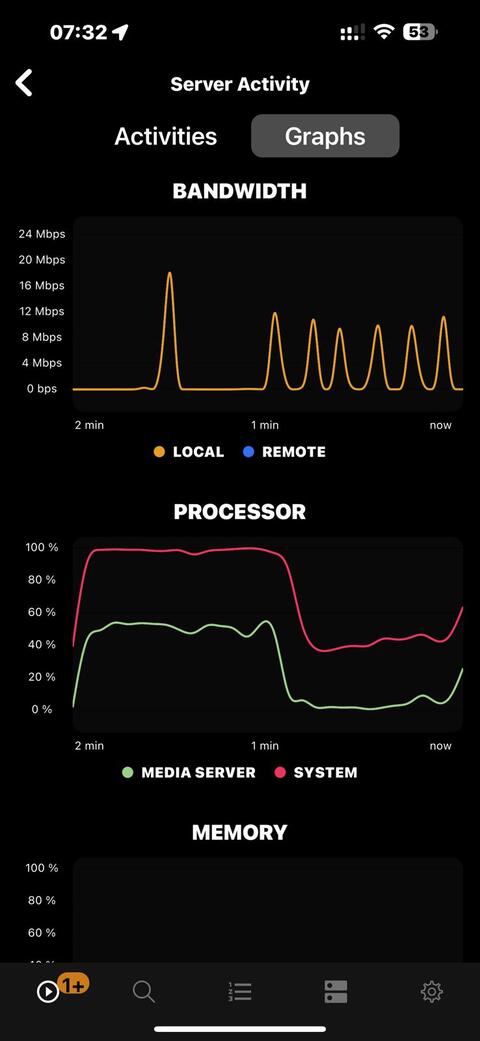
For over a year now the i7 struggles to play certain file types, mainly transcoding HD content, HEVC and H265 (see media example below), buffering every 15 - 30 seconds (with high CPU utilisation visible via Plex Dash), where as the i5 (when I switch to it) will play the same file without any problems (or visible PC resource consumption via Plex Dash). For example yesterday evening I was trying to watch the file below on the main server and it kept crapping out after playing fine for about 5 - 10 mins, but when I switched to the backup server it played without any issues. I would have thought that the i7 would have been able to handle playback better than the i5, especially given that as the i5 has several other apps running in the background.
I was planning on uninstalling and re-installing Plex Media Server on the i7, or even carrying our a fresh windows install, but wanted to check in here first in case anyone had any suggestions to save me the hassle of a complete OS rebuild or switching servers around. I have the logs from the server, but I’m not sure what information to include as there’s a lot of it.
Any pointers would be appreciated.
**MAIN PLEX SERVER SPEC**
Processor Intel(R) Core™ i7-4770T CPU @ 2.50GHz
Installed RAM 16.0 GB
System type Windows 10 - 64-bit operating system, x64-based processor (Win 10 Pro)
HDD Crucial CT51MX100SSD1
**BACKUP SERVER SPEC**
Processor Intel(R) Core™ i5-4570T CPU @ 2.90GHz 2.90 GHz
Installed RAM 16.0 GB (15.4 GB usable)
System type 64-bit operating system, x64-based processor
System type Windows 10 - 64-bit operating system, x64-based processor (Win 10 Enterprise)
HDD Crucial CT51MX100SSD1
**MEDIA DETAILS**
M:\Current Film\Predator (1987).mkv
Media
Duration 1:46:34
Bitrate 1294 kbps
Width 1280
Height 688
Aspect Ratio 1.85
Video Resolution 720p
Container MKV
Video Frame Rate 24p
Audio Profile lc
Video Profile main 10
Part
Duration 1:46:34
File Predator (1987).mkv
Size 989.32 MB
Audio Profile lc
Container MKV
Video Profile main 10
Codec HEVC
Bitrate 1165 kbps
Language English
Language Tag en
Bit Depth 10
Chroma Location left
Chroma Subsampling 4:2:0
Coded Height 688
Coded Width 1280
Color Range tv
Frame Rate 23.976 fps
Height 688
Level 3.1
Pixel Aspect Ratio 172:173
Profile main 10
Ref Frames 1
Title Predator.1987.REMASTERED.720p.BluRay.999MB.HQ.x265.10bit
Width 1280
Display Title 720p (HEVC Main 10)
Extended Display Title - Predator.1987.REMASTERED.720p.BluRay.999MB.HQ.x265.10bit (720p HEVC Main 10)
Codec AAC
Channels 2
Bitrate 128 kbps
Language English
Language Tag en
Audio Channel Layout stereo
Profile lc
Sampling Rate 48000 Hz
Title Predator.1987.REMASTERED.720p.BluRay.999MB.HQ.x265.10bit
Display Title English (AAC Stereo)
Extended Display Title - Predator.1987.REMASTERED.720p.BluRay.999MB.HQ.x265.10bit (English AAC Stereo)
Codec SRT
Language English
Language Tag en
Title Predator.1987.REMASTERED.720p.BluRay.999MB.HQ.x265.10bit
Display Title English (SRT)
Extended Display Title Predator.1987.REMASTERED.720p.BluRay.999MB.HQ.x265.10bit (English SRT)
---
### Author:  [@pl\_5309](https://forums.plex.tv/u/pl_5309)
#### Post date: [March 23, 2024, 6:36pm UTC](https://forums.plex.tv/t/two-plex-servers-one-lan-varying-performance-experience/872968/2 "2024-03-23T18:36:20Z")
Unless you can put an Nvidia RTX or Intel Arc xe card in them then you need to be very choosy with your media.
That or upgrade the server box to a 11th Gen or later.
---
### Author:  [@Hammerite](https://forums.plex.tv/u/Hammerite)
#### Post date: [March 23, 2024, 8:37pm UTC](https://forums.plex.tv/t/two-plex-servers-one-lan-varying-performance-experience/872968/3 "2024-03-23T20:37:46Z")
Hmmm…but why would certain media play smoothly on the i5, but not the i7when they are pretty identical from a spec perspective other than the processor? Surely the media would cause both PC’s to struggle?
---
### Author:  [@pl\_5309](https://forums.plex.tv/u/pl_5309)
#### Post date: [March 23, 2024, 9:54pm UTC](https://forums.plex.tv/t/two-plex-servers-one-lan-varying-performance-experience/872968/4 "2024-03-23T21:54:40Z")
It could of gotten different results when it was analyzed or missing that step. The i5 could have faster RAM. Untill you compare the MDE lines from both servers (Plex Media Server.log) you won’t know if one is making different decisions.
---
### Author:  [@Hammerite](https://forums.plex.tv/u/Hammerite)
#### Post date: [March 23, 2024, 10:51pm UTC](https://forums.plex.tv/t/two-plex-servers-one-lan-varying-performance-experience/872968/5 "2024-03-23T22:51:26Z")
So the suggestion is to play the same media on both servers, for the same duration (say 10 mins) whilst scrapping the logs and the post here?
---
### Author:  [@FordGuy61](https://forums.plex.tv/u/FordGuy61)
#### Post date: [March 23, 2024, 11:15pm UTC](https://forums.plex.tv/t/two-plex-servers-one-lan-varying-performance-experience/872968/6 "2024-03-23T23:15:05Z")
You want to compare apples to apples.
Ensure both servers are configured for debug, not verbose, level [server logs.](https://support.plex.tv/articles/200250417-plex-media-server-log-files/)
Settings → _Server\_Name_ → General + Show Advanced

Specifically choose the Intel graphics in Settings → Transcoder. Don’t use Auto.
Restart Plex Media Server (rolls the logs, captures PMS startup sequence)
With no-one else streaming, re-create the problem. Using the same client, play the same media file from both servers. Do not use Plex Web/Desktop/HTPC on the server from where the media is streaming (to avoid conflicts with PMS). Make sure you choose the same audio track. Do not enable subtitles. Let it go until the problem is re-created. If it occurs immediately, no need to let it run 10 minutes. One or two is sufficient.
You can monitor playback via [Plex Dashboard](https://support.plex.tv/articles/200871837-status-and-dashboard/#toc-1) → Now Playing + Expanded View. It will show if the transcode is using the CPU or the GPU. The second graph will show CPU, but not GPU, utilization.
Stop playback, pull logs (Settings → Troubleshooting), upload the zip files to the thread.
The HD4000 graphics in 4th gen CPUs cannot decode HEVC video, so the decode portion of an HEVC transcode will use the CPU. The encode to H.264 should use the GPU if enabled in the server settings.
The Plex logs will not capture CPU utilization. They will show if the GPU is used for either the decode or encode portion of the transcode.
---
### Author:  [@Hammerite](https://forums.plex.tv/u/Hammerite)
#### Post date: [March 24, 2024, 8:06am UTC](https://forums.plex.tv/t/two-plex-servers-one-lan-varying-performance-experience/872968/7 "2024-03-24T08:06:50Z")
Hey FordGuy61,
Thanks for the detailed step by step instructions, which were made earlier this morning.
Playback on the i7 started to the buffer (badly) at the 2 - 2.30 mins mark, the i5 was left to play for the same duration (a little longer) before capturing the logs from that server. I also took screen grabs from Plex Dash (IOS Version, whilst watching the content) for both servers at the time that issue manifested itself on the i7 and at the same point on the i5.
[i7 - Plex Media Server Logs\_2024-03-24\_07-42-19.zip](https://forums.plex.tv/uploads/short-url/7038tfakv8ONt9p4bV8buir92ZG.zip) (4.9 MB)

[i5 - Plex Media Server Logs\_2024-03-24\_07-53-53.zip](https://forums.plex.tv/uploads/short-url/6unxdFJWExWGv425UyArYYSKUO7.zip) (2.2 MB)
Hopefully I’ve captured everything that was required, and posted the information here correctly.
Thanks again.
---
### Author:  [@Hammerite](https://forums.plex.tv/u/Hammerite)
#### Post date: [April 2, 2024, 8:06am UTC](https://forums.plex.tv/t/two-plex-servers-one-lan-varying-performance-experience/872968/8 "2024-04-02T08:06:52Z")
Hey @FordGuy61 just wondering if you had an opportunity to review the logs that I posted?
Also, and not sure if this has any bearing, but I ran resource monitor on the i7 when it was playing the test file and that was showing a CPU utilisation of just 5% compared to the 100% being reported in Plex Dash, the bandwidth being used also looks very high between the i5 and the i7.
---
### Author:  [@system](https://forums.plex.tv/u/system)
#### Post date: [July 1, 2024, 8:07am UTC](https://forums.plex.tv/t/two-plex-servers-one-lan-varying-performance-experience/872968/9 "2024-07-01T08:07:35Z")
This topic was automatically closed 90 days after the last reply. New replies are no longer allowed.