### Author:  [@edified](https://forums.plex.tv/u/edified)
#### Post date: [November 8, 2023, 7:44pm UTC](https://forums.plex.tv/t/ubuntu-plex-media-server-ignore-gpu/859043/1 "2023-11-08T19:44:25Z")
I am thinking of buying an AMD 6400 GPU for the computer that my Plex Media Server is running on. However, I don’t expect it to work with Plex Media Server. Currently I have an Intel i5-10400 with Quick Sync Video – which I am using for Plex Transcodes. However, I read a comment on r/Plex saying that if I add an AMD video card, I might lose Plex’s ability to use Quick Sync Video (!!)
I just want to know if there is a supported way to have Plex completely IGNORE the AMD 6400 GPU, and yet still use the i5-10400’s QSV features?
TL;DR: I want to add an AMD 6400 GPU to the system and have Plex completely ignore the discrete GPU while also still being able to use intel CPU QSV. Is it possible?
Server Version#: 1.32.6.7557 – But I can easily update to the latest if need be, just haven’t done it yet.
Player Version#:
\
---
### Author:  [@ChuckPa](https://forums.plex.tv/u/ChuckPa)
#### Post date: [November 8, 2023, 8:15pm UTC](https://forums.plex.tv/t/ubuntu-plex-media-server-ignore-gpu/859043/2 "2023-11-08T20:15:01Z")
In **Settings - Server - Transcoder - Show Advanced**
You can select the GPU you want to use.
---
### Author:  [@edified](https://forums.plex.tv/u/edified)
#### Post date: [November 8, 2023, 9:00pm UTC](https://forums.plex.tv/t/ubuntu-plex-media-server-ignore-gpu/859043/3 "2023-11-08T21:00:18Z")
Thank you, ChuckPa. How do I select the GPU I want to use?
Edit: oh… I see now that you said “in Settings - Server - Transcoder - Show Advanced”. I’m sorry, I didn’t see that before, not sure why.
Thanks again!
---
### Author:  [@ChuckPa](https://forums.plex.tv/u/ChuckPa)
#### Post date: [November 8, 2023, 9:43pm UTC](https://forums.plex.tv/t/ubuntu-plex-media-server-ignore-gpu/859043/4 "2023-11-08T21:43:51Z")
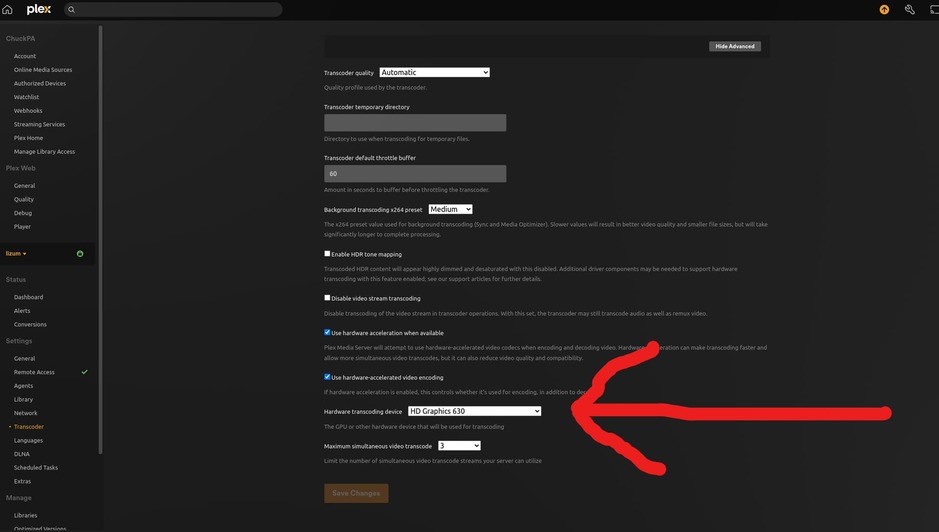
Open Plex/web
Settings - (SERVER) → Transcoder (left panel of Plex/web) → Show Advanced
Scroll down a bit and you’ll see “auto” (by default)
This is a dropdown.
Open the dropdown and select the GPU you want to use.
---
### Author:  [@system](https://forums.plex.tv/u/system)
#### Post date: [February 6, 2024, 9:44pm UTC](https://forums.plex.tv/t/ubuntu-plex-media-server-ignore-gpu/859043/5 "2024-02-06T21:44:27Z")
This topic was automatically closed 90 days after the last reply. New replies are no longer allowed.