My live Tv stopped working and when I try to re-add the tuner I now keep getting the error message ‘Unable to fetch Guide settings’.
I have reinstalled the Plex server and player and updated. Updated the HD home run, restarted everything etc but cannot get it to work?
Can anyone help?
Running Nvidia Shield server in the Uk
Server Version#: 1.18.7.2457
Player Version#: 7.29.2.16071
Tuner Make/Model: Hdhomerun Quattro
Guide/Lineup name: Uk Freeview
Using XMLTV?: No
Pleas provide me the full PMS logs after trying to setup the DVR again.
I tried again and got past the postcode but but after a long time on the next screen I got the message ‘Unable to load channel mappings’. Here’s the log it it helps Plex Media Server Logs_2020-03-23_17-31-18.zip (5.8 MB)
Are you using a reverse proxy? I’m seeing some network errors when trying to obtain the data back from Plex.
No? Just shield connected to router via ethernet and router connected to modem.
Hmm. I’m seeing references to “nginx” in your log. I also notice that you haven’t restarted PMS in a while. You might want to try that and maybe reboot all your network equipment too, just to be sure it’s not a hardware issue.
I’ve restarted evertyhting and just updated to the PMS that been released today and still nothing 
Not sure what’s going on but your server is still having issues talking back to Plex.tv to get the guide info. I also see other errors making other calls to Plex, not just for the EPG data.
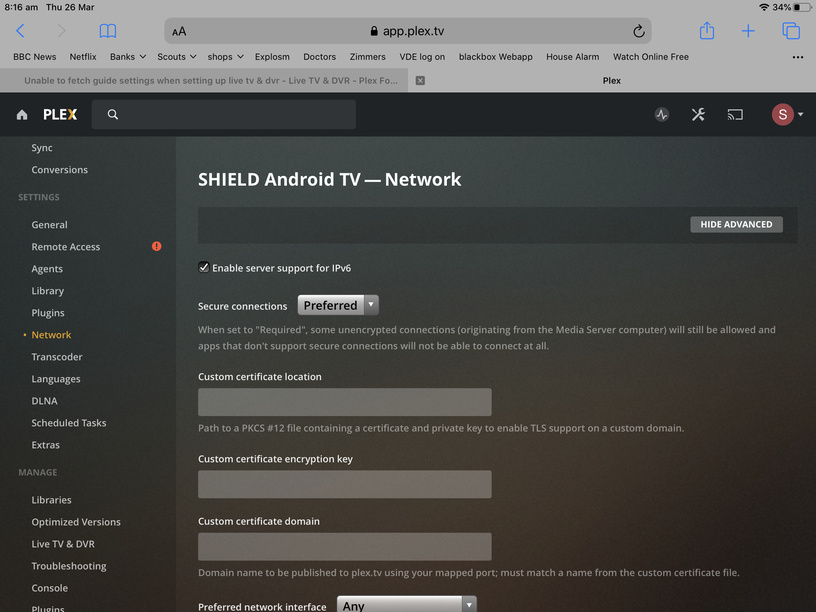
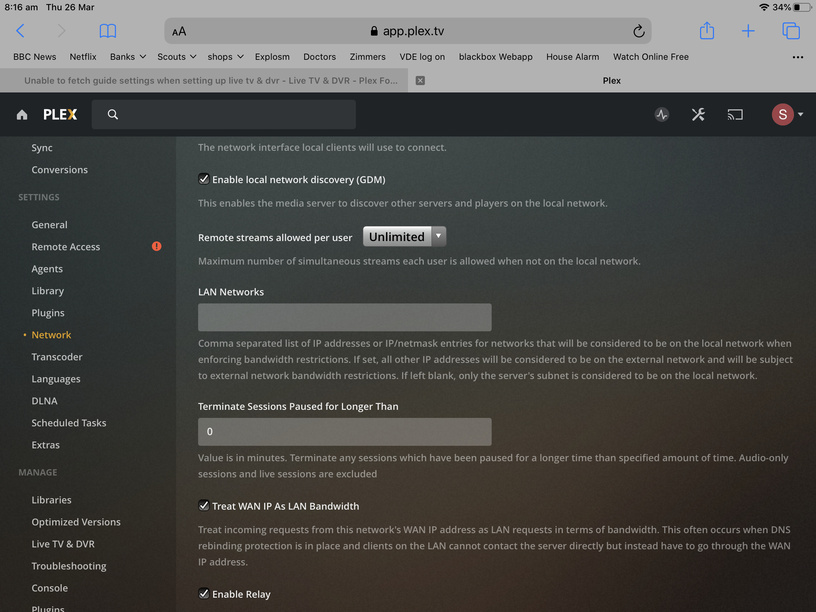
Can you provide a screenshot of the network settings page for your PMS?
First turn off the top option to enable IPv6 support. That is still a flaky feature. Next, in the “preferred network interface”, find the server’s local IP and choose that from the list. Restart PMS and try again.
There still appears to be an issue with your network. Can you describe your network setup?
I use a 3 uk mobile internet modem (huawei I homeFi plus 4g simcard) and netgear orbi for the WiFi. The PMS is running from an Nvidia shield which is connected to the Orb via Ethernet.
No VPN’s or anything, everything is just plug and play
Hmm. I have no idea how PMS reacts to running on a 4G modem. I know I’ve had issues when connecting my Shield to my phone’s hot spot. I will have to get back to you on this.
Also, the HomeFi device is also a router so you are in a double nat situation. That doesn’t affect your guide issue, but just thought I’d mention it incase you noticed that remote access wasn’t working.
Remote access works perfectly. The guide has been running on the 4G router since September. Just stopped randomly and won’t work again
I have an identical issue and very similar network setup.
Three UK 4G hotspot plugged into a gateway/server and everything then plugged into that either wired or wifi.
I have had some issues with the Three network until very recently. For about a month downloading a digital game from an xbox (often 20+GB) would refuse to start for example, while downloading an app would work. Then on the day the lockdown was announced my average speed doubled and the game downloads started working again. Odd.
Anyway, the lines from the log (ive scrubbed the postcode/email) appear to be these ones:
Mar 28, 2020 13:28:10.672 [0x7ff657fff700] DEBUG - Request: [192.168.1.230:50818 (Subnet)] GET /livetv/epg/countries/gbr/tv.plex.providers.epg.cloud/lineups?postalCode=xxx%20xxx (9 live) TLS GZIP Signed-in Token (xxx@xxx.com)
Mar 28, 2020 13:28:10.674 [0x7ff657fff700] DEBUG - HTTP requesting GET https://epg.provider.plex.tv/lineups?country=GB&postalCode=xxx%20xxx&X-Plex-Api-Token=xxxxxxxxxxxxxxxxxxxx
Mar 28, 2020 13:29:10.680 [0x7ff657fff700] ERROR - Error issuing curl_easy_perform(handle): 28
Mar 28, 2020 13:29:10.680 [0x7ff657fff700] DEBUG - HTTP simulating 408 after curl timeout
Mar 28, 2020 13:29:10.681 [0x7ff656ffd700] DEBUG - Completed: [192.168.1.230:50818] 200 GET /livetv/epg/countries/gbr/tv.plex.providers.epg.cloud/lineups?postalCode=xxx%20xxx (4 live) TLS GZIP 60008ms 534 bytes (pipelined: 8)
If I paste:
https://epg.provider.plex.tv/lineups?country=GB&postalCode=xxx%20xxx&X-Plex-Api-Token=xxxxxxxxxxxxxxxxxxxx
into my browser i do get an xml back.
Nothing happens if I paste the line into my browser, do I need to changes the 'x’s to anything?