# Unable to remotely access my server
**URL:** https://forums.plex.tv/t/unable-to-remotely-access-my-server/838263
**Category:** Plex Players
**Tags:** android-mobile-legacy
**Created:** [April 17, 2023, 10:04pm UTC](https://forums.plex.tv/t/unable-to-remotely-access-my-server/838263 "2023-04-17T22:04:44Z")
**Posts on this page:** 18
**Page:** 1
### Author:  [@jamesk8111](https://forums.plex.tv/u/jamesk8111)
#### Post date: [April 17, 2023, 10:04pm UTC](https://forums.plex.tv/t/unable-to-remotely-access-my-server/838263/1 "2023-04-17T22:04:45Z")
I’m unable to stream content from my media server on my home windows PC to my other mobile device remotely. Can I get this access by purchasing the one time activation? Or do I need a Plex pass? If so, I can’t find the option for the one time activation on the app? Please help me Thanks
---
### Author:  [@tom80H](https://forums.plex.tv/u/tom80H)
#### Post date: [April 17, 2023, 10:45pm UTC](https://forums.plex.tv/t/unable-to-remotely-access-my-server/838263/2 "2023-04-17T22:45:19Z")
Remote access is not linked to the app activation or a Plex Pass membership.
There’s a number of different elements when it comes to remote access – so you’ll probably need to dig a bit deeper what exactly is causing this.
Did you already have a look at the related troubleshooting support article?
[https://support.plex.tv/articles/200931138-troubleshooting-remote-access/](https://support.plex.tv/articles/200931138-troubleshooting-remote-access/)
#
There’s also a guide with some more details on how to troubleshoot remote access issues…
> [@The Basics of Remote Access Troubleshooting](https://forums.plex.tv/t/the-basics-of-remote-access-troubleshooting/769517):
>
> When it comes to remote access, there’s a lot of different factors which can impact your setup. Some are under your own control, others not so much. First off… there’s a dedicated [support article on troubleshooting your remote access](https://support.plex.tv/articles/200931138-troubleshooting-remote-access/). I strongly recommend you have a look at that. Find below some additional remarks on how to troubleshoot your remote access setup. Review your internet access / remote access configuration It’s good practice to review if Plex gets the correct public IP address…
---
### Author:  [@jamesk8111](https://forums.plex.tv/u/jamesk8111)
#### Post date: [April 18, 2023, 9:30am UTC](https://forums.plex.tv/t/unable-to-remotely-access-my-server/838263/3 "2023-04-18T09:30:18Z")
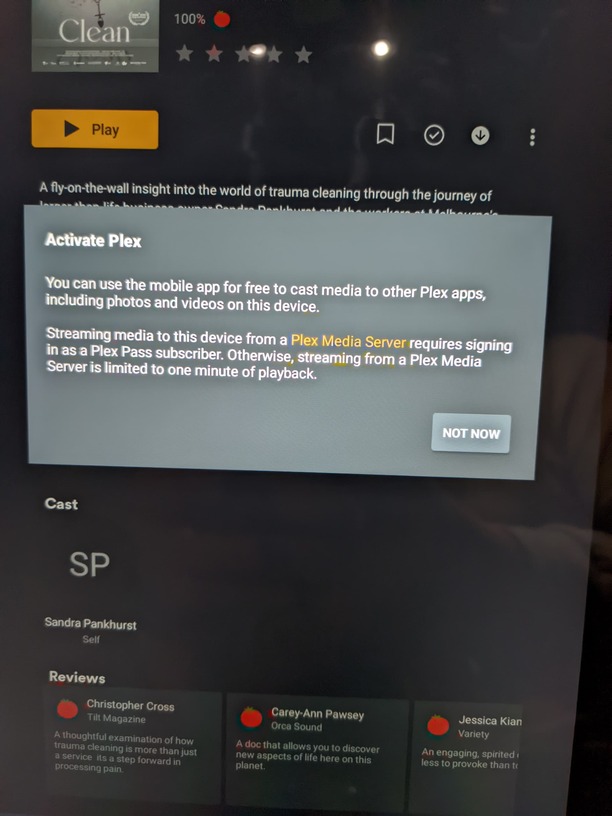
Hi Tom, well this is the message I’m getting which is kind of telling me if I want to stream remote content from my media server I need to sign up to Plex pass??
---
### Author:  [@OttoKerner](https://forums.plex.tv/u/OttoKerner)
#### Post date: [April 18, 2023, 10:20am UTC](https://forums.plex.tv/t/unable-to-remotely-access-my-server/838263/4 "2023-04-18T10:20:37Z")
[https://support.plex.tv/articles/204551227-what-are-the-features-and-limitations-without-unlocking-the-app/](https://support.plex.tv/articles/204551227-what-are-the-features-and-limitations-without-unlocking-the-app/)
You should still be able to test the remote access without unlocking the app. As it allows playback up to 1 minute.
This requirement to activate the app is unique to the Plex apps for mobile devices.
---
### Author:  [@jamesk8111](https://forums.plex.tv/u/jamesk8111)
#### Post date: [April 18, 2023, 6:16pm UTC](https://forums.plex.tv/t/unable-to-remotely-access-my-server/838263/5 "2023-04-18T18:16:24Z")
Yes it plays video for a minute and then stops and returns to Plex main screen ??
---
### Author:  [@tom80H](https://forums.plex.tv/u/tom80H)
#### Post date: [April 18, 2023, 7:56pm UTC](https://forums.plex.tv/t/unable-to-remotely-access-my-server/838263/6 "2023-04-18T19:56:38Z")
As Otto stated… that’s an official restriction of the mobile app – while it isn’t unlocked yet.
That has nothing to do with streaming media remotely or a broken remote access setup.
---
### Author:  [@jamesk8111](https://forums.plex.tv/u/jamesk8111)
#### Post date: [April 19, 2023, 4:10am UTC](https://forums.plex.tv/t/unable-to-remotely-access-my-server/838263/7 "2023-04-19T04:10:40Z")
Ok I get it but Ive tried following the guide to unlock the restriction on my device but I can’t seem to be able to do so??
---
### Author:  [@tom80H](https://forums.plex.tv/u/tom80H)
#### Post date: [April 19, 2023, 6:00am UTC](https://forums.plex.tv/t/unable-to-remotely-access-my-server/838263/8 "2023-04-19T06:00:58Z")
At what point do you get stuck?
---
### Author:  [@jamesk8111](https://forums.plex.tv/u/jamesk8111)
#### Post date: [April 19, 2023, 7:06am UTC](https://forums.plex.tv/t/unable-to-remotely-access-my-server/838263/9 "2023-04-19T07:06:36Z")
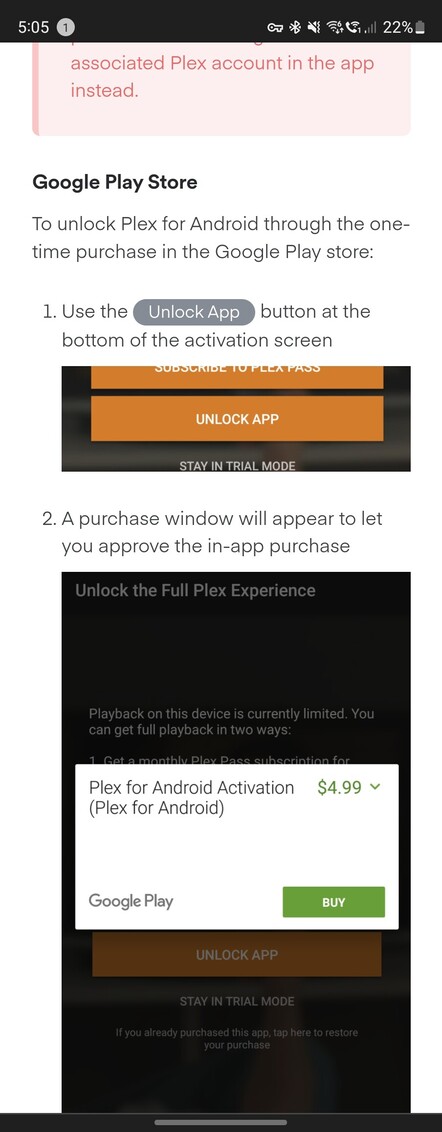
At step 1, I am not seeing the unlock app option on my app or on Google Play store
---
### Author:  [@OttoKerner](https://forums.plex.tv/u/OttoKerner)
#### Post date: [April 19, 2023, 7:10am UTC](https://forums.plex.tv/t/unable-to-remotely-access-my-server/838263/10 "2023-04-19T07:10:22Z")
Please make a screenshot on your _own_ phone
(hold down “Volume-” and “Lock” together).
---
### Author:  [@jamesk8111](https://forums.plex.tv/u/jamesk8111)
#### Post date: [April 20, 2023, 3:56am UTC](https://forums.plex.tv/t/unable-to-remotely-access-my-server/838263/11 "2023-04-20T03:56:23Z")

---
### Author:  [@tom80H](https://forums.plex.tv/u/tom80H)
#### Post date: [April 20, 2023, 5:03am UTC](https://forums.plex.tv/t/unable-to-remotely-access-my-server/838263/12 "2023-04-20T05:03:55Z")
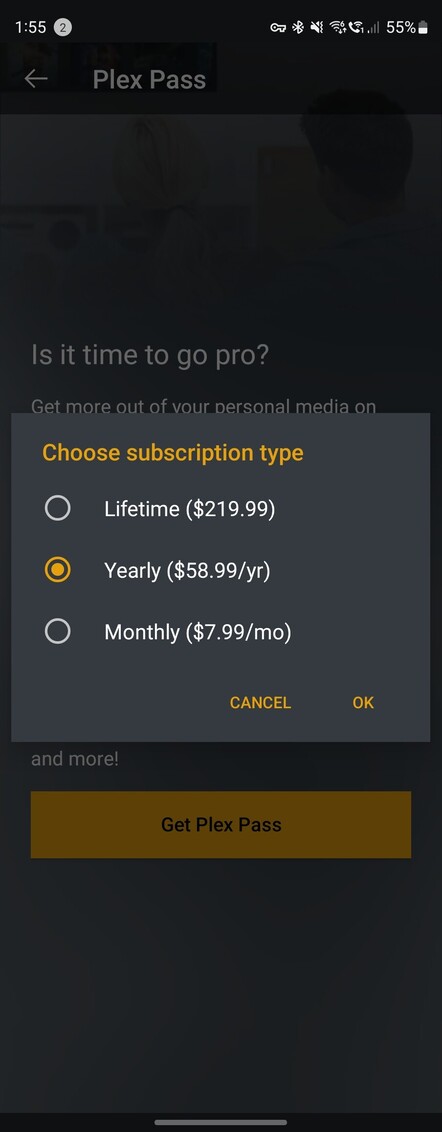
Before you got to click the Get Plex Pass option there should have been an option to activate the app. Depending on your screen size that option might be off screen and you need to scroll a bit further down.
---
### Author:  [@jamesk8111](https://forums.plex.tv/u/jamesk8111)
#### Post date: [April 20, 2023, 5:33am UTC](https://forums.plex.tv/t/unable-to-remotely-access-my-server/838263/13 "2023-04-20T05:33:16Z")
Hi Tom,
Sorry this is all i see..

---
### Author:  [@jamesk8111](https://forums.plex.tv/u/jamesk8111)
#### Post date: [April 22, 2023, 6:40pm UTC](https://forums.plex.tv/t/unable-to-remotely-access-my-server/838263/14 "2023-04-22T18:40:28Z")
Is there another way to activate my app? I’ve tried contacting customer support but all they tell me is to speak to someone on the forum…
---
### Author:  [@tom80H](https://forums.plex.tv/u/tom80H)
#### Post date: [April 22, 2023, 6:45pm UTC](https://forums.plex.tv/t/unable-to-remotely-access-my-server/838263/15 "2023-04-22T18:45:37Z")
What version of the Plex for Android app is that and what version of on what version of Android are you currently running it?
I guess your tablet(?) is using Google’s Play Store for your apps?
---
### Author:  [@jamesk8111](https://forums.plex.tv/u/jamesk8111)
#### Post date: [April 22, 2023, 6:58pm UTC](https://forums.plex.tv/t/unable-to-remotely-access-my-server/838263/16 "2023-04-22T18:58:27Z")
9.20.1.979
Yes using google play store, it’s a Samsung fold4.
I’m using the latest version of plex server on my windows11 PC
---
### Author:  [@tom80H](https://forums.plex.tv/u/tom80H)
#### Post date: [April 22, 2023, 7:33pm UTC](https://forums.plex.tv/t/unable-to-remotely-access-my-server/838263/17 "2023-04-22T19:33:47Z")
I got the following hint/feedback: usually the option will be hidden if you already activated the app or if you’re not signed into a Google Play account on that device. The activation screen should otherwise appear if you try to play some media or approach the 1-minute limit.
If that’s not the case, here’s a few steps to attempt further troubleshooting steps:
1. delete the app
2. reboot the device
3. make sure the user is signed in to Google Play with the desired account
4. download Plex from that account’s Google Play Library
5. then try the activation again in-app.
If that doesn’t work you might need to play something and trigger the activation screen – if that’s not showing or failing, grab the app logs zip file, the attach it in the topic.
---
### Author:  [@system](https://forums.plex.tv/u/system)
#### Post date: [July 21, 2023, 7:33pm UTC](https://forums.plex.tv/t/unable-to-remotely-access-my-server/838263/18 "2023-07-21T19:33:54Z")
This topic was automatically closed 90 days after the last reply. New replies are no longer allowed.