# Upgrading to the new agents
**URL:** https://forums.plex.tv/t/upgrading-to-the-new-agents/712986
**Category:** General Discussions
**Created:** [April 30, 2021, 1:46pm UTC](https://forums.plex.tv/t/upgrading-to-the-new-agents/712986 "2021-04-30T13:46:18Z")
**Posts on this page:** 20
**Page:** 1
### Author:  [@kevindd992002](https://forums.plex.tv/u/kevindd992002)
#### Post date: [April 30, 2021, 1:46pm UTC](https://forums.plex.tv/t/upgrading-to-the-new-agents/712986/1 "2021-04-30T13:46:18Z")
When upgrading a library to use the new movie and tv agents, do you have to do the Plex dance and start from scratch with your metadata?
---
### Author:  [@Insomnic\_1](https://forums.plex.tv/u/Insomnic_1)
#### Post date: [April 30, 2021, 1:50pm UTC](https://forums.plex.tv/t/upgrading-to-the-new-agents/712986/2 "2021-04-30T13:50:53Z")
It kept my metadata and it even remembered the shows that I had switched sources for episode order; Firefly kept TVDB DVD Order even though I set TMDB as episode source for the library.
If you hadn’t seen this article, it might help as well: [Migrating a TV library to use the new Plex TV Series Agent/Scanner | Plex Support](https://support.plex.tv/articles/migrating-a-tv-library-to-use-the-new-plex-tv-series-agent-scanner/)
I think a few art things changed - posters or backgrounds - but none I had previously set myself.
---
### Author:  [@tramp78](https://forums.plex.tv/u/tramp78)
#### Post date: [April 30, 2021, 1:59pm UTC](https://forums.plex.tv/t/upgrading-to-the-new-agents/712986/3 "2021-04-30T13:59:25Z")
The first thing I did was create a duplicate library and scan it with the new scanner. It was a good way to find what would change. For the TV scanner I found a lot of shows that I needed to rename or fix. For movies, it did a much better job than the old one so that was pretty painless. After cleaning up the media, I flipped the agent on the regular libraries and just had to clean up a few duplicates and unmathed stuff later. BUt as stated, the main difference was some poster art flipped and if I cared I just changed it back.
---
### Author:  [@kevindd992002](https://forums.plex.tv/u/kevindd992002)
#### Post date: [April 30, 2021, 3:08pm UTC](https://forums.plex.tv/t/upgrading-to-the-new-agents/712986/4 "2021-04-30T15:08:13Z")
Thanks. So I guess, to be safe, after changing the agent just do a Refresh All Metadata for the library, correct?
---
### Author:  [@Insomnic\_1](https://forums.plex.tv/u/Insomnic_1)
#### Post date: [April 30, 2021, 3:44pm UTC](https://forums.plex.tv/t/upgrading-to-the-new-agents/712986/5 "2021-04-30T15:44:39Z")
You can refresh if you like, but it’ll keep the data you have until you do a full refresh or if a new episode is added to a show that will trigger a refresh as well (though anything locked will stay in place). I think there are still some some minor items with the new scanner as well so a few artwork oddities still crop up and are being addressed in other topics; the TV agent is a bit more complex than the Movie agent so broader audience finding one-off hiccups isn’t a surprise.
If you’re not in a rush, it might be worth waiting a few weeks yet and more folks will have gone through the upgrade and could provide more experiences - or you can do as @tramp78 suggested and run a test library to see what will happen.
---
### Author:  [@kevindd992002](https://forums.plex.tv/u/kevindd992002)
#### Post date: [April 30, 2021, 4:24pm UTC](https://forums.plex.tv/t/upgrading-to-the-new-agents/712986/6 "2021-04-30T16:24:01Z")
Ok, well I just did a “Refresh All Metadata” just now and I didn’t notice any issues. I thought doing a refresh all metadata is the same as doing a full refresh of a library though? I wasn’t talking about scanning a library, if that’s what you thought I meant by refresh.
---
### Author:  [@Insomnic\_1](https://forums.plex.tv/u/Insomnic_1)
#### Post date: [April 30, 2021, 4:41pm UTC](https://forums.plex.tv/t/upgrading-to-the-new-agents/712986/7 "2021-04-30T16:41:03Z")
Did you do the “upgrade matching” process or change the agent in your library?
It really might not change much metadata even after a refresh. I didn’t notice much of a change myself. The sources are still the same just some functional handling is what has changed and some other feature functions so really… you might not see much difference. I didn’t. 🙂
---
### Author:  [@OttoKerner](https://forums.plex.tv/u/OttoKerner)
#### Post date: [April 30, 2021, 4:49pm UTC](https://forums.plex.tv/t/upgrading-to-the-new-agents/712986/9 "2021-04-30T16:49:56Z")
You edit your library,
go to the “Advanced” tab
open the Agent drop down selector and pick either “Plex Movie” or “Plex TV Series”, depending on the library type. Do not touch the “Scanner” selector. It will adjust automatically.
After which the server will perform a shorter scan of the library.
After this however, the conversion to the new agent is not finished, yet!
You will have to perform “Refresh Metadata” for the whole library. I recommend you to start this process before going to bed, so it has enough time to do its work.
You may want to try the Metadata Refresh on just a few items first, to verify everything is working.
If your libraries are particularly big, consider refreshing your items in batches manually.
---
### Author:  [@kevindd992002](https://forums.plex.tv/u/kevindd992002)
#### Post date: [April 30, 2021, 5:32pm UTC](https://forums.plex.tv/t/upgrading-to-the-new-agents/712986/10 "2021-04-30T17:32:48Z")
I changed the agent library for the tv library (I forgot there was an upgrade matching process). For the movie library, I did the upgrade matching process.
Ahh, I see what you mean. Well, I don’t have a super big library anyway, so I think I’m good 🙂
---
### Author:  [@kevindd992002](https://forums.plex.tv/u/kevindd992002)
#### Post date: [April 30, 2021, 5:34pm UTC](https://forums.plex.tv/t/upgrading-to-the-new-agents/712986/11 "2021-04-30T17:34:41Z")
Right, that’s how I understood the official article about upgrading the agent. And that’s what I did.
Correct me if I’m wrong but the “Upgrade matching” option does exactly the same as what you explained but only automatic, right?
---
### Author:  [@OttoKerner](https://forums.plex.tv/u/OttoKerner)
#### Post date: [April 30, 2021, 7:17pm UTC](https://forums.plex.tv/t/upgrading-to-the-new-agents/712986/12 "2021-04-30T19:17:25Z")
> [@kevindd992002](#):
>
> the “Upgrade matching” option does exactly the same as what you explained but only automatic, right?
Correct.
But Refresh Metadata is still necessary afterwards.
---
### Author:  [@soder1](https://forums.plex.tv/u/soder1)
#### Post date: [May 20, 2021, 1:45pm UTC](https://forums.plex.tv/t/upgrading-to-the-new-agents/712986/13 "2021-05-20T13:45:32Z")
Where do Plex get the info text from on the new scanners? With the older version I could pick TMDB for info, and ratings from IMDB. Now I can only change the rating?
Also, where do Plex get the info from for my TV Shows? Scores and episode order from theTVDB, but the text? Or is it still theTVDB, but only it’s the text from Season 1 as general info about the show, and not theTVDB info about the show? Or is it from IMDB?
---
### Author:  [@OttoKerner](https://forums.plex.tv/u/OttoKerner)
#### Post date: [May 20, 2021, 1:55pm UTC](https://forums.plex.tv/t/upgrading-to-the-new-agents/712986/14 "2021-05-20T13:55:33Z")
It is generally a combination of [TheMovieDB.org](http://TheMovieDB.org) and other sources.
For TV shows it is usually TheMovieDB first and TheTVDB second.
---
### Author:  [@soder1](https://forums.plex.tv/u/soder1)
#### Post date: [May 20, 2021, 2:49pm UTC](https://forums.plex.tv/t/upgrading-to-the-new-agents/712986/15 "2021-05-20T14:49:08Z")
Stange. I have a series that is on [theTVDB.com](http://theTVDB.com), but I can’t find it in Plex now after a refresh. Not even when I search with the ID like tvdb-383944 I get any hit.
Suggestions?
---
### Author:  [@OttoKerner](https://forums.plex.tv/u/OttoKerner)
#### Post date: [May 20, 2021, 2:52pm UTC](https://forums.plex.tv/t/upgrading-to-the-new-agents/712986/16 "2021-05-20T14:52:46Z")
> [@soder1](#):
>
> but I can’t find it in Plex now after a refresh
Do you mean you cannot find metadata for the show or do you mean you cannot find the show at all?
Is this actually a tv show library?
Are your files following _all_ rules for [tv show naming](https://support.plex.tv/articles/200220687-naming-series-season-based-tv-shows/)?
[https://www.thetvdb.com/series/dokument-inifran-att-raedda-ett-barn](https://www.thetvdb.com/series/dokument-inifran-att-raedda-ett-barn)
---
### Author:  [@soder1](https://forums.plex.tv/u/soder1)
#### Post date: [May 20, 2021, 3:04pm UTC](https://forums.plex.tv/t/upgrading-to-the-new-agents/712986/17 "2021-05-20T15:04:56Z")
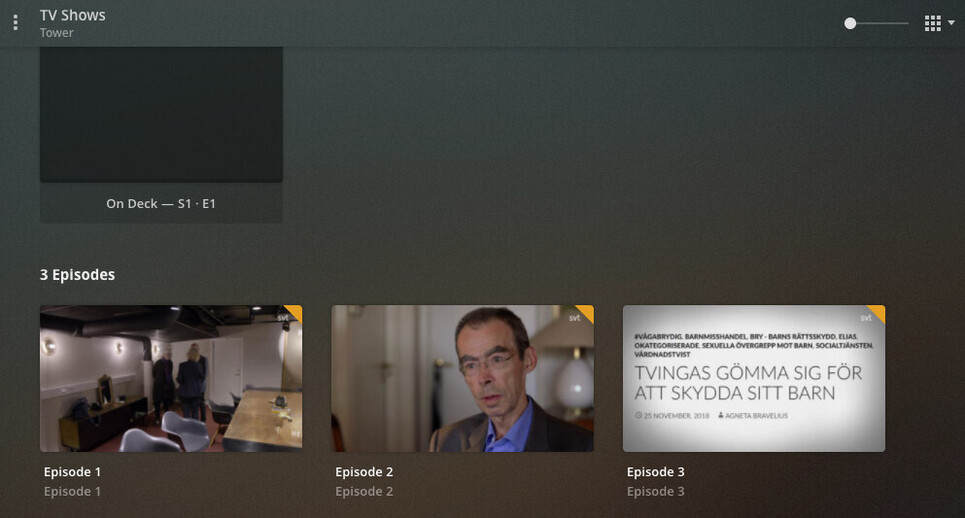
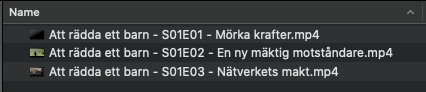
The folder is named “Att rädda ett barn” (was found with the old agent) and the episodes got S01E01 in the file name. Without any match Plex still gives me three episodes, but without the correct info and screens.
When I do a “Fix match” and search for tvdb-383944 I don’t find anything.
The folder is in the same library as all of my other tv shows.
---
### Author:  [@OttoKerner](https://forums.plex.tv/u/OttoKerner)
#### Post date: [May 20, 2021, 3:06pm UTC](https://forums.plex.tv/t/upgrading-to-the-new-agents/712986/18 "2021-05-20T15:06:10Z")
Do you also have a season folder?
Have you checked for duplicate files? The files might have been mis-matched to an existing show.
---
### Author:  [@soder1](https://forums.plex.tv/u/soder1)
#### Post date: [May 20, 2021, 3:10pm UTC](https://forums.plex.tv/t/upgrading-to-the-new-agents/712986/19 "2021-05-20T15:10:08Z")
No season folder. I have the most shows like this. “Name of the Show”/“Name of the Show - S01E01” or with dots instead of space.
> **[Dokument inifrån: Att rädda ett barn - TheTVDB.com](https://www.thetvdb.com/series/dokument-inifran-att-raedda-ett-barn)**
---
### Author:  [@OttoKerner](https://forums.plex.tv/u/OttoKerner)
#### Post date: [May 20, 2021, 3:10pm UTC](https://forums.plex.tv/t/upgrading-to-the-new-agents/712986/20 "2021-05-20T15:10:45Z")
> [@soder1](#):
>
> No season folder.
Then add it. That’s what I meant with “all rules”.
---
### Author:  [@soder1](https://forums.plex.tv/u/soder1)
#### Post date: [May 20, 2021, 3:12pm UTC](https://forums.plex.tv/t/upgrading-to-the-new-agents/712986/21 "2021-05-20T15:12:06Z")
But, please tell me why I should need a folder for this show only, when it’s not needed for other shows?
[Next page](https://forums.plex.tv/t/upgrading-to-the-new-agents/712986.md?page=2)