# Windows 10 vs Plex Transcoding
**URL:** https://forums.plex.tv/t/windows-10-vs-plex-transcoding/767598
**Category:** Plex Media Server
**Tags:** server-linux, player-windows
**Created:** [December 31, 2021, 5:48pm UTC](https://forums.plex.tv/t/windows-10-vs-plex-transcoding/767598 "2021-12-31T17:48:44Z")
**Posts on this page:** 14
**Page:** 1
### Author:  [@nobody3400](https://forums.plex.tv/u/nobody3400)
#### Post date: [December 31, 2021, 5:48pm UTC](https://forums.plex.tv/t/windows-10-vs-plex-transcoding/767598/1 "2021-12-31T17:48:44Z")
Hi,
I have the same problem. It’s quite annoying.
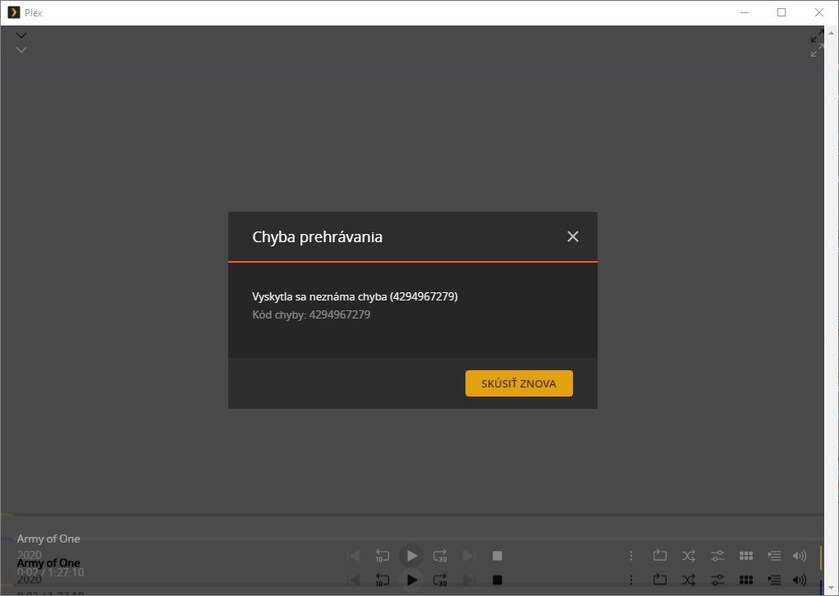
**A mistake:**
An unknown error occurred (4294967279)
Error code: 4294967279
**My environment:**
Client: Windows 10
Client version: 1.35.1.2632-c6783c78
Local IP: 192.168.88.234
User: frantisek@domain.tdl (ID: 37966297)
Device name: test-pc-plex
**Server** :
OS:
Debian 11.1
Plex version: 1.24.3.5033-757abe6b4
GPU HW: Nvidia quadro P2000
GPU Driver Version: 470.57.02
GPU CUDA Version: 11.4
After the server is restarted, the plexmediaserver application also shuts down. I have free space for transcoding.
_he only peculiarity is that if I rewind the film before the transcoding, the film transcodes OK. In case of non-rotation, it will print an error. (see above)_
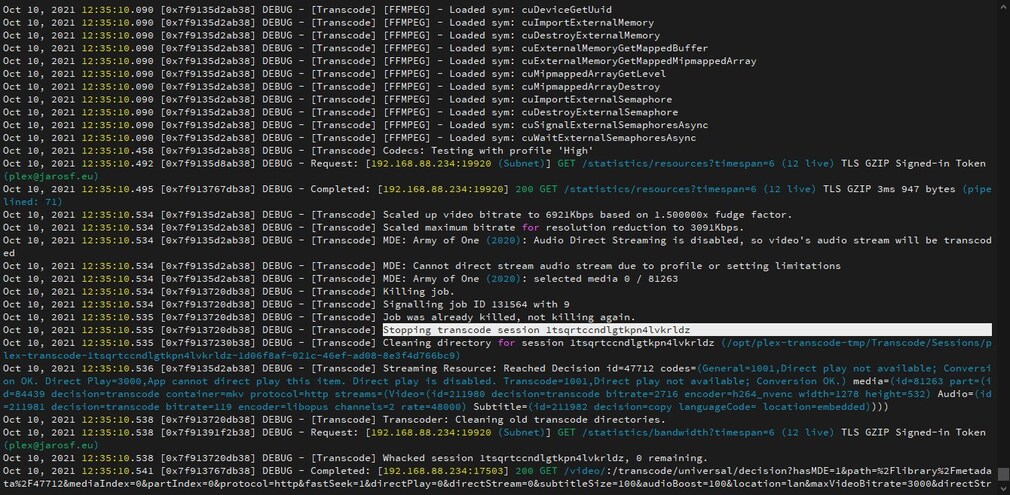
LOGS:
[Plex Media Server.log](https://forums.plex.tv/uploads/short-url/lSlTwSRn75HgaxSC3GApWTqizAz.log) (1.1 MB)
Screns:


---
### Author:  [@ChuckPa](https://forums.plex.tv/u/ChuckPa)
#### Post date: [December 31, 2021, 6:06pm UTC](https://forums.plex.tv/t/windows-10-vs-plex-transcoding/767598/2 "2021-12-31T18:06:43Z")
Log file will not open.
Please use `Settings - Server - Troubleshooting - Download Logs`
Attach the ZIP file please
---
### Author:  [@nobody3400](https://forums.plex.tv/u/nobody3400)
#### Post date: [January 6, 2022, 5:05pm UTC](https://forums.plex.tv/t/windows-10-vs-plex-transcoding/767598/3 "2022-01-06T17:05:01Z")
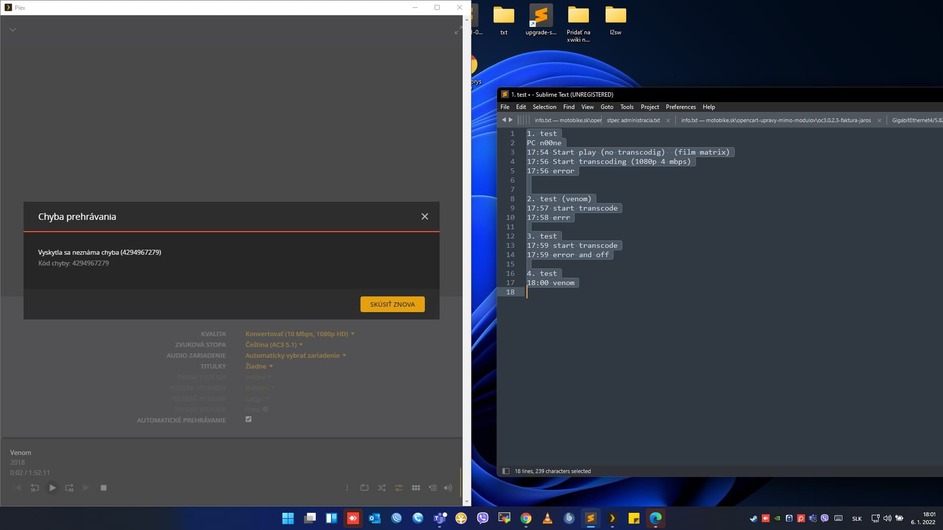
Hi, There is an error in Test 4.
Here you go.
I guess it will help.
well thank you.
PC name is: n00ne
**1. test** (film matrix)
17:54 Start play (no transcodig)
17:56 Start transcoding (1080p 4 mbps)
17:56 error
**2. test** (venom)
17:57 start transcode
17:58 errr
**3. test**
17:59 start transcode
17:59 error and off
**4. test** (fiml venom)
18:00 start transcode to 10mbps 1080p
18:00 error 4294967279 see scrrean
[Plex Media Server Logs\_2022-01-06\_18-00-49.zip](https://forums.plex.tv/uploads/short-url/lEmQqnsSuT0Uth4hGnKjpOZi4nz.zip) (1.3 MB)
---
### Author:  [@nobody3400](https://forums.plex.tv/u/nobody3400)
#### Post date: [January 6, 2022, 5:13pm UTC](https://forums.plex.tv/t/windows-10-vs-plex-transcoding/767598/4 "2022-01-06T17:13:14Z")
I am adding another test but with logging for debugging enabled (not in detail)
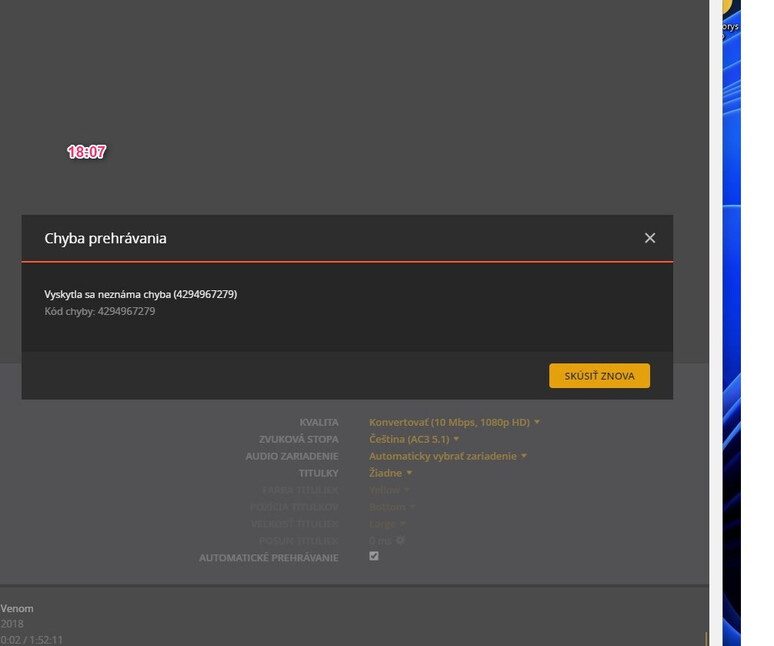
**Time Test 18:07**
- movie venom
- transocde to 1080p 10 mbps
- PC name n00ne
- errror : 4294967279
- see scren
**LOG IS HERE:**
[Plex Media Server Logs\_2022-01-06\_18-07-32.zip](https://forums.plex.tv/uploads/short-url/2M2OEgr5Mn5fbI3A9xYyRuRGPXR.zip) (1.4 MB)
thanks for all.
---
### Author:  [@ChuckPa](https://forums.plex.tv/u/ChuckPa)
#### Post date: [January 6, 2022, 5:54pm UTC](https://forums.plex.tv/t/windows-10-vs-plex-transcoding/767598/5 "2022-01-06T17:54:29Z")
Are you running Debian in a Synology VM?
```auto
Dec 31, 2021 18:30:01.787 [0x7fbdeeaccb38] INFO - Plex Media Server v1.25.2.5319-c43dc0277 - Debian GNU/Linux PC x86_64 - build: linux-x86_64 debian - GMT 01:00
Dec 31, 2021 18:30:01.788 [0x7fbdeeaccb38] INFO - Linux version: 11 (bullseye), language: en-US
Dec 31, 2021 18:30:01.788 [0x7fbdeeaccb38] INFO - Processor Common KVM processor
Dec 31, 2021 18:30:01.788 [0x7fbdeeaccb38] INFO - Compiler is - Clang 11.0.1 (https://plex.tv b587490162c22e078c314e3f7dc560c691d126aa)
Dec 31, 2021 18:30:01.788 [0x7fbdeeaccb38] INFO - /usr/lib/plexmediaserver/Plex Media Server
Dec 31, 2021 18:30:02.050 [0x7fbdf22c5b58] INFO - [CERT/OCSP] Successfully retrieved response from cache.
Dec 31, 2021 18:30:02.158 [0x7fbdebf2eb38] WARN - Couldn't determine bundle identifier for plug-in at: "/usr/lib/plexmediaserver/Resources/Plug-ins-c43dc0277/WebClient.bundle"
Dec 31, 2021 18:30:03.180 [0x7fbdebf71b38] WARN - [MediaProviderManager] Unrecognized MediaProvider feature: availability
Dec 31, 2021 18:30:03.180 [0x7fbdebf71b38] WARN - [MediaProviderManager] Unrecognized MediaProvider feature: availability-platforms
Dec 31, 2021 18:30:03.187 [0x7fbdec31ab38] WARN - [MediaProviderManager] Unrecognized MediaProvider feature: availability
Dec 31, 2021 18:30:03.187 [0x7fbdec31ab38] WARN - [MediaProviderManager] Unrecognized MediaProvider feature: availability-platforms
Dec 31, 2021 18:30:06.164 [0x7fbdeb981b38] ERROR - SSDP: Error parsing device schema for http://192.168.88.247:5000/ssdp/desc-DSM-bond0.xml
```
This is showing either a grossly fragmented database in need of optimization -OR- an overloaded processor (insufficient CPU)
```auto
Dec 31, 2021 18:30:06.278 [0x7fbdeb89db38] WARN - SLOW QUERY: It took 210.000000 ms to retrieve 8 items.
Dec 31, 2021 18:30:06.361 [0x7fbdeb833b38] WARN - SLOW QUERY: It took 450.000000 ms to retrieve 1 items.
Dec 31, 2021 18:30:06.376 [0x7fbdeadcfb38] WARN - SLOW QUERY: It took 510.000000 ms to retrieve 1 items.
Dec 31, 2021 18:30:06.387 [0x7fbdeb509b38] WARN - SLOW QUERY: It took 700.000000 ms to retrieve 0 items.
Dec 31, 2021 18:30:07.241 [0x7fbdeadcfb38] WARN - SLOW QUERY: It took 270.000000 ms to retrieve 1 items.
```
I do need the DEBUG logging enabled (which is the default). You turned it off at some point. You don’t save any space by turning it off. Logs are fixed length.
Please recreate with DEBUG logging enabled then attach fresh logs.
---
### Author:  [@nobody3400](https://forums.plex.tv/u/nobody3400)
#### Post date: [January 8, 2022, 9:12pm UTC](https://forums.plex.tv/t/windows-10-vs-plex-transcoding/767598/6 "2022-01-08T21:12:40Z")
Hi,
**Are you running Debian in a Synology VM?**
No.
**This is showing either a grossly fragmented database in need of optimization**
Optimized (via plex)
**an overloaded processor (insufficient CPU)**
CPU and hardware are oversized. (see screen)
_I don’t think that will be the main problem. (but I’ll set aside more CPU)_
**Let me update the whole ticket.** (new testing)
**My environment:**
Client: Windows 11
Client version: 1.39.1.2763-300bb607
User: frantisek@jarosf.eu (ID: 37966297)
Device PC name: n00ne
**Server** (HP Proliant FW ProLiant DL380 Gen9):
OS: Debian 11.2
Plex version: 1.25.2.5319
Local IP: 192.168.89.100 Plex server
Public IP: 80.87.208.39
The server is logged in as: plex@jarosf.eu
GPU HW: Nvidia quadro P2000
GPU Driver Version: 470.57.02
GPU CUDA Version: 11.4
CPU HW: 2x Intel(R) Xeon(R) CPU E5-2640 v3 @ 2.60GHz
CPU in VM: 4\*7 = 28vCPU (max 32)
Disk: only SSD
_root@plex:~# lscpu_
_Architecture: x86\_64_
_CPU op-mode(s): 32-bit, 64-bit_
_Byte Order: Little Endian_
_Address sizes: 40 bits physical, 48 bits virtual_
_CPU(s): 28_
_On-line CPU(s) list: 0-27_
_Thread(s) per core: 1_
_Core(s) per socket: 7_
_Socket(s): 4_
_NUMA node(s): 1_
_Vendor ID: GenuineIntel_
_CPU family: 15_
_Model: 6_
_Model name: Common KVM processor_
_Stepping: 1_
_CPU MHz: 2597.231_
_BogoMIPS: 5194.46_
_L1d cache: 896 KiB_
_L1i cache: 896 KiB_
_L2 cache: 112 MiB_
_L3 cache: 64 MiB_
**If necessary, I can provide you with any access to the server or PC (ssh or console)**
**I do need the [DEBUG logging](https://support.plex.tv/articles/201643703-reporting-issues-with-plex-media-server/#toc-1) enabled (which is the default). You turned it off at some point. You don’t save any space by turning it off. Logs are fixed length.**
OK
**Please recreate with [DEBUG logging](https://support.plex.tv/articles/201643703-reporting-issues-with-plex-media-server/#toc-1) enabled then attach fresh logs.**
OK
**New test:**
**TEST1**
Film: “Venom” (4K HEVC HDR)
PC: “n00ne”
21:37 - start tracode to 10mbps
21:37 - off with error
**TEST2**
Film: “Venom” (4K HEVC HDR)
PC: “n00ne”
21:43:00 - start tracode to 10mbps
21:43:03 - off without error
**TEST3**
Film: “Venom” (4K HEVC HDR)
PC: “n00ne”
21:47:03 - start film venom (live playback)
21:48:00 - start tracode to 10mbps
21:48:15 - off without error
**TEST4**
Film “Matrix”
PC: “n00ne”
21:54:15 - start film (live playback)
21:54:37 - start tracode to 10mbps
21:54:4\* - off without error
**Test5**
PC: “n00ne”
Film “Nigth house”
21:58:20 - start without transcode
21:59:25 - start tracode to 10mbps
21:59:44 - off without error
22:00 - downloads logs.
**LOGS:** [Plex Media Server Logs\_2022-01-08\_22-01-01.zip](https://forums.plex.tv/uploads/short-url/l1Xl9s8nehIoG7vNNjQoW6kZBsM.zip) (4.6 MB)
CPU is OK.
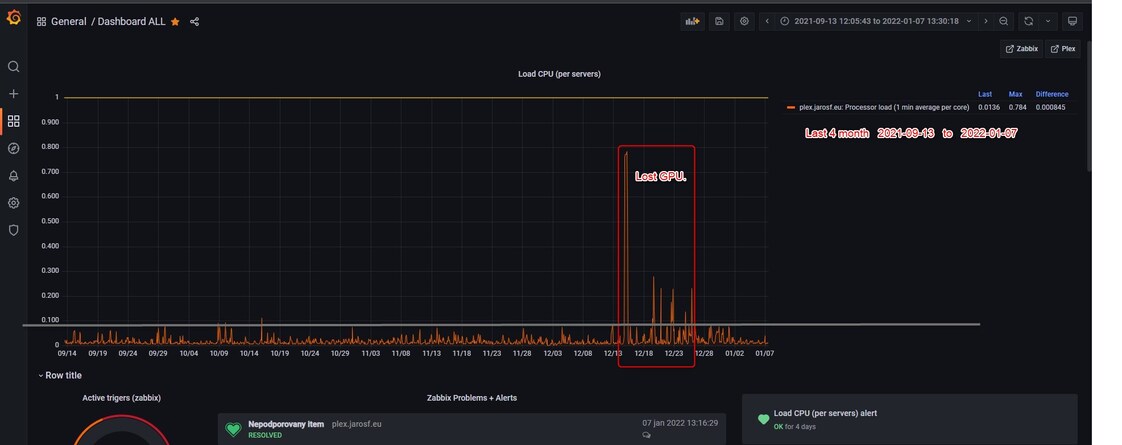
I’ve checked the hardware several times and it’s under wretched.
Everything seems to be OK from GPU to CPU. Disk on HW only SSD.
Personally, I suspect ffmpeg + plex.If I can be of any help, let me know.
Thanks.
---
### Author:  [@ChuckPa](https://forums.plex.tv/u/ChuckPa)
#### Post date: [January 8, 2022, 10:42pm UTC](https://forums.plex.tv/t/windows-10-vs-plex-transcoding/767598/7 "2022-01-08T22:42:00Z")
> [@nobody3400](#):
>
> Common KVM processor
This is what bothers me.
How many virtual CPUs are allocated to the VM?
What’s the base host OS ? I see the Guest OS is Debian 11
---
### Author:  [@nobody3400](https://forums.plex.tv/u/nobody3400)
#### Post date: [January 9, 2022, 10:52am UTC](https://forums.plex.tv/t/windows-10-vs-plex-transcoding/767598/8 "2022-01-09T10:52:53Z")
**How many virtual CPUs are allocated to the VM?**
plex (debina11) - 28 (4 socket, 7 cores)
host (debian11)- 32 (4 socket, 8 cores)
**What’s the base host OS ?**
Debian 11 (both host and vm)
---
### Author:  [@ChuckPa](https://forums.plex.tv/u/ChuckPa)
#### Post date: [January 10, 2022, 3:33pm UTC](https://forums.plex.tv/t/windows-10-vs-plex-transcoding/767598/9 "2022-01-10T15:33:24Z")
Got some errors (not best practice) here in your virtualization.
1. You have a dual socket machine ( 2x 8 core/16 thread)
> [@nobody3400](#):
>
> CPU HW: 2x Intel(R) Xeon(R) CPU E5-2640 v3 @ 2.60GHz
1. You are abstracting to be 4 socket. Recommend matching the physical architecture for interrupt handling continuity.
> [@nobody3400](#):
>
> plex (debina11) - 28 (4 socket, 7 cores)
>
> host (debian11)- 32 (4 socket, 8 cores)
This would mean- Plex: **2 socket, 14 CPU per socket** - yielding your 28 vCPU.
---
### Author:  [@nobody3400](https://forums.plex.tv/u/nobody3400)
#### Post date: [January 10, 2022, 8:26pm UTC](https://forums.plex.tv/t/windows-10-vs-plex-transcoding/767598/10 "2022-01-10T20:26:40Z")
Hi,
thanks I understand, I do not know why I used 4 sockets. ☹
I changed to 2 sockets with 15 cpu = 30 vcpu.
I will test again after the restart.
Do you think this is a transodal error?
---
### Author:  [@ChuckPa](https://forums.plex.tv/u/ChuckPa)
#### Post date: [January 10, 2022, 8:46pm UTC](https://forums.plex.tv/t/windows-10-vs-plex-transcoding/767598/11 "2022-01-10T20:46:36Z")
I will only need to see one failing Nvidia transcoder session to figure out what’s happening.
I’ll need DEBUG logging enabled but VERBOSE logging DISABLED.
After I see the logs, we’ll know where the error is pointing.
A GPU getting “lost” in a VM speaks very much to a virtualization passthrough error.
---
### Author:  [@nobody3400](https://forums.plex.tv/u/nobody3400)
#### Post date: [January 10, 2022, 10:04pm UTC](https://forums.plex.tv/t/windows-10-vs-plex-transcoding/767598/12 "2022-01-10T22:04:59Z")
Hi,
Sockets modified. (thanks)
Server restarted.
Debug logs enabled.
Detailed logs disabled
**Test time** 23:01 (10.1.2022)
**Error** : 4294967283
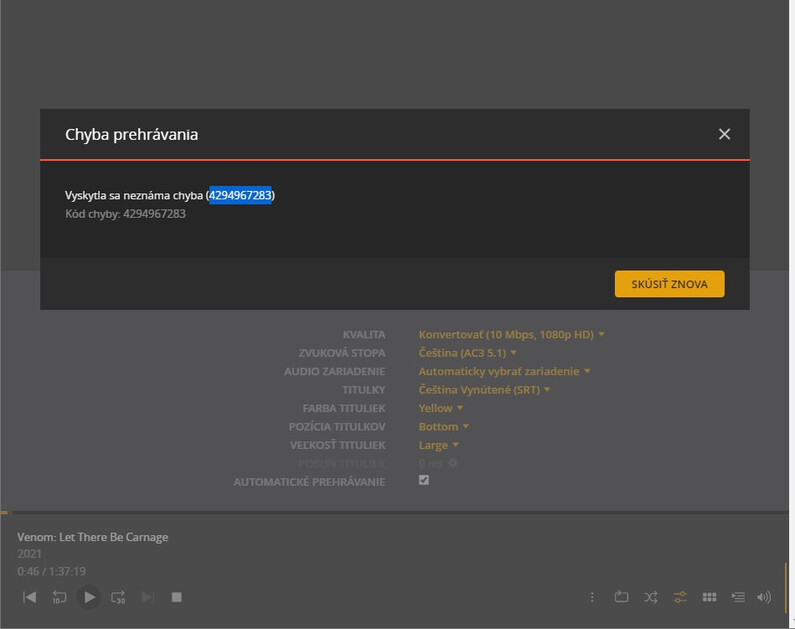
**Debug logs:**
[Plex Media Server Logs\_2022-01-10\_23-01-45.zip](https://forums.plex.tv/uploads/short-url/euIMkqyrjJlsYjB7qXJA3NpW8lj.zip) (3.6 MB)
Thanks
---
### Author:  [@nobody3400](https://forums.plex.tv/u/nobody3400)
#### Post date: [January 21, 2022, 10:09pm UTC](https://forums.plex.tv/t/windows-10-vs-plex-transcoding/767598/13 "2022-01-21T22:09:09Z")
Hi,
did you manage to come up with anything?
---
### Author:  [@system](https://forums.plex.tv/u/system)
#### Post date: [April 21, 2022, 10:09pm UTC](https://forums.plex.tv/t/windows-10-vs-plex-transcoding/767598/14 "2022-04-21T22:09:23Z")
This topic was automatically closed 90 days after the last reply. New replies are no longer allowed.