5400 RPM or 7200 RPM NAS hard drive for my new DiskStation DS918+?

Before I read your last comment I made one more test. I had noticed that my web player had “Automatically adjust quality (Beta)” enabled. So I repeated my last test with that option disabled since my Apple TV player has that option switched off as well.

The outcome was similar:

  • it starts playing as Original (4.6 Mbps, 1080p HD)
  • 19 secs into the programme it changes quality to “Converting (Maximum Quality)”
  • at 1:32 it buffers but stays at “Converting (Maximum Quality)”
  • at 2:36 it buffers but stays at “Converting (Maximum Quality)”

No error message this time.

Playback of my last test started at 19:43 - see attached logs

May 08, 2018 19:43:01.647 [0x7ff2c301b700] DEBUG - TPU: hardware transcoding: enabled, but no hardware decode accelerator found
May 08, 2018 19:43:01.648 [0x7ff2c301b700] DEBUG - TPU: hardware transcoding: final decoder: , final encoder: 
May 08, 2018 19:43:24.032 [0x7ff2c301b700] DEBUG - TPU: hardware transcoding: using hardware decode accelerator vaapi
May 08, 2018 19:43:24.032 [0x7ff2c301b700] DEBUG - TPU: hardware transcoding: zero-copy support present
May 08, 2018 19:43:24.032 [0x7ff2c301b700] DEBUG - TPU: hardware transcoding: not using zero-copy because video is interlaced
May 08, 2018 19:43:24.033 [0x7ff2c301b700] DEBUG - TPU: hardware transcoding: final decoder: vaapi, final encoder: vaapi
May 08, 2018 19:43:25.530 [0x7ff2c41af700] DEBUG - TPU: hardware transcoding: using hardware decode accelerator vaapi
May 08, 2018 19:43:25.531 [0x7ff2c41af700] DEBUG - TPU: hardware transcoding: zero-copy support present
May 08, 2018 19:43:25.531 [0x7ff2c41af700] DEBUG - TPU: hardware transcoding: not using zero-copy because video is interlaced
May 08, 2018 19:43:25.531 [0x7ff2c41af700] DEBUG - TPU: hardware transcoding: final decoder: vaapi, final encoder: vaapi

As for your request, I need some help: what do you mean by a “static file” and how can I tell if a recording is a “static file”?

Maybe I figured it out. If I go into media info of a recoding I see

Codec MPEG2VIDEO

or

Codec H264

Is that what you mean? Still not sure about the “static” bit though - please explain.

H.264 and HEVC have been working for a long time.

here’s one more stupid thing to do.

  1. Control Panel - Shared Folders - Edit the Plex share
  2. Give your username R/W permission
  3. Stop PMS
  4. Navigate into Plex/Library -> Codecs
  5. Delete everything in Codecs (we will make it start again)
  6. As you play each type again (MPEG2VIDEO , H.264, and H.265/HEVC), there will be a short delay while the codec downloads.

I’m not at home today and so I can’t SSH into my DS to view the permissions of the Plex share properly but using the Control Panel I see:

Local users

Local groups

System internal user

So the admin user does already have r/w permissions; not sure what the Plex user has as it only says “Customize” but I can’t see the details.

For the codecs, I found the following folder: /volume1/Plex/Library/Application Support/Plex Media Server/Codecs. It contained these items, which I have deleted:

  • folder 4b51335-1293-linux-ubuntu-x86_64
  • folder 7814ac9-1285-linux-ubuntu-x86_64
  • hidden file .device-id

As I’m not at home at the moment, I can only stream programmes remotely but the results so far look promising albeit the quality of the played files is quite low (about 1-2 Mbps) but it looks promising as it finds the hardware accelerator.

I watched a H.264 file (Have I Got A Bit More New For You) and saw codecs being downloaded. Checking the PMS log for TPU entries I see:

	Line 1715: May 09, 2018 10:52:16.801 [0x7f72e2efb700] INFO - CodecManager: obtaining decoder 'h264'
	Line 1726: May 09, 2018 10:52:29.451 [0x7f72e2efb700] DEBUG - TPU: hardware transcoding: using hardware decode accelerator vaapi
	Line 1727:May 09, 2018 10:52:29.452 [0x7f72e2efb700] INFO - CodecManager: obtaining decoder 'ac3'
	Line 1743: May 09, 2018 10:52:41.818 [0x7f72e2efb700] DEBUG - TPU: hardware transcoding: zero-copy support present
	Line 1744: May 09, 2018 10:52:41.818 [0x7f72e2efb700] DEBUG - TPU: hardware transcoding: not using zero-copy because video is interlaced
	Line 1745: May 09, 2018 10:52:41.818 [0x7f72e2efb700] INFO - CodecManager: obtaining encoder 'aac'

	Line 1750: May 09, 2018 10:52:54.209 [0x7f72e2efb700] DEBUG - TPU: hardware transcoding: final decoder: vaapi, final encoder: vaapi

Then I watched an MPEG2 file (Britain’s Most Historic Towns) and again I saw the codecs folder being updated and in the log I see:

	Line 2560: May 09, 2018 10:57:58.341 [0x7f72e2efb700] INFO - CodecManager: obtaining decoder 'mpeg2video'
	Line 2565: May 09, 2018 10:58:10.760 [0x7f72e2efb700] DEBUG - TPU: hardware transcoding: enabled, but no hardware decode accelerator found
	Line 2566: May 09, 2018 10:58:10.761 [0x7f72e2efb700] INFO - CodecManager: obtaining decoder 'mp2'
	Line 2572: May 09, 2018 10:58:23.142 [0x7f72e2efb700] DEBUG - TPU: hardware transcoding: zero-copy support not present
	Line 2573: May 09, 2018 10:58:23.143 [0x7f72e2efb700] DEBUG - TPU: hardware transcoding: final decoder: , final encoder: vaapi

I haven’t got a H.265/HEVC recording. So I might have to download a test file from the Internet. Let me know if this is important for our test.

I’m attaching the log file containing the output for both files.

Let me know if this is sufficient or if you want me to repeat the test when I’m back home (i.e. tomorrow).

I found some HEVC test files on https://x265.com/hevc-video-files/ and http://www.h265files.com/ and played them and now I can see a HEVC codec downloaded.

Before I deleted the codecs, I had libaac_decoder.so, libaac_encoder.so, libac3_decoder.so, libac3_encoder.so, libh264_decoder.so, liblibx264_encoder.so, libmp2_decoder.so, libmpeg2video_decoder.so.

Now I have libaac_decoder.so, libaac_encoder.so, libac3_decoder.so, libh264_decoder.so, libhevc_decoder.so, libmp2_decoder.so, libmpeg2video_decoder.so.

I’ve highlighted the differences in bold.

@iFredOS said:
I bought the DiskStation DS918+ a few minutes ago. Now the next step, which NAS hard drive is enough for this baby. Considering my last question about the 4K HDR transcoding or not, which speed is required? Preferably, I want low power, low noise. I wanted Seagate IronWolf but they don’t do more than 4 TB versus WD Red up to 10 TB for 5400 RPM. Otherwise, for Seagate IronWolf 12 TB at 7200 RPM will be my ultimate choice but I’m scared of the decibel level it will generate next in the same room has my home theatre.

I will run a Plex Server, 1 Time Machine backup and manage 4-6 web sites for personal uses.

I needs some guidance to finalize my investment.

Thank you very much in advance!

Buy the fastest drives you can comfortably afford bearing in mind some makes/models are noisier than others regardless of spindle speed. SSD’s use a fraction of the power, are silent and are thousands of times faster than mechanical drives but cost a lot more. The cheap plastic cases Synology use really amplify drive noise eg I took ‘noisy’ Hitachi drives from a Synology & put them in a corsair PC case & they are almost inaudible. WD Red’s are noticeably quieter. Be careful taking ‘expert’ advice without a second opinion.

Cheers

SSD’s also have a finite usable life. Most consumer grade are warranted for about 150 TB TBW (Total Bytes Written) with the practical safe limit around 300 TBW and data loss beginning to occur at any point after that whereas you can write petabytes to a mechanical HD over its lifetime. It’s common limitation is “load_cycle_count”. This is how many times the heads can be loaded (extended over the platter at drive spin up) before the mechanical carrier wears to the point where the head may collide with the edge of the platter as it extends from its safe carrier when parked.

“Professional” and “Enterprise” grade SSDs last much longer but the cost is almost prohibitively high.

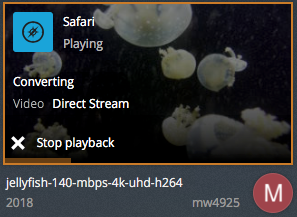
I have tested with the jellyfish test files and all played without issues even up to 140 Mbps - either directly or transcoded:

This leaves me to believe that the issue must be with the recordings. I have 2 recordings that I have used for testing. I could send them to you (via Dropbox, for example). That way you can see if you can reproduce it using your kit.

Correct. The issue is with the recordings / source files.
What you have demonstrated is, with known good source data, PMS will HW transcode correctly.

Thanks @trumpy81 - can I do this in Plex? I guess I could do a transcoding post-recording. Or is there a way to do this at the time of recording?

Thanks - not sure where the 1080i come in; when I look at the media info of the problematic file i see

Video Resolution 1080p

but I also see

Scan Type interlaced

On the other hand, my TV is 1080i

When I play the recording and check on Plex how it is being played, it tells me that it does Direct Play and only transcoding the audio:

BTW, based on Apple TV 4 spec, it can play video up to 1080p which should include 1080i:

Video Formats
HEVC SDR up to 1080p, 30 fps, Main/Main 10 profile
H.264 video up to 1080p, 60 fps, High or Main Profile level 4.2 or lower
H.264 Baseline Profile level 3.0 or lower with AAC-LC audio up to 160 Kbps per channel, 48kHz, stereo audio in .m4v, .mp4, and .mov file formats
MPEG-4 video up to 2.5 Mbps, 640 by 480 pixels, 30 fps, Simple Profile with AAC-LC audio up to 160 Kbps, 48kHz, stereo audio in .m4v, .mp4, and .mov file formats

If media is 1080p it cannot be interlaced.
p = progressive and i is interlaced. Bad media stream or bad header in the file.

I’m beginning to wonder if this “Scan Type interlaced” value is the problem. When I optimise a programme using the various target options available, i.e. Optimized for TV, Original Quality, TV 20 Mbps 1080p, TV 12 Mbps 1080p, TV 10 Mbps 1080p, TV 8 Mbps 1080p, TV 4 Mbps 720p, TV 3 Mbps 720p, TV 2 Mbps 720p, TV 1.5 Mbps 480p I see that only the original file has this tag; all other version don’t have this at all.

Is there a way to strip this “Scan Type interlaced” from the header? Obviously, I could just optimise all recordings automatically, but this has 2 drawbacks:

  1. it takes time
  2. all recordings have language set to the stream that contains audio descriptions (see separate thread https://forums.plex.tv/discussion/comment/1662573/#Comment_1662573)

My telly doesn’t have a CRT but it’s (quite an old) Panasonic Plasma TV which has 1080i as its native resolution.

Anyway, I’ve installed the free version of Infuse on my Apple TV and this can play the problematic files without issues. So whilst the underlying cause may indeed be the wrong header the question now is why Infuse is able to play it and Plex isn’t. I would prefer to have just one app for live and recorded TV and I also quite like the Plex UI.

I received (spamming my mailbox) a millions of replies after I got my answer. For what I see you are out of subject. How can I unsubscribe from this thread on mobile??

Thank you!

To all:

Per OP request, This thread is now closed. Please create a new one