Hey, thanks for responding. This still happens. Just filled up the drive again. There is some process that is bugging out. I’m still in agreement that 30GB for just thumbnails, is kinda a lot. But that’s another thing. It looks like there is something going on here. I keep my plex docker container up to date. So this has been happening for over a year’s worth of updates.
This cache certainly needs some work, I’d actually not call it a cache at all and instead call it bloat. I’ve been deleting this cache weekly via a cron job as i’ve seen it grow to crazy sizes on my environment when directly compared to the size of my media and my plex server. I also never seen any performance hit on my server when I delete it.
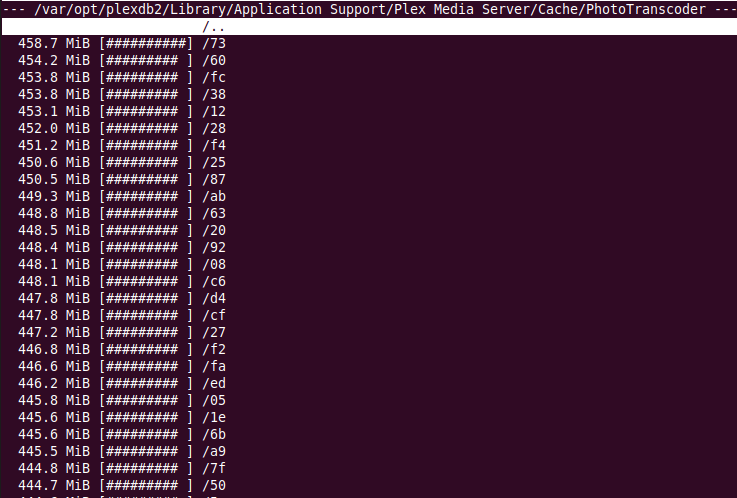
This week I ran a simple test. I deleted the content of Cache/PhotoTranscoder and then over the next 5 days ran three checks to see how bad it gets. 1) size of the PhotoTranscoder, 2) how many files are contained in PhotoTranscoder and 3) most important ran a duplicate check on PhotoTranscoder to see how many times plex is trying to cache the same files over and over again. Here are my results …
xxx@dokuro:/data/Personal/Scripts$ du -sh '/var/lib/plexmediaserver/Library/Application Support/Plex Media Server/Cache'
9.2G	/var/lib/plexmediaserver/Library/Application Support/Plex Media Server/Cache
xxx@dokuro:/data/Personal/Scripts$ find '/var/lib/plexmediaserver/Library/Application Support/Plex Media Server/Cache' -type f -print | wc -l
49422
xxx@dokuro:/data/Personal/Scripts$ fdupes -r -m '/var/lib/plexmediaserver/Library/Application Support/Plex Media Server/Cache'
14429 duplicate files (in 6980 sets), occupying 5210.2 megabytes
xxx@dokuro:/data/Personal/Scripts$
This is just after approx 5 days. In summary 9.2G in size, almost 50,000 files of which almost 15,000 are dups taking up 5.2GB, half the size of this cache. After a month this would grow to approx 60GB which I can confirm as I’ve seen this in the past.
Whatever code path plex is using to update and maintain this cache seem deeply flawed. For context, my library size is 3,200+ movies with 550+ shows (28,000+ episodes). Below are the sizes of my plex media server folders.
xxx@dokuro:/data/Personal/Scripts$ sudo du -sh --threshold=1G /var/lib/plexmediaserver/Library/Application\ Support/Plex\ Media\ Server/* | sort -h
2.7G	/var/lib/plexmediaserver/Library/Application Support/Plex Media Server/Plug-in Support
3.9G	/var/lib/plexmediaserver/Library/Application Support/Plex Media Server/Media
9.2G	/var/lib/plexmediaserver/Library/Application Support/Plex Media Server/Cache
12G	/var/lib/plexmediaserver/Library/Application Support/Plex Media Server/Metadata
xxx@dokuro:/data/Personal/Scripts$
This cache needs work. Almost 50,000 cache files when I don’t even have that amount of content on my server, crazy.
While i totally agree with your general sentiment, the multiplication factor comes from the amount of devices connected to your server. Not ever device can display every content/size/ratio/whatever, so for every device an extra thumbnail? i guess? gets created.
Which is suboptimal.
Yeap, I understand that and its a good point. I was considering adding that to my post but decided to leave it out as the post was already full of detail and lengthy But fdupes is finding duplicate, not different sizes of the same file. They maybe creating duplicates for everything per client. God that would be mad!!!
For my use case I have no more than 4 clients. WebUI (browser for general server maintenance), Shield (used for 90% of viewing), Android Mobile client and Plex Media Player used for the rest. I also have 1 main user as we use plex for family streaming and I have 1 added user who uses it very infrequently. So I’ve not got a high user base which could increase the cache.
Anyhow, it comes down to 2 things for me. 1) the size which I think we can all agree on is crazy and contains many dups and 2) is the cache actually helping.
On point 2 I’m really not sure this cache is doing anything bar using up lots of disk space. As I say previously, I’ve been deleting this cache weekly for approx 1 year with no performance impact.
You notice the performance difference when you delete everything and then browse your library again. Like scroll down really fast all the way. There is like a half a second till the pictures pop up since they need to get resized/transcoded/whatever. At least it is that way for my server. Idk, it’s weird, as if anything can’t display jpg and resize on its own… or cache it in the browser/app ¯_(ツ)_/¯
It’s not a great solution.
You can always use a filesystem with deduplication to solve part of the problem, if you are feeling facny …
Its not noticeable on my server and my network. I’ve tested this many times and its pretty much instantaneous either with a empty cache or full bloated cache on the server.
Another interesting observation I’ve just noticed. I forced a metadata refresh of my TV and Movies (another thing I do weekly) and this cache has doubled in size just by doing that …
xxx@dokuro:/data/Personal/Scripts$ du -sh '/var/lib/plexmediaserver/Library/Application Support/Plex Media Server/Cache'
19G	/var/lib/plexmediaserver/Library/Application Support/Plex Media Server/Cache
xxx@dokuro:/data/Personal/Scripts$ find '/var/lib/plexmediaserver/Library/Application Support/Plex Media Server/Cache' -type f -print | wc -l
113488
xxx@dokuro:/data/Personal/Scripts$ fdupes -r -m '/var/lib/plexmediaserver/Library/Application Support/Plex Media Server/Cache'
29459 duplicate files (in 16450 sets), occupying 8758.2 megabytes
xxx@dokuro:/data/Personal/Scripts$
Its gone from … 9.2G in size, 50,000 files and 15,000 are dups taking up 5.2GB
To … 19.2G in size, 113,000 files and 29,500 are dups taking up 8.7GB
The thing is just a mess and can’t believe more folks are not moaning about.
This issue is almost 2 years old and honestly costing users prob 10s of thousands of dollars in HD space. Please Please fix this… Just make it so there is a de-duplicated cache. Just a K:V store for sizeXformat:location and let everything use that.
I agree with you that it provides a mild performance boost. It depends how fast your CPU is vs. your storage. If your CPU is fast and your metadata source drive is fast it doesn’t help at all. If your CPU is slow and metadata access is slow it helps a TON.
The cache is definitely broken. It’s true that clients don’t all use the same size images.
But many of them could.
Plex itself is breaking the possibility of re-use by adding too many unique identifiers into the hash/key. I don’t think it needs more than “content/format/size”; it’s also including “whatever”.
I’ve been hard linking duplicate cache files together for a long time. It seems to work well. But that’s chasing the file size problem, not the cache key problem.
It also means new clients don’t get any benefit from the cache. It only helps them on reload.
I wonder if we’re missing something. I share the same confusion about how it behaves.
I use jdupes. I know this works well on FreeBSD/Linux. I suspect it would work well on NTFS. I wouldn’t hesitate to try - if it doesn’t work, just nuke the folder.
I’m doing this from cron daily:
/usr/local/bin/jdupes -qHLr "/mnt/plexdata/Plex Media Server/Cache/PhotoTranscoder/"
Thanks, will give that a go for a while. I’ve been deleting weekly but I’m sure over time it’s reducing my ssd’s lifespan so would rather have a better solution.
Have you guys actually checked the duplicate files? Season for shows that don’t have a season poster will reuse the show poster so these will appear as duplicates. This could also happen for albums if it’s not matched, it reuses the artist image.
I’ve no albums, this is all TV shows and Movies. I’ve also local assets for all my artwork, so every show has a poster and every season has a unique poster. None would be missing.
Anyhow, I’ll check a couple and report back but I think I done this in the past and they where identical images but will confirm …
Thanks for getting back!! I promise you that this is an issue somewhere. For years throughout upgrades etc. Its upwards of 80GB for this cache sometimes. We have given you examples, several people are reporting it.
What do we need to do to get this added to the issues list?
If you can verify what is being duplicated, I can bring this up with the team. The rest of the caching looks about right to me. Images are typically 100-500 kB each, so say 200kB average. 100,000 images is about 20 GB.
I need to check, but if you are using the new Plex Movie Agent, I think the original full size posters are saved in there too instead of in the metadata folder. This can also make that cache folder a lot larger.
Okay, so I can confirm they are duplicates of exactly the same image. Of the few I checked some are fanart backgrounds and some are posters. I picked 5 different batches at random (from the txt file below) and checked the files themselves, all are identical duplication of the same images. Attached is a zip file listing of everything reported as a duplicate, all 33,801 of them …
I am using the new modern agents for both movie and tv. I deleted the PhotoTranscoder content approx 1 week ago and now its …
xxx@dokuro:~/Downloads$ du -sh '/var/lib/plexmediaserver/Library/Application Support/Plex Media Server/Cache'
19G	/var/lib/plexmediaserver/Library/Application Support/Plex Media Server/Cache
xxx@dokuro:~/Downloads$ find '/var/lib/plexmediaserver/Library/Application Support/Plex Media Server/Cache' -type f -print | wc -l
120329
xxx@dokuro:~/Downloads$ fdupes -r -m '/var/lib/plexmediaserver/Library/Application Support/Plex Media Server/Cache'
33801 duplicate files (in 18843 sets), occupying 9541.7 megabytes
xxx@dokuro:~/Downloads$
… which in summary is 19G in size, almost 120,000 files of which almost 34,000 are dups taking up 9.5GB. That is just after 1 week, if I was to leave it alone it would grow to well over 60 GB in a month. My plex server has no music libraries, 1 movie and 1 tv library with 3,200+ movies with 550+ shows (28,000+ episodes) and approx 4 different plex clients over the past week. There is something fundamentally wrong with this cache and how its generated …
If you need anything else feel free to reach out to me.
I’m only counting bit-identical files as duplicates.
Lots of different things. Movie posters. Collection images. Backgrounds. It seems like basically all images that are resized for delivery to clients.
There are duplicates of both resized files and multiple duplicates of the original files.
It’s not “instead of” the Metadata folder, because PhotoTranscoder can be deleted. The originals are stored in the Metadata folder and copied from there.
Here’s an example. There are multiple identical resized smaller versions, each bit-identical. There are also multiple identical copies of the original file - and see the last row - the original in Metadata.
Size - 65.25 KiB (66813) - 2 files
/mnt/plexdata/Plex Media Server/Cache/PhotoTranscoder/f3/f33d8ede0893a62270feb7c574e8ffa3998baa05.jpg
/mnt/plexdata/Plex Media Server/Cache/PhotoTranscoder/ed/ed032cb43c73201d673940ca8ad3aefebd7dac2e.jpg

Size - 2.61 MiB (2737417) - 3 files
/mnt/plexdata/Plex Media Server/Cache/PhotoTranscoder/82/821251dc87934a91ab037d4038f535af26a1a249.jpg
/mnt/plexdata/Plex Media Server/Cache/PhotoTranscoder/04/041dff75fafbf2f08085991858c497a0a9c6f6d6.jpg
/mnt/plexdata/Plex Media Server/Metadata/Collections/6/382bcc66104a29a1fc5b1476208d8a1b2b82b6d.bundle/Uploads/posters/7b7d2ad0412edc0bb04ec9ba99310aa1981d6d22
Why is it generating different cache filenames for the same original?
Feb 07, 2022 19:11:52.203 [0x80bdd4e00] DEBUG - Photo cache obtained 2737417 bytes from /library/metadata/182442/thumb/1644224865?X-Plex-Token=xxxxxxxxxxxxxxxxxxxx
Feb 07, 2022 19:11:52.203 [0x80bdd4e00] DEBUG - Saving original media file to /mnt/plexdata/Plex Media Server/Cache/PhotoTranscoder/82/821251dc87934a91ab037d4038f535af26a1a249.jpg
...
Feb 07, 2022 19:21:02.380 [0x806543000] DEBUG - Photo cache obtained 2737417 bytes from /library/metadata/182442/thumb/1644224865?X-Plex-Token=xxxxxxxxxxxxxxxxxxxx
Feb 07, 2022 19:21:02.380 [0x806543000] DEBUG - Saving original media file to /mnt/plexdata/Plex Media Server/Cache/PhotoTranscoder/04/041dff75fafbf2f08085991858c497a0a9c6f6d6.jpg


 But fdupes is finding duplicate, not different sizes of the same file. They maybe creating duplicates for everything per client. God that would be mad!!!
