OK i’ll do that. Want to diagnose one thing or one thing at a time.
So Emby I think is actually transcoding the file when I look at it even though in theory it shouldn’t need to.
It looks like Plex is playing direct in theory from what I saw thru the web interface?
How is the NVidia Shield direct playing the file? Is it the Plex player that is running on the Shield and pulling up the video direct? So is the Shield going to \mediacenter\d$… to play the file?
If it says so, then the video is relayed as-is to the Shield.
Data are always travelling through the server. ‘Direct Play’ means the file is not changed in any way by the server.
When I play a movie on Shield, it talks to homeserver, homeserver finds the movie on mediacenter and passes it thru to the Shield? So the Shield isn’t told by Plex to go directly to \mediacenter\d$\video\movie.wmv and play it?
If that’s the case, then I would think my next step is to try a built in video player or VLC or something and see if that plays OK no? Even if it is passing it thru that way somehow, imagine it’s possible the Plex built in player is the issue?
Yes, that’s how it works. Otherwise you’d have to give each client separately file access permissions to the source. Which can get exhausting if the media files happen to be distributed across several file shares.
Sorry, I fail to see what you are trying to confirm with it? Whether it is a failure of the Shield as a device or the Plex client?
Think the Shield is going back. Contrary to it’s website I do not think this thing does what it says it can do but could be wrong. Manually mapped my network share and the Video player which I assume is the built in one would play the audio but no video came out. VLC on the unit played it fine. So in theory if VLC uses it’s own codec and Video player uses what’s built into the OS, then the device out of the box doesn’t support WMV content but their site says it does. It does show with the right codec WMV will play fine with VLC though so hmmm.
Just for grins - check Server/Settings/Transcoder and ensure the transcoder is NOT disabled. The wording can be a bit strange.
… and for more grinning - check the Plex app settings and enable ‘Adjust Automatically’ - or whatever it says - as a test to give Plex every opportunity to transcode a file the unit doesn’t support.
The Plex app on the Shield does support WMV files. However, some wmv files created with MCEBuddy are not compatible. Basically, when MCEBuddy records, it can end up saving bad data into the file. Some players are fine with these errors, but the Plex app has trouble. The only fix for now is to re-encode these files which removes the troublesome data.
MCEBuddy doesn’t record - it coverts, or not.
MCEBuddy is the middle person between the recording and where it needs to go.
It has many, complex functions, but as far as I’m aware it doesn’t record, or even go to work until the recording is finished.
It’s settings are so complex, I would absolutely believe it’s possible to covert files that won’t play on anything with MCEBuddy - and if there’s a glarring bug in it, by all means take it to MCEBuddy and they’ll put all hands on deck to get it fixed.
I am curious now to know what ‘magic’ was performed on these files previously - so I don’t make that mistake - but MCEBuddy, the way I’m using it, is flawless in it’s execution across every device in the Plexiverse.
Wow, so there may be something to MovieFan.Plex comment. These files are usually created or modified by MCEBuddy. Sometimes converting a MKV file to WMV because my XBox 360 can’t play it, or taking an MP4 with commercial markers and stripping them out.
So here’s the deal, I never did this before. I decided to play one of those high encoded WMV movies I created with Premiere Pro. They actually played however they are being transcoded. So I’m not super happy about that, but better than nothing.
Also if it was Video Quality I was supposed to look for, it’s set to Maximum.
EDIT: Also I’m going to have to test some other WMV movie files. The two I tested were 10,000 kb/s and I know in a lot of cases anything over 8,000 can be out of some codec support. I did that with movies I really wanted to keep the quality maximized.
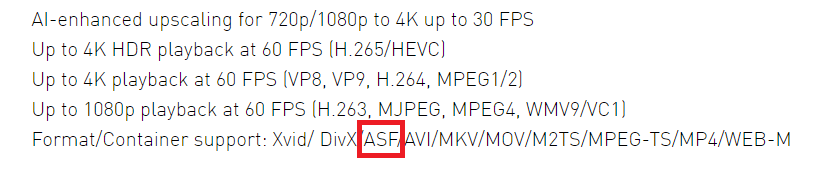
Something else I’m curious about, they say ASF and WMV are the same and you can just change the extension and it keeps working. Wouldn’t the below basically say that it supports ASF files so are they saying if I change WMV to ASF it will work?
Ah sorry. It’s used so often as a post processor that I’m use to thinking of it as the DVR. Either way, I’ve run into several cases where files produce by MCEBuddy just don’t work with some Plex clients.
Yes, these are basically the same thing. I believe there’s a slight difference in the header structure but not enough to affect playback.
You could try and see what various “repair” tool can achieve.
I’ve used such a tool with some success in the past.
But I don’t know anymore its name.
Googling turned up this for instance (I haven’t tested it myself) https://recoverit.wondershare.com/video-repair-tool.html
OK - if we can nail some predictable misbehavior down I’m certain the MCEBuddies would love to know about it. <—unless the misbehavior is on the part of the user - thinking they know more than MCEBuddy does about converting their files <—'cause I’ve been using it for 15 years without issue. <—using one of the ‘barely’ unaltered conversion profiles already provided. <—that are, for all intents and purposes - Stupid Proof. (<—Certified Tester)
I don’t know the details or the causes, but I’ve gotten samples from users and they have some sort of glitch in them. Other video players will skip over these glitches so it’s hard to notice that the issue is in the file, but they become noticeable in Plex.