I’m switching from a HDHomerun EXTEND to a HDHomerun PRIME. The EXTEND had built in transcoding which worked great and reduced file sized by about 20%. Unfortunately, the PRIME does not.
I tested the PRIME with transcoding on and off and unfortunately the transcoding ON setting resulted in files that were over 10% larger!
Is there a way to adjust the transcoding settings for on the fly? Or barring that have an opitmization job called before adding the file to the library?
You can pass the file through a post-processing script before it is added to your library. From Settings -> Live TV & DVR -> DVR Settings:
It’s up to you to find/create said script. A naive script could just pass the file through HandBrakeCLI with a fixed profile and call it good. A more robust script would check the properties of the file (resolution, scan type, etc…) and optimize accordingly.
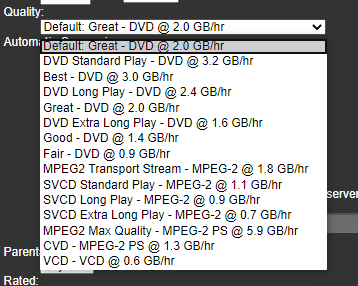
I get this. For me though, I can’t always predict the type of file being sent. Somehow my SageTV system just brought it down to a meaningful GB/hour setting that I could choose how much data was kept. The resolution would stay the same though. Super easy. Exhibit one: