whats full bit rate though? With a 19Mbps rip, I get about 560MB usage per transcode.
well for example atomic blond has an overall bitrate;
- Bitrate 51248 kbps
FWIW, I’m able to get, I’m able to get 4 - 4k ~50mb transcodes --> 1080p 20mb with a 1050ti before running out of vram for a 5th. 1050 ti 4gb
@depreciated is that on windows, or linux via the current nvdec hack ?
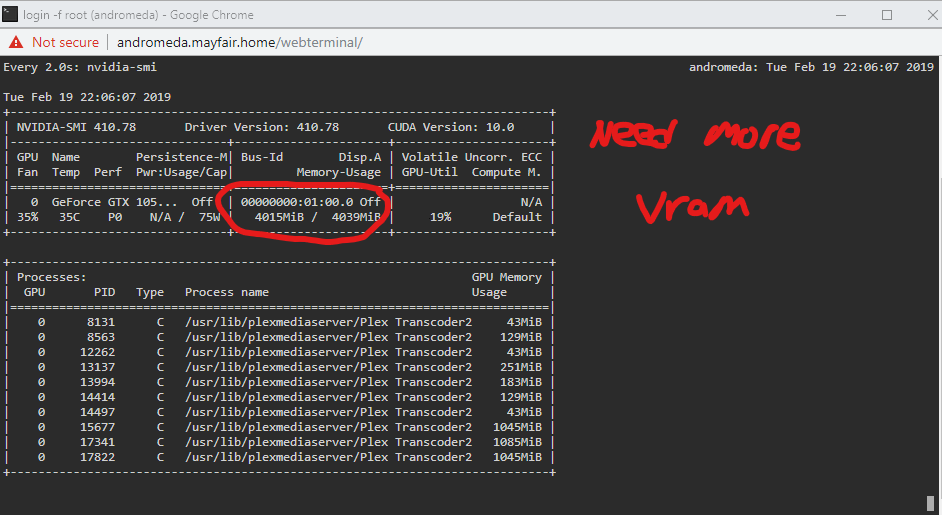
Ok yeah, your card has 4gig ram.
my p400 (cheap $115 substitute instead of p2k) only has 2 gig vram, and I have only gotten one 4k Decode working.
What we need is a comparison of vram usage for 4k decoding/transcoding on both windows vs linux.
Also realize that windows does not use nvdec, but the DXVA2 decoder, and there may well be different vram usage considerations between the 2 decoders.
If for example NVDEC uses ~ 1.1 gig vram per 4k decode, and windows DXVA2 uses 600m vram, then windows will get more 4k decodes out of the available vram on whatever card is being used.
yeah I noticed windows and linux are handling the decoding differently.
I’m spinning up a W10 vm on my unraid box now to see what I can get out of this 1050. Is there a comparable command on the windows side for nvidia-smi? Task manager doesn’t break it down as nicely.
as far as I know, there is no windows equivalent to nvidia-smi, maybe someone else has something.
that said, an updated/recent windows release should have the gpu loads on the task manager and you can right click the graphs to change them to some other stats (not in front of my home pc to say which).
give me a few to gather some info and i’ll post some screen shots of task manager and Tautulli. W10 and Docker.
for reference on my windows desktop test plex server, 960gtx gm206 via windows task manager
4k/hdr/x265 decode + 1080p/x264 encode + truehd > aac (cpu)
20-30% gpu DEcode load
less than 10% gpu ENcode load
0.9/2.0GB vram load
idle gpu vram load = 0.6/2GB
so on in this case, the combined 4k decode/1080encode load is only using 0.3GB of vram.
that is hugely different than what I see on linux 4k decode (~1.1 to 1.5 GB vram/thread).
I ended up using this to find all the processes older than 100 minutes, and killing them off:
sudo find /proc -maxdepth 1 -user plex -type d -mmin +100 -exec basename {} ; | xargs ps | grep Transcoder2 | awk ‘{ print $1 }’ | sudo xargs kill -9
I believe I could just script this to run every hour…
Long post but scroll down to the bottom if you’re just looking for what I found in my testing
W10 Test
@TeknoJunky already confirmed what I found. 300mb of vram and about 20% decode on each 50mb transcode. The stream looks pretty good but I’m locked at two due to the geforce crap nvidia does. It sucks but it is what it is. I did notice the occasional hiccup once I kicked up the second transcode even when I had 20+ seconds of buffer, which I found odd. Every 20 seconds or so, I’d have a second of buffering. Then complete lock down when the third (non HW decoded) stream started. which was expected. I turned off all visuals on a clean install of W10 with the latest geforce drivers & PMS v1.15.0.659
Back to the linux docker.
I unlock the 1050ti, run the nvdec script and I’m back with high unusually high vram usage again. What I just now realized was that I wasn’t actually transcoding 4 streams with the 1050ti last night. I was using the 4770’s igpu. If you check my first post, you’ll see a few procs with 45MiB.
That was just encoding and not decoding. Here’s how I can tell.
I queue up a video on an iPad and hit start. nvidia-smi shows 1 process running. I then convert to a 20mpbs 1080p and it starts a second process but the first one doesn’t get killed. That’s the problem I mentioned earlier. I kicked off 2 more streams (different files but all within the same 50-60 mpbs mark) and then restart the docker. All three devices pause for a second but then I’m back to only three full hardware encode/decode processes. I can verify this using the nvidia-smi dmon -s u command and i’m sitting around 60% decode. Awesome sauce but I have a big, blocky problem.
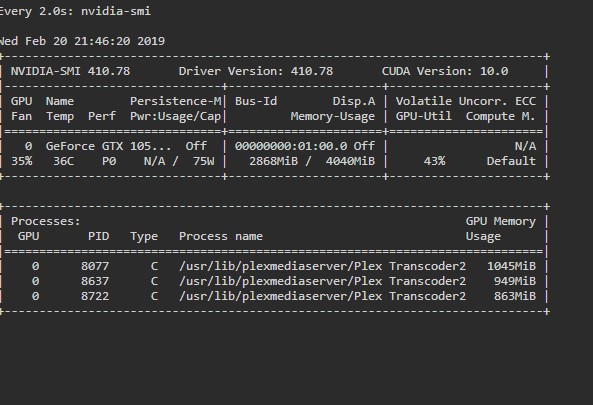

The quality is so poor even, with just the two streams unpatched. The decoder work around is causing artifacts (estimating) 300x600 pixel chunks at a time, scene changes cause complete color loss. Its watchable, it doesn’t buffer, I’m getting awesome transcode speeds and my 4770 is seeing about 25% per stream but it is not up to my standards. If I wanted to watch low bitrate, blocky content, I’d head on over to netflix.
Next steps…I guess
I have a 2080/9900k in my main rig that I’m going setup a test linux PMS on. The new RTX cards are supposed to have better decoders built in (source needed). It should give me more headroom with vram and cpu but I really really really don’t wan’t to be dropping a 1k gpu, into a rack server just to use it as an encoder and the Turing quadros are way out of my reach at this point.
I’m also going to head over to a windows thread to see if anyone else has had that strange buffering issue I ran into. If i could get that fixed, I’d just go get a P2000 and run W10. I don’t want to run into the same problem because that’s again a deal breaker for me. I wonder if the Emby grass is any greener? I’d hate to leave Plex. I’ve been using it for over a decade at this point but 4k is here and if it can’t keep up, it has to go.
TLDR W10 looks great, low vram usage but I ran into stuttering issues with a very healthy buffer. Linux looks terrible but great performance, which I guess isn’t anything new at this point.
Great writeup!
Seen this? https://github.com/keylase/nvidia-patch/tree/master/win
Yes! TY. That’s what I tried with my testing and it does work with encode but it doesn’t seem to lift the limit on decodes. Maybe someone a little more savvy that me can chime in but I could not get it to work in regard to decoding.
it works with AnanymousRetard’s hack. holy cow…
This is currently with 12 streams running on a Test bench i have running…
I currently have a i5-4690k and a GTX1080 in this machine. i’m pretty sure this can do like 20+ streams. limiting factor is probably the proc being not as strong.
Please plex just release the update this is so amazing its not even funny!

Change the script to use exec and the processes will behave as they should
#!/bin/sh
exec /usr/lib/plexmediaserver/Plex\ Transcoder2 -hwaccel nvdec "$@"
Hey Levi I’m going to give this a shot later tonight. If you wouldn’t mind indulging me, is this why the exec command works in this instance?
Source( g_p on askubuntu)
- Forking provides a way for an existing process to start a new one. However, there may be situations where a child process is not the part of the same program as parent process. In this case
execis used.execwill replace the contents of the currently running process with the information from a program binary. - After the forking process, the address space of the child process is overwritten with the new process data. This is done through an exec call to the system.
Edit: user on the unraid forum tested it with exec and it performs as you described. Thank you for the help!
keep in mind your example is 720 x264 to sd x264, which while a great example, is not going to be representative to any (4k) x265 to x264 loads.
Every process on Linux has a parent, up to init (PID 1). If you run a script/program from within a Bash script, that process becomes a child of Bash (via fork). This means the process topology looks like:
Plex → Bash Script Hack → Plex Transcoder
Plex is unaware of the third process, it believes Bash is the transcoder. If it kills the process, it’ll think it killed the transcoder – when in reality it’s still running.
With exec, the transcoder replaces the Bash process, so topology is:
Plex → Plex Transcoder
Which is what Plex is expecting.
Well today I learned something new! I always thought a child process dies when the parent does, but apparently not. That explains the behavior some of us have experienced.
Edit: Updated the docker image adnanklink/plex-norelay-hwdecoding and so far so good but Ill report back if I see anymore hanging processes.
