I have also noticed this in the past I’m pretty sure. Is there a possibility to solve this through either mpv or Plex development?
Oh dear, that’s bad. I will update my post regarding this phenomenon. Luckily it is easy to fix with the linked tool. Thanks for the info!
I also have to add a rather bad message… I purchased a hdfury arcana just for HDMI diagnostics/debugging. (I know it is originally intended for eARC stuff, which I don’t care about)
It also shows information about the passed-through metadata and - well - with its current state Plex HTPC does not pass through metadata at all. (yes, tested with -target-colorspace-hint=yes) The mpv command does help with getting an overall better HDR image (so my article is not 100% wrong) but it is not “bit-perfect”. I tried it with the standalone mpv client and it does not pass through real HDR metadata in windowed mode either, in fullscreen it does. With mpv in fullscreen, it even passes through additional information regarding the colorspace (Bt.2020 or DCI-P3) which is kinda impressive.
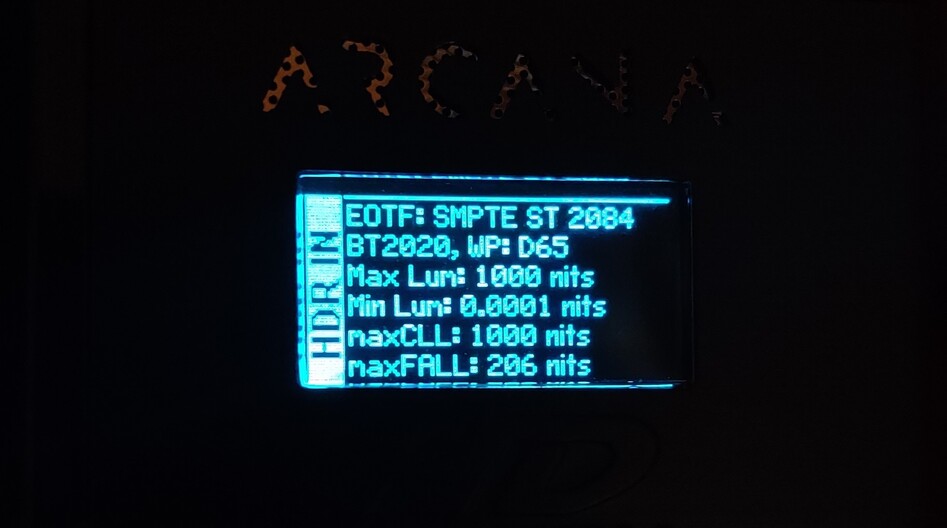
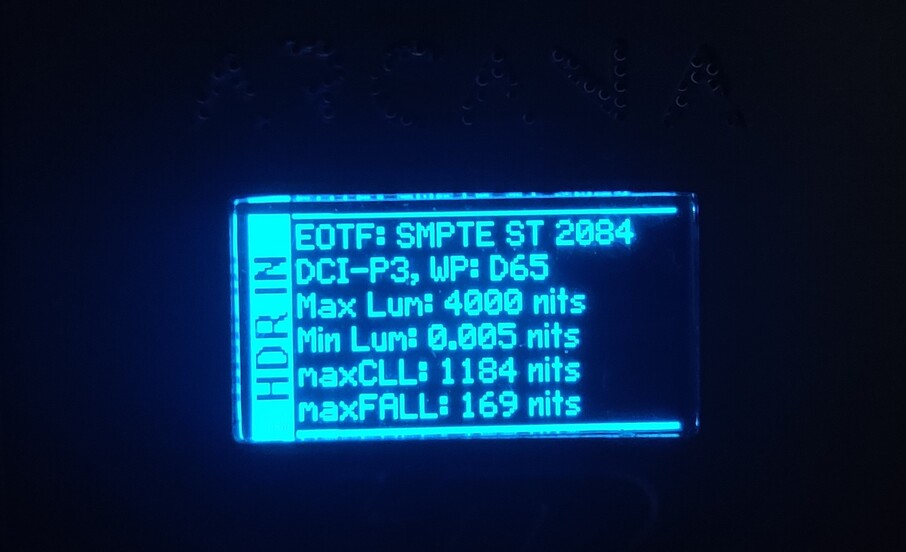
The fullscreen real metadata passthrough method worked with my Nvidia RTX3050 and the AMD RX580 card. (d3d11 method)
On the Nvidia card, the standalone Vulkan method that switches the TV to HDR does not pass through metadata at all - no metadata in windowed or fullscreen mode. The only circumstance I was able to get the metadata to the Tv was with HDR enabled in Windows and then mpv with Vulkan in fullscreen.
I guess it is not possible for plex to somehow run mpv in fullscreen? I will also ask over at the mpv github page if real-metadata-passthrough could be added for windowed mode either.
1 Like
Interesting. I have personally seen a dramatic improvement when target-colorspace-hint=yes is set (using D3D11). Perhaps it is changing the processing with Windows in this case.
Arg, likely this is due to a check somewhere on whether the app is fullscreen or not. It does make sense to only enable things such as metadata passthrough only when in fullscreen so it seems like a reasonable check. The problem is a client like Plex HTPC cannot really tell MPV in a good way that it is fullscreen and thus should enable behavior like this.
For reference for others, the GHI is [gpu-next] HDR metadata not forwarded in windowed mode · Issue #10628 · mpv-player/mpv · GitHub
1 Like
Indeed, the image looks way better with the option set and the difference between the image with real metadata passthrough is minimal. I guess in normal movie watching it’s okay-ish… With hdr calibration files, the difference is huge. For testing, I can highly recommend the HDR10 test pattern set by Mehanik (HDR10 test patterns set | AVS Forum), especially the file "03. 900-4000nits-MaxCLL-4000-MDL-4000.mp4". With actual metadata passed through to the tv, the blinking squares are almost visible until the 4000 nit value. (the TV in this case knows how bright the video actually is and adapts its tone mapping to its own brightness) Without metadata present but with target-colorspace-hint=yes set, the squares are not visible after the 1500 nit range, everything above is clipped and no squares are visible. Without target-colorspace-hint=yes it completely looks wrong.
I really hope that this can be changed somehow either in mpv or in plex htpc. We are so close to perfect playback and when metadata passthrough would work, it would actually surpass the shield in correct HDR10 playback. (The shield transmits wrong values for minLUM.) Well, let’s see if an mpv dev will see the github issue and finds a way to fix it. I also sincerely hope that windowed hdr metadata passthrough is even possible and is not impossible due to some API limitations.
1 Like
I did some digging through the MPV code and I cannot find anything along the path to set the HDR metadata on the swapchain that depends on whether it is in fullscreen or not. Perhaps there is something in the OS that’s preventing it in the case of HTPC. It calls IDXGISwapChain4_SetHDRMetaData (as best I can tell by looking at what it logs vs what it should log on certain code paths) which the docs indicates it sets the metadata to enable the monitor’s output to be adjusted.
2 Likes
Thanks for having had a look at the code. I have also looked at the code also at the libplacebo code but to be honest I have no idea what I was even looking for. However, maybe I found something in the libplacebo code, which seems that windowed metadata passthrough should be possible. (libplacebo/src/include/libplacebo at master · haasn/libplacebo · GitHub / swapchain.h/ d3d11.h)
Hopefully haasn over at the mpv github page will take a look at this.
I’m not sure what you are pointing out in the code there. What I looked at was:
- This is where the
target-colorspace-hintoption is handled (https://github.com/mpv-player/mpv/blob/b9c7e5b5fff88c86ed19c9753b3b8a2499293bee/video/out/vo_gpu_next.c#L1822) translates to the variabletarget_hint - Here is where MPV uses that code (https://github.com/mpv-player/mpv/blob/b9c7e5b5fff88c86ed19c9753b3b8a2499293bee/video/out/vo_gpu_next.c#L872-L881) to call
pl_swapchain_colorspace_hintin libplacebo - And the implementation of
pl_swapchain_colorspace_hintin libplacebo (https://github.com/haasn/libplacebo/blob/e55f7d48a62af04cc67c0771be80af0924b8306a/src/swapchain.c#L54-L80) which callssw->impl->colorspace_hint - Where
colorspace_hint(https://github.com/haasn/libplacebo/blob/2eb4a55e2ca172d889156ffad71412fc08a792a2/src/d3d11/swapchain.c#L423) is mapped to the static functiond3d11_sw_colorspace_hintfor D3D11 swapchains d3d11_sw_colorspace_hintcallsupdate_swapchain_color_config(https://github.com/haasn/libplacebo/blob/2eb4a55e2ca172d889156ffad71412fc08a792a2/src/d3d11/swapchain.c#L406-L410)- The implementation of
update_swapchain_color_config(https://github.com/haasn/libplacebo/blob/2eb4a55e2ca172d889156ffad71412fc08a792a2/src/d3d11/swapchain.c#L340-L404) which logs things likeNew swap chain configuration received from hint: format: R10G10B10A2_UNORM, color space: RGB_FULL_G2084_NONE_P2020.(which I see in my logs) and callsset_swapchain_metadata set_swapchain_metadata(https://github.com/haasn/libplacebo/blob/2eb4a55e2ca172d889156ffad71412fc08a792a2/src/d3d11/swapchain.c#L272-L306) which callsIDXGISwapChain4_SetHDRMetaDataand logs if it fails prior to that (logs which I do not see in my logs)
That’s one of the chains of code I followed and no where do I see anything that checks for fullscreen.
The swapchain is actually created in MPV (https://github.com/mpv-player/mpv/blob/b9c7e5b5fff88c86ed19c9753b3b8a2499293bee/video/out/gpu/d3d11_helpers.c#L614-L666) and passed into libplacebo (https://github.com/mpv-player/mpv/blob/37aea112c15958052bcc6d0582593edf3bfead8f/video/out/gpu_next/context.c#L88-L91)
In looking at this I checked to see if MPV is manipulating the swapchain differently whether it is in fullscreen or not. The only thing I found was this function (https://github.com/mpv-player/mpv/blob/bb5b4b1ba61b67da40c85c34376aced9383fc366/video/out/d3d11/context.c#L363-L394) but that only comes into play if you have the MPV option d3d11-exclusive-fs set which defaults to off.
I wonder if you might have luck talking to him in the #mpv irc channel (see mpv.io | Community). Several of the MPV devs including hassn do hang out in there. Just be prepared to join, ask, and wait for several hours for one to notice your question and reply as most lurk in there.
I was just looking for an explanation about different calls to see if passthrough in windowed mode is something that could work. I was not looking for the actual mpv code. (I though libplacebo handles all the passthrough logic)
I will have a look at the irc chat, maybe I can catch him there. Thanks!
1 Like
So, after the IRC chat with MPV devs (and I saw your last note with wid=0/fs), this is quite definitively in the realm of Windows. I found an excellent test case which demonstrates this:
- Find a video which requires the HDR metadata passthrough to display connectly.
- Play it with the CLI MPV, advance to this point, and pause the video
- Toggle fullscreen (the
fkey) multiple times observing the differences.
You can see very clearly the difference with the HDR metadata passthrough where it is passing through when fullscreen and not when windowed. It isn’t MPV which is doing the switching here.
I did find this blog post which appears to describe what is going on: Demystifying Fullscreen Optimizations - DirectX Developer Blog This really appears that the fullscreen optimizations are what is at play here.
Now if only there were a way that HTPC could tell DXGI that it should treat the MPV window as the top level window when it comes to these optimizations.
2 Likes
Great, wasn´t sure if you got the message. (I don’t really get the principle of IRC chats, I mean when you go offline and in some hours back online, you cannot see what has been written in these hours… different topic)
That article is very informative and sheds some light on this mystery. (I never heard of “fullscreen optimizations” before) Thanks for having it linked!
Is this something you can ask Microsoft or try to implement somehow? I´m happy to try things out, just let me know! 
(Don´t know if this is useful information, but just tried Kodi to see if it works there, and yes in fullscreen it does forward metadata to the TV with all the playback controls working correctly- maybe they have done it via “fullscreen optimizations”? )
There are a few solutions to this. Since I like command-line Linux, I use irssi running inside tmux on a server that’s running 24/7. So I reconnect to the tmux session and I can see the history.
It would be nice if they implement something like that but I wouldn’t expect them to do so. The blog post about the fullscreen optimizations did yield some useful information as to when it is applied.
Fullscreen optimization isn’t something an app does. It gets applied by Windows under certain circumstances (namely a fullscreen window with nothing on top of it).
In the mean time, since your test (with wid=0) demonstrated that the MPV that comes with the app is capable of metadata passthrough, I was able to try some other things. Turns out that a monitor only capable of 300 nits is far better with these tests than a TV capable of 1000nits. Likely because it’s easier to find material which is mastered over 300 nits than 1000 and it’s more obvious to the eye.
Anyway, the crux of the issue is the UI layered on top of the video. The layering of windows is (inside HTPC):
- Top Level Window (Plex HTPC)
- UI (Chromium inside Qt framework)
- MPV
- MPV Created Window
- Cover Window
Note, 1.3 is not displayed in HTPC but only in Plex for Windows/Mac. We give MPV the id of window 1.2 and it creates 1.2.1 (only during playback). The HDR metadata is set on the swapchain for this window. I tried creating a swapchain for window 1 and setting the metadata there but it didn’t accomplish anything (which is somewhat expected because child windows are display on top of a parent window’s content). Turns out child windows can passthrough the HDR metadata and the fact that window 1.1 is displayed on top of 1.2 (and thus 1.2.1) is enough to break HDR metadata passthrough, even when window 1.1 is completely transparent with no content.
So, I tried a hack: I re-ordered window 1.2 on top of 1.1 (thus put video playback on top of the UI) and with that it appears to passthrough the HDR metadata. I had a delay after playback on this change and the change in tone-mapping in the display is plainly obvious when it occurs.
Perhaps this can be employed more in the future to always move the UI behind the video when it isn’t displaying anything.
For the curious, I was testing the same clip as in my earlier post about the mouse. In this scene, on a display that can only do 300 nits without the HDR metadata, the stag is entirely invisible inside a blob of white. With the HDR metadata (or a display with higher peak brightness) you can actually see the stag.
2 Likes
Okay, well that’s something I thought about, but unfortunately something I don’t have. (electricity is ridiculously expensive in my area…) But thanks for pointing this out! 
That sounds promising. I mean when playing a file, the UI is not needed, and when you need the playback ui elements its probably fine if metadata passthrough is not working for that short period of time they are on screen. (If I understood it correctly)
How much of a delay do you get? (And how does it show up?)
Well, I guess that’s fine. (It shouldn´t be too disturbing or is it? (on my testing with the mpv cli tool it was subtle))
As always thank you very much!
1 Like
If it can be made to work. Still not sure if this idea is tenable though. It would require cooperation from the UI side to indicate if it has anything to display over the video and we aren’t sure if we can reasonably do that.
This delay was only for purposes of my testing so the change occurred during playback and I could see it. In previous experiment instances I was screwing with MPV’s created window (1.2.1 above) which didn’t exist until playback actually starts so the delay was used for that too.
It’s quite obvious with this clip on a 300 nit peak brightness display. Effectively the difference is the bright elements stop being washed out. Likely this clip/display is an extreme case as most of the screen exceeds the peak brightness of the display. So without the metadata, it washes everything out but with it requires tone-mapping everything down to actually get any detail.
2 Likes
Fingers crossed that they will also stand behind this idea!
Oh okay, I thought it was necessary to get it somehow to work.
One note about Fullscreen Optimizations in Windows. I believe these only apply to “exclusive fullscreen” applications, but regardless, they can be disabled on a per-app bases from the “Compatibility” tab in the Properties window for the app:

Have you tested with that checkbox enabled?
I have not tried it with Plex HTPC yet but with mpv and there it doesn’t change anything (or even breaks HDR passthrough altogether - more Infos on the linked GitHub page)
1 Like
Soon the vulkan route may be viable.
I’ve been experimenting with separating the randr (resolution and refresh rate) switch and the HDR switch. Some TVs (my dad’s included) appear to take issue when the two are switched so close to one another (about half the time the TV changes into HDR, then the refresh rate changes and it’s back in SDR). So instead this code switches randr, delays, switches HDR, delays, then starts playback (maybe these delays should be different?). When switching back, it does the reverse. Since it toggles HDR after the randr, this can also help cases with HDMI 2.0 is used because HDMI 2.0 cannot do 4:4:4 4K HDR at 60Hz but it can at lower refresh rates.
@Mitzsch Earlier you stated that when using Vulkan and target-colorspace-hint (at least with some drivers) it switches the display into HDR without requiring Windows to be switched but it stays in HDR when playback ends until the app exits. I read earlier (I think it was first mentioned in your MPV GHI on this) that playing SDR content is a workaround for getting the display out of HDR. This gave me and idea, so I tried something:
As part of the randr/hdr switching work, I’ve been adding several async abilities inherited through the nano Plex Media Server included in the app. So it became relatively easy to make the code that switches from HDR->SDR to play a small file, that’s in SDR (black frame 320x240, 0.5seconds long, no audio). It only plays this SDR file when target-colorspace-hint is set and gpu-context=winvk.
So when using vulkan and target-colorspace-hint, if you tell HTPC to switch HDR, this experimental version does:
On Playback: Switch randr, delay, switch HDR on, delay, play
On Playback Exit: Play this tiny SDR file, wait for it to complete, switch HDR off, delay, switch randr.
I tested this on my setup where the display would stay in HDR if I used target-colorspace-hint in vulkan. After this version, the display exits HDR when playback ends. So it appears this is a viable workaround.
2 Likes
Awesome, that sounds great! Thanks! So maybe Vulkan is/can be a viable alternative to D3D11.
Unfortunately, the Vulkan route does not fix the metadata passthrough issue (Vulkan also needs mpv to be in fullscreen mode)… - to make matters even worse - to actually get metadata to be forwarded in Vulkan mode you need to first enable HDR under the windows setting - regardless of mpv also switching your TV in HDR. Well, luckily Plex HTPC can do this for us.
- (Windows) Better hide the cursor when playing HDR content
Just wanted to note it also here. With Version 1.26.1 the rectangle that shows after a mode switch is now gone! (In d3d11 and vulkan!) Thanks!
2 Likes
I just updated my first post regarding AMD GPUs and Vulkan. Vulkan metadata passthrough is indeed working. I updated the drivers to Adrenalin 22.9.2 and tried again. I guess it also would have worked before updating the driver. In the past I have not tested enabling HDR within Windows first and then run mpv with Vulkan enabled… This errors out like before ( VK_ERROR_FULL_SCREEN_EXCLUSIVE_MODE_LOST_EXT) but when HDR is enabled before playback … it also correctly forwards the metadata. (mpv cli) So it basically behaves like Nvidia…
Whenever true metadata passthrough is working with Plex HTPC it will also work correctly with AMD gpus and Vulkan.
Looking forward to the future!
2 Likes
