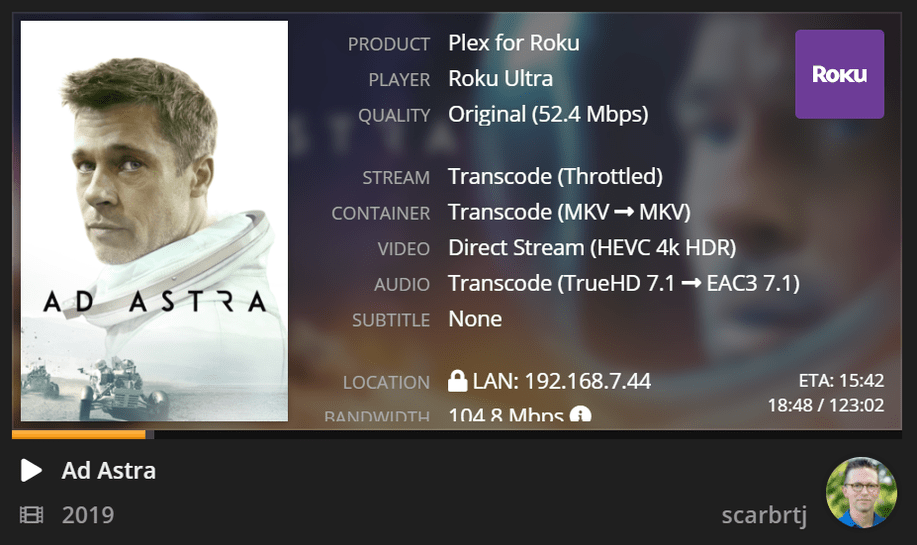
erm, because keeping the HDR is as important to some as keeping the truehd+atmos.
for those that don’t care, by all means pay an extra 20 to adobe and take the time and effort to manually convert hdr to sdr…
in any case, it seems apparent to me, that sooner or later, plex will be able to convert hdr to sdr, and as already noted, in some cases/device can already display hdr on sdr devices without messed up colors.
Whether it will come down to newer hardware that can transform color space in hardware, or more client work, or work on the transcoder level, or most likely all of the above.
Until then, we make use of the options available.
btw, this all ties back to the original post:
and
that is one of the main reasons to avoid transcoding in the first place.
until full color mapping/correction/whatever can be done so the colors are normal looking, there is little point to transcoding 4k other than ‘because I want to’.
I don’t think he’s being obtuse. Please assume good intent.
I don’t think he’s saying “Everything is wonderful”. I think he’s giving a few recipes that are known to work for 4K and HDR and fancy audio.
I don’t think anybody at Plex has ever said “Yeah, we’re good.” They’ve stated that they’re working on HDR → SDR, for instance.
Indeed, a big value of Plex is that it can massage your audio and video, at playback time, to accommodate the limitations of the client device and network. It also supports pre-optimization, if you prefer (or need) that approach.
But it’s a FAQ - “How can I get 4K + HDR + fancy audio?” and there really are a limited number of ways to accomplish that today.
This entire topic post is about how things are today, not how they “should” be. There’s definitely room for improvement.
Well the title of the thread is “The Rules of 4K.” Now we add in “fancy” audio. Now we add in receivers, clients, different TVs, varying “intents” (whatever that means). It’s a mishmash. Maybe the title of the thread is “Here Are My Rules.” But then no one would look at that. People come looking for “Why does HDR playback look bad,” not “Why does this sound bad.” But it’s all relative. For example… let’s say you have a 2018 Shield and it’s hooked to a non-Atmos, but TrueHD, receiver. You get TrueHD playback from the Atmos file in that situation, which is by definition HD audio. And you’ll get 7.1 Dolby Digital Plus, transcoded by Plex, from that same Atmos file on a Roku… which Netflix calls “studio quality” (https://www.idownloadblog.com/2019/05/01/netflix-enhanced-audio-quality/). “Fancy” enough for you? If so or if not, we don’t get “studio quality” video transcodes in Plex. For every “try this kludge” suggestion, I can think of a workaround or exception. Technically, if you want to be honest/complete, don’t say:
I was thinking of adding a “TLDR” section to the OP–
Invest in speakers. A 5.1 setup is preferable, including subwoofer obv. If you want to extract full Atmos effects, 7.1-channel speaker setups with extra “height” speakers will be needed.
plug shield into receiver with hdmi 2.x cable
plug tv into receiver with hdmi 2.x cable
profit
If you just have a 4K TV, no soundbar, buy a Shield or Roku or ATV or whatever. It’ll play most of your HDR videos. Except when transcoding sound, in some instances. In those instances, go buy an Atmos receiver. Which is only there to keep Plex from transcoding sound. Or just avoid transcoding sound altogether by only playing back audio which a TV can handle. Some TVs can handle some HD audio formats, but it varies…
Also, different soundbars have different HD audio capabilities.
Just know that a lot of 4K HDR titles use DTS-MA, so Atmos is moot point in those file instances.
And a lot of files just use True HD, again sound maybe a moot point?
Some files have HD audio in 5.1 formats, others 7.1. So if you want to “hear everything,” a receiver and 7.1 speaker setup of some sort required. Else the 7.1 gets mapped by receiver across 5.1…
… I could go on… JUST buying an Atmos receiver means “Spend $500 so Plex won’t have to transcode ever.”
In any case, I’m sorry that you seem to take offense to the use ‘rules’ instead of ‘opinion’ or simply trying to help the average user to understand the more intricate details of why things don’t ‘simply just work’ like most of what plex provides.
4k make seem easy or simple, but it isn’t, and as the saying may go, caveat emptor.
OR… get a mini Windows PC as your client. It will play everything, outputs HD audio, and tone maps HDR perfectly. It could be cheaper than adding an Atmos receiver to the equation, and definitely cheaper than a receiver PLUS a Shield. You still get 4K image resolution, the colors pop, and almost no one can immediately tell the difference that it’s not 4K HDR instead of 4K being tone mapped to SDR very well. This doesn’t solve “outside the home” issues, or when PMS needs to transcode, but is a “one box” solution for everyone no matter their current equipment.
I like this approach. “This is going to be our TrueHD viewing room. And this will be our DTS lounge. Yes, dear, we really do need both. Are the kids moving out soon? We’ll turn their rooms into the 8K theater.”
It’s funny; 99% of the time I’m happy with a 4K Roku-integrated TV and DD 5.1. Improved audio would require so much more equipment, and remotes, and I don’t think everything would “just work” in the way it currently does for me. So I’m in no hurry to change.
I am genuinely trying to understand you. Are you saying that it’s frustrating that Plex doesn’t live up to a promise of “play anywhere”? Or that @TeknoJunky’s recommendations are wrong?
I think there are a few big opportunities for Plex to improve audio transcoding, but I also think TVs are a disaster at reporting audio capabilities correctly.
In a way, your outline isn’t really so different from @TeknoJunky’s. Here’s some stuff that works, and here’s where it gets more complicated.
I think we should blame Dolby and DTS as much as anything. The technology is all neat but their licensing and feature treadmills have contributed a lot to this pain across the industry.
we should also blame the HDR/SDR standards for not being backwards compatible with each other.
if HDR was an extra layer on top of SDR, then HDR would automagically work anywhere (sort of like how DTS-HD is an extra component on top of dts-lossy).
@scarbrtj - is there a specific reliable & supported Windows PC that fits this suggestion? Maybe this deserves a separate thread entirely.
You make a great point. The Windows Plex app and PHT apps are the absolute best at what they do. The trade-off is that now you have another computer, and all of the associated upkeep and user interface (remotes) etc.
Good point about HDR and SDR. It’s only in the last year or two that I’ve even understood how color spaces work well enough to see how difficult it is. It’s a little bit impressive that the SDR color space lasted as long as it did.
The same vendor behavior criticism applies to HDR. Dolby Vision is awesome tech, but it’s such an incremental improvement compared to HDR10 or especially HDR10+. Some of the big manufacturers really tried to get Dolby off their backs this time by not including it, and then caved in. Or there’s “Dolby Vision Low Latency” which pretends to be a feature but is really a kluge.
And Hybrid Log Gamma might happen, which would mean yet another PQ/mapping spec!
“The nice thing about standards is that you have so many to choose from.”
My fingers are crossed that Plex will be able to encompass all of these, but I’m not sure if some transcoding paths are technically possible or permitted by the licensing.
The recommendations are “non-right,” not wrong per se, depending on how you look at them. Again, maybe you’ve got an Atmos soundbar for example (or worse yet, maybe you have one, but you don’t know, but you buy an Atmos receiver because of this thread). Soon there’s gonna be more TVs with Atmos built-in. When a Roku is transcoding Atmos to EAC, you can’t tell it’s doing so because the conversion is so good. Every 4K disc also has a non-HD track… only using that is also a solution and makes TONS of sense if you don’t have an audio receiver and are just playing back through TV or soundbar.
“Buy a shield and an Atmos receiver” is wrong to put out as a panacea. Right now, I have a Roku Ultra direct hooked to the HDMI port of a new TV I bought, Vizio P75Q9-H1. No receiver, no soundbar. Just Roku and TV. And here’s what’s up (see below). So, no, you don’t HAVE to have a Shield or an Atmos receiver. But you do sometimes! And it widely varies.
Here’s a reasonable PC that tonemaps in-client, but playing Plex, and in this setup to ANY TV, you’re output will look very good. It’ll be 4K on a 4K TV, and always tonemapped correctly.
Intel NUC NUC8i3BEH Mini PC/HTPC, Intel Dual-Core i3-8109U Upto 3.6GHz (on amazon dot com)
No one has said its the only solution, or perfect solution, other than perhaps for truehd+dolby atmos+dolby vision (for which is currently the only solution).
again, if truehd/atmos/vision is not important to you, then by all means look at other solutions.
every user will need to evaluate their own desires and choose accordingly
But it is currently the most simple solution, and one that mostly works as one would expect without additional complications or responsibilities or costs of an HTPC based system, or limitations of other solutions like roku/atv4k.
Why would that be most simple solution if you already have a TV and Roku that’ll play Atmos and TrueHD out of your TV speakers. Dolby Vision is a WHOLE other thing (talk about weeds). I mean c’mon we can’t tell people to chuck their Roku and go buy a Shield and an AV receiver so they can watch their Shield on their TV in the same fashion as they could their Roku.
I am not aware of ANY tvs that will direct play truehd+atmos out of tv speakers, that does not come directly from a 4k bluray player itself (which in all likelihood is decoding the truehd to PCM and letting the tv play that).
Haha no kidding. So you’re saying people just need the frisson of direct playing Atmos 7.1 out of 2.0 TV speakers … instead of the horror of playing Atmos which has been transcoded to EAC 7.1 out of 2.0 speakers.
Again, I find this obtuse. Equally obtuse would be adding an Atmos receiver to this chain, and a Shield instead of Roku, just to get “Atmos” to light up on a panel, with no sonic or visual differences discernable to any human on planet earth.
But it is sound, which sounds good, and no one can hear has been altered if playing from 2.0 TV speakers. A completely different situation than HDR transcoding where we are acutely aware of the differences.
Just as an aside, if someone had a Roku and a 4K TV where the Roku could play and never tonemap, why are you recommending that anyone would 1) ditch the Roku for a Shield, 2) buy an AV receiver, or 3) expect to hear any sonic difference from the TV in either a Shield/Receiver situation vs Roku situation.
This is where we have to tell people (and signal to Plex even), if you are just playing audio from stereo TV speakers, atmos>eac3 is good enough for everyone. Maybe including bats and dogs and dolphins too.