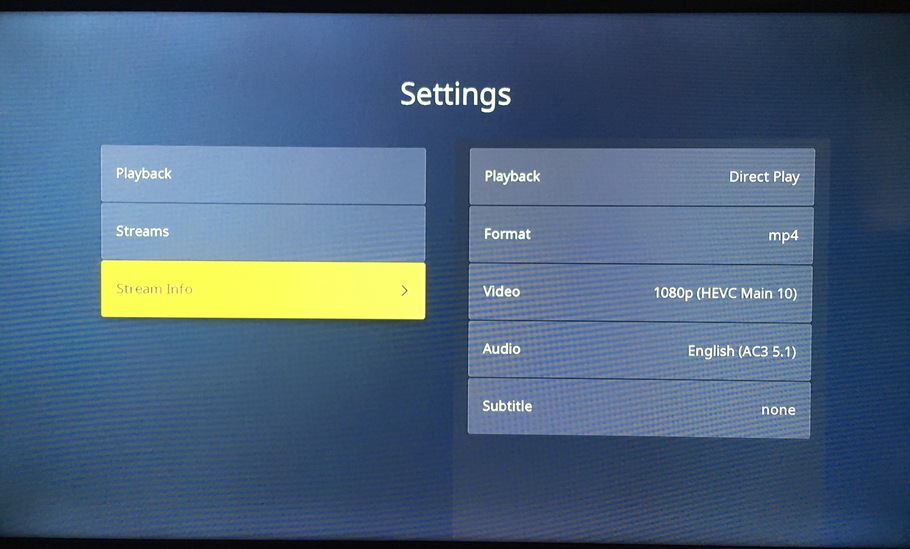
After thinking about my last post I got curious. What if I used FFmpeg and converted the aac audio in the release group mp4 and converted it to ac3, so that Roku could directly play the mp4 back directly?
Well, I did that and now the Plex Client on the Roku shows the file is an mp4, plays back the mp4 directly, without the “always-on” HDR issue.
In summation, the problem is HEVC/SDR mkv files are broken on the Roku in the respect that they are subject to the “always-on” HDR. If a file’s audio is transcoded, the plex client on Roku will read the file as an mkv, and if the video is an HEVC/SDR, the video will also have the “always-on” HDR glitch that regular HEVC/SDR mkv files also experience.
Sadly, I’ve been dealing with this color distortion since November. Also, rarely, some of my media is extremely choppy. I greatly regret upgrading from a Roku Premiere+.
I just updated my Roku as instructed by Roku support earlier today and restarted it. The problem still persists, nothing has been done about this issue, despite the many months that have passed. Roku support is absolutely horrible.
I can fully confirm. I have four Roku Ultra clients on a Plex server connected to a variety of displays. Everything from a 1080P (SDR) projector all the way up to a 4K HDR OLED. All four are exhibiting this issue with any of my HEVC content. Colors are completely crushed and saturated beyond recognition with latest Plex server, latest Roku firmware and latest Plex client. I cannot believe that Roku and/or Plex haven’t fixed this problem in all these months. Clearly it isn’t a hard problem to reproduce or document. This is shameful.
More food for thought … There a known issue where Roku doesn’t support AAC audio with more than 2 channels, so when you play a MP4 with AAC 5.1 audio, Plex transcodes the audio to AC3 5.1 and direct streams (i.e., copies) the video stream. What I didn’t realize until reading about your investigation is that Plex apparently puts the copied video stream and re-muxed audio stream into a MKV container, which then triggers the “always-on” problem. By re-encoding the original to AC3 yourself, but keeping the MP4 container, the problem is avoided.
Have you tried playing a RARBG file that has only 2 AAC channels to see if the problem still happens? Plex shouldn’t be transcoding it, so it should Direct play and show as a MP4 on the Roku.
The problem lies 100% with Roku. The 2019 Roku Ultra does not exhibit any of these issues. The only workaround Plex can institute is to create a profile that automatically transcodes the HEVC content to AVC on the PlexServer to work around the issue. Roku is 100% responsible for the cause and should be the one to fix this issue.
Have you tried copying the media to a thumbdrive & playing it with the Roku Media Player app? When I did that the files played perfectly. So Im not sure this is a Roku problem.
This is why I said “and/or”. Quite frankly, this is for both Plex and Roku to figure out. This doesn’t happen with other streaming apps on Roku that I’ve tested (Netflix, Disney, HBO Max, Hulu, Apple TV+, etc.). Only with Plex and only with HEVC content. It might be a problem with how the Plex app runs on that Roku. It might be a bug in Roku itself. It might be a corner case involving bugs on both. Even if it does or does not work with the Roku Media Player app, this is itself isn’t fully conclusive of where the bug(s) reside. Attempting to blame one or the other is folly.
The problem also occurs when 8-bit HEVC content is in an MKV when tested with Emby and Jellyfin. This has been previously tested and is easy to reproduce. The problem 100% lies with Roku. Plex can’t fix Roku’s broken firmware, the best Plex could do is work around it by making the Plex Server transcode all 8-bit HEVC content on the 4800x. That’s it. Roku needs to fix this problem via firmware update.
An end-user can force a transcode on the Plex server using the plex client on Roku as a workaround. It’s a bad workaround but it would be no different than Plex creating a special profile to deal with the 4800x. The only way to create a proper fix for the problem is to have Roku correct the problem via a firmware update.
I have spent several days narrowing down the root cause of the problem and opened several tickets with Roku tech support. Honestly, I don’t think they care. The problem is not hard to reproduce. Roku support is garbage.
The problem is completely and totally with how the 4800x Roku reads MKV files.
Someone over at the Roku thread about this issue discovered that if you strip all of the MKV Header info from the file using MKVToolnix, the 4800x applies BT.709 correctly; however, if the BT.709 info is kept in the MKV Header, the 4800x Roku will incorrectly apply BT.2020. The guy on the Roku forum tested the issue using a USB drive and those are the results he got.
If your 8-bit HEVC MKV played correctly using a USB drive, the MKV file is likely missing the MKV BT.709 Header from the file.
Thus, the problem lies specifically with how the 4800x processes MKV files.
You can verify this issue yourself with the test MKV/MP4 videos that I created using FFmpeg and shared in April. The MKV I created using FFmpeg has a proper MKV header. Feel free to test/verify this issue yourself. The MP4 is the same exact video file, only the container was changed using FFmpeg.
Because of a known issue with multichannel AAC audio on Rokus, the Plex Server will transcode AAC audio to AC3.
Thus, even an MKV file originally without the BT.709 info in the file header will run into these issues, as the Plex Server will transcode the audio and thus stream a “new” MKV file to the 4800x Roku with the BT.709 header and AC3 audio.
The issue I mention is the exact same reason MP4 files with AAC audio run into problems, despite being in an MP4 container. The Plex client shows audio/video that has been transcoded and streamed as always streaming from an MKV. Transcoded content will always show on the Plex client on the Roku the source file is an “MKV” even though the original source file is an MP4.
This is why 8-bit HEVC content in an MP4 with AC3 multichannel is audio is immune to BT.2020 being incorrectly applied to the content. The 4800x can’t misread the MKV header as no MKV header exists in MP4 files and the audio is directly streamed, (no transcoding) so the container file being streaming to the Plex client on the 4800x is an MP4.
If you read through my prior posts on this problem, you can see how I tested and discovered the transcoding MKV container issues with the 4800x. The AAC transcoding issue resulting in BT.2020 being misapplied to MP4 files is something I have had documented on both Roku and Plex forums for many months.
If I read you correctly, the ONLY way to get HEVC media to play correctly on a Roku Ultra in Plex is to encode HEVC video with AC-3 audio to a MP4 container?
Two ways, to “workaround” the issue for direct streaming. One proper way for direct streaming, the other will result in an improper file container.
The other option is forced transcoding by the PlexMediaServer, which I will explain at the end.
Direct Streaming:
HEVC with AC3 audio in an MP4 container. (proper)
HEVC with AC3 audio in an MKV container, with the MKV BT.709 header info stripped from MKV. (improper)
-This may or may not cause issues on other devices, since you will be essentially damaging the container to make the file compatible with the 4800x.
If you want to look at the MKV header info, use MKVToolNix. Moritz Bunkus is both the MKVToolNix developer and guy behind the MKV standard. Thus MKVToolNix is a bit of an MKV super tool.
One option solid option, although less than ideal, is you uncheck “allow direct stream” and change “direct play” to “Disable” during HEVC playback on the Plex Client on Roku. Doing that will force the Plex Server to transcode the HEVC content to AVC. It’s a bad workaround in the respect that it creates a ton of unnecessary work for the Plex Server that the Roku should handle; however, it does make the video watchable as AVC has none of the issues on the 4800x that HEVC has.
Last option, replace your 4800x with a 4670R, aka the 2019 Roku Ultra. No dolby vision but at the same time, it works correctly with HEVC content.
One problem putting all the blame on Roku is why, when I play a HEVC MKV container with AAC audio from a thumbdrive with Roku’s Media Player app, does it appear to play just fine? Have you attempted that? Just making sure Im not missing something in debugging this.
It goes back to the problems with AAC audio and Rokus. You could be using any container that supports AAC audio. MKV, MP4, etc., etc., Plex will transcode the AAC audio to AC3.
Thus, the plexmediaserver is remuxing a new file with AC3 and in doing so, adds a proper header to the new MKV file that is streamed to the Roku, which causes the 4800x to have its known issues with proper MKV files and HEVC video.
In theory, if you set “direct play” to “forced” then the plexmediaserver should not remux your file, at least in theory. With “direct play” set to “forced” an MP4 with AAC audio plays HEVC properly on the Roku, but then you are introducing the Rokus known issues with AAC audio into the mix.
If you take Plex completely out of the picture, play the MKV file from a thumbdrive inserted in the USB port of the Roku, with the Roku Media Player app, it appears to play perfectly. The Roku is able to play content from the MKV container with the BT header HEVC video & AAC audio with no problems.
Idk how else to explain this. If Plex transcodes anything, including just the audio, which the default profile for the 4800x does for AAC audio, it will cause the BT.2020 issue. This occurs with MP4 files also. If you really want, you can customize the default profile for Roku on the plexmediaserver to not transcode the audio, but you are likely to introduce known issues with AAC audio.
That’s it.
Only one other person has been able to directly play 8-bit HEVC back from an MKV correctly from a USB drive; however, that person had to strip the BT.709 info from the MKV header. I can not recreate your experience or test your file without having access to it.
If you think the problem is Plex specifically, test it on Emby and/or Jellyfin. That should allow you to quickly rule in/out Plex as the cause of your issues. Once again, I can not test your file on Emby or Jellyfin without having access to the file.