@wlp3s0
Im using the natve app. Worked out of box
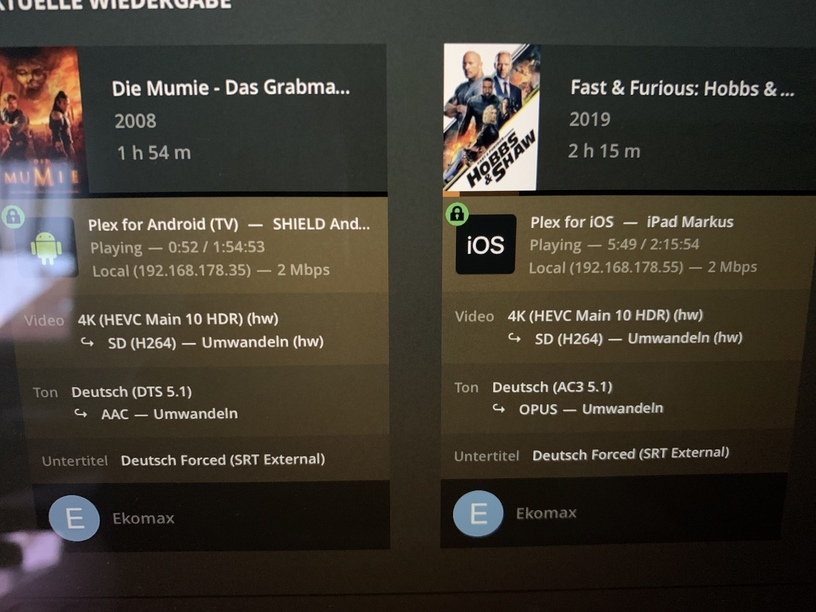
I’m getting software tone mapping (Ubuntu 20.04) but hardware video/audio transcoding. I do have libOpenCL and Beignet installed - the Plex installer shows them there. Per the release notes for this version (1.21.0.3616) this is the behaviour when Plex can’t detect libOpenCL or Beignet. Any ideas what to do to help it find them?


I may have found the problem: its a Skylake 6770 and looks like Skylake can’t do 10bit hardware decoding! Bum. Time for a hardware upgrade!
I’ve got Skylake too and I’m not seeing any improvement. The colors still seem washed out. Isn’t tonemapping supposed to work with software transcoding too?
Exciting progress!!! Thank you!!!
Not yet, because I don’t know if it’s an issue yet. Is tonemapping supposed to work with software transcoding? If it is supposed to work, then I’ll report the issue.
It was exciting to see the beta tonemapping support in the list today! Is there any more detail on what “partial” means with regard to support of it on Intel/Windows?
Thanks!
And why is there nothing listed for nVidia on Windows? Seems like nVidia would be one of the first to be supported. Is this an issue with nVidia or Plex?
Just tested this myself and I have to say, Im VERY impressed!
Great job!
Was very surprised to see this pop up on the change notes! Been keeping an eye on this for ages and can soon finally get rid of my hard to maintain multiple library solution to split HDR and non-HDR content.
Quickly upgraded and given it a spin with a few different videos and I am seriously impressed. Worked out-the-box.
Excellent work Plex team!
Yikes…trying to stream a 4K movie transcoded to 1080p, 20Mbps to my browser (over wired connection in the same network) and I’m getting frequent buffering pauses, even though the CPU on my streaming box is nowhere near maxed out:

Compared to CPU/GPU usage when HDR tone mapping is turned off (no buffering pauses):

It was tone mapping perfectly for me - make sure you have it enabled in the settings and if using Ubuntu have the dependencies installed.
I had but I also found the problem before I needed to submit it. Skylake doesn’t support HEVC 10bit hw decoding, only 8 bit.
Thanks, I’m on Windows, so that’s not the problem. It just shows up very bright. Is yours brighter than the actual 1080p version? If so, maybe it’s working, but I just prefer the actual 1080p version.
THANK YOU!!! Finally my 4k content looks like it is supposed to!
Isn’t anyone else seeing an image that is too bright?
I was so happy to see the HDR to SDR transcoding in the new version! I tried it out immediately and it works very well! I tried several tv shows then a few 4K rips, then spent the next few hours importing the rest of my rips and deleting the duplicates. Happy day, Plex, happy day indeed! Thanks!!
I do find the transcoded video to be a bit too dark in the shadows, but I had the same problem with my own transcodes done with an ffmpeg command line so I’m not going to complain 
Running Ubuntu 20.04 on a Pentium Silver J5005
Very excited to see this implemented, thank you! One of the big ones on my list for a while.
Not nearly a priority, but would be nice to eventually see the thumbnails tone-mapped as well. Thumbnails for HDR movies are washed out, on an HDR display or SDR display with tone-mapping. But that is pretty minor. Really glad this is up and running, though!!
Yeah a little bit. But far better than washed out colors. Mostly the white highlights are a bit too bright. But that is surely something that gets improved later on.
Got it, yea, colors aren’t as vibrant, but agree its better than washed out. I’ll keep my 1080p copies until it gets better.
I wonder why nVidia isn’t supported on Windows. I thought they were the first to support it. I definitely need some hardware to support transcoding. Software transcoding is killing my Skylake CPU!
