When is Plex going to add tone mapping for 4K HDR transcoding?

Those claiming that “the solution is simple, just keep separate libraries for HDR and non-HDR content, and use the correct client for the job”, aren’t keeping my use case in mind. I want to watch HDR content on an HDR TV, with subtitles. There is currently NO way to handle this case, except by either fixing the transcoder to tone-map properly, or to change the streaming strategy to be able to pass subtitles to my Roku device without having to burn them in (and hence start transcoding) – but I don’t even know if that is possible. (Does the Roku Ultra support subtitle streams separate from the video?)

— Or is the official suggestion to keep TWO 4k HDR versions of my content? One with Subtitles burned in beforehand, and one without subtitles? That would be ridiculous.

1 Like

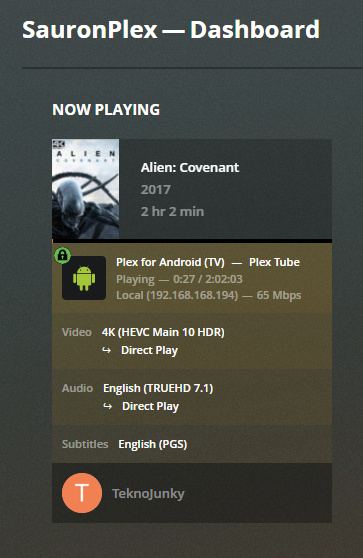
you can certainly direct play 4k hdr with subtitles.

you just need subtitles that are compatible with your client.

or a better client that is compatible with the subtitles that you want to use.

see below, 4k/hdr+atmos > direct play > shield tube using wifi > yamaha atmos receiver > 4k hdr tv

image

if you are getting unexpected transcoding with subtitles, check your audio stream.

if the audio is transcoding and you enable subtitles, then the video will be forced to trancode (plex does this to keep audio/video/subtitles in sync).

solution: change the audio to dolby digital/dts or stereo.

see also @ [INFO] Plex, 4k, transcoding, and you - aka the rules of 4k

3 Likes

Wow, thanks, I didn’t know that was possible. It seems that PGS subs are not supported on Roku Ultra. :frowning: That’s my problem.

1 Like

there is a lot of confusion, and frustration, regarding 4k and plex.

the main cruxes of the issue is

  • hdr is not backwards compatible with sdr (washed out colors etc)
  • hd audio does not pass through tv (audio must be transcoded)
  • not all clients are compatible with all subtitles (incompatible subtitles coupled with transcoded audio = transcoded video)
  • and whenever an old server gets hit with 4k transcoding = fall over go boom (hevc/265 transcoding takes magnitudes more computer power than old 264)

I’ve never heard of the Shield Tube until now. I may have to get one for my home theater, it looks pretty nice!

Image based subs cause issues to a lot of clients. Fortunately plex allows you to search for subs online and use those on the fly. Just use .srt

Transcoding should always be last resort. I agree asking people to keep two sets of mediafiles is ridicilous, so hopefully this will be fixed soon.

What puzzles me is how some of the clients manage to tonemap on the fly when hooked up to non HDR displays. Couldnt the same tonemapping algorithms be applied serverside for transcoding? An alternative to tonemapping could be just encoding to hvec and keeping the HDR, leaving tonemapping to the clients, they allready seem to be able to handle this. I dont know how taxing that would be to the server though

1 Like

Let me just pile on to that misery of a list :stuck_out_tongue:

The bulletpoint regarding HD audio is not entirely correct. Yes this is how the PLEX client does things, but I don’t think it’s down to hardware limitations of our TV’s. You see I can stream Dolby True HD perfectly fine until I enable subtitles. Then and only then does Plex start transcoding and for reasons unknown it does this for every kind of subtitle format. If I switch to a regular old Dolby Digital audio track the transcoding stops. I have tested this on various incarnations of the LG OLED’s from B7 up to C9 and they all behave the same way despite the TV’s clearly having no issue with Dolby True HD to 2 channel PCM conversion.

1 Like

interesting, but that is not passthrough (ie through tv to receiver/soundbar).

If the LG can direct play truehd without transcode (ie decoding truehd internally), it does sound like a profile issue of the plex/lg client to force transcoding with subtitles.

its worth its own thread, if there isn’t one (or more).

as with all troubleshooting threads, all the details, the specific versions involved (latest is NOT a version), and client/server logs.

The problem is not FFMPEG or Plex being unable to tonemap (through transcode) but Plex developers being unable to focus on important things. They rather constantly change the design of clients or abandon clients for a different client (which they’ll abandon sooner or later again).

Client requests an item to be streamed. Client tells Server what it can handle. Server compared with what it got and decides if it has to transcode or not.

Client just has to tell the Server if the Display is HDR or SDR (maybe make it a manual setting in the client). Server then can compare if client wants SDR but requests HDR item. If so, server just transcodes using a freaking simple tonemapping.

It doesn’t take much resources and even NAS can do that easily, without HW transcoding.

It doesn’t matter if it’s 4K or 1080p or HEVC or H.264. If it’s HDR and clients wants SDR just tonemap it.

10 Likes

To be honest I have so much stuff to do and the majority of movies I watch I don’t really need subtitles for. Hence it’s far easier to explain to the SO that she needs to switch audio track to enable subtitles then to go through the hoops of reporting this to Plex who will most likely ignore it any way as it’s such a niche issue considering that only a minority of their user base has these TV’s anyway.

PS: I don’t think the TV supports TrueHD over ARC although I’m, not 100% sure. Still what a client can support over ARC and directly is and always have been two different things. And it seems really weird to limit things to ARC seeing as far more people probably have these TV’s without an ARC enabled surround system than with one. At least if that is the case make a client option where you can define weather or not ARC is used and which version we are talking about. ARC is after all standardised regardless which TV set you are using.

just wanted to point out that Roku 4K’s always will fail on PGS subs in the particular TrueHD circumstance because they have to transcode the TrueHD. They can do OK with DTS-MA because they can direct play the DTS core and the server sees this as direct play.

So the option is still the good 'ol remove the PGS from the MKV and mux in an SRT (or just place the SRT in the same folder using a very correct file name implementation) you get from Gunter in Belgium somewhere off the Internet.

Yes i can agree. 4K HDR is becoming more common and that is a real problem.

1 Like

Especially with ATSC 3.0 rolling out. I guess people will have to take all of their OTA recordings, transcode them on their own, and keep a separate library of that, too.

1 Like

What on earth is going on with all the people that talk about “things you SHOULD be doing instead of transcoding from HDR” instead of giving those suggestions as workarounds until HDR tone mapping is added? Seriously…so much aggressive behavior by people who have their library set up one way, expecting everyone else to do the same.

I was using free Plex on my old NAS. With my new NAS, I specifically bought one that had hardware encoding support for multiple 4K streams. And in order to use hardware encoding, I had to subscribe to Plex. No problem, I thought. So I subscribed. And then…I noticed major color banding and faded colors. So I googled to see what the problem is. I know when I play HDR content on my SDR laptop, it plays it with proper tone mapping. So there are 2 issues, really:

  1. Plex doesn’t do tone mapping while transcoding HDR content to SDR, which causes faded colors
  2. Because plex can’t transcode from 4K HDR to 1080p HDR, for example, the client itself can’t automatically do tone mapping when it’s playing HDR content on an SDR display

Why is this an issue? Well, unlike the suggestions from all the people who talk about how they make multiple copies in different resolutions for their 20-30 customers or whatever that they’re illegally selling video streaming services to, my content is for myself. And I like to access it on a variety of devices. Some HDR, some not. Some on high speed broadband, and sometimes…for example when I’m on the go…over cellular. Or I may be visiting a friend/family member and we want to watch a movie, but their internet isn’t fast enough to play the videos I have. I’m basically SOL.

As a paying subscriber, I’m allowed to express the desire for a feature that is common in many other apps. Otherwise, guess what? I have no reason to subscribe. Over 99% of my content is 4K HDR. And I’m not going to waste the time or space to make another set of videos in lower resolutions. If I wanted to do that, I wouldn’t need to subscribe to Plex Pass. So if the Plex solution is to go out of my way to get it working without utilizing the feature that I’m paying Plex for, then I wouldn’t pay Plex. And I don’t think that’s the company line.

Note: IT IS PERFECTLY REASONABLE AND ACCEPTABLE TO ASK WHY A SERVICE YOU’RE PAYING FOR DOESN’T HAVE A CERTAIN FEATURE THAT YOU WOULD OTHERWISE EXPECT IT TO HAVE.

It is also ACCEPTABLE to give suggestions to people, telling them how they can go about watching their content by working around this limitation.

It is NOT ACCEPTABLE to say the feature doesn’t need to exist because of an arbitrary reason and because you don’t need it. You’re one user. You may not need it. I do. Others here do as well.

Plex DOES need to address this limitation. If this were resolved, it would benefit us all. By you saying it’s an unnecessary feature, you’re creating the impression that it’s not a universally beneficial feature, and lowering it on the To-Do list of features. So you’re really not helping anybody, and you’re just being a jerk.

White knighting for a company that works for profit is one of the silliest things people can do. The company doesn’t care about me, and they don’t care about you. You get nothing by defending them. You only take away from others. And if you get joy in doing that, then God help you.

edit: Forgot to add…thumbnails generated for HDR videos is also washed out. So even if I am streaming in original 4K HDR quality, the thumbnails over the seek bar are washed out due to lack of tone mapping.
11 Likes

why not? thats unprofessional and rude, this is a paid service.

some truehd’s have an ac3 core that the client is “direct playing” maybe

Until Plex is offering solutions to play common video files, and 4K UHD HDR is now common, you’re right. It can’t be recommended to everyone and you can’t really make a great argument for paying for it. Not everyone is an IT and video genius, and nobody’s got years of their lives to spend on making and creating multiple copies of videos for multiple use cases.

If Plex could just solve the Roku/TrueHD issue, that’d go a long way. No need per se for PMS to be transcoding video just because audio has to transcode. At least throw us that bone, Plex.

You can have a Plex sever custom built by Google and NVIDIA for $100K. It still won’t play an HDR video properly (or not looking horrible) for a Shield or Roku hooked up to a 1080p TV. It won’t choke or die or “fall down”; it just spits out crappy looking transcoded video.

Are you talking about the video itself, or do you mean “with HD audio and subtitles enabled at the same time”?

If the streaming device is 4K-capable and can directly play the audio and subs if should be able to direct play the video, too. And then the streaming device itself will remap things for the display being non-HDR.

I mean the video itself in any scenario where PMS is not transcoding and a 4K Roku or Shield is direct playing 4K HDR on a 1080p set that can’t do BT2020. AFAIK these clients will not “remaps things for the display being non-HDR.” I have both, used in multiple different display situations.

I don’t know of any device besides PCs right now that will do BT2020->BT709. And in fact though Plex PCs can’t even send HDR to a 4K HDR TV (but the image it plays which is at 4K resolution image mapped from BT2020->709, in the PC, looks pretty good). Shields and Rokus won’t map from one color space to the other; their image looks crap in the setting of either one playing 4K HDR on a 1080p TV. For a device that CAN map BT2020->709, and I guess demonstrate it’s kind of rare and difficult, see the Panny UHD player (https://www.avforums.com/reviews/panasonic-dp-ub820-review.15619). It has a special processor to do this, and it works super for UHD Blurays. It doesn’t do this for Plex though. Unfortunately.

Right now, thanks to multiple clients having wildly different UIs (eg you can’t even see who directed the dang movie in Shield/Android, and it doesn’t show “related movies,” etc etc), different HD audio capabilities, and if you toss in PC having the ability to tonemap but it can’t play HDR to an HDR TV… Plex offers zero “perfect” it-just-plays solutions along with a good UI for zero users. No matter how much anyone spends or invests. There is no “showcase” Plex scenario because of a significant drawback/trade-off in every single conceivable Plex scenario (except in some unwieldy outboard HDR->SDR video processor situations… and HDFury Diva does not work); again, even if you have the world’s most expensive and QUADRO’d out server.

And HDR content is the sole source of there being drawbacks appearing.

When fed 4K/HDR, the Apple TV 4K will downscale to 1080p AND tonemap when connected to a 1080p display
