I use Plex on my Samsung TV, Android TV boxes as well as in browser.
They all have the same problem:
I have some streaming services, my own Plex server, as well as other Libraries that have been shared with me.
Some of the shared libraries contain multiple versions of a tv show - one in 1080p and one in 4K.
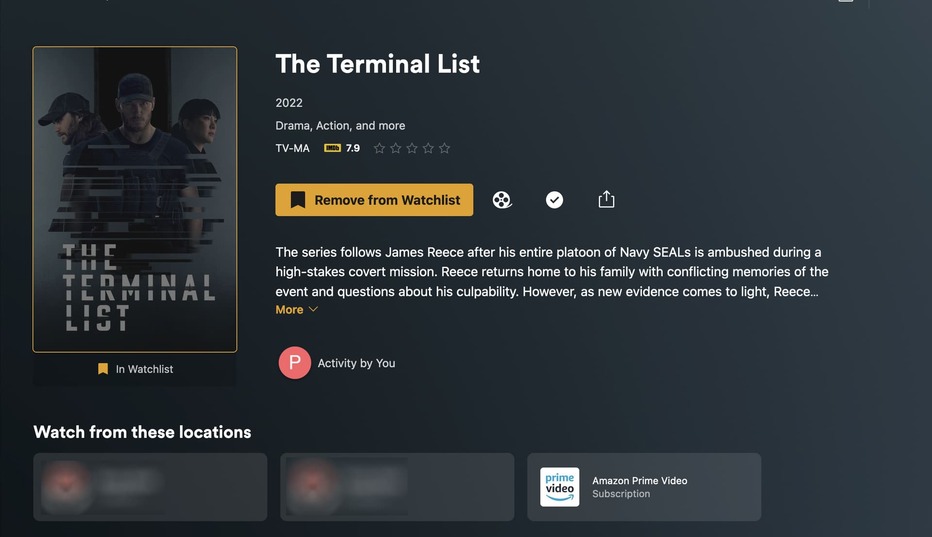
I add series I want to watch to my Watchlist. Now I go into Watchlist, click on a Tv Show and I’m presented with a number of Location buttons where I can select where I want to watch it from. The problem now I’m provided with 2 buttons for the shared Library (on leads to the 1080p version, the other the 4k version) , but without going in to the series folder it’s impossible to tell which is which.
Is it possible to add the folder name from the Library to the Location button to distinguish?
I‘m not entirely sure if I understand what you’re suggesting.
Do you have different libraries with the same movie/show (e.g. in different quality versions) and want to see the library name included in each location in the Watch from these locations hub?
As for distinguishing libraries from different servers (e.g. local/remote), that information should already be listed on each location entry.
Would you mind sharing a screenshot and detailing what you see (maybe explaining the underlying libraries) and what you expect to see?
The series appears in both those folders: TV_Shows (1080p) and TV_Shows_4K (4K), which then produces 2 buttons (or 3 in this case where it is also on a streaming service):