I installed this server 2 days ago and I have the same error. Using Windows 10 and Plex 1.28.2.6151
1 Like
I have the same issue.
I have same issue
Plex Media Server Linux Ubuntu 64 Version 1.29.1.6260
Windows app Version 1.54.2.3267-d35cd36f
The most reliable way to reproduce the issue. Just close the app and relaunch it. It happens more times than it doesn’t.
I have one server on my account. I do not use Live TV or DVR(because they are useless within Plex, until you give us Plugin support back…).
And all that other stuff is disabled also (They’re just as useless as the Live TV & DVR Feature… just some constructive feedback  )
)
Same issue here. Mostly when I am copying something to the plex library folder, at that moment the search bar wont work till I wait till the files are copied and then restart the plex desktop app. Then the search bar works again.
1 Like
I’m seeing it happen intermittently when connected over VPN. The ‘test’ is to just close then reopen the Windows client. I see the search error…
- 0 out of 10 times without a VPN connection
- 6 out of 10 times with a VPN connection
Debian server: Version 1.29.0.6244
Windows client: Version 1.54.2.3267-d35cd36f
1 Like
Hi,
Same issue here
Server PMS 1.29.1.6260 (Windows 11 22H2)
Client Plex for Windows 1.54.2.3267 (Windows 11 22H2)
Happens while on the same network
Not using Live TV & DVR
Today’s new desktop Plex player update does not fix the issue.
I too am seeing this problem almost every time I use plex. Sometimes it works, most of the time it doesn’t 
1 Like
I am having the same problem… In desperation, I signed out and then signed back in and the problem fixed itself but came back when I exited and started again. It again went away when I logged out and back in.
1 Like
Adding to the growing list of affected Plex desktop users, just started for me yesterday, error now consistently staying put no matter how many times I open or close the client. Since searching through my library was my primary use for the desktop client, I was back to using only the web client for that now, where searches still work without issue. (For now.)
- I had changed many of the preferences of the player app away from the default…but none recently.
- I only have one shared server, sharing 3 libraries with under 1/2 dozen family members, Movies, TV, Other. (I don’t use Plex to curate or deliver my music).
- Not using Live TV or DVR.
- I have not enabled any Streaming Services, nor do I use any Webhooks.
- I have Online Media Sources (General) Enabled for me, and when I disabled them all, the search initially came back. But only one time, then reverted to showing me the error message.
- Discover was already Disabled. (I tried changing all of those options one-by-one, but no other option made the search field return to normal display.)
- I have two Plex Home accounts, one for me and the missus and one for the kids and grands.
- I have 37 devices listed in my Authorized Devices.
- Discover shows it is in BETA.
Desktop OS: Win 11, latest updates.
Plex server: Version 1.29.0.6244
Windows Plex Client: Version 1.55.0.3278-c6164b3c
Although one user above linked the problem with using VPN, I’ve been using the same VPN for years, never was an issue before yesterday…and I’m not giving up using VPN just because of a bad Plex desktop client behavior.
1 Like
I should mention when it first is loading up, for a split second I will see the search bar and then the error shows with the triangle.
I just fired it up with a VPN and it took three launches before the search bar worked properly.
Yes. Same here. ALSO, my web client is now regularly showing “SOMETHING WENT WRONG”, but a quick refresh always snaps normal appearances and behavior back into place.
2 Likes
Issue is also intermittently happening for me on Windows 11 with Plex Version 1.55.0.3278-c6164b3c (happened before as well). Usually closing and re-opening the app 1 - 3 times will get the search bar back.
1 Like
Comes and goes for me as well. Not really a big deal, but annoying.
If i hit F5 on my kb to refresh the Plex player, search generally works fine after.
Windows 10 Pro (21H2)
Plex for Windows—General
Version 1.55.0.3278-c6164b3c
Search on other devices (ie. TV, Phone, Browser) works fine.
2 Likes
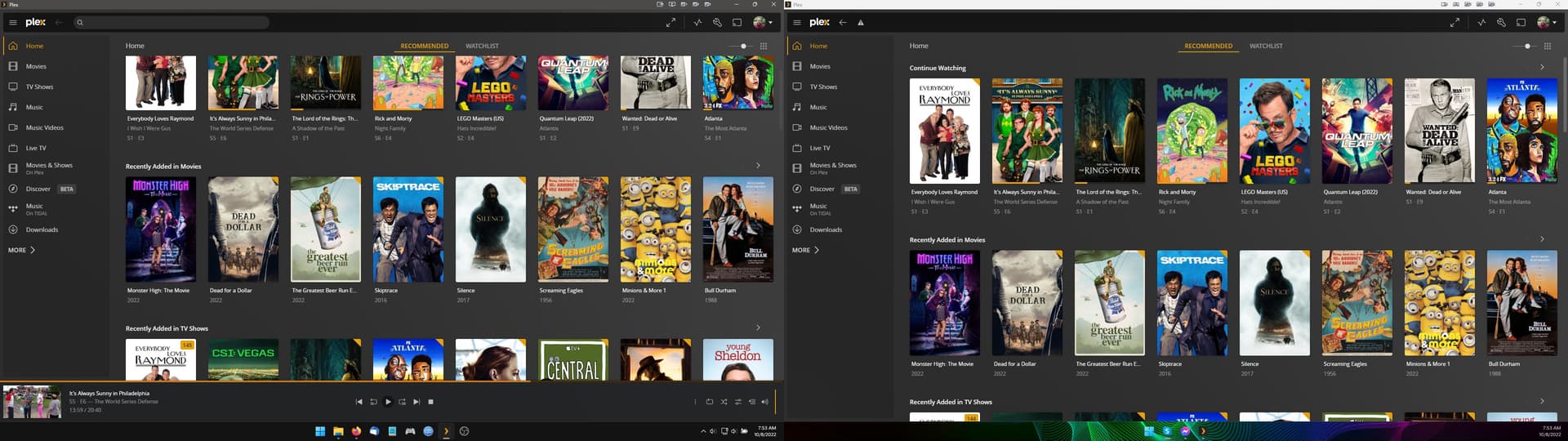
1 Like
can confirm, hitting f5 refreshes the player and brings the search bar back. i agree it is super annoying.
Yep I have the same issue here. Still waiting on a fix.
I did some heavy searching then this happened to me, when I switched to another user in the same account and server it was working fine!
and also fixed the issue with the original user! < Just happened while writing this comment 
you may try this workaround and see if it’s working for you.
1 Like
I turned on compatibility windows 8. Seemed to fix it for me. Right click on Plex icon the click properties. Compatibility. Then click run this program in compatibility mode. Select windows 8. Apply.
