Still the unanswered question.
Did you try the upgrade by any chance? I would assume it’s not utilising the experimental player because after the previous complaints and confusion about vague release notes we were promised that all builds with the experimental player would say so in the release notes.
Yeah, if the notes don’t explicitly say “experimental player” then it’s not included on the build and it’s just the normal Plex beta.
And they post on here when a new version is released.
Good to see some work is being done on this! I’ve got a few video files that cause the issue 100% of the time on my 2022 4k ATV, including a new set I was trying to watch last night that caused the issue. When I switch to the Infuse app, the media plays perfectly.
I’ve filled out the testing form to get into the TestFlight beta if you’re still looking for people to test the changes to try fix the issue 
Is it a known issue that some SDR content is played back as HDR? I saw one other person mention that in previous posts but didn’t see any confirmation from @hsousa. I have an entire season of 1080p HEVC SDR that triggers my TV into HDR mode. If not known, i can submit sample files.
Please provide a sample. I have yet not seen this occur.
Is this definitely using the Experimental player?
I have two sample SDR files that trigger HDR mode on my TV. From my limited testing, it looks like any HEVC SDR file will trigger HDR playback. I confirmed i’m using version 8.38 (8676). Here are links to the two files:
If i set “Use Old Video Player” to “On” in settings, then the files playback in SDR mode as expected.
Hi, got your samples, thank you.
A question with your ATV, do you have format set to HDR in settings? If yes then it will display as HDR on the Display / TV.
I have it set Dolby Vision and TV displays Dolby Vision Logo as per ATV setting. My Tv is Dolby Vision capable
( LG OLED65B8STB)
Tested with 8.38 (8676) with Experimental Player, PMS Version : 1.40.4.8679-424562606
There is no Transcoding going on and it is Direct Play on both samples as per attachments below.
So to anwser your question, all seems to be in order displaying HDR.


Thanks for asking @rcork for sample and digging into the issue! 
Do you (@SE56) have content matching enabled on your TV? Because if so, even if you have Apple TV configured to display Dolby Vision, it should switch to SDR or HDR when showing different content. It’ll be easy to spot because you’ll get the annoying black screen when modes are changing 
I suspect @rcork is correct in that there is an issue around misidentifying HEVC 10bit as HDR, even though the color space of the file is bt709 and not bt2020.
Thank you both, I’ve filed the issue internally to include in our investigation. 
That was no problem asking rcork for some samples. Anyway checked my ATV setting Content Matching, I did indeed have it set to On for Dynamic Range and Frame Rate. After changing it to off for both, I did a restart of ATV.
Result: Both samples returned NO Flag at all on the TV, using the MPV Player 8.38 (8676). The black screen was only momentary (2 seconds maybe). If file is large it seems to be in that annoying black screen longer.
So on behalf @rcork and myself thanks for your acknowledgement, internal investigation and correction. 
Hi @Xhaka! So far “nothing” is a thing of the past simply because we’re not (yet  ) focusing on this. Our priority is performance and reliability, core functionality that’s currently not working (e.g. subtitles) and only once we’re done with that will we dive into functionality beyond what we already have today.
We understand (and share) your frustration and desire to have this working. 
I’d say DV is core functionality. As is any codec. Dolby Atmos (EAC-3) is another. That doesn’t work currently.
Apologies for not being specific: when I said “core functionality that’s currently not working” I was referring to regressions introduced with the changes we’re making.
Yes, DV support is core functionality on devices that support it, but not a regression.
With Content matching set to off, I have random drop outs with playing content, ATV screen saver appears, using the Back key play resumes on the TV.
Is this a known issue?
Since you’re looking for sample content.
Large file, 21GB, but this is a 4K HDR 50FPS video of a Coldplay concert that is an absolute slide show on the non-beta client.
Curious if anyone with the Beta Client can comment on whether it plays smoothly or not.
I can mirror if needed, just let me know.
On to it…
Will have a look at it sometime in next 6 hrs and report back

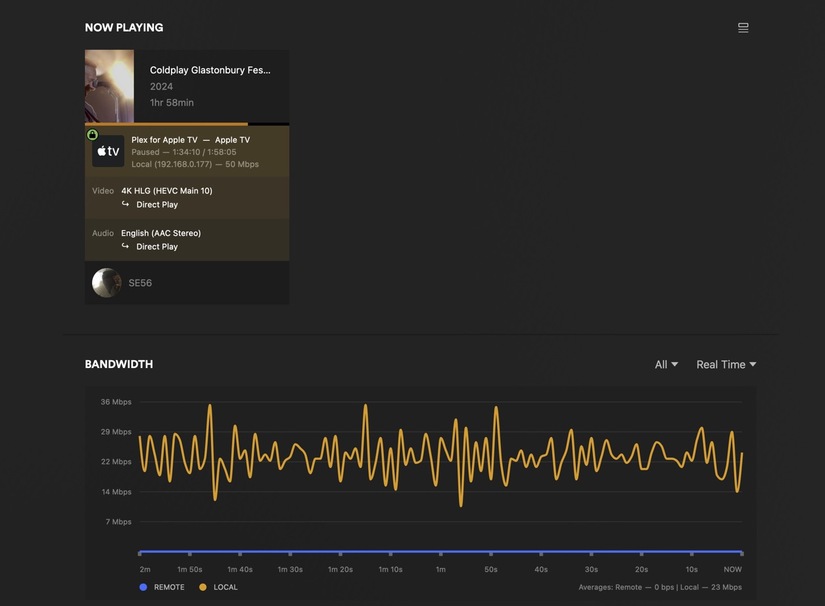
Thanks! I can’t wait for this beta to be over
That was the greatest concert ever! Dua Lipa was amazing too.
Greater than Live Aid at Wembley Stadium? Now I have seen both, I don’t think so. 
Can you elaborate on the symptoms please? I don’t think this is something we’ve encountered ourselves.
Does it happen with any content, or specifically with high bitrate, resolution or HDR?
