+1
In order for mp4 files to be compatible with iTunes (at least to sync to iPhone), the first track must be AAC 2.0. I have thousands of MP4s that I created using Handbrake that have (2) English tracks, first is AAC 2.0, second is AC3 5.1. Some clients (Roku I believe is one) correctly play the 5.1 track by default. Most others players play the first track listed by default (AAC 2.0 in my case). I agree there needs to be a setting to playback the 5.1 by default.
Automatically Set Preferred/Default Audio For Videos (audio format/codec) // mod: option to override
2 Likes
I agree with cayars I’d love to see a hierarchy. Were I can set Plex to default to lossless first, and then sound sound followed lastly by stereo.
@ohiomedic said:
I agree with cayars I’d love to see a hierarchy. Were I can set Plex to default to lossless first, and then sound sound followed lastly by stereo.
This would be the most logical and allow for preferring, for example, stereo on a bedroom client and 5.1 on another, pass-through DTS-HD MA in the living room, etc
@wdpaynter said:
In order for mp4 files to be compatible with iTunes (at least to sync to iPhone), the first track must be AAC 2.0. I have thousands of MP4s that I created using Handbrake that have (2) English tracks, first is AAC 2.0, second is AC3 5.1. Some clients (Roku I believe is one) correctly play the 5.1 track by default. Most others players play the first track listed by default (AAC 2.0 in my case). I agree there needs to be a setting to playback the 5.1 by default.
Yep…agree 100%. h.264 + AAC 1st + AC3 2nd audio track is almost “standard” for mp4/m4v container files. I realize that Apple (and iTunes) is primarily responsible for this “format”. That being said, lots of folks ripping with Handbrake (not using MKV), are using the Apple Presets (or some derivative thereof), so the majority of mp4 files are going to be in this container format. Should be a way for Plex to set some kind of “Prefer AC3 when available” option…or as posted above, some kind of GLOBAL way to set audio stream TYPE priority. Don’t know why this couldn’t be worked into the language and subtitle page settings?
Currently, I have to manually set AC3 on the details view for each individual movie/TV show in order to default to AC3 on my Apple TV4 in the Media Room. The lions share of viewing takes place there, and it is a major pain to have to manually pick (via ATV4 Plex app) AC3 for each and every show. Gotta be some way to fix this…
A priority list would be great but, if that’s difficult to implement, at least let Plex select the default audio rather than just the first. I have a full season in which the first audio channel is Spanish and the second English. English is the default channel but I have to change every video in Plex to get the English soundtrack.
Yes. There needs to be a setting to playback the 5.1 by default. I would go a step further: I would like to be able to set as the default “the highest quality audio track available.” Specifically, I don’t want to specify 5.1, because the movie may contain a 7.1 track. And since 7.1 is “better than” stereo, that should be the track selected when both are available.
If we’re going to re-imagine film audio handling I’d also like to have the default overridable on a film by film basis. While default “English, 5.1” might be OK for 99% of my films there are a few foreign language titles (foreign to me anyway) which have an English dubbed track as well as the native audio.
Since I hate watching dubbed films and would much rather have the original actors voice + subtitles, I’d like to override the “English” default for those to choose the native language.
Anyway +1 for the original “default stream” idea, that would be better than it is now for most cases and no worse in the others.
1 Like
Still waiting for Plex to play the user assigned default stream instead of INcorrectly playing the stream it wants to play.
1 Like
Keep running into this issue and it is annoying when Plex plays non-default tracks by default.. At a minimum it would be great if Plex would recognize the default audio track setting in the MKV container.
There’s another request for this problem, that appears almost identical as this request. It has more votes, so it might be better to vote and/or comment there if you feel they are the same.
I’ll never understand why it’s possible for Rokus to handle this simple request, and impossible on any other app.
I noticed that when TrueHD Atmos is not being supported plex will transcode instead of automatically switching to a different audio stream.
My suggestion would be to have Plex automatically detect what the device audio capabilities are and instead of transcoding automatically switch from TrueHD 7.1 audio to AC3 5.1 or Stereo.
I have added a screenshot below to better understand what I meant, instead of having to manually tell plex what audio stream to use before playback, have plex take the decision himself and prevent transcoding.
It is very common for Bluray remuxes to have more than one audio stream.
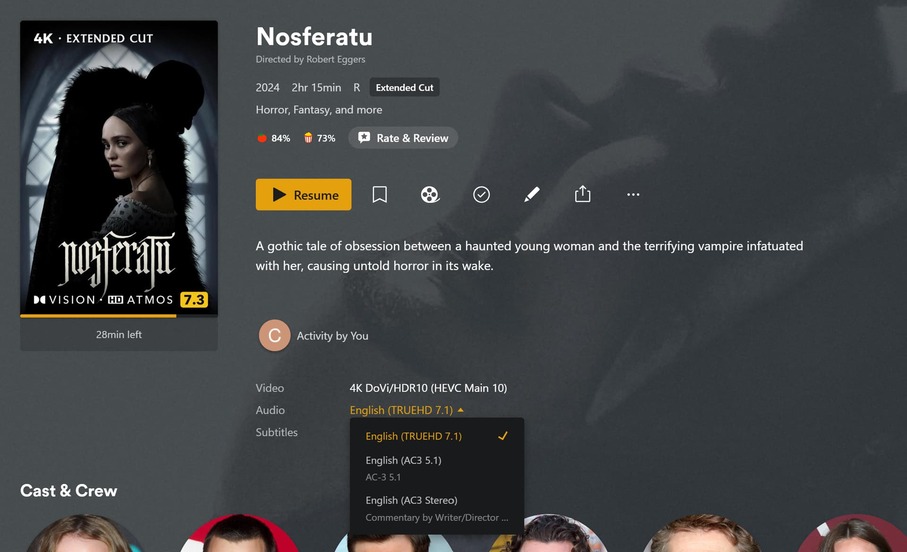
1 Like
That’s a great suggestion and I would also like it. If implemented it should only auto switch to the same Language though, if 2nd or 3rd track is Italian etc, disregard and transcode
It’s been a long time. It’s really important for seemless functions between different audio streams and different devices.
I don’t know if this has been suggested before, but if there is more than one track in the user’s preferred language, and one of them is tagged as the default track, PLEASE respect that. It makes sense to ignore the default tag and automatically pick the preferred language instead, but there needs to be a clause that the default tag comes into play when there are multiple tracks in the preferred language, instead of always picking the first.
Long time Roku user here, I just replaced my Rokus with onn 4K Plus boxes which I have hooked up via HDMI to Atmos/DTS-X surround systems, and was totally confused and spent a couple of hours trying desperately to get Plex to default to surround audio instead of stereo on the onn 4k Plus. Then I come here and find this thread and learn only Plex on Roku can auto-select the best audio track?! What the heck? Please fix this!
Also, is HDMI passthrough working with the onn 4k Plus? I can change audio formats and my receiver recognizes the number of channels in the stream correctly but it just identifies the format of all audio as “Direct”, it doesn’t look like it’s bitstreaming the codec like it does on Roku.
Please, at the very least, add the ability to select a default preference based on channel count per client.
I don’t even care if it’s automatic because it’s not like most people are switching up their audio setup for their various clients on a regular basis. I just want to set the default for all content to stereo/2ch if available on my bedroom client and 5.1/6ch if available on my living room client.
