Server Version#:1.19.5
Player Version#:
So, i have a Qnap TVS-951X running raid 5 -4-8tb drives. I recently purchased a TR-004 as a backup DAS. On the advice of a Qnap forum member, I set the raid to 5 as well, 4-8tb. I can’t figure out how to set up backup using QTS. Just not familiar with the terms, yet. Also I was wondering if raid 5 is the best way to go. I end up with so little volume for each NAS/DAS. I was thinking of going to raid 0 on the backup, transferring all and then restoring to Nas after reconfiguring TVS to raid 0. Any thoughts?
RAID 0 is double vulnerable to failure over a single drive volume because of the striping. You don’t need that kind of speed.
Simple USB 3.0, single EXT4 volume will be more than enough.
In PMS 1.19.5, I introduced the PlexData share.
To make backups:
- Stop Plex
- Backup the share (following links). (( you can also backup over the LAN from SMB systems))
- Start Plex.
If you’re going to migrate away from RAID 5 on the backup array RAID 10 (1+0) would likely be a better choice, since you have four drives. It offers most of the write performance benefits of RAID 0, but with the added benefit of resiliency. And, array rebuilds are faster (and therefore safer?) than RAID 5. But, as with RAID 0, storage efficiency is only n/2.
Having said that, I’d probably just stick with RAID 5 for typical home use. Its storage efficiency is good, its read performance is very good, its sequential write performance is okay, and resiliency is good. The only place it really falls down is random writes.
Stay with Raid-5 for the TR-004, setup backups via Hybrid Backup Sync 3 to the TR-004.
Note this will only let you backup data in shared folders (like your media) and not the hidden folders that Plex is installed in by default.
Got it working using HBS-3 Thanks all.
Well, backup of media failed. It said not enough space on the TR-004. All 8 drives are 8TB, 4 in each and I am only backing up media so I don’t understand.
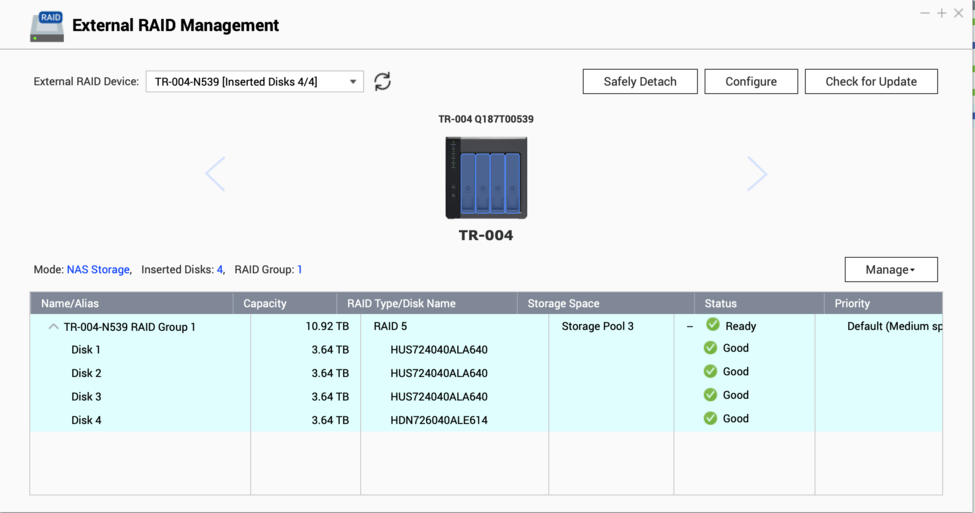
Would need to see some screenshots from storage manager on the TR004 config to start with. Doesn’t sound right.
I truly believe the problems are all of my making, not understanding how the Qnaps work. On further perusal of my nas’das I noticed, while I have created “raid-5” for each, only the first drive on the NAS has any items in it. And it was backing up to only a single drive on the DAS hence the failures. I assumed, wrongly, that if a raid is created and the disks are grouped in the raid, that it would automatically distribute the programs and media. This is not the case in my configuration. I have not surmised, as of yet, how to correct that. I need to read more. Let’s put this on hold for now. Thanks
Easiest option on the TR-004 is to set it for SW configuration on the DIP switches. You then reset/reboot (don’t remember exact terminology). That should clear the configuration on the TR-004.
Just for good measure I would power it off while main QNAP is up. Then when you power it on, QNAP / QTS should pick it up and ask you to configure it. Walk through Raid-5 configuration via QTS and you should be good.
It should look something like this:
This topic was automatically closed 90 days after the last reply. New replies are no longer allowed.
